> For the complete documentation index, see [llms.txt](https://hacking-notes.jord4n.pro/llms.txt). Markdown versions of documentation pages are available by appending `.md` to page URLs; this page is available as [Markdown](https://hacking-notes.jord4n.pro/de/reconnaissance/web-profiling.md).
# Web-Profiling
Web-Profiling-Techniken zur Identifizierung von Technologien, Frameworks, CMS, Servern, Bibliotheken und offengelegten Versionen auf einer Zielwebsite.
Webprofiling identifiziert den Ziel-Technologie-Stack, einschließlich CMS, Frameworks, Webserver, JavaScript-Bibliotheken, Analysetools, Sicherheitsprodukte und offengelegte Versionen.
{% hint style="info" %}
Es gibt viele Möglichkeiten, mehr über die von einer Website verwendeten Technologien zu erfahren. Dank verschiedener Tools, die über die Konsole, Browser-Erweiterungen oder spezialisierte Websites zugänglich sind, können Sie detaillierte Informationen über die von einer Seite verwendeten Technologien erhalten. Hier sind mehrere Methoden, um sie zu identifizieren:
{% endhint %}
## WhatWeb:
> WhatWeb ist ein sehr beliebtes Kommandozeilen-Tool zur Identifizierung der von einer Website verwendeten Technologien. Schnell und präzise kann es eine breite Palette von Technologien erkennen, darunter CMS, Frameworks, Webserver, Analysetools usw. Besonders hervorzuheben ist seine Fähigkeit, HTTP-Header, den Quellcode und andere Elemente auf der Seite zu analysieren.
```bash
whatweb https://website.com
```
Dieser Befehl liefert Ihnen einen detaillierten Überblick über die von der Website verwendeten Technologien, einschließlich des CMS, JavaScript-Bibliotheken, Analysetools und vielem mehr.
## BuiltWith:
> [BuiltWith](https://builtwith.com) ist eines der detailliertesten Tools zur Analyse von Website-Technologien. Dieser Onlinedienst bietet einen umfassenden Überblick über die verwendeten Technologien, wie Server, Frameworks, Bibliotheken, Marketing- und Sicherheitstools sowie sogar die Versionen bestimmter Technologien. Obwohl die bereitgestellten Informationen manchmal übermäßig sein können, ist dieses Tool dennoch großartig, um einen vollständigen Überblick zu erhalten.
## Wappalyzer:
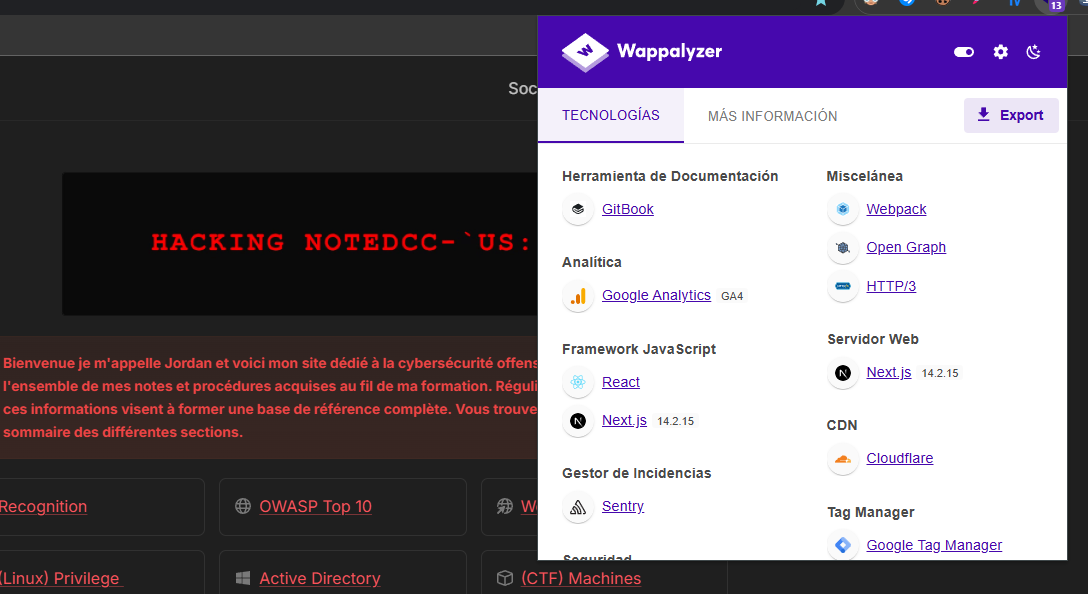
> [Wappalyzer ](https://www.wappalyzer.com/)ist eine Browser-Erweiterung, die sich durch ihre Einfachheit und Effizienz auszeichnet. Sobald Sie eine Website aufrufen, erkennt die Erweiterung automatisch die verwendeten Technologien, einschließlich CMS, Webserver, JavaScript-Bibliotheken und mehr. Eine der Stärken von Wappalyzer liegt in seiner Geschwindigkeit, insbesondere darin, wesentliche Informationen sofort bereitzustellen. Außerdem kann es manchmal die Versionen erkannter Technologien anzeigen.
---
# Agent Instructions
This documentation is published with GitBook. GitBook is the documentation platform designed so that both humans and AI agents can read, navigate, and reason over technical content effectively. Learn more at gitbook.com.
## Querying This Documentation
If you need additional information that is not directly available in this page, you can query the documentation by asking a question.
Perform an HTTP GET request on the following URL with the `ask` and `goal` query parameters:
```
GET https://hacking-notes.jord4n.pro/de/reconnaissance/web-profiling.md?ask=&goal=
```
`ask` is the immediate question: it should be specific, self-contained, and written in natural language.
`goal` is what the user is ultimately trying to achieve, the reason they need the answer. Sharing it helps GitBook give you a better, more relevant answer. A goal is most helpful when it describes the outcome the user wants rather than restating the question. For example, with `ask=how do I create an API token`, a goal like `automate deployments from our CI pipeline` lets GitBook tailor the answer to that use case.
The response will contain a direct answer to the question and relevant excerpts and sources from the documentation.
Use this mechanism when the answer is not explicitly present in the current page, you need clarification or additional context, or you want to retrieve related documentation sections.
.png?alt=media)
.png?alt=media)