> For the complete documentation index, see [llms.txt](https://hacking-notes.jord4n.pro/llms.txt). Markdown versions of documentation pages are available by appending `.md` to page URLs; this page is available as [Markdown](https://hacking-notes.jord4n.pro/de/web/authentication/username-enumeration-via-subtly-different-responses.md).
# Benutzerenumeration über subtil unterschiedliche Antworten
Notizen zur Benutzerenumeration über subtil unterschiedliche Antworten für die Labs der PortSwigger Web Security Academy, einschließlich Ausnutzungsablauf, Payload-Tests, Burp-Suite-Validierung und Behebungskontext.
### Benutzernamen-Enumeration über subtil unterschiedliche Antworten
Die Site ist leicht anfällig für die Aufzählung von Benutzernamen sowie für grobes Passwort-Bruteforcing. / Ein Konto verwendet einen Benutzernamen und ein Passwort, die in den bereitgestellten Wortlisten vorhanden sind. / Ziel: Einen gültigen Benutzernamen finden, das Passwort per Brute-Force ermitteln und dann auf die **Mein Konto** Seite.
#### Labordaten
* Wortliste der Benutzernamen (Authentifizierungs-Laborbenutzer).
* Passwort-Wortliste (Authentifizierungs-Laborpasswörter).
* Standard-Anmeldeformular.
#### Schritt 1 – Liste der Benutzernamen
1. Fange die Anfrage des Anmeldeformulars ab und sende sie an **Intruder**.
* Führe einen Angriff auf das **Benutzername** Parameter mit der Benutzernamen-Wortliste aus.
* Standardmäßig gibt der Server die Meldung zurück:/ `Ungültiger Benutzername oder falsches Passwort`.
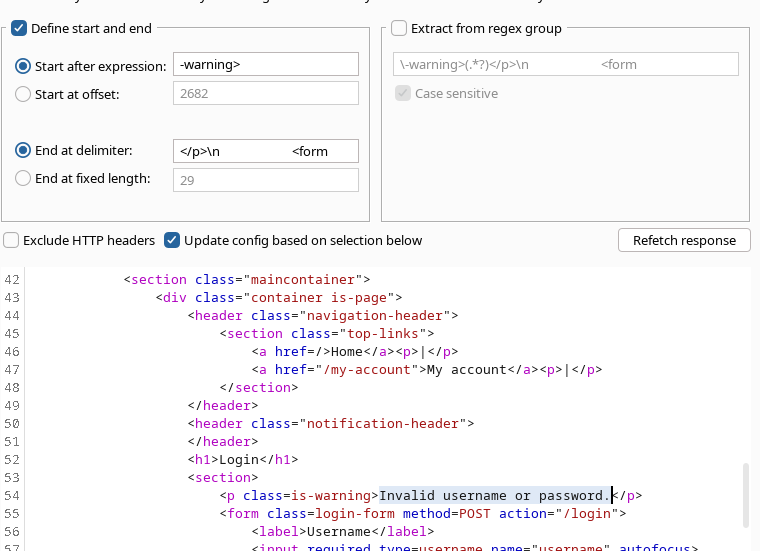
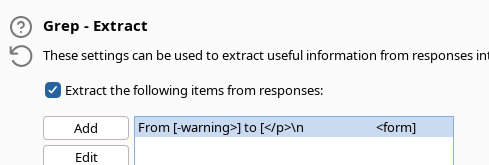
* In **Einstellungen**dIntruder, lege eine Bedingung für **stimmen nicht überein** diese generische Antwort (um identische Antworten herauszufiltern).
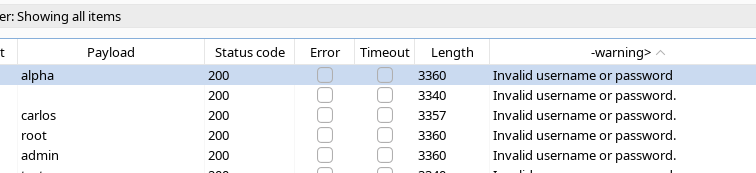
* Bei der Beobachtung der Ergebnisse finden wir einen Eintrag, dessen Antwort sich leicht unterscheidet: / eine Antwort ohne den üblichen Punkt in der Meldung, verbunden mit dem Benutzer **alpha**.
Daraus lässt sich schließen, dass **alpha** ein gültiger Benutzername ist.
#### Schritt 2 – Passwortstärke per Brute-Force testen
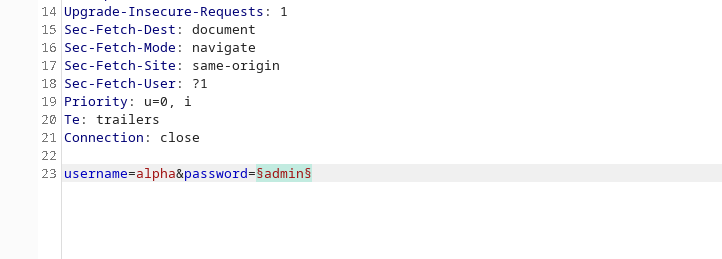
1. Behalten Sie dieselbe Anmeldeanfrage bei, mit **alpha** als Benutzername festgelegt.
2. Konfigurieren Sie Intruder, um den **Passwort** Parameter mit der Passwort-Wortliste anzugreifen.
3. Starten Sie den Angriff und vergleichen Sie die Serverantworten.
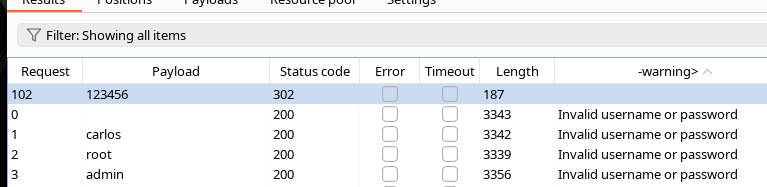
4. Für das Passwort **123456**, ist die Antwort ein **302** mit ok in den Notizen markiert, was anzeigt, dass der Verbindungsversuch erfolgreich war.
---
# Agent Instructions
This documentation is published with GitBook. GitBook is the documentation platform designed so that both humans and AI agents can read, navigate, and reason over technical content effectively. Learn more at gitbook.com.
## Querying This Documentation
If you need additional information that is not directly available in this page, you can query the documentation by asking a question.
Perform an HTTP GET request on the following URL with the `ask` and `goal` query parameters:
```
GET https://hacking-notes.jord4n.pro/de/web/authentication/username-enumeration-via-subtly-different-responses.md?ask=&goal=
```
`ask` is the immediate question: it should be specific, self-contained, and written in natural language.
`goal` is what the user is ultimately trying to achieve, the reason they need the answer. Sharing it helps GitBook give you a better, more relevant answer. A goal is most helpful when it describes the outcome the user wants rather than restating the question. For example, with `ask=how do I create an API token`, a goal like `automate deployments from our CI pipeline` lets GitBook tailor the answer to that use case.
The response will contain a direct answer to the question and relevant excerpts and sources from the documentation.
Use this mechanism when the answer is not explicitly present in the current page, you need clarification or additional context, or you want to retrieve related documentation sections.