> For the complete documentation index, see [llms.txt](https://hacking-notes.jord4n.pro/llms.txt). Markdown versions of documentation pages are available by appending `.md` to page URLs; this page is available as [Markdown](https://hacking-notes.jord4n.pro/de/web/xss/stored-dom-xss.md).
# DOM-basiertes gespeichertes XSS
Notizen zu DOM-basiertem gespeichertem XSS für Labs der PortSwigger Web Security Academy, einschließlich Ausnutzungs-Workflow, Payload-Tests, Burp-Suite-Validierung und Behebungskontext.
### Gespeichertes DOM-XSS
Dieses Labor demonstriert eine im Blog-Kommentarfeature gespeicherte DOM-Schwachstelle. Um das Labor zu lösen, verwende diese Schwachstelle, um den `alert()` Funktion aufruft.
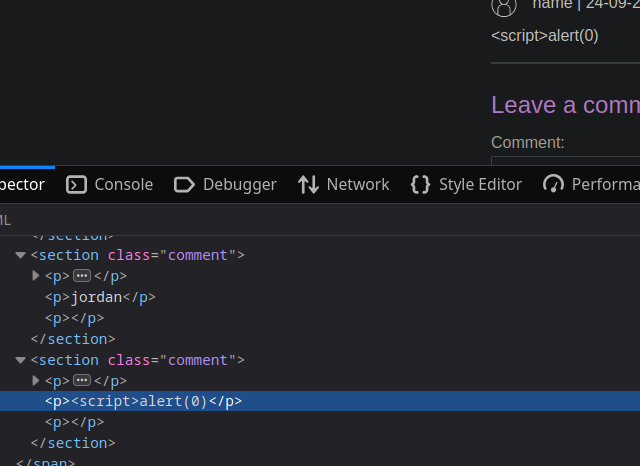
wenn du das klassische `Skript` in den Kommentarbereich einfügst:
```javascript
```
Wir stellen fest, dass die Seite einen Teil des Kommentars löscht.
Die Funktion ist:
```javascript
function loadComments(postCommentPath) {
let xhr = new XMLHttpRequest();
xhr.onreadystatechange = function() {
if (this.readyState == 4 && this.status == 200) {
let comments = JSON.parse(this.responseText);
displayComments(comments);
}
};
xhr.open("GET", postCommentPath + window.location.search);
xhr.send();
function escapeHTML(html) {
return html.replace('<', '<').replace('>', '>');
}
function displayComments(comments) {
let userComments = document.getElementById("user-comments");
for (let i = 0; i < comments.length; ++i)
{
comment = comments[i];
let commentSection = document.createElement("section");
commentSection.setAttribute("class", "comment");
let firstPElement = document.createElement("p");
let avatarImgElement = document.createElement("img");
avatarImgElement.setAttribute("class", "avatar");
avatarImgElement.setAttribute("src", comment.avatar ? escapeHTML(comment.avatar) : "/resources/images/avatarDefault.svg");
if (comment.author) {
if (comment.website) {
let websiteElement = document.createElement("a");
websiteElement.setAttribute("id", "author");
websiteElement.setAttribute("href", comment.website);
firstPElement.appendChild(websiteElement)
}
let newInnerHtml = firstPElement.innerHTML + escapeHTML(comment.author)
firstPElement.innerHTML = newInnerHtml
}
if (comment.date) {
let dateObj = new Date(comment.date)
let month = '' + (dateObj.getMonth() + 1);
let day = '' + dateObj.getDate();
let year = dateObj.getFullYear();
if (month.length < 2)
month = '0' + month;
if (day.length < 2)
day = '0' + day;
dateStr = [day, month, year].join('-');
let newInnerHtml = firstPElement.innerHTML + " | " + dateStr
firstPElement.innerHTML = newInnerHtml
}
firstPElement.appendChild(avatarImgElement);
commentSection.appendChild(firstPElement);
if (comment.body) {
let commentBodyPElement = document.createElement("p");
commentBodyPElement.innerHTML = escapeHTML(comment.body);
commentSection.appendChild(commentBodyPElement);
}
commentSection.appendChild(document.createElement("p"));
userComments.appendChild(commentSection);
}
}
};
```
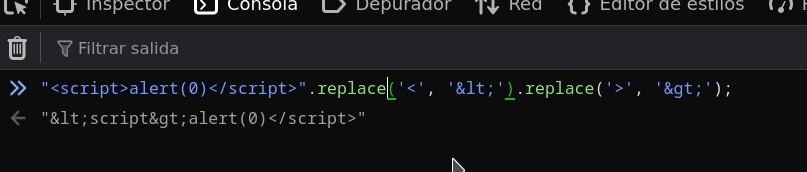
* Das `escapeHTML(HTML)` Funktion maskiert nicht **dass die erste** Vorkommen von `<` und `>` (Verwendung von `replace` einfach).
* Da der Code dann `innerHTML` zum Einfügen von Werten verwendet, können bösartige Tags bestehen bleiben und vom Browser interpretiert werden.
* Die Maskierung ist daher nur für das erste Auftreten wirksam; die folgenden Vorkommen bleiben verwundbar.
* Verwende eine globale Ersetzung (`replaceAll` oder einen globalen regulären Ausdruck), um zu maskieren **alle** Vorkommen von `<` und `>`.
* Vermeide die Verwendung von `innerHTML` für unzuverlässige Daten; bevorzuge `textContent` oder `createTextNode`
Ausnutzbare Payloads
* Schließe und injiziere ein Skript:
```javascript
<>
```
* Erzwinge einen Bildfehler, um `onerror:`
```javascript
<>
```
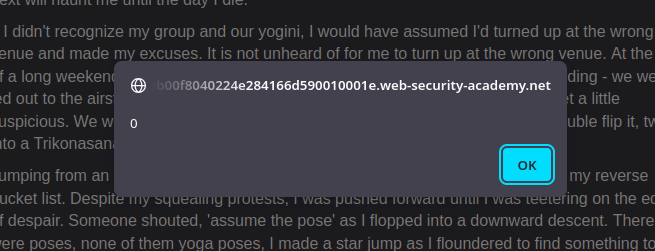
Diese Payloads funktionieren, weil nur wenige Zeichen umgewandelt werden und zusätzliche Vorkommen von `<`/`>` interpretierbar bleiben.
---
# Agent Instructions
This documentation is published with GitBook. GitBook is the documentation platform designed so that both humans and AI agents can read, navigate, and reason over technical content effectively. Learn more at gitbook.com.
## Querying This Documentation
If you need additional information that is not directly available in this page, you can query the documentation by asking a question.
Perform an HTTP GET request on the following URL with the `ask` and `goal` query parameters:
```
GET https://hacking-notes.jord4n.pro/de/web/xss/stored-dom-xss.md?ask=&goal=
```
`ask` is the immediate question: it should be specific, self-contained, and written in natural language.
`goal` is what the user is ultimately trying to achieve, the reason they need the answer. Sharing it helps GitBook give you a better, more relevant answer. A goal is most helpful when it describes the outcome the user wants rather than restating the question. For example, with `ask=how do I create an API token`, a goal like `automate deployments from our CI pipeline` lets GitBook tailor the answer to that use case.
The response will contain a direct answer to the question and relevant excerpts and sources from the documentation.
Use this mechanism when the answer is not explicitly present in the current page, you need clarification or additional context, or you want to retrieve related documentation sections.