> For the complete documentation index, see [llms.txt](https://hacking-notes.jord4n.pro/llms.txt). Markdown versions of documentation pages are available by appending `.md` to page URLs; this page is available as [Markdown](https://hacking-notes.jord4n.pro/fr/web/cache-poisoning/url-normalization.md).
# Normalisation d’URL
Notes sur la normalisation d’URL pour les laboratoires de la PortSwigger Web Security Academy, incluant le workflow d’exploitation, les tests de payloads, la validation dans Burp Suite et le contexte de remédiation.
### Normalisation d'URL
Ce laboratoire contient une **XSS** vulnérabilité qui n'est pas directement exploitable, car le navigateur applique automatiquement une **d'URL** encodage. / Par conséquent, la **processus de normalisation d'URL du cache** doit être utilisé pour exploiter cette faille.
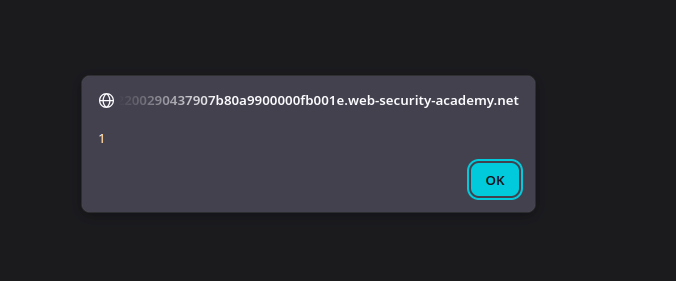
L'objectif est d'injecter une charge utile qui s'exécute `alert(1)` dans le navigateur de la victime, puis de lui fournir l'URL malveillante.
#### 1) Identification du point d'injection
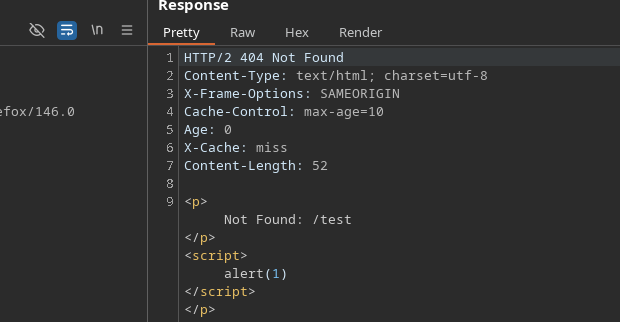
Lorsque vous accédez à une page inexistante (par exemple `/test`), le site renvoie une **page d'erreur** qui réutilise le chemin demandé dans la réponse HTML.
Si une balise HTML est fermée et qu'un script est injecté, il est interprété comme :
```javascript
/test
```
#### 2) Problème rencontré
Si cette URL est saisie directement dans le navigateur, la charge utile **n'est pas exécutée**. / La raison est que le navigateur **encode automatiquement** les caractères spéciaux (`<`, `>`, `/`, etc.), ce qui empêche l'exécution du script.
#### 3) Fonctionnement via la normalisation du cache
Pour contourner cette protection, le **cache** est utilisé :
* La requête malveillante est envoyée via **Burp Suite**, sans passer par la barre d'adresse du navigateur.
* Le cache **normalise** l'URL et stocke la réponse associée.
* La réponse en cache contient alors la charge utile **non encodée**.
#### (4) Déclenchement du XSS
Une fois la réponse empoisonnée dans le cache :
* L'URL est fournie à la victime.
* Le cache renvoie la version standard de la page.
* Le script est interprété et `alert(1)` s'exécute dans le navigateur de la victime.
---
# Agent Instructions
This documentation is published with GitBook. GitBook is the documentation platform designed so that both humans and AI agents can read, navigate, and reason over technical content effectively. Learn more at gitbook.com.
## Querying This Documentation
If you need additional information that is not directly available in this page, you can query the documentation by asking a question.
Perform an HTTP GET request on the following URL with the `ask` and `goal` query parameters:
```
GET https://hacking-notes.jord4n.pro/fr/web/cache-poisoning/url-normalization.md?ask=&goal=
```
`ask` is the immediate question: it should be specific, self-contained, and written in natural language.
`goal` is what the user is ultimately trying to achieve, the reason they need the answer. Sharing it helps GitBook give you a better, more relevant answer. A goal is most helpful when it describes the outcome the user wants rather than restating the question. For example, with `ask=how do I create an API token`, a goal like `automate deployments from our CI pipeline` lets GitBook tailor the answer to that use case.
The response will contain a direct answer to the question and relevant excerpts and sources from the documentation.
Use this mechanism when the answer is not explicitly present in the current page, you need clarification or additional context, or you want to retrieve related documentation sections.