> For the complete documentation index, see [llms.txt](https://hacking-notes.jord4n.pro/llms.txt). Markdown versions of documentation pages are available by appending `.md` to page URLs; this page is available as [Markdown](https://hacking-notes.jord4n.pro/ja/reconnaissance/subdomains.md).
# サブドメイン
公開DNSレコード、証明書透明性エントリ、インデックス化されたホスト、公開インフラを見つけるためのサブドメイン列挙手法。
サブドメインの列挙は、公開ホスト、DNSレコード、仮想ホスト、証明書透明性エントリ、インデックス化されたインフラを発見することで、対象の攻撃対象領域を拡大します。
{% hint style="info" %}
Webサイトに関連付けられたサブドメインを発見するためのさまざまな手法があります。これらの手法は、オンラインツールを使って、またはコンソールから直接実行でき、目的や利用可能なリソースによって異なります。以下に、この作業に使用できるいくつかのツールと、詳細なコマンド例を示します。
{% endhint %}
## Gobuster:
> Gobuster は、Webサイトに対して DNS クエリを実行することでサブドメインを素早く発見できる、とても人気のあるツールです。単語リストを使って、さまざまなサブドメインの組み合わせを試します。以下はコマンドラインでの使用例です。
```bash
gobuster vhost -u https://website.com --append-domain -w /usr/share/SecLists/Discovery/DNS/subdomains-top1million-110000.txt -t 100
```
* **-u**: 対象WebサイトのURLを指定します。
* **-w**: サブドメインのテストに使用する単語ファイルのパスを設定します。
* **-t**: スレッド数(この場合は100)を設定し、検索速度を向上させます。
* /| grep -v "403": HTTP 403 応答を無視します。
## Wfuzz:
> Wfuzz は、HTTP 応答を利用してさまざまなサブドメインをテストできる、別のファジングツールです。サブドメインを検索するには、次のコマンドを使用します。
```bash
wfuzz -c -t 100 -w /usr/share/SecLists/Discovery/DNS/subdomains-top1million-5000.txt -H "Host: FUZZ.website.com" https://website.com
```
* **-c**: 結果を見やすくするためにカラー表示を有効にします。
* **-t 20**: 同時スレッド数(ここでは20)を設定して処理を高速化します。
* **-H "Host: FUZZ.website.com"**: リスト内の各値を "FUZZ" に置き換えて、可能なサブドメインをテストします。
* **--hc=404**: HTTP 404 応答を無視します。
## **Sublist3r**
> Sublist3r は、OSINT を使って Webサイトのサブドメインを列挙するために設計された Python ツールです。Google、Yahoo、Bing、Baidu、Ask などの検索エンジンや、Netcraft、Virustotal、ThreatCrowd、DNSdumpster、ReverseDNS1 といった他のソースを使用します。
* **Sublist3r**: サブドメインを列挙するツール。例:/ `sublist3r -d website.com`
## Google Dorks:
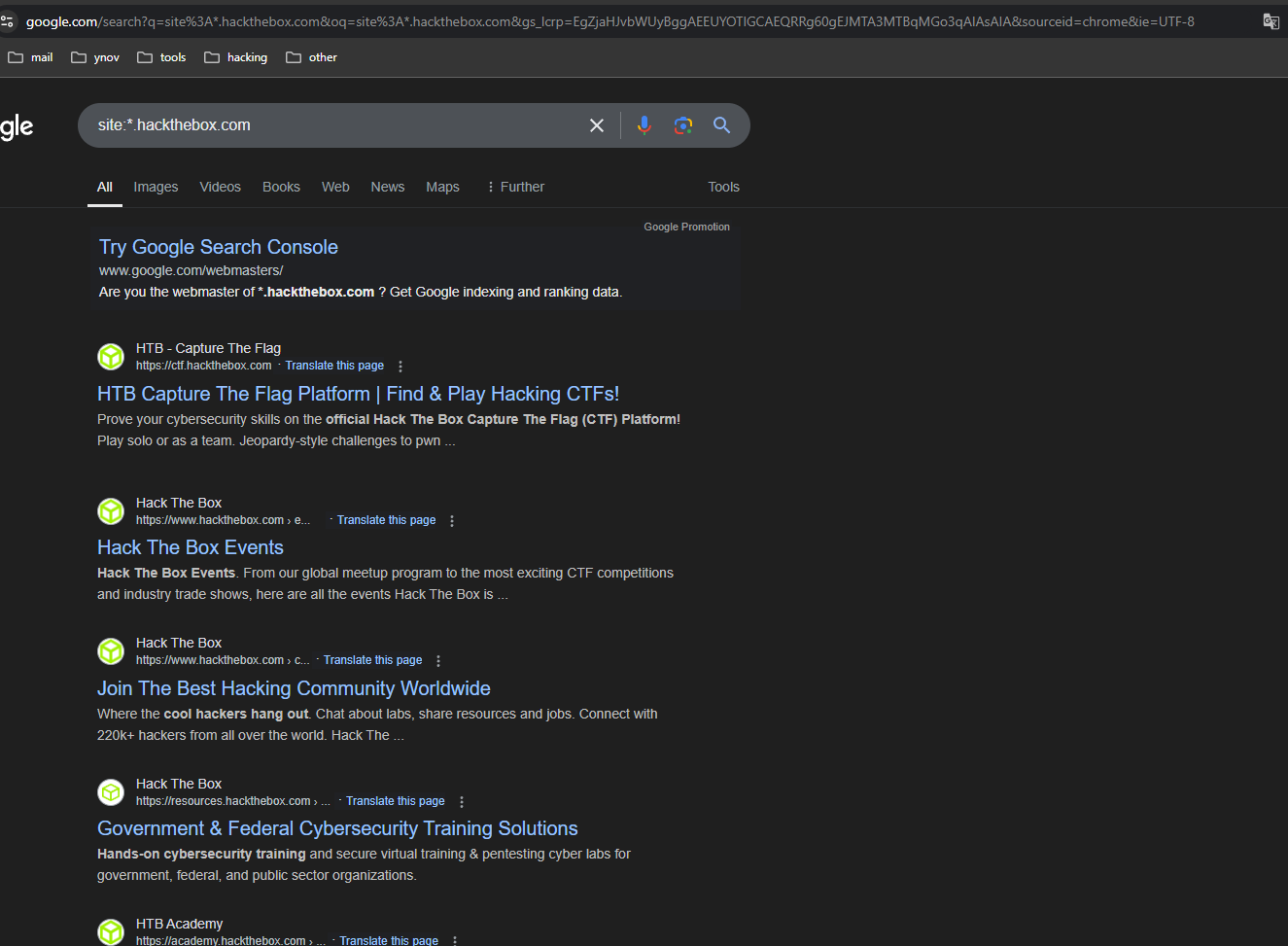
> Google Dorks は、Google を使って特定の情報を見つけるための特殊なクエリです。Webサイトのサブドメインを発見するには、次のクエリを使用できます。
```makefile
site:*.website.com
```
このコマンドは、 **website.com** の Google インデックスにあるすべてのサブドメインを表示します。この手法は、公開アクセス可能なサブドメインの一覧を素早く取得するのに特に有用です。
## DNSDumpster:
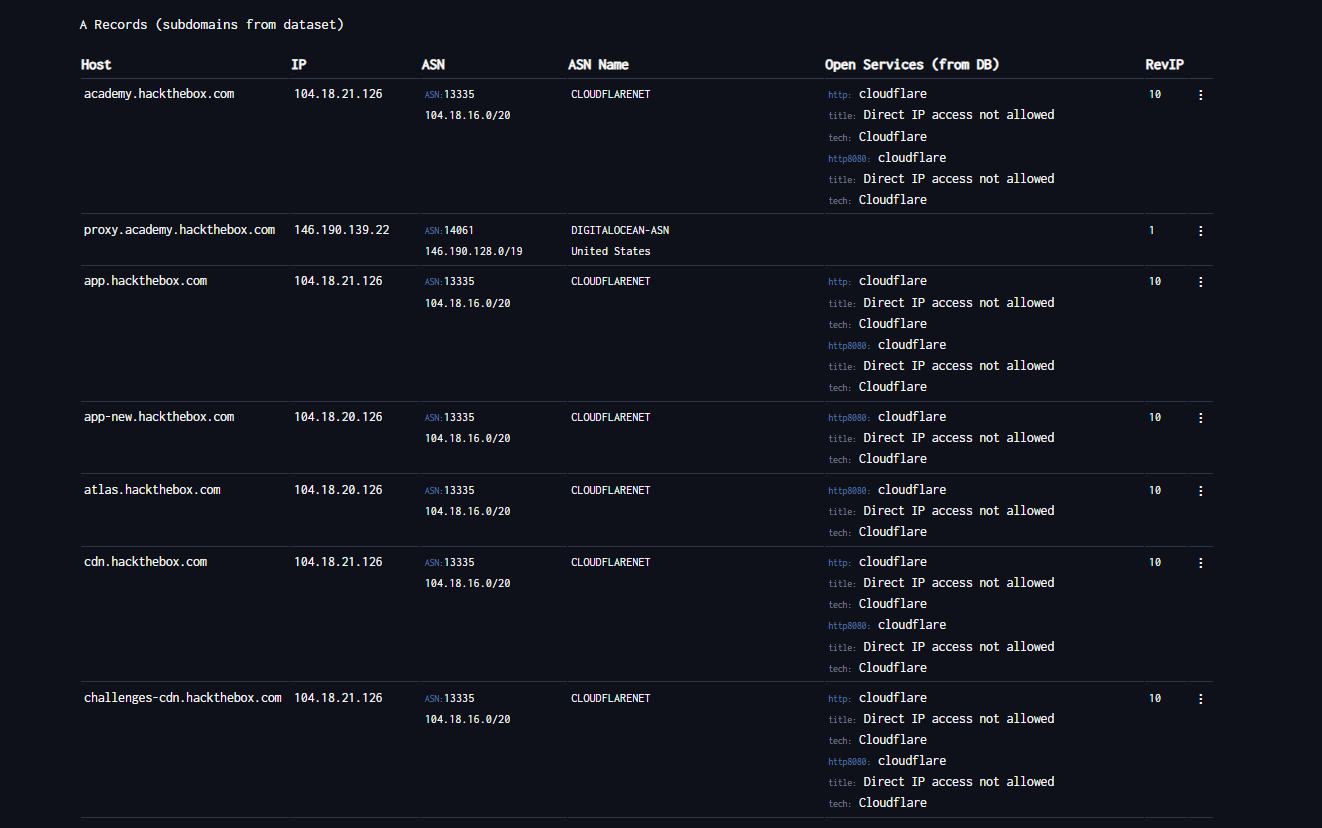
> [DNSDumpster ](https://dnsdumpster.com/)は、Webサイトのドメインネームシステム(DNS)に関する情報を収集するための無料のオンラインツールです。特に、組織のネットワークインフラに関する情報を得るためのペネトレーションテスト(pentesting)で有用です。DNSDumpster を使うと、あるドメインの公開 DNS レコードの詳細にアクセスし、次のような主要なインフラ要素を発見できます。
* サーバー。
* サブドメイン。
* 関連する IP アドレス。
* その他のネットワークサービス。
## 受動的ドメイン列挙
まずは受動的なソースを使って、対象のインフラに直接触れずに候補サブドメインを収集します。 `target.com` は許可されたドメインに置き換えてください。
```bash
export TARGET="target.com"
```
### 証明書の透明性
クエリ `crt.sh` および生の JSON 出力を確認します。
```bash
curl -s "https://crt.sh/?q=${TARGET}&output=json" | jq .
```
証明書透明性の結果から一意のホスト名を抽出します。
```bash
curl -s "https://crt.sh/?q=${TARGET}&output=json" \
| jq -r '.[] | .name_value, .common_name' \
| sed 's/\*\.//g' \
| sort -u
```
### Project Sonar
公開されている Project Sonar 形式のデータセットから、サブドメイン、関連 TLD、逆引き DNS の結果を収集します。
```bash
curl -s "https://sonar.omnisint.io/subdomains/${TARGET}" | jq -r '.[]' | sort -u
curl -s "https://sonar.omnisint.io/tlds/${TARGET}" | jq -r '.[]' | sort -u
curl -s "https://sonar.omnisint.io/all/${TARGET}" | jq -r '.[]' | sort -u
```
1つの IP または CIDR 範囲に対する逆引き DNS ルックアップ。
```bash
curl -s "https://sonar.omnisint.io/reverse/192.0.2.10" | jq -r '.[]' | sort -u
curl -s "https://sonar.omnisint.io/reverse/192.0.2.0/24" | jq -r '.[]' | sort -u
```
### 複数ソースの収集
実行 `theHarvester` 複数の設定済みソースに対して:
```bash
while read -r source; do
theHarvester -d "${TARGET}" -b "$source" -f "${source}-${TARGET}"
done < sources.txt
```
### サブドメインを IP に解決
確認済みのサブドメインを一意の IP リストに変換します。
```bash
while read -r subdomain; do
host "$subdomain" | awk '/has address/ {print $4}'
done < subdomains.txt | sort -u > ip-addresses.txt
```
### Shodan で IP を拡充
解決された各 IP アドレスについて、Shodan を使って公開サービスを確認します。
```bash
while read -r ip; do
shodan host "$ip"
done < ip-addresses.txt
```
## 追加の OSINT リソース
Phonebook とその他の公開 OSINT リソースは、次に集約されています。 [People and Breach Research](/ja/hacking-tools/osint/people-and-breach-research.md). Web サイトのインフラ、Shodan、アーカイブ済み URL のリソースは、次に集約されています。 [ウェブサイトとインフラストラクチャ](/ja/hacking-tools/osint/websites-and-infrastructure.md).
---
# Agent Instructions
This documentation is published with GitBook. GitBook is the documentation platform designed so that both humans and AI agents can read, navigate, and reason over technical content effectively. Learn more at gitbook.com.
## Querying This Documentation
If you need additional information that is not directly available in this page, you can query the documentation by asking a question.
Perform an HTTP GET request on the following URL with the `ask` and `goal` query parameters:
```
GET https://hacking-notes.jord4n.pro/ja/reconnaissance/subdomains.md?ask=&goal=
```
`ask` is the immediate question: it should be specific, self-contained, and written in natural language.
`goal` is what the user is ultimately trying to achieve, the reason they need the answer. Sharing it helps GitBook give you a better, more relevant answer. A goal is most helpful when it describes the outcome the user wants rather than restating the question. For example, with `ask=how do I create an API token`, a goal like `automate deployments from our CI pipeline` lets GitBook tailor the answer to that use case.
The response will contain a direct answer to the question and relevant excerpts and sources from the documentation.
Use this mechanism when the answer is not explicitly present in the current page, you need clarification or additional context, or you want to retrieve related documentation sections.
.png?alt=media)
.png?alt=media)
.png?alt=media)