> For the complete documentation index, see [llms.txt](https://hacking-notes.jord4n.pro/llms.txt). Markdown versions of documentation pages are available by appending `.md` to page URLs; this page is available as [Markdown](https://hacking-notes.jord4n.pro/ja/reconnaissance/web-profiling.md).
# Webプロファイリング
対象サイト上の技術、フレームワーク、CMS、サーバー、ライブラリ、公開バージョンを特定するための Web プロファイリング手法。
Webプロファイリングでは、CMS、フレームワーク、Webサーバー、JavaScriptライブラリ、分析ツール、セキュリティ製品、公開されているバージョンを含む、対象の技術スタックを特定します。
{% hint style="info" %}
Webサイトで使用されている技術について学ぶ方法は数多くあります。コンソール、ブラウザ拡張機能、または専門サイトから利用できるさまざまなツールのおかげで、ページで使われている技術に関する詳細な情報を取得できます。以下に、それらを特定するいくつかの方法を示します:
{% endhint %}
## WhatWeb:
> WhatWebは、Webサイトで使用されている技術を識別するための非常に人気のあるコマンドラインツールです。高速で正確であり、CMS、フレームワーク、Webサーバー、分析ツールなど、幅広い技術を検出できます。HTTPヘッダー、ソースコード、その他のページ要素を分析できる点が特徴です。
```bash
whatweb https://website.com
```
このコマンドにより、CMS、JavaScriptライブラリ、分析ツールなど、サイトで使用されている技術の詳細な概要を取得できます。
## BuiltWith:
> [BuiltWith](https://builtwith.com) は、Webサイトの技術を分析するための最も詳細なツールの1つです。このオンラインサービスでは、サーバー、フレームワーク、ライブラリ、マーケティングおよびセキュリティツール、さらには一部の技術のバージョンまで、使用されている技術を包括的に把握できます。提供される情報は時に過剰になることもありますが、それでも全体像を把握するのに非常に優れたツールです。
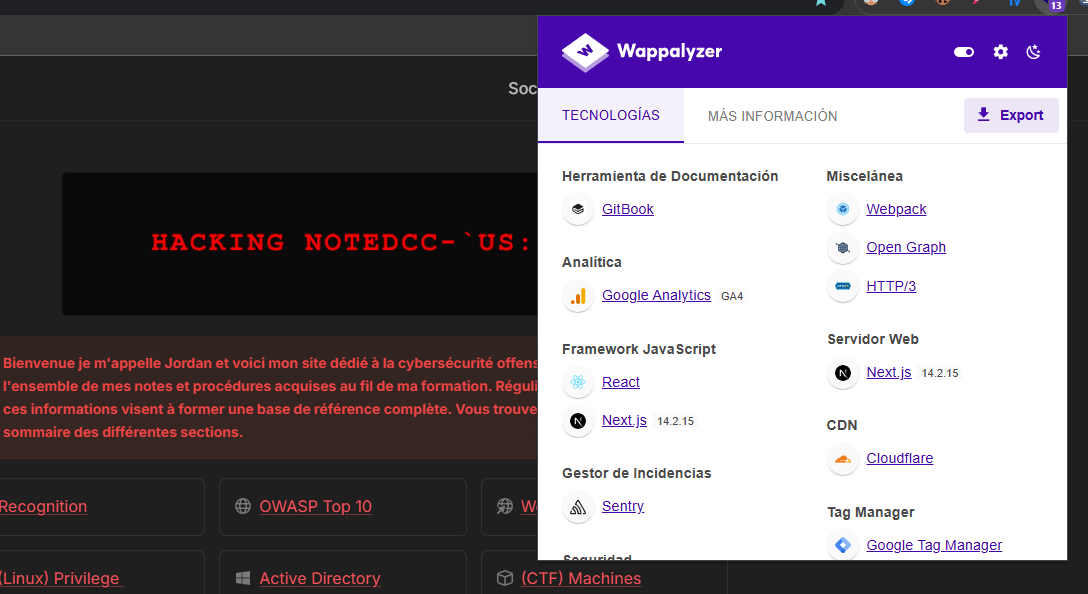
## Wappalyzer:
> [Wappalyzer ](https://www.wappalyzer.com/)は、そのシンプルさと効率性が際立つブラウザ拡張機能です。Webサイトにアクセスするとすぐに、拡張機能がCMS、Webサーバー、JavaScriptライブラリなど、使用されている技術を自動的に検出します。Wappalyzerの強みの1つは、その速さ、特に必要な情報を即座に提供できる点にあります。さらに、検出された技術のバージョンを表示することもあります。
---
# Agent Instructions
This documentation is published with GitBook. GitBook is the documentation platform designed so that both humans and AI agents can read, navigate, and reason over technical content effectively. Learn more at gitbook.com.
## Querying This Documentation
If you need additional information that is not directly available in this page, you can query the documentation by asking a question.
Perform an HTTP GET request on the following URL with the `ask` and `goal` query parameters:
```
GET https://hacking-notes.jord4n.pro/ja/reconnaissance/web-profiling.md?ask=&goal=
```
`ask` is the immediate question: it should be specific, self-contained, and written in natural language.
`goal` is what the user is ultimately trying to achieve, the reason they need the answer. Sharing it helps GitBook give you a better, more relevant answer. A goal is most helpful when it describes the outcome the user wants rather than restating the question. For example, with `ask=how do I create an API token`, a goal like `automate deployments from our CI pipeline` lets GitBook tailor the answer to that use case.
The response will contain a direct answer to the question and relevant excerpts and sources from the documentation.
Use this mechanism when the answer is not explicitly present in the current page, you need clarification or additional context, or you want to retrieve related documentation sections.
.png?alt=media)
.png?alt=media)